Realm Swift stores models as live objects, and the build, encryption and threading details decide whether that suits your app
Realm is a mobile database: a replacement for Core Data & SQLite
At a glance
- What is it?
- realm-swift is the iOS, macOS, tvOS and watchOS source for Realm Swift and Realm Objective-C. It trades SQL tables and an ORM for persisted classes, notifications and an on-disk file, and the README leaves several operational questions open.
- Who is it for?
- Pick Realm Swift when an Apple-platform app wants persisted Swift classes with change notifications and optional at-rest encryption, and you accept a Realm file and Realm Core instead of SQLite tables. Skip it if you need SQL, or platforms outside iOS, macOS, tvOS and watchOS.
- Can I use it commercially?
- Yes. Apache-2.0 is a permissive licence: you can use, modify and sell software built on it, as long as you keep its copyright and licence notices.
- Is it still maintained?
- Yes. The repository last received commits 60 days ago.
- What is it written in?
- Mainly Objective-C, according to GitHub's language statistics.
Answers come from the project's GitHub data, last synced on November 25, 2026, and from our analysis. They are not legal advice.
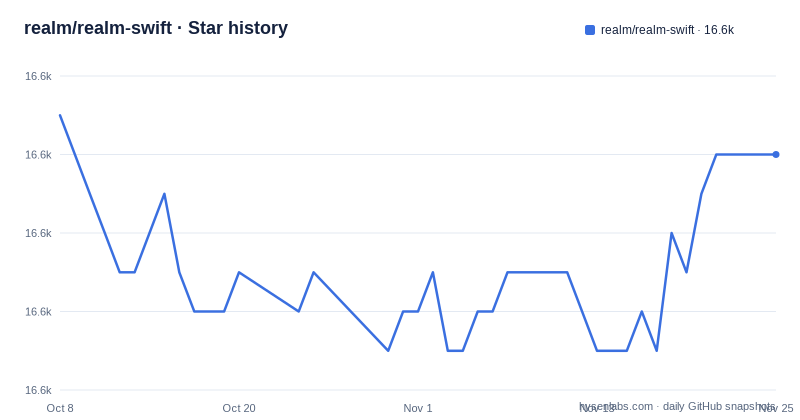
Star history
- realm/realm-swift16,604 ★ · -1
| Repository | 2026-10-08 | 2026-11-25 |
|---|---|---|
| realm/realm-swift | 16.6k | 16.6k |
-1 Stars in the last 48 days, measured from the daily GitHub snapshot. Compare with other projects
Editorial analysis
Models are Object subclasses with @Persisted properties
A Realm model is a Swift class that inherits from Object, with each stored field marked @Persisted. The README example defines Dog with a name and an age, then Person with a primary key and a list of dogs. The primary key is declared inline as @Persisted(primaryKey: true) var _id: String, and the relationship is nothing more than a List<Dog> property.
class Dog: Object {
    @Persisted var name: String
    @Persisted var age: Int
}
class Person: Object {
    @Persisted(primaryKey: true) var _id: String
    @Persisted var name: String
    @Persisted var age: Int
    // Create relationships by pointing an Object field to another Class
    @Persisted var dogs: List<Dog>
}
There is no schema file and no mapping layer to maintain. The class is the schema. The README says this removes the need for an ORM and can save thousands of lines of code, a claim it makes without a measurement. What you give up is the ability to hand the same type to code that expects a plain struct, because the persisted type must be a class that subclasses Object.
Live objects push changes through observe and NotificationToken
Objects read from a realm are live: data updated anywhere is automatically updated everywhere, in the README's words. To react to a change, call observe on the object and keep the returned NotificationToken in a variable.
var token: NotificationToken?
token = dog.observe { change in
    switch change {
    case .change(let properties):
        for property in properties {
            print("Property '\(property.name)' changed to '\(property.newValue!)'");
        }
    case .error(let error):
        print("An error occurred: (error)")
    case .deleted:
The closure receives one of three cases: .change with the list of changed properties, .error, or .deleted. Writes must happen inside try! realm.write, as in the README's realm.add(dog) example. The token matters in practice. The README stores it in a variable named token, which is how the observation is kept alive for as long as you hold it; drop the reference and the example gives you no way to stop or inspect the subscription. The README does not describe which thread the closure runs on, so a handler that touches UI or writes back to the realm should be checked against docs/ before you rely on it.
SwiftUI gets @ObservedResults and binding helpers
The SwiftUI section shows a ContactsView built on @ObservedResults(Person.self) var persons. The property wrapper yields a live collection, and the example hands it straight to a ForEach inside a List, with no view model in between.
struct ContactsView: View {
    @ObservedResults(Person.self) var persons
The same wrapper exposes a projected value with mutation methods. The example uses .onMove(perform: $persons.move) and .onDelete(perform: $persons.remove) on the ForEach, and a Button whose action is $persons.append(Person()). Reordering, deleting and adding are therefore one-line bindings to the realm instead of hand-written write transactions.
The cost is coupling. The README does not show how to point a view at a non-default realm or how to preview such a view without a database file on disk, so those answers have to come from docs/ in the repository.
Encryption needs a 64-byte key that you must store yourself
Realm encrypts data at rest and in flight, per the README. The example builds a 64-byte random key with SecRandomCopyBytes and passes it to the configuration.
var key = Data(count: 64)
let config = Realm.Configuration(encryptionKey: key)
let realm = try Realm(configuration: config)
The whole security story rests on that key. The example generates a fresh value and opens the realm with it, and it ends there. The README shows no code for saving the key between launches, and a key generated at random on every start cannot reopen a file written under a previous one. You need your own storage for the key before any real data is written, and nothing in the README says where it should live.
The example also uses try rather than try!, so opening an encrypted realm is a call that can throw. Wrap it in error handling you can test.
Four install routes, and a source build that fetches Realm Core
The README names four ways to install: Swift Package Manager, CocoaPods, Carthage, or a dynamic XCFramework. The repository carries what each needs: Package.swift, Realm.podspec, RealmSwift.podspec and a Carthage directory. Full steps are in docs/guides/quick-start.md.
Building from source has hard prerequisites. Xcode 15.3 or newer is required, and building the documentation also needs jazzy. The build is a single command:
sh build.sh buildThe first build needs an internet connection to download the core binary, and the output is Realm.xcframework and RealmSwift.xcframework in build/Release/. Realm Core is a separate Apache 2.0 repository at github.com/realm/realm-core, so this repository is the Apple-platform layer on top of it.
Two more commands matter. sh build.sh help lists every action, including building for ios or osx, running tests and generating docs. sh build.sh docs produces the API reference through jazzy. An air-gapped build machine will fail on the first run because of the core download.
Where the repository stops: Apple platforms only
The scope is stated in the README's first lines: the source for iOS, macOS, tvOS and watchOS versions of Realm Swift and Realm Objective-C. The top-level directories confirm both languages. Realm/ holds the Objective-C code and RealmSwift/ holds the Swift layer, with examples/ios, examples/osx and examples/tvos showing usage and examples/installation covering setup.
That excludes Android and server-side Swift by omission. A team shipping the same data model on another platform cannot use this repository for it.
The repository also does not offer SQL. Realm describes itself as a replacement for Core Data and SQLite, and queries in the encryption example use a string predicate: realm.objects(Dog.self).filter("name contains 'Fido'"). Anything that needs joins written in SQL has to be rethought in terms of Object relationships and predicates.
The data also lives in a Realm file, not in a SQLite database. The bug report guidance asks for that file by name, which tells you the file is the unit you copy around when debugging. Tooling built around SQLite files, such as command-line shells or generic database viewers, does not apply to it, and the README names no replacement tool for inspecting one.
Releases are current, and CHANGELOG.md is where breaking changes live
The repository is not archived. Its default branch is named community, the last push was on 2026-09-27, and the most recent tags are v20.0.6 on 2026-09-27, v20.0.5 on 2026-06-14 and v20.0.4 on 2026-02-23. That is a release roughly every few months across three tags.
A major version of 20 means a long history of API changes, and the README carries no migration guide for them. CHANGELOG.md sits in the repository root, and SUPPORT.md sits beside it. Read the changelog for each version between yours and the target before upgrading.
For help, the README points to the realm tag on Stack Overflow, the Community Forum, and GitHub issues. A bug report should include the Realm version, a full log, the Realm file and a project that reproduces the problem. Feature requests go to the same issue tracker and should say what the feature does and why. Contributions follow CONTRIBUTING.md, and the project adheres to the MongoDB Code of Conduct.
Editorial conclusion
Pick Realm Swift when an Apple-platform app wants persisted Swift classes with change notifications and optional at-rest encryption, and you accept a Realm file and Realm Core instead of SQLite tables. Skip it if you need SQL, or platforms outside iOS, macOS, tvOS and watchOS. Before adopting it, read CHANGELOG.md for the release you plan to use and decide how you will store the encryption key.
Frequently asked questions
What is Realm database?
Realm is a mobile database that runs directly inside phones, tablets or wearables. Its repository describes it as a replacement for Core Data and SQLite.
What is Realm Swift?
realm-swift holds the source code for the iOS, macOS, tvOS and watchOS versions of Realm Swift and Realm Objective-C. It is published under the Apache 2.0 license.
What is Realm in software?
In this repository, Realm is an object-oriented on-device database that persists data on disk so apps work offline. Models are classes with @Persisted properties and no ORM is needed.
What is a good database for Swift?
Realm Swift is one option for Apple platforms, with Swift classes as models, SwiftUI support through @ObservedResults and optional encryption. It installs through Swift Package Manager, CocoaPods, Carthage or a dynamic XCFramework.
Official sources
Add this badge to your README
If you maintain this project, the badge below links readers to this analysis and shows its maintenance status from the daily GitHub snapshot. Paste the markdown into your README; add ?metric=license or ?metric=stars to the image URL for a different field.

[](https://hysenlabs.com/projects/realm-realm-swift)Star history chart for your README
[](https://hysenlabs.com/projects/realm-realm-swift)Was this useful?