TigerBeetle is built around accounts and transfers, and the quick start runs a single replica in development mode
The financial transactions database designed for mission critical safety and performance.
At a glance
- What is it?
- TigerBeetle is a Zig database for financial transactions built around accounts and transfers. This piece walks through the quick start commands, the account and transfer model in the REPL, and what the repository itself leaves to the external docs.
- Who is it for?
- Choose TigerBeetle if your workload is double-entry style debits and credits between accounts on a ledger and you accept that it is not a SQL database. Skip it for general-purpose tables or ad hoc queries.
- Can I use it commercially?
- Yes. Apache-2.0 is a permissive licence: you can use, modify and sell software built on it, as long as you keep its copyright and licence notices.
- Is it still maintained?
- Yes. The repository last received commits 1 day ago.
- What is it written in?
- Mainly Zig, according to GitHub's language statistics.
Answers come from the project's GitHub data, last synced on November 26, 2026, and from our analysis. They are not legal advice.
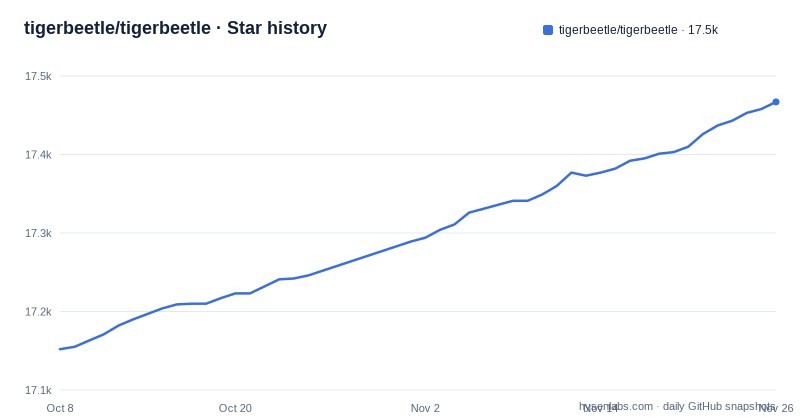
Star history
- tigerbeetle/tigerbeetle17,467 ★ · +315
| Repository | 2026-10-08 | 2026-11-26 |
|---|---|---|
| tigerbeetle/tigerbeetle | 17.2k | 17.5k |
315 Stars in the last 49 days, measured from the daily GitHub snapshot. Compare with other projects
Editorial analysis
A database whose first example is a debit and a credit between two accounts
TigerBeetle describes itself as the financial transactions database designed for mission critical safety and performance, built to power the next 30 years of OLTP. The language is Zig and the license is Apache-2.0. The homepage is https://tigerbeetle.com.
What sets the README apart from most database front pages is its first working example. After starting a server, the very next step is creating two accounts and moving an amount between them with a debit side and a credit side. There is no table creation step, no schema file and no SQL. The data model is accounts and transfers, and the README presents it before anything else about how the engine works.
For a reader deciding whether this fits, that ordering answers a question early: TigerBeetle is built for ledgers, where each record is an account or a movement between two accounts. A workload of users, orders and free-form documents has no place to live here.
The quick start downloads a zip, formats a file, then starts one replica
The README gives four console lines for Linux, with a pointer to other platforms on the docs site:
$ curl -Lo tigerbeetle.zip https://linux.tigerbeetle.com && unzip tigerbeetle.zip
$ ./tigerbeetle version
$ ./tigerbeetle format --cluster=0 --replica=0 --replica-count=1 --development 0_0.tigerbeetle
$ ./tigerbeetle start --addresses=3000 --development 0_0.tigerbeetle
The install is a single binary from a zip, with no package manager involved. The second line prints the version. The third line creates the data file 0_0.tigerbeetle, and its name follows the cluster and replica numbers that were passed as flags, 0 and 0. The fourth line starts the server listening on address 3000.
The flags --cluster, --replica and --replica-count are what describe the cluster to the file at format time. Here the replica count is 1, so this is a single-replica cluster. The README does not show a multi-replica start, so how replicas find each other beyond the --addresses flag is a question for the docs site.
The --development flag appears on both format and start
Both the format command and the start command in the quick start carry --development. The README gives no explanation of what the flag changes. It does not say whether data written in this mode can later be run without the flag, and it does not say whether the flag relaxes safety checks.
The consequence is concrete. If you copy the quick start into a script, you carry a flag whose effect you have not read about. The one-replica cluster is also the opposite of the mission critical positioning in the description, since a cluster of one has no other replicas to agree with.
Treat the four lines as a way to try the REPL on a laptop. For anything beyond that, the replica count, the flag and the address list are decisions to make from https://docs.tigerbeetle.com, not from the README.
The REPL accepts accounts and transfers as key=value statements ending in a semicolon
Once the server is running, the README connects with:
$ ./tigerbeetle repl --cluster=0 --addresses=3000Inside the REPL the example creates two accounts in one statement, separated by a comma and closed with a semicolon: create_accounts id=1 code=10 ledger=700, id=2 code=10 ledger=700. Each account carries an id, a code and a ledger number. The output for each is a JSON object with a timestamp and a status string, tigerbeetle.CreateAccountStatus.created in the example.
The transfer statement is create_transfers id=1 debit_account_id=1 credit_account_id=2 amount=10 ledger=700 code=10. It names the debit account, the credit account, the amount, the ledger and a code, and returns a status of tigerbeetle.CreateTransferStatus.created. Then lookup_accounts id=1, id=2 reads both accounts back. The displayed account record includes id, user_data and ledger fields before the README output is cut off, so the full field list is not visible in the repository front page.
Timestamps in the REPL output are assigned by the cluster
Every result in the example carries a timestamp, such as 1761605367595515148 for the first account and 1761605367595515149 for the second. The two values differ by one. That is the only evidence in the README about how timestamps behave, and it shows two objects created in one statement receiving consecutive values.
The example does not set a timestamp in the statement, so the value comes back from the server. The README does not say what unit the numbers are in, whether they are unique across the whole cluster, or whether a client can supply its own. Those details matter for anyone reconciling TigerBeetle records against another system's clock.
If you plan to compare records with an external ledger, read the data model pages on the docs site first. The repository README cannot settle those questions.
Engineering method lives in TIGER_STYLE.md and two external talks
The README keeps its explanations out of the repository front page and sends readers to four places. https://docs.tigerbeetle.com is the main documentation. A video with The Primeagen covers design decisions on performance, safety and debit and credit primitives. A QCon SF talk, Redesigning OLTP for a New Order of Magnitude, goes deeper on the local storage engine and the global consensus protocol. And docs/TIGER_STYLE.md is the engineering methodology behind the code.
The top level of the repository is small: .github, .gitignore, CHANGELOG.md, LICENSE, README.md, build.zig, docs, src and zig. The build.zig file means the project builds through the Zig build system. The zig directory sits at the root beside src, though the README does not say what it holds.
A reader who wants to judge the storage or consensus design from the repository alone has TIGER_STYLE.md and the source. Everything else is in the talk and the docs.
Releases arrive in 0.17.x patch steps and the last push was 2026-10-23
The repository is not archived. Its last push was on 2026-10-30. The recent tagged releases are 0.17.9 on 2026-07-06, 0.17.8 on 2026-06-22 and 0.17.7-1 on 2026-06-21.
The version numbers are all below 1.0. The README does not state whether the 0.x series carries any compatibility promise between versions, and it does not describe an upgrade path for a data file created by an older binary. The CHANGELOG.md file at the top level is where that history would be read.
Security reports go to [email protected], the only contact address in the README. The gap between the 2026-07-06 tag and the 2026-10-30 push means there is committed work on main that has not been tagged, so pin to a release tag if you want a reproducible binary.
Editorial conclusion
Choose TigerBeetle if your workload is double-entry style debits and credits between accounts on a ledger and you accept that it is not a SQL database. Skip it for general-purpose tables or ad hoc queries. Before committing, verify the replica count and the --development flag in your own deployment, because the README only shows a one-replica development cluster.
Frequently asked questions
What type of database is TigerBeetle?
TigerBeetle is a financial transactions database designed for mission critical safety and performance, aimed at OLTP. Its example uses accounts and transfers with debit and credit sides.
What language is TigerBeetle written in?
The repository's primary language is Zig, and the top level contains build.zig and a zig directory.
Is TigerBeetle open source?
The repository is public under the Apache-2.0 license, with source in the src directory.
What does TigerBeetle do?
It records financial transactions. In the README example it creates accounts on a ledger and then creates a transfer that debits one account and credits another.
Official sources
Add this badge to your README
If you maintain this project, the badge below links readers to this analysis and shows its maintenance status from the daily GitHub snapshot. Paste the markdown into your README; add ?metric=license or ?metric=stars to the image URL for a different field.

[](https://hysenlabs.com/projects/tigerbeetle-tigerbeetle)Star history chart for your README
[](https://hysenlabs.com/projects/tigerbeetle-tigerbeetle)Was this useful?