UniMate animates any skeleton by canonicalising rig topology before training
[SIGGRAPH Asia 2026] UniMate: One Unified Model to Animate Diverse Skeletons
At a glance
- What is it?
- UniMate is an MIT licensed SIGGRAPH Asia 2026 research project that animates diverse skeletal topologies with one model, trained on UniML3D, a dataset of 13,769 text-paired motion clips across 7,430 skeletons. The rig_preprocess tool extends that to your own GLB, glTF or FBX assets.
- Who is it for?
- Adopt UniMate if you need motion for characters whose rigs you did not author and cannot retopologise, and you are willing to run its Blender-based data pipeline yourself. Do not adopt it expecting a turnkey inference service, since the checkpoints are preview quality at the time of writing and the model is single-file research code with no release tags.
- Can I use it commercially?
- Yes. MIT is a permissive licence: you can use, modify and sell software built on it, as long as you keep its copyright and licence notices.
- Is it still maintained?
- Yes. The repository last received commits 31 days ago.
- What is it written in?
- Mainly Python, according to GitHub's language statistics.
Answers come from the project's GitHub data, last synced on November 7, 2026, and from our analysis. They are not legal advice.
Star history
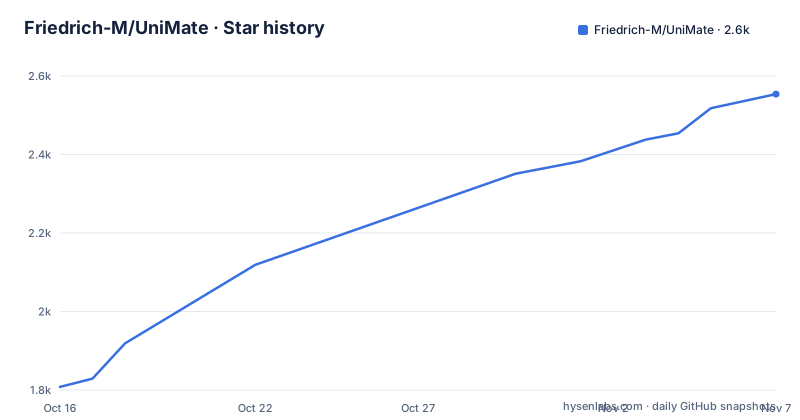
- Friedrich-M/UniMate2,554 ★ · +746
| Repository | 2026-10-16 | 2026-11-07 |
|---|---|---|
| Friedrich-M/UniMate | 1.8k | 2.6k |
746 Stars in the last 22 days, measured from the daily GitHub snapshot. Compare with other projects
Editorial analysis
The problem is skeleton topology, not motion
Motion capture rigs assume a skeleton. Every clip is defined against a specific joint hierarchy with a specific number of joints, named and ordered in a specific way, with a particular rest pose. Models must account for differences in topology, joint count, semantics and rest pose across skeletal structures.
That is what UniMate addresses. Its title is One Unified Model to Animate Diverse Skeletons, and the dataset it is trained on is the argument: 13,769 text-paired motion clips on 7,430 skeletons covering diverse skeletal topologies, specifically bipedal, quadrupedal, avian, marine, insectoid, serpentine and articulated rigid objects, all brought into a unified canonicalization.
Read that topology list carefully, because it defines the claim. A single model covering all of those is a claim about representation, not about sample size.
The second half of the input is text. The clips are text-paired, so the model animates from a prompt rather than from a retargeted reference performance. That combination, arbitrary topology plus natural language, is what distinguishes it from a retargeting tool that maps one known rig onto another known rig.
The project is from Princeton, UC Berkeley, MIT and NTU, accepted to SIGGRAPH Asia 2026, with a paper on arXiv at 2609.05415.
rig_preprocess is the piece that makes it usable on your own asset
The October 2026 news entry is the most consequential change, because it turns a research model into something usable on assets the dataset never contained.
`rig_preprocess`, in the `data_process/rig_preprocess/` directory, turns any rigged GLB, glTF or FBX, animated or not, into an asset UniMate can animate, with a review step for its joint labels and facing. The sampler then takes dataset skeletons and your own assets by reference.
The review step is the part that shows honest design. A preprocessing tool that automatically infers joint labels and which way a creature faces will sometimes get it wrong, and a wrong facing produces an animation that is technically valid and completely wrong. Requiring a human to check the labels before the asset enters the pipeline is the difference between a usable tool and a source of silent garbage.
Support for FBX means users can submit FBX assets directly without first converting them to glTF.
The entry also notes that UniML3D adds training-ready features, canonical rest-pose meshes, and generic and detailed captions. That means the canonical rest pose is now part of the published data rather than something each user has to construct, which is the piece you would otherwise have to reverse-engineer.
The distinction to hold onto is that `rig_preprocess` produces an asset UniMate can animate; it does not retrain the model. The published checkpoints are separate.
A single conda environment, and a pin that explains why
All components share one conda environment specified in `requirements.txt`, and the setup is four commands:
conda create -n unimate python=3.10 -y
conda activate unimate
pip install "setuptools<81"
pip install -r requirements.txt --no-build-isolation
The `setuptools<81` pin looks arbitrary until you read the comment in `requirements.txt`, which explains it: the Motion git dependency has a legacy `setup.py` that imports `pkg_resources`, which setuptools 81 and later no longer ships. Isolated builds always use the newest setuptools, so the install must run with `--no-build-isolation` against an environment with setuptools below 81, and fresh conda environments ship setuptools 81 or newer too. The pin prevents pip from upgrading it back.
That is a complete diagnosis of a dependency problem in four lines, and it is the kind of comment that saves an afternoon. If you build this yourself, do not remove the pin or the flag.
The environment targets Python 3.10 and CUDA 12.4. The PyTorch pins are cu124 builds, `torch==2.5.1+cu124` and `torchvision==0.20.1+cu124`, pulled from the PyTorch cu124 index. The `torchvision` pin carries its own comment: it is required by the CLIP text encoder, which imports `torchvision.transforms` at module load, and it is pinned to the matching cu124 build so pip cannot resolve a torchvision compiled against a different torch and CUDA and drag torch along with it.
There is a second index line for Blender, because PyPI no longer hosts cp310 `bpy` wheels. That confirms the data pipeline runs Blender as a Python module rather than shelling out to a Blender binary, and it explains why `mathutils` and `bmesh` need no lines of their own: they ship inside the `bpy` wheel.
A third-party dependency that would otherwise be a licensing question, `torch-geometric==2.7.0`, is pinned in the core and training section with the note that it is the GCN graph embedding.
Two attention variants, and a config naming scheme that encodes them
Runs are configured by JSON files in `configs/`, and the naming convention is informative enough to read as documentation.
The pattern is `{dataset}_{frames}frames_{attention}_{text_cond}.json`, and there are 8 configs: 4 data combinations by 2 model variants, all at 60 frames.
The data axis has a `uniml3d_*` prefix for the full dataset combining Truebones, Mixamo and Objaverse, and `truebones_*`, `mixamo_*` or `objaverse_*` prefixes for a single source.
The model axis is the interesting half. `_graph_adaln` is graph attention by adaLN: attention factored into spatial, per frame, and temporal, per joint, passes with graph-distance, edge-type and depth biases, and the caption folded into the adaLN modulation. `_full_cross_attn` is full attention by cross-attention: one attention over the flattened joint by time tokens, with the caption entering every block as cross-attention keys and values.
The README then makes a point that is easy to skim: the two axes are independent and all four combinations are implemented, so `full` x `adaln` and `graph` x `cross_attn` also run if you set them in a config. The two shipped pairings are the ones the paper compares. So the config surface is wider than the file list implies, which is useful if you want to ablate the architectural choice rather than just reproduce the paper.
The per-combination tuning is stated as batch sizes of 16, 32, 24 and 16 for Truebones, Mixamo, Objaverse and UniML3D respectively, and step counts of 80k, 120k, 100k and 120k. Both axes being tuned separately is itself a signal that the data combinations are not equally hard.
The data pipeline has stages, and one stage you cannot download
The pipeline description in `data_process/README.md` names the stages in order: download, export, rendering, captioning, joint annotation, feature extraction, animation.
Stage 4 is the one the training instructions point at, since it is what produces the training-ready features:
hf download Linzhan/UniML3D --repo-type dataset --local-dir dataset \
    --include "features/*" --exclude "features/*/videos/*" --exclude "features/*/tpose/*"
Training reads the canonicalized clips from `dataset/features/<dataset>/`, and you can either download them or build them with stage 4. Note the exclude patterns: videos and tpose directories are excluded, so you get the features without the rendered media and without the rest-pose material, which is what you want for training and what you would skip if you were inspecting.
The licensing constraint is stated plainly and belongs in any adoption decision. The raw source assets are on the Hugging Face Hub under three dataset collections: Mixamo-Animations-Characters, Objaverse-XL-Rigged-Animated and Truebones-ZOO-Annotations, which contains prompts, metadata and renders only. The reason for that last restriction is that the Truebones ZOO animal motions themselves are a commercial asset pack whose licence does not permit redistribution. The README asks you to purchase the pack directly from Truebones and rebuild the per-clip layout with the build scripts in Truebones-ZOO-Annotations.
So the published dataset is everything except the Truebones motions and meshes, and the training instructions repeat that the Truebones clips must be built from the purchased pack. If you are evaluating whether you can train this, that is the question to answer first: some source data depends on a purchase.
The project page, an interactive 3D demo for browsing animation results, the UniML3D dataset collection and the UniMate checkpoints are all linked from the README on Hugging Face.
Preview checkpoints and a repository without releases
Two facts about maturity.
The checkpoints were released as preview on 2026-09-27, with a note that new checkpoints will be synced there. Preview is the operative word, and it comes after the training and inference code release on 2026-09-06 and the dataset and data-processing pipeline on 2026-08-30. The order is sensible, code first, then weights, but it does mean the weights have had less time in public hands than the code.
The repository has no GitHub releases. Version information lives in the repository and on the Hub, not in tags. Combined with the SIGGRAPH acceptance in July 2026 and an interactive demo in August, the release cadence is that of a conference project opening its artefacts: a burst of releases followed by incremental additions like `rig_preprocess`.
The licence is MIT, with a LICENSE file at the repository root. Note that the project licence does not extend to the dataset content, which is governed by the upstream terms of Mixamo, Objaverse and Truebones respectively.
The last push was on 2026-10-08, three days after the `rig_preprocess` announcement dated 2026-10-05, so the tree reflects recent work.
The top level layout is small and legible: `assets/` for images, `configs/` for the training JSON files, `data_process/` for the pipeline, `scripts/`, and `unimate/` for the model code itself. There is no inference server, no deployment configuration and no packaging for distribution, which is consistent with the research framing and with what you should expect before deciding to productionise it.
Editorial conclusion
Adopt UniMate if you need motion for characters whose rigs you did not author and cannot retopologise, and you are willing to run its Blender-based data pipeline yourself. Do not adopt it expecting a turnkey inference service, since the checkpoints are preview quality at the time of writing and the model is single-file research code with no release tags. Verify first the licensing of your motion source: the README states the Truebones ZOO animal motions are a commercial asset pack whose licence does not permit redistribution, so those clips must be purchased and rebuilt locally rather than downloaded.
Frequently asked questions
How do I set up the UniMate environment?
Create a conda environment with `conda create -n unimate python=3.10 -y`, activate it, run `pip install "setuptools<81"`, then `pip install -r requirements.txt --no-build-isolation`. The setuptools pin and the flag are required because the Motion dependency's legacy setup.py imports pkg_resources, which setuptools 81 no longer ships.
What skeleton types does UniMate cover?
The UniML3D dataset spans bipedal, quadrupedal, avian, marine, insectoid, serpentine and articulated rigid objects, with 13,769 text-paired motion clips on 7,430 skeletons, all brought into a unified canonicalization.
Can I use UniMate with my own 3D character?
Yes. The `rig_preprocess` tool in `data_process/rig_preprocess/` turns any rigged GLB, glTF or FBX, animated or not, into an asset UniMate can animate, with a review step for joint labels and facing before the sampler uses it.
Can I download the Truebones motion data?
No. The README states the Truebones ZOO animal motions are a commercial asset pack whose licence does not permit redistribution, so the Hub holds prompts, metadata and renders only. You need to purchase the pack and rebuild the per-clip layout with the build scripts in Truebones-ZOO-Annotations.
What are the two UniMate model variants?
`_graph_adaln` factors attention into spatial and temporal passes with graph-distance, edge-type and depth biases and folds the caption into the adaLN modulation, while `_full_cross_attn` runs one attention over the flattened joint by time tokens with the caption as cross-attention keys and values. All four axis combinations are implemented.
Are UniMate checkpoints ready for production?
They were released as preview checkpoints on Hugging Face on 2026-09-27, with the note that new checkpoints will be synced there. The repository has no GitHub releases, and there is no inference server or deployment configuration in the tree.
Official sources
Add this badge to your README
If you maintain this project, the badge below links readers to this analysis and shows its maintenance status from the daily GitHub snapshot. Paste the markdown into your README; add ?metric=license or ?metric=stars to the image URL for a different field.

[](https://hysenlabs.com/projects/friedrich-m-unimate)Star history chart for your README
[](https://hysenlabs.com/projects/friedrich-m-unimate)Was this useful?