Nothing Private matches your browser fingerprint to a stored name, even in an incognito window
Do you think you are safe using private browsing or incognito mode?. :smile: :imp: This will prove that you're wrong. Previously hosted at nothingprivate.ml
At a glance
- What is it?
- Nothing Private is a small PHP, MySQL and JavaScript demo that remembers the name you type and returns it in a private window by fingerprinting the browser. It proves one tracking technique, not tracking in general, and its README leaves the matching details open.
- Who is it for?
- Use Nothing Private to show a non-technical audience that incognito mode does not stop browser fingerprinting, or to study a minimal Client.js plus PHP plus MySQL fingerprint pipeline. Do not treat it as a privacy tool or as a measurement of how unique your own browser is, since it only stores a name against a fingerprint.
- Can I use it commercially?
- Yes, with conditions. GPL-3.0 is a copyleft licence: if you distribute software that includes it, you must release that software's source code under the same licence. Running it internally without distributing it does not trigger that obligation.
- Is it still maintained?
- Yes. The repository last received commits 38 days ago.
- What is it written in?
- Mainly JavaScript, according to GitHub's language statistics.
Answers come from the project's GitHub data, last synced on November 24, 2026, and from our analysis. They are not legal advice.
Star history
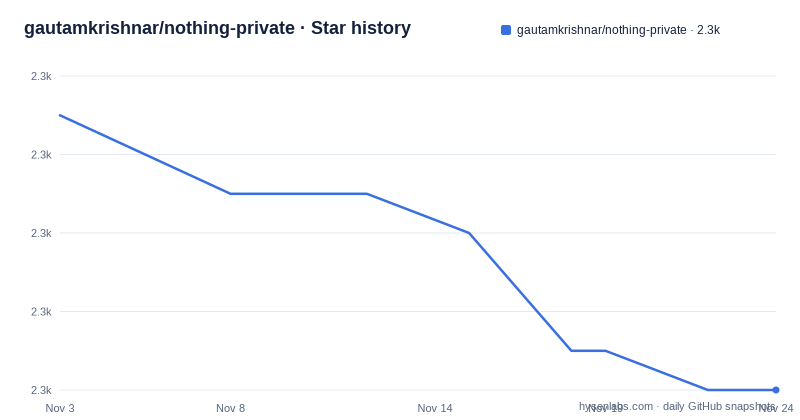
- gautamkrishnar/nothing-private2,288 ★ · -7
| Repository | 2026-11-03 | 2026-11-24 |
|---|---|---|
| gautamkrishnar/nothing-private | 2.3k | 2.3k |
-7 Stars in the last 21 days, measured from the daily GitHub snapshot. Compare with other projects
Editorial analysis
A name typed once comes back because the fingerprint, not a cookie, is the key
The demo has three steps. Visit the site and enter your name, click the See the magic button, then open the same site in a private or incognito window. The page greets you by the name you typed. The README presents this as proof that a website can recognise you even when you browse privately.
The mechanism is described in the section called Some tech stuff. The page uses the browser fingerprinting feature of Client.js to compute a fingerprint. When you submit the form, that fingerprint is saved with your name in a MySQL database through a PHP backend. On your next visit the fingerprint is compared with the stored column and the matching name is returned. The key is the fingerprint, so clearing history or opening a private window does not remove the record.
Sixteen data points feed the fingerprint, and several of them are storage
The README lists what goes into the fingerprint:
user agent, screen print, color depth, current resolution, available resolution, device XDPI, device YDPI, plugin list,
font list, local storage, session storage, timezone, language, system language, cookies, canvas print
Most of these describe the machine and browser: screen size and depth, installed fonts and plugins, time zone, language settings and a canvas rendering print. Local storage, session storage and cookies are in the list as well, and the README does not say how those items behave in a private window or how the stored fingerprint is matched. Treat the claim that your name returns as the project's own demonstration, and test it in your browser, because a browser with countermeasures may produce a different fingerprint each time.
Private browsing clears history and hides nothing from the network
The README's own explanation is blunt. Using private browsing or incognito mode, it says, only helps you clear your browsing history. The internet service provider, search engines and the websites you favour can still track you. A linked video explains the argument further.
The repository does not measure how far any of that goes. The Google lawsuit articles it cites, from Reuters and ZDNet, concern the company's tracking in incognito mode, and the README also quotes BuiltWith figures for how many top sites use Google Analytics. Those are attributed claims in the README, not results produced by the demo, which fingerprints one browser and stores one name. Matomo is mentioned as an open source analytics alternative, with the caveat that self-hosted options do not match Google Analytics in availability and features.
docker-compose up -d starts the PHP app and a MySQL database on port 80
Local running is through Docker:
git clone [email protected]:gautamkrishnar/nothing-private.git
cd nothing-private
docker-compose up -d
The README adds that you can use --build to update the image after a git pull, and that you then visit http://localhost/. The compose file defines two services. The app service builds from the Dockerfile (php:7.4-apache with the mysqli and zip extensions) and publishes port 80. The database service runs mysql:8.0 and exposes 3306 to the compose network only.
The credentials in docker-compose.yml are safeuser for the user and password, safedb for the database, and safeuser again for the root password. They are fine on a laptop and wrong for any public host. An optional MONITORING_URL variable, commented out in the file, is there for Sentry.
The backend is PHP over MySQL, with an older SQLite version in git history
Server files sit in the db_server directory. The README links an earlier SQLite version of the backend, pinned to a specific commit, so the storage layer was once a single file and moved to MySQL later. The Docker setup mounts db_server into the MySQL container's docker-entrypoint-initdb.d, so the database is initialised from files in that folder, and the database files themselves live under docker/data on the host.
The frontend is plain HTML, CSS and JavaScript with a Vite config. The start script is vite --port 8080, and build and preview scripts are defined. That serves the page. The fingerprint storage depends on the PHP and MySQL side, which the Docker route provides, so a static preview alone cannot show the name coming back.
Karma, Jasmine and Cypress cover the page, but not the privacy claim
The test scripts use Karma with Jasmine for unit tests and Cypress for integration tests. npm test runs start-server-and-test against http://localhost:8080/index.html and then cy:run, and test-no-record runs the local variant without recording. unit-test-ci runs Karma in ChromeHeadless, and test-cross-platform uses a BrowserStack configuration.
None of the scripts named in package.json is described as checking that a fingerprint survives a private window, which is the demo's central claim. Running that check is a manual step in a real browser, once in a normal tab and once in a private one.
Browser fingerprinting is one tracking method and the README says so
The README's advice on staying safe is narrow. To reduce the likelihood of browser fingerprinting, it points to a community list of browsers that implement countermeasures, kept in browsers-with-countermeasures/README.md. It then states that fingerprinting is only an example of several ways to track identity, and links a Freecodecamp article for others.
Two consequences follow. Switching to one of the listed browsers lowers the odds, and the README does not promise it removes them. And tracking that does not depend on the browser, such as what an internet service provider sees, is outside what this demo or its countermeasure list addresses.
Releases stopped at 2.8 in 2020, and the domain has changed hands before
The last three tagged releases are 2.8 on 2020-05-10, 2.7 on 2020-03-30 and 2.6 on 2019-12-22. The last push to the repository was 2026-10-02, and the project is not archived. package.json still says version 1.0.0, so the release tags and the package metadata do not agree.
The README's Hall of Fame thanks people who reported that the nothingprivate.ml domain had expired in issue 128, saving the project from misuse of the domain. The live site now lives at nothingprivate.gkr.pw. The licence is GPL-3.0, although package.json says SEE LICENSE IN LICENSE. Treat the hosted demo as separate from the code: if it disappears again, the Docker route above still works.
Editorial conclusion
Use Nothing Private to show a non-technical audience that incognito mode does not stop browser fingerprinting, or to study a minimal Client.js plus PHP plus MySQL fingerprint pipeline. Do not treat it as a privacy tool or as a measurement of how unique your own browser is, since it only stores a name against a fingerprint. Before showing it, run the Docker setup locally and confirm the name actually comes back in a private window in your browser.
Frequently asked questions
Is incognito 100% private?
No. The README says private browsing only helps clear your browsing history, and that your internet service provider, search engines and the websites you visit can still track you.
How can I browse privately without being tracked?
The README suggests using one of the browsers on its community list of browsers implementing fingerprinting countermeasures to reduce the likelihood of fingerprinting. It also says fingerprinting is only one of several tracking methods.
is nothing private
Nothing Private is a proof of concept that a website can identify and track you using browser fingerprinting, even in private browsing or incognito mode.
Official sources
Add this badge to your README
If you maintain this project, the badge below links readers to this analysis and shows its maintenance status from the daily GitHub snapshot. Paste the markdown into your README; add ?metric=license or ?metric=stars to the image URL for a different field.

[](https://hysenlabs.com/projects/gautamkrishnar-nothing-private)Star history chart for your README
[](https://hysenlabs.com/projects/gautamkrishnar-nothing-private)Was this useful?