The OpenCCU badge row points at the same releases page three times
Buildroot-based, cloud-free smart-home platform for a Homematic IP CCU (CCU3/ELV-Charly). Runs on Raspberry Pi & x86/ARM or as a virtual appliance (Proxmox VE, Home Assistant, Docker/LXC/K8s)...
At a glance
- What is it?
- OpenCCU is a Buildroot-based, cloud-free operating system that replaces the vendor Homematic IP CCU3 firmware and runs on that hardware, on single board computers, as a virtual appliance, and as a Home Assistant add-on. Its Makefile dates every build, verifies an upstream tarball with a file called a signature, and reads a version out of a makefile with grep.
- Who is it for?
- OpenCCU is a fork with a real engineering discipline behind it, and the parts that matter for an adopter are the cross-compatible backups and the drop-in claim on CCU3 hardware, since that is what makes migration reversible. Two things to settle before you flash anything.
- Can I use it commercially?
- Yes. Apache-2.0 is a permissive licence: you can use, modify and sell software built on it, as long as you keep its copyright and licence notices.
- Is it still maintained?
- Yes. The repository received new commits within the last day.
- What is it written in?
- Mainly JavaScript, according to GitHub's language statistics.
Answers come from the project's GitHub data, last synced on November 13, 2026, and from our analysis. They are not legal advice.
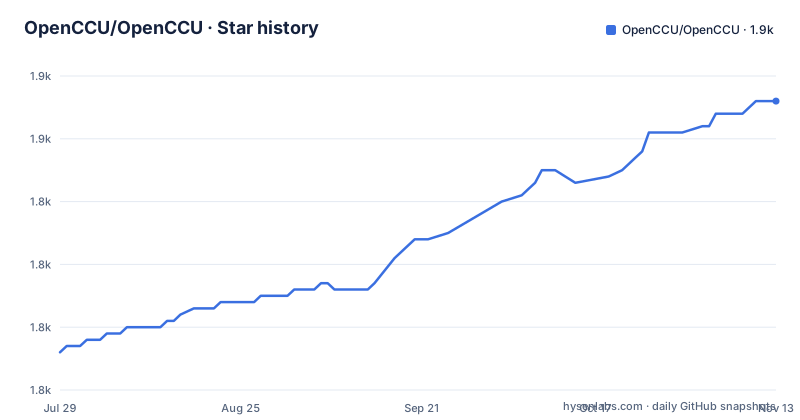
Star history
- OpenCCU/OpenCCU1,856 ★ · +40
| Repository | 2026-07-29 | 2026-11-13 |
|---|---|---|
| OpenCCU/OpenCCU | 1.8k | 1.9k |
40 Stars in the last 107 days, measured from the daily GitHub snapshot. Compare with other projects
Editorial analysis
The badge row repeats the same link three times and has no alt text
The block of links under the title is a row of badges, and reading the destinations rather than the images is revealing. The releases-latest URL appears three times. The issues URL appears twice. The remaining links cover the snapshots release, the actions page, the contributors graph, artifacthub, the license, a PayPal donation button, GitHub Sponsors and the stargazers page.
Two of those repeats look like a badge styled differently in a light and a dark theme. The third is harder to account for, and the same goes for the second issues badge. A reader cannot tell which link is meant to be the canonical one, and a maintainer editing the row has no obvious way to know which entries are load-bearing.
Every link in the row is written with empty link text. In the rendered document each one is a bare image with nothing describing it, so a screen reader has no announcement to make and a text-mode fetch gets a list of URLs with no indication of what each badge claims. The row also includes a German readme link marked as such, which is the one entry in the block that carries text and is therefore the only one that survives being read aloud.
None of this affects the software. It is the first thing a visitor sees, and it is the part of the project that looks unfinished.
The Requirements section lists platforms and nothing you would need
The heading promises requirements and delivers a support matrix.
The hardware list is CCU3, the ELV Charly, Raspberry Pi, Hardkernel ODROID, ASUS Tinkerboard 2 and 2S, and generic x86_64 or aarch64. The virtualization list is longer still: Proxmox VE, QEMU/KVM, XCP-ng and XenServer, VMware ESXi and Workstation Player, Hyper-V, VirtualBox, Synology Virtual Machine Manager, QNAP Virtualization Station, Unraid, Docker and OCI, LXC, Kubernetes, and Home Assistant as an add-on.
That is nineteen deployment targets named without a single number attached to any of them. No minimum storage, no memory figure, no processor architecture beyond x86_64 and aarch64, no note about which boards boot from USB, nothing about whether the virtual appliance form wants more than a default allocation. A reader choosing between Proxmox and a bare Raspberry Pi has nothing to compare.
The same absence runs through the install steps. First boot is described as detecting Homematic and Homematic IP radio modules such as `RPI-RF-MOD` and `HmIP-RFUSB` on GPIO or USB, which is the only hardware requirement stated anywhere, and it arrives as a side effect of booting rather than as a pre-flight check.
The one genuinely useful sentence is about the WebUI address, `http://openccu/`, with the device's DHCP-assigned IP as the fallback when name resolution is not available. A single hostname on the local network is a small thing that saves a lot of bookmarking.
The download is a zip and the thing you flash is an image inside it
The quick start gives a filename pattern for what you download:
OpenCCU-X.XX.XX.YYYYMMDD-<TARGET>.zipA zip archive. Then the install instructions say to unzip it and flash the `*.img` to a microSD card, with Etcher or `dd` named as the tools. The pattern documents the archive, the step that matters operates on the image inside it, and the two are never reconciled, so a reader who trusted the pattern and looked for `OpenCCU-3.89.11.20260919-rpi.img` on the releases page will not find it under that name.
The same file serves a second purpose. For a migration from CCU2 or CCU3, the instruction is to upload the OpenCCU package as a regular firmware update, which means the archive is simultaneously an SD card image source and a firmware package the vendor's own update mechanism accepts. That is a genuinely clever reuse and it depends entirely on the two being the same artifact.
Which means the backup story is the strongest claim in the project. Backups are described as cross-compatible, so a configuration can move between the vendor firmware and OpenCCU in either direction, and the first-boot step offers restoring an existing CCU backup. If that holds, the migration is reversible, which is the thing to test before relying on it.
The version number is today's date, so a commit does not identify a build
The version is assembled in the Makefile rather than declared. The date comes from the shell:
DATE=$(shell date +%Y%m%d)
PRODUCT=
PRODUCT_VERSION:=$(OPENCCU_BASE_VERSION).$(DATE)
So the release name is the base version with the build date appended, which is exactly the shape the filenames use: three releases in the recent history are 3.89.8.20260719, 3.89.9.20260914 and 3.89.11.20260919.
The consequences are worth being explicit about. A build made today and a build made tomorrow from an identical tree are different versions, so the version number is not a function of the source. Two builds on the same day collapse into one version, so a rebuild on a day with a fix in it is indistinguishable from the morning's. And the base component, 3.89 across all three recent releases, has not moved while the date component carries the only variation.
The numbering also skips. Between 3.89.9 and 3.89.11 there is no 3.89.10, and the gap in dates is wide: from 2026-07-20 to 2026-09-14 is close to two months, followed by two releases five days apart. A cadence that is mostly date-driven will look like this.
The practical advice follows from the mechanism. Keep the release artifact. Rebuilding from a tag will not necessarily give you back the thing you ran.
The upstream tarball is verified by a hash held next to it, in a file called .sign
The Buildroot tarball is pinned by version and hash:
BUILDROOT_VERSION=2026.08
BUILDROOT_SHA256=0d1aaec0dfd1272ccaea0084a03f9e5bff2018ea06bfd7cb61eaf3c5c7ca4027
and the download rule writes that hash into a file whose name ends in `.sign`, then checks it:
echo "$(BUILDROOT_SHA256)  buildroot-$(BUILDROOT_VERSION).tar.gz" >buildroot-$(BUILDROOT_VERSION).tar.gz.sign
shasum -a 256 -c buildroot-$(BUILDROOT_VERSION).tar.gz.sign
The name is the problem. That file is a checksum manifest, not a signature. The hash it contains is the same value written a line earlier in the Makefile, so the check confirms the download matches what the build system already expected, which catches a truncated or corrupted transfer and nothing else. It does not establish that the tarball came from the Buildroot project, because the file expressing the expectation is generated by the thing being tested. A signature would need a key that does not travel with the download.
The same Makefile is careful about one other thing, and the contrast is instructive. Compiler output goes to a shared cache in the user's home directory, `BR2_CCACHE_DIR=${HOME}/.buildroot-ccache`, while downloaded tarballs go to a directory inside the checkout, `BR2_DL_DIR=$(shell pwd)/download`. One cache is shared across projects and one is deliberately local, which keeps a large tree out of your working copy only on the side where it does not need to be.
The build reads its own version out of a makefile with grep
The base version is not a variable anyone sets. It is extracted from a package makefile at build time:
OPENCCU_BASE_VERSION=$(shell grep "OPENCCU_BASE_COMPAT_VERSION =" $(BUILDROOT_EXTERNAL)/package/openccu-base/openccu-base.mk | cut -d' ' -f3)The version that ends up in a release name is therefore the third space-separated field of a line in a `.mk` file, recovered with `grep` and `cut`. That works, and it keeps one definition instead of two, but it makes the exact spacing in that file load-bearing. Change `KEY = value` to `KEY=value` and the `cut -d' ' -f3` returns nothing, with no error. A build that would otherwise be reproducible now depends on a formatting convention in a file no editor is checking.
A second variable is pulled the same way from a neighbouring line, one that matches at the start of the line, which is a subtle difference between the two greps and a sign the format is being relied on precisely.
The target list works by the same kind of convention. Products are derived from defconfig filenames:
PLATFORM:=$(shell echo -n $(PRODUCT) | sed 's/_\(amd64\|arm.*\)//')The product name is expected to be the platform, then a `_` separator, then the architecture, and `sed` strips the architecture suffix away to leave the platform. A product named without that shape yields a platform equal to its own name and no complaint. Adding a target is a matter of dropping a `.config` file into `buildroot-external/configs`, which is a clean design that leans entirely on the naming convention to hold.
One more detail worth knowing: the default target is `help`, so running make with no arguments prints a help screen and builds nothing.
The English README links every document to the German wiki
The documentation section is a numbered list, and every entry is a link into the project wiki. The links are named in German: Einleitung, Installation, Installation-CCU3, Installation-ELV-Charly, Installation-RaspberryPi, Installation-ODROID, Installation-Tinkerboard2, Installation-Generic-x86_64.
The wiki home is offered in two languages, with a German page and an `en.Home` page. That is the only place an English wiki page is named. Everything below it, including the pages for requirements, features, limitations, licence and warranty, commercial distribution and each individual hardware installation, is a German URL with no English counterpart listed.
The anchor names make the same point. The sections referenced are `#vorraussetzungen` for requirements, `#grundinstallation-hardware` for the hardware installation, `#kommerzieller-vertrieb` for commercial distribution and `#lizenz--haftung` for licence and warranty. The English README sends a reader to a German anchor.
So the English entry point is a summary, and the documentation behind it is German. That is a reasonable arrangement for a project with a German-speaking origin, and it is also the single largest barrier for anyone else reading it, since the README itself defers to the wiki for the limitations and the warranty terms.
The repository root reflects the same split. `README.de.md` sits next to `README.md`, and a `.claude/` directory, a `.coderabbit.yaml`, `.markdownlint.yml` and `.yamllint` sit alongside the community and governance files.
Apache-2.0, non-commercial, and a page about commercial distribution
Three statements about licensing sit side by side, and they do not point the same way.
The repository carries a LICENSE file and the metadata classifies the project under Apache-2.0, which is a permissive licence that permits commercial use and distribution with attribution. The README describes OpenCCU as a free, non-commercial, open-source operating system. The documentation index includes a page titled Commercial Distribution and another titled License and Warranty.
An Apache-2.0 project does not need a commercial distribution page, because the licence already answers the question. A project that intends to be non-commercial does not need either, because the licence and the intent conflict. The presence of all three suggests the software licence and the distribution policy are separate things, which is normal, but the README does not say so, and a reader looking for permission to ship OpenCCU in a product has to infer the arrangement from a wiki page title.
The same page index also carries a limitations section, which is the other thing to look for before committing. A cloud-free replacement for a vendor hub that targets full compatibility is a large claim, and the section that would say where it stops is the one section the English README does not summarise.
The funding side is straightforward by comparison: a PayPal donation button and GitHub Sponsors, both in the badge row at the top.
Editorial conclusion
OpenCCU is a fork with a real engineering discipline behind it, and the parts that matter for an adopter are the cross-compatible backups and the drop-in claim on CCU3 hardware, since that is what makes migration reversible. Two things to settle before you flash anything. The licensing story pulls in three directions at once, with a repository under Apache-2.0, a README describing the software as non-commercial, and a wiki section on commercial distribution, and nobody reading the project gets a single answer. And the version number is today's date appended to a base version, so a build is not reproducible from a commit, which means you need to keep the release artifact rather than rebuild it.
Frequently asked questions
How can I use OpenCCU with HomeAssistant?
OpenCCU ships a native Home Assistant App, and Home Assistant is listed as an add-on target alongside the hypervisor options. The repository contains four add-on directories: a base add-on plus development, hapdrap and proxy variants, with a repository.json at the root describing them.
openccu vs ccu3
The README positions OpenCCU as a drop-in replacement targeting 100% compatibility with the vendor CCU3, installable directly on CCU3 and ELV Charly hardware, with backups that are cross-compatible in both directions. It does not describe any behavioural difference between the two.
openccu vs debmatic
Debmatic is not mentioned anywhere in the project documentation, so that comparison is not answered here. What OpenCCU states about itself is that it was formerly known as RaspberryMatic and is a free, non-commercial, open-source operating system for a cloud-free hub compatible with eQ-3's Homematic IP and HomeMatic devices.
pivccu vs openccu
PiVCCU does not appear in the README or the documentation index either. The published scope is a Buildroot-based operating system installable on CCU3 and ELV Charly hardware, on single board computers, on generic x86_64 or aarch64, or as a virtual appliance.
raspimatic vs openccu
They are the same project under two names. The README states that OpenCCU was formerly known as RaspberryMatic, so both names refer to the same codebase and the same release history, whose recent versions run 3.89.8.20260719, 3.89.9.20260914 and 3.89.11.20260919.
openccu alternative
The documentation does not list alternatives or compare OpenCCU against another project. Its stated scope is a cloud-free Homematic IP hub with drop-in compatibility and cross-compatible backups, running on vendor hardware, single board computers, hypervisors, containers, Kubernetes or as a Home Assistant add-on.
Official sources
Add this badge to your README
If you maintain this project, the badge below links readers to this analysis and shows its maintenance status from the daily GitHub snapshot. Paste the markdown into your README; add ?metric=license or ?metric=stars to the image URL for a different field.

[](https://hysenlabs.com/projects/openccu-openccu)Star history chart for your README
[](https://hysenlabs.com/projects/openccu-openccu)Was this useful?