getwud/wud: a container update watcher for Docker, Swarm, Kubernetes and Nomad
Keep your containers up-to-date!
At a glance
- What is it?
- WUD (What's Up Docker?) scans running workloads, compares their image digests and tags against a registry, then notifies you or recreates the container. It is a monitoring tool first and an auto-updater second, and the docs are the only place the trigger and registry behaviour is pinned down.
- Who is it for?
- Adopt WUD if you run containers on more than one orchestrator and want a single place to see which images have moved, with notification triggers you already use. Do not adopt it if you expect the auto-updater to be a full deployment system: the README describes recreation of containers on Docker, Docker Compose and Nomad, and says nothing about rollback or health gating after a recreate.
- Can I use it commercially?
- Yes. MIT is a permissive licence: you can use, modify and sell software built on it, as long as you keep its copyright and licence notices.
- Is it still maintained?
- Yes. The repository received new commits within the last day.
- What is it written in?
- Mainly TypeScript, according to GitHub's language statistics.
Answers come from the project's GitHub data, last synced on November 25, 2026, and from our analysis. They are not legal advice.
Star history
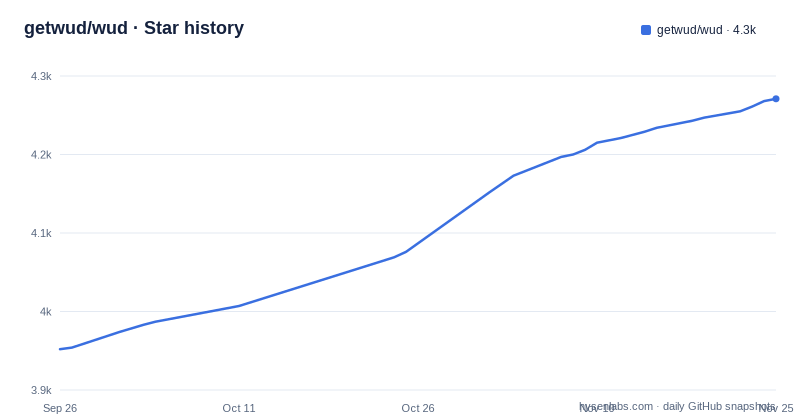
- getwud/wud4,271 ★ · +319
| Repository | 2026-09-26 | 2026-11-25 |
|---|---|---|
| getwud/wud | 4k | 4.3k |
319 Stars in the last 60 days, measured from the daily GitHub snapshot. Compare with other projects
Editorial analysis
What WUD actually watches, and who needs that
Most teams do not run one container runtime. A host has a Docker daemon, a Compose file on a VM, a Swarm stack that nobody migrated, and a Kubernetes cluster someone else owns. The update question is the same in all four places: has the image behind this workload changed since it started? Answering it by hand means pulling tags and comparing digests, which is exactly the work nobody schedules.
WUD is aimed at that gap. According to the README, it is a container update monitoring and automation tool that scans container environments, detects image updates across public and private registries, performs semantic version analysis, and then alerts or triggers updates. The supported watchers are listed as standalone Docker daemons, remote Docker engines over TLS, Docker Compose, Docker Swarm, native Kubernetes workloads (Deployments, StatefulSets, DaemonSets, CronJobs) and HashiCorp Nomad clusters. That breadth is the product. If you only run one Docker host, the same README's feature list is more surface than you need.
The registry side is similarly wide: Docker Hub, GHCR, AWS ECR, Google GCR and GAR, Azure ACR, Quay, GitLab, Gitea, Forgejo, Codeberg, LinuxServer (LSCR), and any custom OCI registry. The README describes Docker Hub and GHCR as zero-config, with the rest requiring credentials. That distinction matters more than the list length, because an unauthenticated registry call against a private repo returns nothing useful and you get a silent gap rather than an error you notice.
The watcher, engine, registry, trigger loop
The README's own diagram lays out four stages. Watchers discover running containers. The WUD engine compares versions and digests. Registries are inspected for tags and manifests. Triggers notify or auto-update. Data flows watcher to engine, engine to registry and back, then engine to trigger.
The interesting part is the middle comparison. WUD does not simply ask whether a tag exists; the README says it performs semantic version analysis, and the tag filtering feature list describes targeting semver at major, minor or patch level, matching custom regular expressions, pinning versions, or defining include and exclude tag rules. That is a policy layer, and it is where most misconfiguration will happen. A rule set to patch level on an image published with date tags will never fire. A regex that is too loose will fire on every nightly build. The README documents the strategies but does not promise a default that suits your images.
Digest comparison is the second half. Two tags can point at the same digest, and one tag can be repointed at a new digest without any version number changing. The engine checks both, which is why the README frames the tool around updates rather than around version numbers alone. The trigger stage is deliberately pluggable: the README lists more than thirty notification and automation targets, including Discord, Slack, Telegram, Matrix, Mattermost, Home Assistant, Gotify, Ntfy, Apprise, generic webhooks, Kafka, AMQP/RabbitMQ, NATS, Opsgenie, PagerDuty, Uptime Kuma, SMTP email and shell scripts. The auto-updaters are narrower: Docker, Docker Compose and Nomad.
Installing WUD with Docker Compose
The README gives two installation paths, a docker run command and a Compose file. The Compose one is easier to keep. It mounts the Docker socket so the Docker watcher can see containers, publishes port 3000, and sets the initial admin credentials through environment variables.
services:
  whatsupdocker:
    image: getwud/wud:latest
    container_name: wud
    ports:
      - "3000:3000"
    environment:
      - WUD_AUTH_ADMIN_USER=admin
      - WUD_AUTH_ADMIN_PASSWORD=MySecurePassword123
    volumes:
      - /var/run/docker.sock:/var/run/docker.sock
    restart: unless-stopped
Start it with the usual Compose command:
cd /path/to/your/compose/dir
docker compose up -d
The README states that the web UI is then available at http://localhost:3000, and that you log in with the admin user and password you set above. Change that password before the port is reachable from anywhere but localhost. Mounting the Docker socket gives the container effective control over the daemon, which is what the auto-updater needs and also what makes an exposed instance a serious problem.
The Dockerfile explains the runtime you get: a Node 24 Alpine image, the app built and pruned to production dependencies, the UI build copied into ./ui, and an entrypoint at /usr/bin/entrypoint.sh. It declares EXPOSE 3000 and a healthcheck that curls http://localhost:3000/health every 30 seconds, but only when WUD_SERVER_ENABLED is unset or true. If you disable the server, the healthcheck exits 0 without checking anything, so a container that reports healthy may simply not be running the HTTP server at all. The image also installs tzdata, openssl, curl, bash and libstdc++, which is worth knowing if you are comparing image sizes against a distroless alternative.
Where WUD stops short
The auto-updater is the feature people reach for first and the one with the most caveats. The README lists native auto-updaters for Docker, Docker Compose and Nomad only. Kubernetes and Swarm appear as watchers, not as update executors. If your estate is mostly Kubernetes, WUD will tell you an image moved and then hand the decision back to you. That is a reasonable design, and it is not what the phrase automated container updates suggests at a glance.
Rollback is the other gap. The README does not document a rollback mechanism, and it does not describe health gating after a container is recreated. A recreated container that fails to start is a container that failed to start; the tool's job appears to end at the recreate. Anyone who has watched a Compose service come back with a broken config knows that this is the moment you want a previous image tag pinned somewhere.
The tag filtering layer is also a footgun rather than a limitation of the software. Semver analysis assumes your images are versioned. Many popular images use date stamps, commit SHAs, or floating aliases like latest. Pointed at those, the comparison either never fires or fires constantly, and the README's include and exclude rules exist precisely because the default cannot know. There is no documented dry-run mode for an auto-update trigger, so the first time a rule matches, something gets recreated.
WUD versus Watchtower, and versus doing nothing
Watchtower is the obvious comparison, and the difference is in scope rather than in the update action. Watchtower watches a Docker daemon, pulls newer images and restarts containers. WUD watches Docker plus Compose, Swarm, Kubernetes and Nomad, and its default posture is notification through one of thirty-plus triggers, with auto-update as one trigger among many. If you have a single Docker host and you want containers restarted when a new image lands, Watchtower is the smaller tool for that job and the README's feature list is not needed. If you have several orchestrators and you want one dashboard plus a Slack message, WUD is built for that shape.
The second alternative is doing nothing and letting a scheduled pull-and-recreate script run. That works until the image you pull is broken, at which point you have no record of what changed or when. WUD's value in that comparison is the inventory: the README describes a web dashboard showing container statuses, manual update check triggers, a REST API, a Prometheus /metrics endpoint and pre-built Grafana dashboards. Those are the parts that survive contact with a real incident, more than the auto-updater is.
A third path is a GitOps controller that already reconciles image tags against a registry. It will not cover a stray Swarm stack, which is often exactly the workload nobody has migrated.
Maintenance, licence and upgrade cost
The repository is not archived, and the last push was on 2026-09-22. Releases 9.0.0 and 9.0.2 landed on 2026-09-11 and 2026-09-12, and 9.1.0 on 2026-09-22. That is a fast cadence, and the 9.0.0 major bump is the signal worth noting: a major version in a tool that talks to registries and orchestrators usually means configuration or API changes, and the README does not include a migration section. Read the release notes for 9.0.0 before upgrading from 8.x.
The licence is MIT, which permits commercial use, modification and redistribution with the copyright notice retained. Nothing in the repository indicates a separate enterprise licence or a feature gate. That is a factual statement about the licence file, not an assessment of your compliance obligations; if you redistribute WUD inside a product, have someone check the notice requirements.
Running cost is one container plus whatever registry API calls your scan interval produces. Authenticated registries have rate limits, and the README does not publish a recommended scan interval. The practical upgrade cost is the trigger and registry configuration you maintain in environment variables and files, which is portable across versions but not free to re-verify.
Editorial conclusion
Adopt WUD if you run containers on more than one orchestrator and want a single place to see which images have moved, with notification triggers you already use. Do not adopt it if you expect the auto-updater to be a full deployment system: the README describes recreation of containers on Docker, Docker Compose and Nomad, and says nothing about rollback or health gating after a recreate. Before trusting it in production, run the Docker Compose quick start against a throwaway daemon, confirm the registry credentials you need are configured under the registries section of the docs, and verify that your tag scheme is actually matched by the semver or regex rule you set, because a wrong rule produces either silence or noise.
Frequently asked questions
What is What's Up Docker (WUD)?
WUD is a container update monitoring and automation tool that scans running workloads, compares their image versions and digests against public and private registries, and then notifies you or triggers an update. It supports Docker, Docker Compose, Docker Swarm, Kubernetes and Nomad as watchers.
What is Docker and why would you use it?
WUD's README does not explain what Docker is or why someone would adopt it. It only describes how WUD watches Docker containers and other orchestrators for image updates.
Is Docker still relevant in 2026?
WUD's README does not address Docker's relevance as a technology. It only shows that WUD treats Docker, Docker Swarm, Docker Compose, Kubernetes and Nomad as environments it can monitor.
Can you explain Docker to a beginner?
WUD's README does not include a beginner explanation of Docker. It assumes you already run containers and describes only how WUD scans them and detects image updates.
Official sources
Add this badge to your README
If you maintain this project, the badge below links readers to this analysis and shows its maintenance status from the daily GitHub snapshot. Paste the markdown into your README; add ?metric=license or ?metric=stars to the image URL for a different field.

[](https://hysenlabs.com/projects/getwud-wud)Star history chart for your README
[](https://hysenlabs.com/projects/getwud-wud)Was this useful?