GhostESP is an ESP-IDF native firmware platform for wireless security research
The open-source wireless research platform for ESP32.
At a glance
- What is it?
- GhostESP turns an ESP32 into a portable wireless research station, with live capture into Wireshark, on-device analysis of PCAP and hc22000 files, threat detection features and a native app ecosystem. The 2.2 release added dual stack LoRa and richer captures, and the project is deliberately built on Espressif's ESP-IDF rather than the Arduino core.
- Who is it for?
- GhostESP fits a security researcher or network auditor who needs to capture, analyse and detect with portable hardware, and who wants the radio and silicon features that only the vendor SDK exposes. It is the wrong choice for a general purpose wireless tool, and features such as deauthentication, Karma and the Evil Portal are dual use and should only be pointed at infrastructure you own or are authorised to test.
- Can I use it commercially?
- Yes, with conditions. GPL-3.0 is a copyleft licence: if you distribute software that includes it, you must release that software's source code under the same licence. Running it internally without distributing it does not trigger that obligation.
- Is it still maintained?
- Yes. The repository last received commits 1 day ago.
- What is it written in?
- Mainly C, according to GitHub's language statistics.
Answers come from the project's GitHub data, last synced on November 7, 2026, and from our analysis. They are not legal advice.
Star history
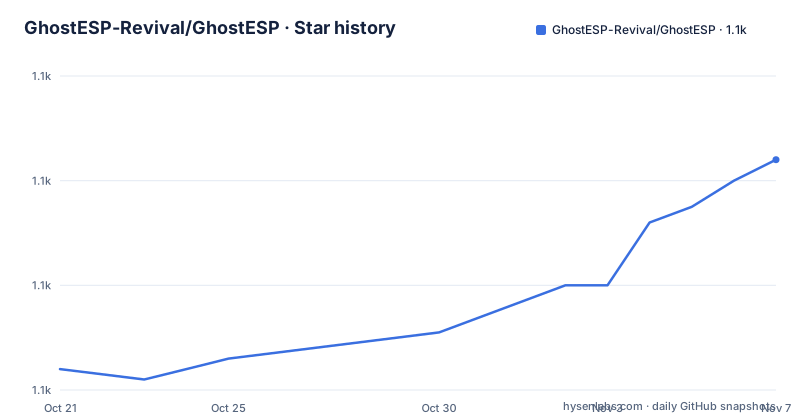
- GhostESP-Revival/GhostESP1,124 ★ · +40
| Repository | 2026-10-21 | 2026-11-07 |
|---|---|---|
| GhostESP-Revival/GhostESP | 1.1k | 1.1k |
40 Stars in the last 17 days, measured from the daily GitHub snapshot. Compare with other projects
Editorial analysis
Built on ESP-IDF rather than the Arduino core
The positioning statement in the README is direct. GhostESP is the ESP-IDF native wireless security platform for ESP32, offering deep Wi-Fi and BLE assessment, research-grade capture and export, and a real app ecosystem, and it is built directly on Espressif's ESP-IDF rather than through the Arduino core, so new silicon and radio features land first and there is no abstraction layer between GhostESP and the hardware.
The Why GhostESP section makes the same argument by comparison, naming Marauder and Bruce as the Arduino-based alternatives. The claim is that GhostESP works against Espressif's SDK directly, gets new chips and radio features first, which it lists as 802.15.4, Zigbee and 5 GHz on the C5, and has lower-level control of the radios, memory and partitions. It also concedes the other side of that coin: Arduino-based firmware can reach the same APIs, just not as directly.
That is a real difference in approach rather than a feature list, and it explains the rest of the project. If you want the newest radio silicon behaviour, a vendor SDK is the only way to get it, and the price is a firmware project that has to track Espressif's own release cadence. The badge in the README pins that expectation at ESP-IDF v6.1, and the version badge reads 2.2.
The licence is GPL 3.0, with the file in the LICENSE path and a LICENSES/ directory alongside it, which matters for a firmware project whose builds are distributed as binaries.
Capture is the core activity, and it can be streamed or analysed on device
The second of the five points in the Why section is live capture and on-device analysis: you can stream traffic into Wireshark in real time over USB, and browse, inspect and convert captures on the device itself.
The formats listed are the ones a wireless researcher actually meets: PCAP, hc22000, WiGLE and 802.15.4. The WiFi feature list adds WiFi capture to SD as PCAP with an on-device PCAP browser and hc22000 export, and a USB dongle mode for Wireshark described as an extcap stream.
The 2.2 release sharpened the capture side. It added per-frame signal, channel and rate information in Wireshark, 802.1Q and QinQ VLAN tag support, and control frames, RTS, CTS and ACK, in EAPOL and Wireshark captures. For BLE there is packet capture and a BLE stream to Wireshark.
The on-device browser is the part that changes where the work happens. hc22000 is the file format used for WPA handshake material, and being able to open, inspect and convert a capture on a device with no laptop attached is what makes a handheld unit useful in the field rather than only a capture dongle.
The WiFi list also includes a scan and detection surface, which reads as the defensive half of the platform: PineAP detection, a Flock and surveillance detector, drone detection and spoofing, WPS detection, a channel congestion analysis view, an Airspace Monitor with real-time packet and threat insights and a packets per second sparkline, and a DNS sinkhole with blocklist based NXDOMAIN blocking and built-in blocklist downloads.
Wardriving and detection share the same export path
A cluster of features around mapping and detection is worth reading as one group, because they share the same data model.
The exports are listed as wardriving exports for WiFi, BLE and GPS, plus a sweep CSV covering WiFi, BLE, GPS and 802.15.4. There is a passive local-name sniffer, mdnssniff, for mDNS, LLMNR, SSDP and NetBIOS, running per ARP-discovered host, and a WiFi OUI vendor lookup. A dual-band dualwd helper does BLE and Wi-Fi coexistence wardriving on PSRAM boards, and a split-channel wardriving helper runs through GhostLink, the two-device pairing mode.
The BLE side has the parallel set: scan modes for general, AirTag, Flipper and raw, advertisement scanning with OUI prefix and vendor filtering plus RGB match pulses, GATT and service scan with per-device enumeration and device tracking, BLE wardriving, and BLE skimmer detection. Version 2.2 widened the device detect list to include Tile, Samsung SmartTag, Chipolo, AirPods per model, Apple Watch, FindMy, Fast Pair and hearing aids, and added the bledetect scan with list, track and AirTag spoof actions.
A separate RSSI tracking feature for access points and stations comes with a live RSSI meter view, and the Airspace Monitor adds suspect device cards on top of the packet view.
The honest way to read this list is that a single device is doing two different jobs, and they pull in opposite directions. The capture and analysis side wants to be a lab instrument, and the detection features want to be a portable sensor for a network you are responsible for. Both are in the same firmware, which is unusual and is also the reason the UI work in 2.0 was as large as it was.
One command set, driven from six different front ends
The fifth point in the Why section is that a single command set can be driven from many front ends: the on-device UI, the serial CLI, the WebUI, a Flipper Zero app, an Android app, or a GhostLink connected device, all against the same commands.
That is a design decision with a real cost and a real benefit. The cost is that every front end has to be maintained, and the v2.0 release rebuilt the UI and introduced the native app ecosystem, which is a lot of surface for a firmware project. The benefit is that the tool fits the situation: a headless capture device over USB, a screen device in the field, a Flipper user who already has their own workflow, and a browser when a laptop is all that is available.
The WebUI and the filesystem and remote command relay features mean the device can also be operated over the network, which is how it would sit in a monitoring role rather than a field role.
The GitHub repository layout matches this breadth. There is main/ and components/ for the firmware, plugins/ for the app plugin system, webui/ for the web front end, ota_updater/ for the update path, firmware/ and configs/ for board configuration, a firmware-manifest.json, build.py alongside CMakeLists.txt, a BRAND_GUIDELINES.md, and a long list of partition tables, one per board family, with names such as partitions_ota_8mb.csv, partitions_s3twatch.csv, partitions_crowpanel_p4.csv and partitions_banshee_c5_factory.csv. That partition table list is a good indicator of the hardware range: each variant needs its own flash layout, and the project carries them all in the tree.
Native apps, GhostScript and the Cloud Store
The app system is the piece that separates 2.0 from what came before. Native apps are SD apps with their own permissions and storage, built with gbt and a plugin SDK, installed from the Cloud Store, plus a Lua runtime for scripts. The examples the README gives are Device Inspector, ESP32Finder, a Doom port and a QR generator.
Version 2.2 extended that with a Game Boy and Game Boy Color emulator, gallery folders for Tools, System, Games, Communication, Media and Sensors, and a richer plugin UI API. The 2.1 Revival release added the Cloud Store itself along with GhostScript, a sandboxed Lua environment, an ST25R3916 NFC backend, and on-device OTA with rollback protection.
The GhostScript sandbox is worth a note, because arbitrary code execution is the thing that usually makes a device like this dangerous to deploy. A sandboxed Lua runtime gives the same extensibility with a stated boundary, and the 2.1 rollback protection on OTA is the other half of the safety story, since it means a bad firmware image can be backed out.
The LoRa work in 2.2 is the other substantial feature block. Meshtastic and MeshCore run on SX1262, switchable at runtime, with the official apps over BLE, and the supported boards are Heltec V3, T-Deck, CrowPanel Advance in 2.4, 2.8 and 4.3 inch, and CrowPanel Advanced P4 in 7, 9 and 10.1 inch. The badge in the README counts 62 board targets, which tells you the hardware range the project is built around.
Flashing only from the official flasher, and how to get the code
The installation story is one warning and two options, and the warning is the important part: only flash GhostESP with the official flasher at ghostesp.net/flasher, or with binaries from the GitHub releases, because the maintainers say they cannot verify integrity or provide support for third party flashers and mirrors.
For a device that runs attack and capture tooling, the supply chain argument is a reasonable one. A third party mirror could ship a modified image, and a modified image on a wireless research device is a problem that the user of that device would not necessarily notice.
The community and documentation entry points are a Discord server, the documentation at docs.ghostesp.net, and the project website at ghostesp.net, where the flasher lives. The full change history is in CHANGELOG.md in the repository, and the release tags show v2.2.2 on 2026-10-15, a v2.2.2-pre1 pre-release on 2026-10-14 and v2.2.1 on 2026-10-09. The last push was on 2026-10-15, and the default branch is named Development-deki rather than main, which tells you the development line is a moving target and the releases are the stable points.
The repository also carries an examples/ directory with a ghostscript example, which is the fastest way to see what the scripting layer looks like before flashing anything.
Editorial conclusion
GhostESP fits a security researcher or network auditor who needs to capture, analyse and detect with portable hardware, and who wants the radio and silicon features that only the vendor SDK exposes. It is the wrong choice for a general purpose wireless tool, and features such as deauthentication, Karma and the Evil Portal are dual use and should only be pointed at infrastructure you own or are authorised to test. Verify first that your board is on the list of supported targets, and that you flash the official image from ghostesp.net/flasher or the GitHub releases, because the maintainers state they cannot verify third party flashers or mirrors.
Frequently asked questions
What is GhostESP and what hardware does it run on?
GhostESP is firmware for ESP32 hardware that turns the board into a wireless research platform, covering Wi-Fi and BLE capture, detection and analysis. The README badge counts 62 board targets, including Heltec V3, T-Deck, CrowPanel Advance and CrowPanel Advanced P4.
How do I install GhostESP on a device?
The README directs you to the official flasher at ghostesp.net/flasher, or to the binaries published in the GitHub releases, and states that only those should be used because the maintainers cannot verify integrity or support third party flashers and mirrors.
How is GhostESP different from Arduino-based firmware such as Marauder or Bruce?
The README argues that GhostESP works against Espressif's ESP-IDF directly rather than through the Arduino core, so new chips and radio features land first and there is lower-level control of the radios, memory and partitions, while conceding that Arduino firmware can reach the same APIs, just less directly.
Can GhostESP capture into Wireshark?
Yes. It streams traffic into Wireshark in real time over USB, including a USB dongle mode described as an extcap stream, and since 2.2 the captures carry per-frame signal, channel and rate, 802.1Q and QinQ VLAN tags, and control frames. Captures can also be browsed and converted on the device itself in PCAP, hc22000, WiGLE and 802.15.4 formats.
What can I extend on a GhostESP device?
Native apps are SD apps with their own permissions and storage, built with gbt and a plugin SDK and installed from the Cloud Store, and there is a Lua runtime called GhostScript that 2.1 introduced as sandboxed. The examples the README lists are Device Inspector, ESP32Finder, a Doom port and a QR generator.
Official sources
Add this badge to your README
If you maintain this project, the badge below links readers to this analysis and shows its maintenance status from the daily GitHub snapshot. Paste the markdown into your README; add ?metric=license or ?metric=stars to the image URL for a different field.

[](https://hysenlabs.com/projects/ghostesp-revival-ghostesp)Star history chart for your README
[](https://hysenlabs.com/projects/ghostesp-revival-ghostesp)Was this useful?