gamdl: Downloading Apple Music Songs and Videos from the Command Line
A command-line app for downloading Apple Music songs, music videos and post videos.
At a glance
- What is it?
- gamdl is a Python CLI that downloads Apple Music songs, music videos and post videos, with synced lyrics and automatic tagging. It needs an active subscription and exported browser cookies, and it builds a private Rust extension for muxing.
- Who is it for?
- Adopt gamdl if you are comfortable on the command line, already have an active Apple Music subscription, and can export Netscape-format cookies from a logged-in browser session. Skip it if you need a GUI, a mobile app, or a tool that works without a subscription: gamdl does not provide any of those, and the README does not document rollback or an uninstall path.
- Can I use it commercially?
- Yes. MIT is a permissive licence: you can use, modify and sell software built on it, as long as you keep its copyright and licence notices.
- Is it still maintained?
- Yes. The repository last received commits 3 days ago.
- What is it written in?
- Mainly Python, according to GitHub's language statistics.
Answers come from the project's GitHub data, last synced on November 22, 2026, and from our analysis. They are not legal advice.
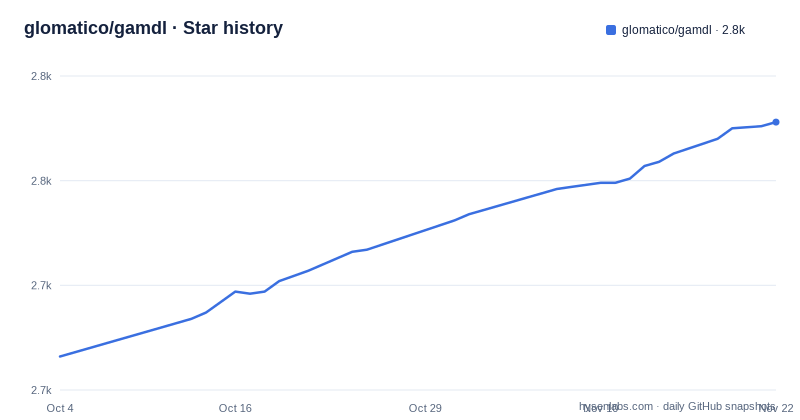
Star history
- glomatico/gamdl2,778 ★ · +112
| Repository | 2026-10-04 | 2026-11-22 |
|---|---|---|
| glomatico/gamdl | 2.7k | 2.8k |
112 Stars in the last 49 days, measured from the daily GitHub snapshot. Compare with other projects
Editorial analysis
What gamdl solves, and who it is written for
gamdl is a command-line app for downloading Apple Music songs, music videos and post videos. That sentence is the project's own description, and it is also the clearest statement of scope. The tool exists for people who already pay for Apple Music and want local files they can tag, archive or play elsewhere, rather than a streaming client that keeps everything inside Apple's apps.
The audience is narrow by design. The README lists three required prerequisites: Python 3.10 or higher, an active Apple Music subscription, and Apple Music cookies exported from a logged-in browser in Netscape format. There is no GUI, no web interface and no mobile client. The supported URL types are songs, albums, playlists, music videos, artists, post videos and Apple Music Classical, and the README notes that catalog and library URLs are both accepted. If your workflow is already terminal-based, that list covers most of what you would want to hand the tool. If it is not, gamdl is the wrong shape of product for you.
The feature list is concrete rather than aspirational: AAC 256kbps songs and other codecs, music videos up to 4K, synced lyrics in LRC, SRT or TTML, automatic tagging with metadata, artist-level downloads, and a config file for advanced users. Nothing there is unusual for a downloader, but the combination of lyrics formats and metadata tagging is what separates it from a plain stream ripper.
How gamdl works: Python orchestration over a native muxer
The repository layout explains more about the architecture than the README does. The Python package lives in gamdl/, and the build backend in pyproject.toml is maturin, not setuptools. The manifest points at gamdl/downloader/ammuxer/Cargo.toml and builds a module named gamdl._ammuxer. In other words, gamdl is a Python application with a compiled Rust component inside it.
The README describes the division of labour: the native media engine handles wrapper TCP decrypt and reassembly plus MP4 and M4A writing and muxing, while Python remains responsible for the CLI, downloads, metadata tagging and high-level orchestration. That is a meaningful split. Muxing and decryption are the parts where a pure-Python implementation would be slowest, and pushing them into a Rust extension means pip has to compile or fetch a binary wheel for your platform rather than installing pure Python.
Data flow, as far as the documentation describes it, runs from a URL through the CLI, out to Apple's endpoints using your cookies, then into the downloader layer. When the wrapper is enabled, account and playback calls go over HTTP JSON to the wrapper server, and decryption goes over a WV2D batch TCP port. The README states that newer wrapper-v2 builds use port 10020 for that decrypt channel, configurable with --wrapper-decrypt-host and --wrapper-decrypt-port. The default download path is yt-dlp, with N_m3u8DL-RE available as a faster alternative via --download-mode nm3u8dlre.
The wrapper is not optional for everything. The README says the wrapper is recommended when using the alac song codec, and that ALAC can be attempted without it but probably will not work due to API limitations. Song codecs other than alac do not require the wrapper. That is a clear boundary, and it is the single most important architectural fact for anyone planning an ALAC workflow.
Installing gamdl and downloading a first album
Installation is a single pip command. The package is published on PyPI, and pyproject.toml declares requires-python as >=3.10, so an older interpreter will refuse the install rather than fail later.
pip install gamdlBefore the first run you need cookies. The README instructs you to export browser cookies in Netscape format while logged in at music.apple.com, and points at the Export Cookies extension for Firefox and Get cookies.txt LOCALLY for Chromium. Place the file in the working directory as cookies.txt, or point at it with --cookies-path. The default value for that option is ./cookies.txt.
The general invocation is gamdl followed by one or more URLs. The README's own example downloads a single song:
gamdl "https://music.apple.com/us/album/never-gonna-give-you-up-2022-remaster/1624945511?i=1624945512"Dropping the ?i= parameter targets the whole album instead:
gamdl "https://music.apple.com/us/album/whenever-you-need-somebody-2022-remaster/1624945511"Artist URLs work too, and the README documents an interactive selection prompt with arrow keys to move, Space to toggle, Ctrl + A to select all and Enter to confirm. For scripted runs there is --artist-auto-select, which picks artist content automatically instead of prompting.
Configuration lives in ~/.gamdl/config.ini on Linux or %USERPROFILE%\.gamdl\config.ini on Windows. The file is created automatically on first run, and command-line arguments override config values. If you want to bypass the file entirely, -n or --no-config-file does that. The README does not print a full config.ini example, so the section name is not something quoted from the documentation; the option names use_wrapper and wrapper_url are documented, and the README shows them as use_wrapper = true and wrapper_url in its option descriptions.
Where gamdl stops working, and the wrapper dependency
The hardest constraint is the subscription. gamdl requires an active Apple Music subscription, and the README does not describe any path around that. Anyone searching for a way to download Apple Music without paying is looking at the wrong tool, and no amount of configuration changes that.
The second constraint is ALAC. The README is unusually direct here: ALAC can be attempted without the wrapper, but probably will not work due to API limitations. If lossless is your reason for using gamdl, you are effectively committing to running a separate wrapper-v2 server, configuring --wrapper-url, and opening the decrypt channel. That is a second process to keep alive, and the README notes that when using the wrapper you will be asked to insert credentials to log in if you have not already. It also notes that cookies can be skipped when using the wrapper, which is a real simplification but only inside that mode.
Third, the optional accelerated path has its own dependencies. N_m3u8DL-RE needs FFmpeg, and if either executable is not on your system PATH you must set --nm3u8dlre-path or --ffmpeg-path manually. On a headless machine with a minimal PATH, that is two extra configuration steps before the faster download mode works at all.
Finally, the build itself is a constraint. Because the build backend is maturin and the extension is compiled, platforms without a matching wheel will need a Rust toolchain to build gamdl._ammuxer from source. The README does not document what happens when the extension fails to build, and it does not document rollback or downgrade steps for a bad release. Version 3.9.1 was published on 2026-09-22, one day after 3.9, so the project does ship fixes quickly, but there is no documented way back to 3.8.5 beyond pinning the version yourself.
gamdl against yt-dlp and N_m3u8DL-RE
The obvious comparison is yt-dlp, and it is not a hypothetical one: yt-dlp is a declared dependency of gamdl, and the README describes the default download mode as yt-dlp with N_m3u8DL-RE as a faster alternative. So gamdl is not competing with yt-dlp at the transport layer. It sits above it.
The difference is everything around the download. yt-dlp is a general extractor that handles a long list of sites and leaves tagging, lyrics and library organisation to you or to post-processing flags. gamdl is single-purpose: it knows about Apple Music catalog and library URLs, it writes AAC 256kbps or other codecs, it fetches synced lyrics in LRC, SRT or TTML, and it tags files automatically with metadata. It also carries Apple-specific machinery that a general tool has no reason to include, namely the cookies-based session, the wrapper protocol for playback and decryption, and the Rust muxer for MP4 and M4A output.
N_m3u8DL-RE is a different kind of alternative again. It is a downloader you can point at a manifest, and gamdl can use it as a backend. Running N_m3u8DL-RE directly means you supply the manifest URL and handle naming, tagging and lyrics yourself. gamdl's value in that pairing is the orchestration around it, not the byte transfer.
If your library spans many services, a general downloader plus your own tagging pipeline is the more flexible arrangement. If it is Apple Music specifically, and you want lyrics and metadata without writing that pipeline, gamdl is doing work you would otherwise have to build.
Maintenance, licensing and upgrade cost
The repository is not archived, and the last push was on 2026-09-22. Releases have been frequent: 3.8.5 on 2026-08-03, 3.9 on 2026-09-21, and 3.9.1 on 2026-09-22. The 3.9 to 3.9.1 gap of one day suggests patch releases follow reports quickly. That is a statement about the release cadence visible in the repository, not a guarantee about future maintenance.
The upgrade cost is dominated by the native extension. Because maturin builds gamdl._ammuxer from gamdl/downloader/ammuxer/Cargo.toml, a version bump can mean a new compiled artifact, and on platforms without a prebuilt wheel that means a local Rust build. There is also the wrapper protocol to track: the README distinguishes newer wrapper-v2 builds using HTTP JSON for account and playback from WV2D batch TCP decrypt, which implies the wrapper interface has changed across versions. If you pin a gamdl version, pin the wrapper version alongside it.
The licence is MIT, declared both in pyproject.toml and in the LICENSE file at the repository root. MIT is permissive: it allows use, modification and redistribution with the copyright notice and licence text retained, and it disclaims warranty. That is a statement about the licence text, not legal advice, and it says nothing about the legality of downloading particular content. The README does not discuss the terms of Apple's service, and nothing in the repository grants rights to the media itself.
Editorial conclusion
Adopt gamdl if you are comfortable on the command line, already have an active Apple Music subscription, and can export Netscape-format cookies from a logged-in browser session. Skip it if you need a GUI, a mobile app, or a tool that works without a subscription: gamdl does not provide any of those, and the README does not document rollback or an uninstall path. Before committing, verify that gamdl installs cleanly on Python 3.10 or higher, that your cookies.txt exports correctly, and that the alac codec behaves as the README describes with and without the wrapper.
Frequently asked questions
How do I use gamdl?
Install it with pip install gamdl, export your Apple Music cookies in Netscape format to cookies.txt, then run gamdl followed by one or more Apple Music URLs. The README shows song, album and artist URL examples, and artist downloads open an interactive selection prompt unless you pass --artist-auto-select.
What is the best high-quality downloader for Apple Music?
gamdl downloads songs in AAC 256kbps and other codecs, music videos up to 4K, and synced lyrics in LRC, SRT or TTML with automatic metadata tagging. Whether it is the best option depends on your platform and whether you are willing to run the optional wrapper for ALAC, which the README says probably will not work without it.
Can you download Apple Music without a subscription?
No. The README lists an active Apple Music subscription as a required prerequisite alongside Python 3.10 or higher and exported Apple Music cookies. There is no documented mode that works without a subscription.
Official sources
Add this badge to your README
If you maintain this project, the badge below links readers to this analysis and shows its maintenance status from the daily GitHub snapshot. Paste the markdown into your README; add ?metric=license or ?metric=stars to the image URL for a different field.

[](https://hysenlabs.com/projects/glomatico-gamdl)Star history chart for your README
[](https://hysenlabs.com/projects/glomatico-gamdl)Was this useful?