The Stitch SDK generates a screen from a prompt and hands you a download URL, not markup
Generate UI screens from text prompts and extract their HTML and screenshots programmatically.
At a glance
- What is it?
- The Stitch SDK is a TypeScript client for Google's screen generation service, exposing projects, screens, edits and variants, with tool wrappers for the Vercel AI SDK and Google's ADK. The SDK is generated from captured tool definitions, which is why the repo has a capture script instead of hand written types.
- Who is it for?
- Adopt the Stitch SDK when you are prototyping screen designs programmatically or driving an agent that needs to create and revise screens, and when a hosted generation service with your API key is acceptable. Do not adopt it for a pipeline that needs the markup inline, since getHtml and getImage return download URLs that you then have to fetch and manage.
- Can I use it commercially?
- Yes. Apache-2.0 is a permissive licence: you can use, modify and sell software built on it, as long as you keep its copyright and licence notices.
- Is it still maintained?
- Yes. The repository last received commits 3 days ago.
- What is it written in?
- Mainly TypeScript, according to GitHub's language statistics.
Answers come from the project's GitHub data, last synced on November 7, 2026, and from our analysis. They are not legal advice.
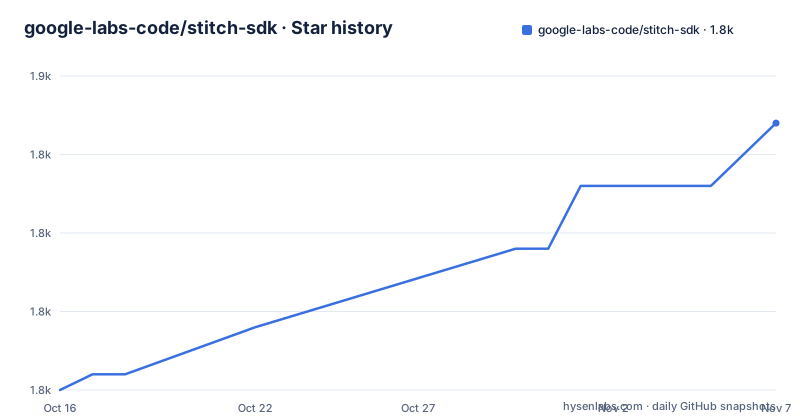
Star history
- google-labs-code/stitch-sdk1,847 ★ · +17
| Repository | 2026-10-16 | 2026-11-07 |
|---|---|---|
| google-labs-code/stitch-sdk | 1.8k | 1.8k |
17 Stars in the last 22 days, measured from the daily GitHub snapshot. Compare with other projects
Editorial analysis
The API is small: a project generates screens, a screen yields URLs
The quick start is four calls after setting an API key in the environment:
import { stitch } from "@google/stitch-sdk";

// STITCH_API_KEY must be set in the environment
const project = stitch.project("your-project-id");
const screen = await project.generate(
  "A login page with email and password fields",
);
const html = await screen.getHtml();
const imageUrl = await screen.getImage();
The critical detail is what those return. The README says html is a download URL for the screen's HTML, and imageUrl is a download URL for the screenshot. So the SDK does not give you markup in memory; it gives you two URLs and you fetch them yourself. That is a real design constraint for a pipeline that wants to transform the output, because you now own fetching, error handling on those fetches, and where the artefacts end up.
The documented API centers on Stitch and Project. Stitch is the root and manages projects, with projects() to list everything accessible and project(id) to reference one by ID, and the latter makes no API call until a method is called on it. Project holds generate(prompt, deviceType?), screens(), getScreen(screenId), createDesignSystem(designSystem) and listDesignSystems().
Note the design system methods. A project is not only a bag of screens; it can carry a design system, which is the mechanism for making several generated screens look related rather than independently random.
Two identifiers exist on Project, and the difference is documented: id is an alias for projectId, and projectId is the bare ID with no projects/ prefix. That is the kind of detail that wastes an afternoon if you assume they are interchangeable.
Editing and variants are separate operations with their own budget
Editing a screen is a distinct call that returns a new screen rather than mutating the one you have:
const screen = await project.generate("A dashboard with charts");
const edited = await screen.edit("Make the background dark and add a sidebar");
const editedHtml = await edited.getHtml();
That immutable shape is convenient in a script, since you keep the original, and it means each edit is another generation you pay for.
Variants are the branching call:
const variants = await screen.variants("Try different color schemes", {
  variantCount: 3,
  creativeRange: "EXPLORE",
  aspects: ["COLOR_SCHEME", "LAYOUT"],
});
Three options control it. variantCount is a number from 1 to 5 defaulting to 3. creativeRange is a string defaulting to "EXPLORE", with "REFINE" and "REIMAGINE" as the other values. aspects is a string array with no default narrowing, so all aspects apply unless you list them, and the accepted values are LAYOUT, COLOR_SCHEME, IMAGES, TEXT_FONT and TEXT_CONTENT.
The distinction between creativeRange and aspects is worth holding on to. The range sets how far from the original the generator may go, and the aspects say which dimensions it may change. Setting aspects to LAYOUT alone with a REIMAGINE range is a coherent request; leaving aspects unset with REIMAGINE is a request to change everything, which is rarely what a design review wants.
A tool client exists for agents that want the raw interface
Alongside the typed API there is a lower level tool client, described as being for agents and orchestration scripts that need direct MCP tool access.
import { stitch } from "@google/stitch-sdk";

const { tools } = await stitch.listTools();
const result = await stitch.callTool("create_project", {
  title: "Agent Project",
});
This is the escape hatch for the case where you need a tool the typed API does not expose yet, which is also how you create a project in the first place from the typed side, since stitch.project only references an existing ID.
For explicit configuration, such as a custom API key or a custom base URL, you construct StitchToolClient directly:
import { StitchToolClient } from "@google/stitch-sdk";

const client = new StitchToolClient({ apiKey: "your-api-key" });
const result = await client.callTool("create_project", {
  title: "Agent Project",
});
await client.close();
One lifecycle detail that matters for long running processes: the client auto-connects on the first callTool or listTools call, so there is no connect() to call. The counterpart is close(), which is shown in the example and is easy to forget in a script that creates a client per iteration.
Two agent framework integrations, both with an include filter
The SDK ships tool wrappers for two frameworks, each in its own subpath export.
For the Vercel AI SDK, stitchTools from "@google/stitch-sdk/ai" returns tools you pass to generateText, with ai installed alongside:
import { generateText, stepCountIs } from "ai";
import { google } from "@ai-sdk/google";
import { stitchTools } from "@google/stitch-sdk/ai";

const { text, steps } = await generateText({
  model: google("gemini-2.5-flash"),
  tools: stitchTools(),
  prompt: "Create a project and generate a modern dashboard with a stat card",
  stopWhen: stepCountIs(5),
});

const toolCalls = steps.flatMap((s) => s.toolCalls);
The comment above that example says the model autonomously calls create_project, generate_screen and get_screen. The agent chooses the sequence, and the example limits the run with stopWhen: stepCountIs(5).
For Google's own ADK for TypeScript, stitchAdkTools from "@google/stitch-sdk/adk" returns FunctionTools you attach to an LlmAgent:
import { stitchAdkTools } from "@google/stitch-sdk/adk";
import { LlmAgent } from "@google/adk";

const tools = stitchAdkTools();

const designerAgent = new LlmAgent({
  name: "Designer",
  model: "gemini-2.5-pro",
  instruction: "You are a designer. Create a project and generate a screen.",
  tools,
});
Both wrappers take an include array to narrow the surface, with the same three tool names shown in both examples: create_project, generate_screen_from_text and get_screen. Narrowing keeps the tool surface available to the agent smaller.
The SDK is generated from captured tool definitions, and the scripts show it
The repository is a Bun and Turbo monorepo whose root package is private, and the scripts tell you how the SDK is produced.
capture runs bun scripts/capture-tools.ts, which appears to capture the service's tool definitions. generate runs bun scripts/generate-sdk.ts. The pipeline script chains capture, generate, build and then a vitest run inside packages/sdk. So the types you import are produced from a capture rather than written by hand, which is why validate:generated and check:skills exist as separate verification steps.
That architecture has an obvious consequence: the SDK tracks a service that can change independently, and the version scheme has to absorb that. The tags tell the story, v0.0.3 on 2026-03-12, v0.1.1 on 2026-04-27 and a canary v0.4.0-canary.1 on 2026-09-25, while the root package.json already reads version 0.4.0. The root also carries BRIDGE-0.4.0.md and MIGRATION-1.0.md, which is a migration guide for a major version that has not shipped, and that file is the first thing to read before writing code against the 0.4 line.
Quality gates in the scripts block are extensive: typecheck, check:bundle for bundle size, check:consumer-types and check:examples running tsc against separate tsconfigs, format:check via prettier, test:e2e and test:smoke, version:sync and publish:readiness. That is what a generated SDK needs in order to be trustworthy, and it is also evidence that the generated output is checked rather than merely emitted.
Install is npm install @google/stitch-sdk, with ai added as well if you want the Vercel AI SDK tools. Licence is Apache-2.0, the default branch is main, and the last push was on 2026-10-01.
Where this is the wrong tool
The first wrong case is a production UI pipeline. Generated HTML is a prototype artefact, and the SDK returns URLs to it rather than a component tree, so shipping it means adopting whatever the generator produced as your interface.
The second is an air gapped or privacy constrained build. STITCH_API_KEY is required in the environment, and every generate, edit and variants call is a request to a hosted service. The codebase does not stay local in any meaningful sense during generation.
The third is cost predictability. edit returns a new screen, variants produces up to five, and an agent with the full tool set can loop. The README documents no quota, rate limit or retry behaviour, so a budget for API usage has to be established outside this SDK.
The fourth is version risk on a 0.x package. The tool names used in the integration examples, create_project, generate_screen_from_text and get_screen, are service level identifiers that a generated SDK will rename when the service renames them, and the presence of a MIGRATION-1.0.md confirms this project has already done that kind of change.
Editorial conclusion
Adopt the Stitch SDK when you are prototyping screen designs programmatically or driving an agent that needs to create and revise screens, and when a hosted generation service with your API key is acceptable. Do not adopt it for a pipeline that needs the markup inline, since getHtml and getImage return download URLs that you then have to fetch and manage. Verify first which version you are on, because the tags include v0.0.3, v0.1.1 and a canary, and the repository root carries a BRIDGE-0.4.0.md and a MIGRATION-1.0.md, so the 0.x API has already moved once.
Frequently asked questions
How do I install and use the Stitch SDK?
Run npm install @google/stitch-sdk, set STITCH_API_KEY in the environment, then create a project reference with stitch.project("your-project-id") and call project.generate("A login page with email and password fields"). Add the ai package as well if you want the Vercel AI SDK tools.
Does getHtml return HTML markup or a link?
A download URL. The README states that html is a download URL for the screen's HTML and that imageUrl is a download URL for the screenshot, so your code has to fetch both artefacts itself.
What options does screen.variants accept?
variantCount from 1 to 5 defaulting to 3, creativeRange defaulting to "EXPLORE" with "REFINE" and "REIMAGINE" as alternatives, and aspects, an array drawn from LAYOUT, COLOR_SCHEME, IMAGES, TEXT_FONT and TEXT_CONTENT.
How do I limit which tools an agent can call?
Both stitchTools and stitchAdkTools accept an include array, for example include: ["create_project", "generate_screen_from_text", "get_screen"]. With the Vercel AI SDK you can also bound the run with stopWhen: stepCountIs(5).
What licence is the Stitch SDK released under?
Apache-2.0, with the terms in the LICENSE file at the root of the repository.
Official sources
Add this badge to your README
If you maintain this project, the badge below links readers to this analysis and shows its maintenance status from the daily GitHub snapshot. Paste the markdown into your README; add ?metric=license or ?metric=stars to the image URL for a different field.

[](https://hysenlabs.com/projects/google-labs-code-stitch-sdk)Star history chart for your README
[](https://hysenlabs.com/projects/google-labs-code-stitch-sdk)Was this useful?