Stack-chan is a JavaScript robot whose first stable release arrived three years after its release candidate
A JavaScript-driven M5Stack-embedded super-kawaii robot.
At a glance
- What is it?
- Stack-chan is an open-source desktop robot built on M5Stack hardware, with firmware, MOD applications, a WebAssembly simulator, a Blockly editor, 3D printed cases and schematics all in one repository. What the files reveal is a project with a long pre-1.0 road: a release candidate in October 2023, version 1.0 in July 2026, a develop branch as the default, three Japanese mirrors of its governance documents, and one operation that irreversibly replaces the factory firmware.
- Who is it for?
- Stack-chan suits a maker who already owns compatible M5Stack hardware or is willing to buy the K151 package, and who wants to write applications in JavaScript rather than fight a C toolchain, since the web installer removes the need for the Moddable SDK or ESP-IDF. Three things to check before you commit.
- Can I use it commercially?
- Yes. Apache-2.0 is a permissive licence: you can use, modify and sell software built on it, as long as you keep its copyright and licence notices.
- Is it still maintained?
- Yes. The repository received new commits within the last day.
- What is it written in?
- Mainly TypeScript, according to GitHub's language statistics.
Answers come from the project's GitHub data, last synced on November 25, 2026, and from our analysis. They are not legal advice.
Star history
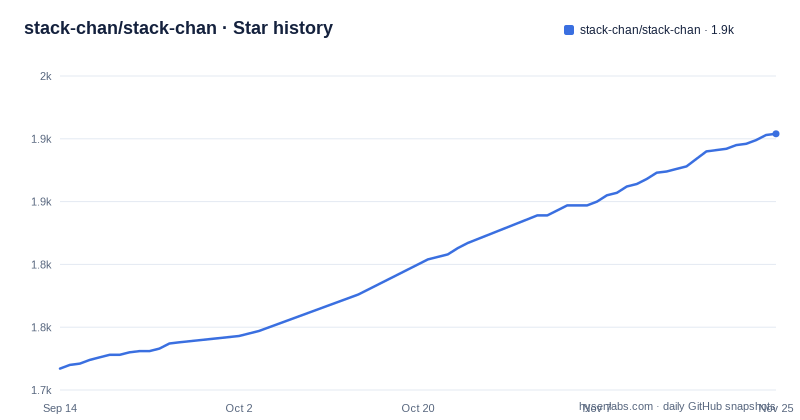
- stack-chan/stack-chan1,904 ★ · +187
| Repository | 2026-09-14 | 2026-11-25 |
|---|---|---|
| stack-chan/stack-chan | 1.7k | 1.9k |
187 Stars in the last 72 days, measured from the daily GitHub snapshot. Compare with other projects
Editorial analysis
Flashing this firmware erases the factory firmware, and getting it back needs M5Burner
The install path is deliberately short. Connect the device with a data-capable USB cable, open the web firmware installer in Chrome or Edge, and select M5StackChan CoreS3 as the device. No Moddable SDK and no ESP-IDF are required, which is the whole point of shipping the flasher as a web page. What the documentation puts in an IMPORTANT callout is the consequence: flashing this repository's firmware replaces the factory firmware supplied by M5Stack. The way back is documented elsewhere, in the M5Stack product documentation, using M5Burner, a separate tool that is not part of this project. So the first run of a brand new device is a one-way door unless you read that page first, and the recommendation to start from a preassembled unit rather than a self-built board makes more sense once that is understood.
Thirty-three months separate the release candidate from version 1.0
The release history explains the project's current state better than any status word could. The first tagged release is v1.0.0rc, published 2023-10-23, and v1.0.0 itself arrives on 2026-07-21, which is close to three years later. v1.1.0 follows on 2026-08-25, so a stable 1.x line exists but is barely a month old at the time of the most recent commit. The release titles are written in half-width katakana, with the product name rendered in that style rather than in ordinary Japanese characters, which is a small stylistic tell that the project presents itself as a character first. The citation block at the bottom of the README dates the work to 2021 and credits Shinya Ishikawa with the Stack-chan community, so the gap covers most of the project's life: a long period of hardware bring-up, printing and firmware work that produced no stable tag.
Four devices get distributed firmware, and two more only build from source
Hardware support is drawn as a line rather than a list. The firmware that is published supports M5Stack, M5Stack Core2, M5Stack CoreS3 and M5StackChan CoreS3. M5StackChan CoreS3 is the standard configuration of the project and, more importantly, the target used for physical-device release validation, so it is the only combination on which a release is actually exercised before shipping. Two more targets sit outside that guarantee: Stack-chan RT and Takao Core2 with an SG90 servo can be built from source, with the target-specific commands and constraints in the firmware guide. That distinction is the one to hold on to. A build succeeding on RT says nothing about the binary you can download, and the validation statement covers one device rather than the family.
Seven browser tools, and the simulator runs the firmware as WebAssembly
Most of the project is tooling that runs in a browser, and the seven entries divide into three jobs. Setup is handled by the firmware installer over USB and the preferences page, which changes Wi-Fi and device preferences over Bluetooth Low Energy. Extension is handled by the MOD Gallery, the Blockly block editor for creating MODs, and the shape face editor, where eyes and a mouth are arranged into a custom face. Verification is handled by the simulator, which runs MODs against the WebAssembly firmware alongside a 3D model, and by the MediaPipe tracking page, which sends tracked face and hand movement over BLE to the device. A MOD can therefore be written as blocks, tried in the simulator against a WebAssembly build of the firmware, and only then installed on hardware, with camera-driven animation as an optional input path.
The default branch is develop, and the JavaScript toolchain sits at the root
The repository is a hardware project that is developed as a JavaScript monorepo, and the traces are at the top level. A .changeset directory holds the versioning workflow, lefthook.yml manages the git hooks, and .editorconfig and .coderabbit.yaml handle formatting rules and automated review on pull requests. There is a .gitmodules file, so at least part of the firmware tree comes from elsewhere, and AGENTS.md sits next to the contributor documents. Primary language is recorded as TypeScript, which describes the web tooling and the build scripts rather than the firmware itself, since the firmware targets an embedded JavaScript runtime. The default branch is develop, not main, so cloning the repository and building from it gives you whatever is in flight rather than the newest release.
Three Japanese mirrors and a firmware review document sit beside the English originals
Documentation is duplicated rather than translated in place. Alongside README.md there is README_ja.md, and the governance files follow the same pattern with CODE_OF_CONDUCT.md and its Japanese counterpart, and GUIDELINE.md and its Japanese counterpart. That is three mirrored pairs, and each pair can drift. One document has no English counterpart at all: REVIEW_firmware-rearch_ja.md, a Japanese review of the firmware re-architecture sitting loose in the top level rather than in docs/. That is the most interesting file in the tree for anyone joining the project, because a re-architecture review is an argument about direction, and it is available only to Japanese readers. The docs/ directory holds the rest, described as the roadmap, specifications, operations guides and release notes.
The case, the schematics and the firmware live in one repository
The physical device is a repository citizen, which is unusual and useful. case/ holds the case models for 3D printing, with parts lists and assembly instructions in its own README, so anyone can print the shell rather than buy one. schematics/ holds board information and layouts for the electronics, and firmware/ holds the host firmware, its modules, the MODs that ship with it and the development scripts, with a separate development guide for MOD authors and a firmware API document under firmware/docs/. web/ holds the browser side, which is the installer, the preferences page, the editors, the Gallery and the simulator. The result is that the three things you need to reproduce a device, its firmware, its shell and its board, are versioned together, and a checkout of one release is enough to rebuild the robot rather than only to run it.
A MOD is the unit of extension, and the gallery runs it before you install it
Applications are called MODs, and the loop around them is the part that lowers the barrier. The Gallery is where published MODs and mini apps are found, and any of them can be tried in the simulator or installed on a device, so the risk of trying something is a click rather than a reflash. Block-based samples go further, opening directly in the block editor where they can be changed rather than only run. On the device side the distribution is a MOD install, with a separate directory of shipped MODs inside the firmware tree and its own development README, and the firmware API document describes what a MOD can call. Face animation is part of the same surface, since the shape face editor defines the eyes and mouth a MOD can drive, which is why the character reads as programmable rather than as a fixed prop.
Editorial conclusion
Stack-chan suits a maker who already owns compatible M5Stack hardware or is willing to buy the K151 package, and who wants to write applications in JavaScript rather than fight a C toolchain, since the web installer removes the need for the Moddable SDK or ESP-IDF. Three things to check before you commit. Flashing this firmware replaces what the factory shipped and restoring it needs M5Burner, so know your way back. Only four devices are covered by distributed firmware, and the release validation target is the M5StackChan CoreS3 specifically. And the default branch is develop, so pin a release tag such as v1.1.0 rather than tracking it.
Frequently asked questions
What is Stack Chan?
Stack-chan is an open-source, JavaScript-driven desktop robot built with M5Stack hardware. The repository ships firmware configured for the M5StackChan CoreS3 as its standard target, user applications called MODs, browser development tools, 3D printed cases and schematics.
How do I set up StackChan?
Start from a preassembled M5StackChan, connect it with a data-capable USB cable, open the web firmware installer in Chrome or Edge and select M5StackChan CoreS3. The Moddable SDK and ESP-IDF are not needed, and Wi-Fi and device preferences are changed afterwards over BLE from the preferences page.
How much does the Stack Chan robot cost?
The repository states no price anywhere. It links the M5Stack official store for worldwide orders and two Japanese product pages, describes the standard AI Desktop Robot as the K151 package, and treats the joystick remote controller as an optional extra rather than part of the standard set.
Official sources
Add this badge to your README
If you maintain this project, the badge below links readers to this analysis and shows its maintenance status from the daily GitHub snapshot. Paste the markdown into your README; add ?metric=license or ?metric=stars to the image URL for a different field.

[](https://hysenlabs.com/projects/stack-chan-stack-chan)Star history chart for your README
[](https://hysenlabs.com/projects/stack-chan-stack-chan)Was this useful?