Mailbox: AWS serverless email infrastructure with Terraform-managed deploys
Versatile email infrastructure on AWS serverless
At a glance
- What is it?
- Mailbox is a Go-based email backend that runs on SES, Lambda, API Gateway, DynamoDB, and SQS, deployed entirely through Terraform. It is not a ready-made mail server; it is infrastructure you assemble, with two required S3 buckets and a manual SES rule setup.
- Who is it for?
- Adopt Mailbox if you run email on AWS, want infrastructure-as-code for the whole backend, and are comfortable managing S3 bucket names and SES receipt rules by hand. Skip it if you need a self-hosted mail server or a one-command deploy.
- Can I use it commercially?
- Yes. MIT is a permissive licence: you can use, modify and sell software built on it, as long as you keep its copyright and licence notices.
- Is it still maintained?
- Yes. The repository last received commits 18 days ago.
- What is it written in?
- Mainly Go, according to GitHub's language statistics.
Answers come from the project's GitHub data, last synced on October 4, 2026, and from our analysis. They are not legal advice.
Star history
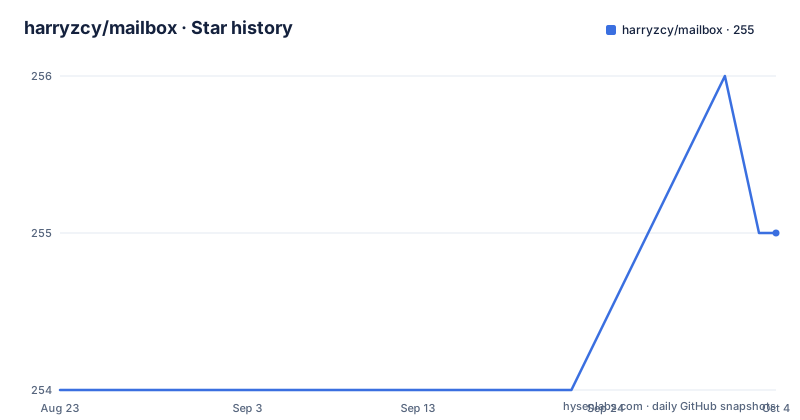
- harryzcy/mailbox255 ★ · +1
| Repository | 2026-08-23 | 2026-10-04 |
|---|---|---|
| harryzcy/mailbox | 254 | 255 |
1 Stars in the last 42 days, measured from the daily GitHub snapshot. Compare with other projects
Editorial analysis
What Mailbox actually is
Mailbox is not a mail client or a mail transfer agent. It is a backend that receives email through AWS SES, stores raw messages in S3, and exposes them through an API built on Lambda, API Gateway, DynamoDB, and SQS. The primary language is Go, but you never run a Go binary directly. You deploy it as Lambda functions. The project targets developers who want email infrastructure on AWS without managing EC2 instances or a traditional mail server. The README points to two separate client projects: mailbox-browser for the web and mailbox-cli for the command line. This review covers only the backend repository, harryzcy/mailbox.
Deployment is Terraform-first, not Go-first
The deployment path is Terraform, not `go run` or a container image. The README says deployment is managed with Terraform, and the Makefile targets reflect that: `make init`, `make plan`, `make deploy`, and `make apply`. `make deploy` deploys the latest release, while `make apply` deploys binaries built from your working tree. This is a deliberate split. A release-based deploy is reproducible, but a working-tree deploy is for development. The Terraform configuration creates Lambda deployment packages, uploads them to an S3 artifacts bucket, and signs them with AWS Signer. That signing step is unusual. It means the Lambda functions are code-signed, which adds a layer of integrity checking but also requires `signer:StartSigningJob` permission during deployment. If you are not familiar with Terraform or AWS Signer, this is a steep entry point.
Two S3 buckets you must create by hand
The most concrete constraint is that you must create two S3 buckets outside Terraform before you can deploy. One is the state bucket for Terraform state, and the other holds the raw email that SES delivers. The README explains why: the state bucket must exist before `terraform init` can run, and the email bucket must outlive any stack so mail is not lost when you tear down infrastructure. A third bucket, for build artifacts, is created by Terraform, but you must name it through `aws_s3_artifacts_bucket_override`. Bucket names are globally unique, so the project does not generate a default. This is a real operational burden. You cannot just clone and deploy. You need to pick globally unique names, enable versioning on the state bucket, and ensure the email bucket is never deleted accidentally. The README warns that the email bucket holds raw messages, so it is not rebuildable from a release.
IAM permissions: the error that misleads you
The README lists a long set of AWS permissions needed to deploy: write access to IAM, Lambda, API Gateway, CloudWatch Logs, SQS, Signer, SES, and the S3 buckets. It also calls out a specific trap: you need `iam:PassRole` for the Lambda execution role, and the failure error names `CreateFunction` instead of `PassRole`. That is a practical warning. If you are setting up a deployment role from scratch, you will likely hit this. The recommended pattern is to attach permissions to a role and assume it, not to grant them to a user directly. The README gives an example AWS config profile that uses `role_arn` and `source_profile`. This is a well-structured approach for production, but it means the setup cost is high. You are not just deploying a service; you are designing an IAM policy that covers Terraform, Signer, and Lambda. For a small team, this is the kind of thing that eats an afternoon.
SES receipt rules: Terraform manages one rule, not the set
Receiving email on SES requires a receipt rule set, and SES applies one active rule set per region. The README is explicit that Terraform manages a single rule inside an existing set rather than the set itself. This is a careful design choice. It avoids Terraform destroying unrelated rules. But it means you must manually create the rule set and a rule with two actions in order: deliver to S3, then invoke Lambda. Then you must activate the rule set. After that, you can import the rule into Terraform with `terraform import 'aws_ses_receipt_rule.receive[0]' <rule-set-name>:<rule-name>`. This is a manual step that cannot be automated by the project. If you are deploying to a fresh AWS account, you have to click through the SES console or use the AWS CLI to set up the rule set before Terraform can manage it. The README also notes that SES may already hold rules unrelated to this project, so the import step is necessary to avoid conflicts. This is a limitation: the project cannot fully bootstrap email receiving from scratch.
Configuration variables: what is required and what is optional
The README documents a table of Terraform variables. Two are required: `aws_s3_bucket_override` and `aws_s3_artifacts_bucket_override`. Everything else has a default. `aws_region` defaults to `us-west-2`, and `project_name` and `environment` default to `mailbox-v2` and `dev`. There is an option to use an existing DynamoDB table via `aws_dynamodb_table_override`, and point-in-time recovery defaults to `true`, which incurs extra cost. The SES receipt rule variables are both required to enable Terraform management of the rule. The CI role variables, `github_repository` and `github_oidc_provider_arn`, are optional and both required to create a CI role. The README says CI does not use the deployment profile; it assumes a short-lived, plan-only role through GitHub OIDC, and points to `oidc.tf`. This is a clean separation: deploy with a long-lived role, CI with a short-lived one. But it also means you need to understand GitHub OIDC if you want CI to plan changes.
Limitations and the wrong tool cases
Mailbox is the wrong tool if you want a self-contained email server that you can run on your own hardware or on a single VM. It is AWS-only, and it depends on SES, which is not available in every region and has its own sending and receiving limits. The README does not mention any fallback for non-AWS environments. Another limitation is that the project does not include a client. You must deploy mailbox-browser or use mailbox-cli separately. The repository is a backend only. Also, the README notes that only the most recent minor versions of Go are officially supported for development. That means if you are on an older Go version, you may not be able to build the project. The project has a release cadence, with v2.1.0 pushed in August 2026, so it is actively maintained, but the maintenance cost is on you: you must track Go releases and AWS service changes.
Alternatives: how Mailbox differs from a full mail server
The most direct alternative is running a traditional mail server like Postfix or Dovecot on an EC2 instance, or using a managed email service like Amazon WorkMail. Mailbox is different in that it is serverless and API-first. You get no SMTP server, no IMAP, no POP3. The API is the interface, and the clients (browser and CLI) talk to that API. This is a fundamental difference in approach. A mail server gives you standard protocols; Mailbox gives you a JSON API. If you need to integrate with existing email clients that speak IMAP, Mailbox will not work. Another alternative is to use SES directly with a custom Lambda function that you write yourself. Mailbox saves you from writing that Lambda and the API layer, but it imposes its own Terraform structure. So the choice is between building a thin layer on SES yourself or adopting Mailbox's infrastructure. The trade-off is control versus convenience. Mailbox is more convenient than rolling your own, but less flexible than a raw SES integration.
Maintenance and licence considerations
The project is licensed under MIT, which is permissive and allows commercial use, modification, and redistribution. There is no copyleft obligation, which is good for proprietary deployments. The maintenance cost is tied to AWS service changes. The README mentions that only recent Go versions are supported, so you need to keep your Go toolchain current. The Terraform configuration is part of the repo, so you inherit its choices. Upgrading from one release to another, say from v1.11.0 to v2.0.0, likely requires running `make plan` and reviewing changes to IAM and Lambda resources. The README does not document a migration path, so you should test in a staging account. The project's release notes are not detailed in the material, so you cannot know what changed between versions without inspecting the repository. That is a gap. Before adopting, check the changelog or git history for breaking changes, especially in the Terraform variables.
Editorial conclusion
Adopt Mailbox if you run email on AWS, want infrastructure-as-code for the whole backend, and are comfortable managing S3 bucket names and SES receipt rules by hand. Skip it if you need a self-hosted mail server or a one-command deploy. Before adopting, verify your AWS account can create IAM roles and Lambda packages signed with Signer, and confirm you can import an existing SES receipt rule. The project demands AWS-specific knowledge and manual bucket naming, so it suits teams that already live in Terraform.
Frequently asked questions
What AWS services does the mailbox project use?
It runs on AWS serverless pieces including SES, Lambda, API Gateway, DynamoDB and SQS, plus S3 for raw message storage, with deployment managed by Terraform.
Which S3 buckets do I have to create before deploying mailbox?
Two, and neither is created by Terraform. A state bucket, which should have versioning enabled, and an email bucket where SES delivers raw messages and which is kept outside the stack so mail outlives it. Both names must be supplied, because bucket names are global and no default works.
How do I install the mailbox command line client?
With go install github.com/harryzcy/mailbox-cli. There is also a separate web client, mailbox-browser, and the project requires Go 1.27 or newer, noting that only the most recent minor versions are officially supported.
Why does my Terraform run hang instead of failing?
An unset required variable makes Terraform wait on standard input, which can strand the state lock. The make targets pass -input=false so it errors instead, and they guard the email bucket variable, though the artifacts bucket variable is not covered by that check and the destroy target has neither.
Official sources
Add this badge to your README
If you maintain this project, the badge below links readers to this analysis and shows its maintenance status from the daily GitHub snapshot. Paste the markdown into your README; add ?metric=license or ?metric=stars to the image URL for a different field.

[](https://hysenlabs.com/projects/harryzcy-mailbox)Star history chart for your README
[](https://hysenlabs.com/projects/harryzcy-mailbox)