hBlock: how a shell script overwrites the hosts file to block ad and malware domains
Improve your security and privacy by blocking ads, tracking and malware domains.
At a glance
- What is it?
- hBlock is a POSIX-compliant shell script that downloads domain blocklists from configurable sources and overwrites the system hosts file with a merged result. It replaces the file on each run, keeps a separate allowlist for exceptions, and the Makefile reveals installation details the README does not document.
- Who is it for?
- hBlock suits a single-machine setup where you want every process on the system blocked from reaching ad and malware domains, and you accept the hosts file being replaced on each run. Before adopting it, verify the shasum check completes without error on the curl install, and read SOURCES.md to understand which upstream lists hBlock trusts by default.
- Can I use it commercially?
- Yes. MIT is a permissive licence: you can use, modify and sell software built on it, as long as you keep its copyright and licence notices.
- Is it still maintained?
- Yes. The repository last received commits 114 days ago.
- What is it written in?
- Mainly Shell, according to GitHub's language statistics.
Answers come from the project's GitHub data, last synced on October 23, 2026, and from our analysis. They are not legal advice.
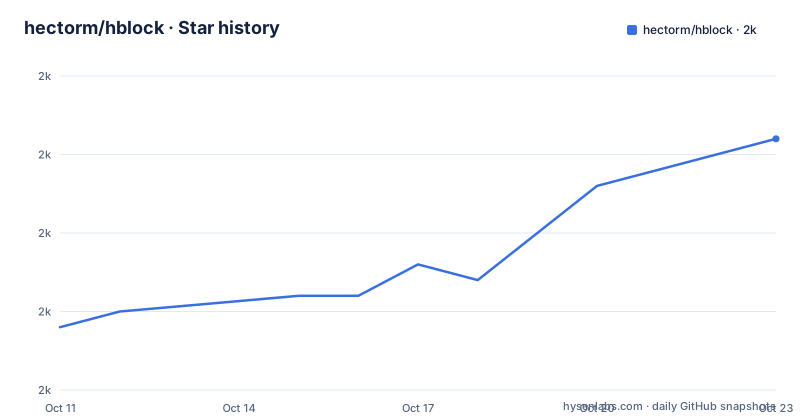
Star history
- hectorm/hblock2,001 ★ · +12
| Repository | 2026-10-11 | 2026-10-23 |
|---|---|---|
| hectorm/hblock | 2k | 2k |
12 Stars in the last 12 days, measured from the daily GitHub snapshot. Compare with other projects
Editorial analysis
The hosts file is checked before any DNS query, making the blocking machine-wide
A hosts file maps domain names to addresses and is read by the operating system before any DNS query leaves the machine. hBlock writes blocked domains into that file in a form that prevents the system from routing connections to them, so any process that tries to reach a blocked domain gets a local response rather than a real network connection. A browser extension only blocks within its own browser. A network-level DNS resolver requires setting up a separate server. Modifying the hosts file requires neither and applies to every process running on that machine.
Custom entries in the existing hosts file, such as local hostname overrides or development environment mappings, are overwritten without a prompt because hBlock writes the file from scratch on every run. Making a backup before running hblock for the first time is the only protection the documentation gives for preserving those entries. No merge or append mode exists.
Hosts-based blocking also has a hard scope limit. A server that delivers ad content from a numeric IP address directly, without using a domain name, is outside the scope of a hosts file entirely.
How hBlock assembles one file from multiple upstream blocklists
SOURCES.md lists the remote URLs that hBlock queries. Each run rewrites the output from scratch, so the blocked set reflects whatever those upstream lists contain at that moment. hMirror at https://github.com/hectorm/hmirror archives a wider collection of upstream blocklists for reference, and the two files are not interchangeable. SOURCES.md contains the active subset that hBlock queries by default. The sets differ, so a hit in hMirror does not mean hBlock's default configuration would block that domain.
Nightly builds at hblock.molinero.dev run the same download-and-merge cycle on a daily schedule and publish the result, giving a reference for what a fresh local run would produce.
Between sources, the denylist and the allowlist, hBlock separates three distinct input channels. Sources are upstream lists fetched on each run. A denylist holds domains that are always blocked regardless of the sources. An allowlist holds domains that are never blocked regardless of what the sources contain, and this channel is the primary mechanism for handling false positives.
Installing via curl or a package manager, with a checksum step
Two installation paths appear in the README. Package managers are listed first, and PACKAGES.md has the current list. For a manual install, the README gives a curl command:
curl -o /tmp/hblock 'https://raw.githubusercontent.com/hectorm/hblock/v3.5.1/hblock' \
  && echo 'd010cb9e0f3c644e9df3bfb387f42f7dbbffbbd481fb50c32683bbe71f994451  /tmp/hblock' | shasum -c \
  && sudo mv /tmp/hblock /usr/local/bin/hblock \
  && sudo chown 0:0 /usr/local/bin/hblock \
  && sudo chmod 755 /usr/local/bin/hblock
5 commands run in sequence, chained with &&: curl to download, shasum to verify the hash, then 3 sudo calls to move the file, set ownership to root (uid 0, gid 0) and set mode 755. A failed shasum check stops the chain before the file reaches /usr/local/bin.
Running hblock with no arguments after installation starts the default behavior: downloading the current domain lists and replacing the hosts file. No dry-run flag is described in the README, so replacement happens immediately. For unattended operation, resources/systemd/ contains a timer definition. Installing and enabling that timer runs hblock on schedule, keeping the blocked domain set current without manual calls.
MIT is the licence in LICENSE.md.
Six flags the README does not list: -H, -F, -S, -A, -D, -O and the HOSTNAME variable
Neither --help nor hblock.1.md is reproduced in the README body, which instead points to them for the full option list. A closer look at the Makefile's hosts build target shows the flags directly:
HOSTNAME='' ./hblock -H builtin -F builtin -S builtin -A builtin -D builtin -O ./dist/hostsSix flags control the main output stages. -H sets the header content for the output file, -F sets the footer, -S specifies the sources, -A specifies the allowlist and -D specifies the denylist. -O sets the output file path. Setting any argument to builtin means hBlock uses its own embedded default for that field.
HOSTNAME='' is not documented in the README. This environment variable overrides the hostname that hBlock would include in the generated file header. In the Makefile, setting it to an empty string strips that field from the dist/ artifact so the published hosts file does not carry the build machine's name.
This same flag set explains the temporary disable command. Running hblock with -S none and -D none clears both the sources list and the denylist, generating a hosts file with no blocked entries while leaving the script and any systemd timer in place.
False positives: two separate problems with two separate solutions
Blocking a legitimate domain creates two distinct problems. The first is local: the machine cannot reach a domain it needs. The second is upstream: a blocklist incorrectly includes that domain. Handling each problem requires a different action.
For the local problem, adding the domain to the allowlist bypasses the block immediately, since the allowlist overrides both sources and the denylist. For the upstream problem, the blocklist author holds the only write access to that list. hBlock has no mechanism to override what its sources publish, so the report must go to the author who maintains the upstream list, not to the hBlock project.
hMirror at https://github.com/hectorm/hmirror archives each upstream list separately. Its contents show which lists include a given domain, pointing to which blocklist author to contact. Once the author removes the domain from that list, the nightly build at hblock.molinero.dev picks it up. That propagation window is at most 24 hours, per the nightly cycle. The SOURCES.md caveat applies here too: a match in hMirror does not mean hBlock's default configuration was the source of the block.
Any domain in the allowlist is excluded regardless of what sources or the denylist contain. This makes it the right place for permanent exceptions, such as a tracking domain from a service you use intentionally.
Alternative output formats and the dnsmasq deployment model
The repository contains an alt-formats directory under resources/, and dnsmasq appears among the 20 repository topics, indicating that hBlock can generate output suited to that DNS server rather than only a flat hosts file. Nightly builds at hblock.molinero.dev include these converted files. Per the Makefile's hosts target, each alternative format is generated by a separate shell script in resources/alt-formats/ that takes the base hosts output as its input.
The README points to resources/alt-formats/ for the full format list without describing what each format produces or how it differs from the standard hosts file. Anyone who needs a specific format should read the relevant script in resources/alt-formats/ to understand exactly what is included.
Using the dnsmasq output format with a local DNS resolver is a different deployment model from the hosts file approach. hBlock generates the domain list either way, but the format determines where the block is applied. A hosts file change affects only the machine running hBlock. A dnsmasq configuration sitting on a dedicated server can handle requests for multiple machines on the same network. hBlock's inclusion of a dnsmasq format in resources/alt-formats/, alongside dnsmasq in its repository topics, shows the project supports that use case, though no setup procedure appears in the README for that deployment.
What the Makefile reveals about install paths and statistics the README omits
A detail that a reading of only the README would miss: the Makefile's build target prints 'No build step required' and then 'Run make install to install hBlock.' Among the 14 files and directories at the repository root are hblock.1 and hblock.1.md, the compiled and source forms of the man page. A make install uses 8 Makefile variables (DESTDIR, prefix, exec_prefix, bindir, libdir, datarootdir, mandir and unitdir) to place the binary, man page and systemd unit at standard system paths. The curl command in the README installs only the hblock script, leaving the man page and systemd unit unset. The Makefile also lists 5 build tool dependencies (help2man, pandoc, shellcheck, systemctl and install), none of which are needed for a basic binary install.
The Makefile includes a stats target absent from the README. That target produces two files from the merged domain list: most_abused_tlds.txt lists which top-level domains appear most frequently in the blocked set, and most_abused_suffixes.txt does the same for suffixes. Both files land in dist/ and are not part of the default hblock run.
One further item: the repository root holds BSDmakefile alongside the standard Makefile. BSDmakefile accommodates native make implementations that interpret some makefile syntax differently from GNU make. Having both files in the repository means the build targets work without requiring GNU make to be installed on every supported system.
Editorial conclusion
hBlock suits a single-machine setup where you want every process on the system blocked from reaching ad and malware domains, and you accept the hosts file being replaced on each run. Before adopting it, verify the shasum check completes without error on the curl install, and read SOURCES.md to understand which upstream lists hBlock trusts by default. Use the -A flag to add allowlist entries for legitimate domains the sources include. Not a fit if you need per-application blocking, require a log of which connections were blocked, or already hold custom hosts entries you cannot afford to lose on each update.
Frequently asked questions
What is hBlock?
hBlock is a POSIX-compliant shell script that downloads domain blocklists from multiple configurable sources and writes them into the system hosts file, preventing every process on the machine from reaching ad, tracking and malware domains.
How do I temporarily disable hBlock without uninstalling it?
Run hblock with the -S none and -D none flags to generate a hosts file with no blocked domains, leaving the script and any systemd timer in place. Running hblock with no arguments restores blocking from the current sources.
What should I do if hBlock is blocking a legitimate domain?
Add the domain to the local allowlist so the machine can reach it immediately. Then report the false positive to the original blocklist author. The nightly build cycle propagates the upstream fix within 24 hours.
Does hBlock update the hosts file automatically?
Not by default. Automation requires the systemd timer in resources/systemd/. With the timer installed and enabled, hblock runs on schedule without manual invocation.
Can hBlock output formats other than a standard hosts file?
Format-conversion scripts in resources/alt-formats/ turn the merged hosts output into other formats, including one for dnsmasq. Nightly builds of those converted files are available at hblock.molinero.dev.
Official sources
Add this badge to your README
If you maintain this project, the badge below links readers to this analysis and shows its maintenance status from the daily GitHub snapshot. Paste the markdown into your README; add ?metric=license or ?metric=stars to the image URL for a different field.

[](https://hysenlabs.com/projects/hectorm-hblock)Star history chart for your README
[](https://hysenlabs.com/projects/hectorm-hblock)Was this useful?