Shadcn Editor: A Lexical Editor Built with shadcn/ui Components
Lexical base rich text editor using shadcn/ui components
At a glance
- What is it?
- Shadcn Editor is a TypeScript editor project built around Lexical and shadcn/ui. It suits React developers who want a configurable WYSIWYG source component, but its README does not provide a complete first-render guide.
- Who is it for?
- Developers who already use React, Vite, Lexical, and shadcn/ui can assess the editor as a source-level component collection. Teams requiring a documented end-to-end setup, stable release history, or clearly supported upgrade path should first verify those omissions.
- Can I use it commercially?
- Yes. MIT is a permissive licence: you can use, modify and sell software built on it, as long as you keep its copyright and licence notices.
- Is it still maintained?
- Yes. The repository last received commits 17 days ago.
- What is it written in?
- Mainly TypeScript, according to GitHub's language statistics.
Answers come from the project's GitHub data, last synced on November 6, 2026, and from our analysis. They are not legal advice.
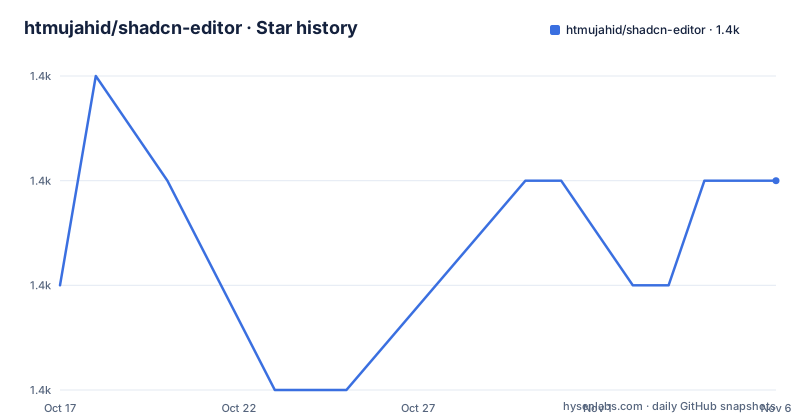
Star history
- htmujahid/shadcn-editor1,393 ★ · +1
| Repository | 2026-10-17 | 2026-11-06 |
|---|---|---|
| htmujahid/shadcn-editor | 1.4k | 1.4k |
1 Stars in the last 20 days, measured from the daily GitHub snapshot. Compare with other projects
Editorial analysis
What Shadcn Editor Is Meant to Build
Shadcn Editor addresses a specific front-end problem: assembling a rich text editor without treating its interface as a closed, monolithic component. Its central editor is based on Lexical, while the repository description identifies shadcn/ui components as the presentation layer. This makes it relevant to developers building React editing experiences in which the visual controls should remain close to the application design system. The homepage is a Vercel deployment, but the repository itself is primarily a TypeScript source project rather than a hosted editing service.
The project is aimed at engineers, not end users looking for a browser-based document service. Its files are organized as an application and reusable editor source, with editor extensions under `src/components/editor/extensions`, activity and insertion behavior under `src/components/editor/plugins`, and TypeScript configuration for both application and Node tooling. The top-level `components.json` also places the work in the shadcn component ecosystem. That composition points to an editor intended to be inspected, changed, and integrated into an existing React codebase.
The scope is broader than ordinary text formatting. Listed capabilities include headings, lists, check lists, links, images, tables, equations, code, embeds, mentions, polls, cards, columns, collapsible blocks, emoji, speech-to-text, drag-and-drop paste, and review-related decoration. Those features make the package more than a styled `contenteditable` surface. At the same time, the README does not document a persistence format, collaboration workflow, authentication model, or server API. It should therefore be evaluated as a front-end editor implementation, not as a complete document platform.
Lexical Extensions, Transformers, and Plugin Composition
The editor's architecture is explicit in the usage section. The project imports node constructors and helpers from `lexical`, then assembles behavior from Lexical packages such as `@lexical/clipboard`, `@lexical/code-core`, `@lexical/extension`, `@lexical/history`, `@lexical/list`, `@lexical/markdown`, `@lexical/rich-text`, and `@lexical/table`. This is a modular composition model. Document structure comes from nodes, while features are supplied through extensions and plugins.
The usage imports a broad extension set, including `ClearEditorExtension`, `HorizontalRuleExtension`, `TabIndentationExtension`, `HashtagExtension`, `HistoryExtension`, `CheckListExtension`, `ListExtension`, `RichTextExtension`, and `TableExtension`. It also defines project-specific extensions under `@/components/editor/extensions`. Their names indicate concrete editing responsibilities: auto-linking, autocomplete, cards, code, datetime insertion, drag-and-drop paste, images, layout, mentions, polls, ruby text, speech-to-text, tab focus, Twitter and YouTube embeds, and formatting state.
Plugins control interaction rather than merely rendering controls. The import list includes a floating toolbar, link editor, context menu, draggable blocks, emoji picker, speech-to-text activity, find and replace, review decoration, a block insert menu, and several component-picker plugins. Markdown transformers and `registerMarkdownShortcuts` are also imported, connecting typed Markdown behavior to Lexical's node model. The visible architecture therefore moves from user actions and block pickers, through extensions and plugins, into Lexical nodes. That separation is useful for customization, but it also means adopters must understand which combinations share state or interact with the same document nodes.
Installing the Editor with the shadcn CLI
The README provides one installation command. It adds the editor through the shadcn CLI rather than instructing users to install an npm editor package directly. Run it from the target React project that already uses the shadcn component system. The repository includes `components.json`, which is the kind of project configuration used by that workflow, but the command itself should still be issued in the application where the editor will live.
npx shadcn@latest add @shadcn-editor/editor-xAfter the command completes, the target project should contain the generated editor source and the dependencies required by that source. However, the README does not describe the expected generated paths in full, so an engineer should inspect the CLI output rather than assume a particular directory layout. The top-level source layout in this repository uses `src/components/editor`, but the README does not explicitly state that this path will be identical after installation.
There is also no documented CLI configuration for selecting individual extensions, changing editor behavior during installation, or restoring generated files. The name `editor-x` identifies the registry item, yet the README does not explain what distinguishes it from other potential registry configurations. The practical tutorial therefore stops at the documented installation step. A complete first render cannot be reproduced from the README because its TypeScript example ends during the import list, before the component composition, initial configuration, and JSX render.
A First Lexical Integration from the Documented Imports
The README begins a TypeScript integration example, but it does not show the complete editor declaration. It confirms that consumer code is expected to import React, Lexical, Lexical packages, and local editor modules. The following excerpt is copied from the documented import portion and shows the foundation visible in the guide:
import { useMemo } from "react";

import {
  $createParagraphNode,
  $createTextNode,
  $getRoot,
  defineExtension,
} from "lexical";
These imports indicate that a typical integration may create paragraphs and text nodes, access the root node, define project-specific extensions, and memoize configuration. The guide continues with extension and plugin imports, but the published excerpt ends during those imports. It does not show the editor component, its props, its initial editor state, or the plugin mount order.
That omission is important for a first real use. Copying the visible imports alone will not start an editor, and inventing the missing composition would risk presenting a non-project-specific API as official guidance. Developers should inspect the generated component and the repository's existing editor entry point after installation. Before proceeding, check whether the application already has `LexicalComposer` setup, how `initialConfig.editorState` is supplied, and where the generated component is imported from. The README names those areas indirectly through node helpers and extensions, but it does not document their required values.
Where Shadcn Editor Is More Than a Text Box
The most distinctive choice is the breadth of structured blocks exposed alongside basic rich text. Headings and quotes come from `@lexical/rich-text`. Lists and check lists come from `@lexical/list`, tables from `@lexical/table`, code from `@lexical/code-core`, and clipboard behavior from `@lexical/clipboard`. Local extensions then add product-oriented blocks and actions, including cards, polls, images, equations, Figma content, Twitter and YouTube embeds, and datetime elements.
The block insertion plugins show how these elements are intended to enter the document. Separate plugins handle code blocks, columns, emoji, equations, horizontal rules, images, and tables. Component-picker plugins provide corresponding choices for paragraphs, headings, quotes, reviews, dividers, collapsible content, lists, cards, polls, and pull quotes. Floating and activity-bar plugins add contextual controls such as links, formatting state, read-only mode, shortcuts, counts, and speech-to-text.
This design favors editor flexibility, but flexibility carries a maintenance cost. Each installed feature brings its own Lexical packages or local extension modules, and several features can affect selection, decoration, paste behavior, keyboard focus, or document structure. The repository includes many features that may appear optional, but the README does not provide a minimal feature bundle or compatibility matrix. An adopter should not copy every import without reviewing the corresponding node, plugin, and decorator dependencies.
Constraints, License, and Repository Activity
The clearest limitation is incomplete integration documentation. The README has an installation command and a large usage import list, but it does not present a complete first editor. It also does not document persistence, controlled initial content, serialization, collaboration, accessibility testing, browser support, server rendering, or rollback. Those omissions do not prove that the features are absent, but an engineering team cannot confirm them from the README.
The package file establishes a stricter runtime expectation for local repository development: Node.js `24.x`. The project also uses `pnpm-lock.yaml` and `pnpm-workspace.yaml`, while its scripts are exposed through Vite, TypeScript, ESLint, and Prettier. Consumers installing the registry item may have different dependency management, but the source repository itself is configured around modern Node and a pnpm workspace. Upgrade work should account for Lexical packages pinned at `0.52.0`, React `^19.3.0`, and the other dependencies declared in `package.json`.
The repository is not archived, and its last push was on 2026-10-08. The repository has no GitHub releases, and its package version is `0.0.1` with `private: true`. Consumers therefore cannot infer a published semantic-version upgrade stream from the release metadata. The MIT license permits use, modification, distribution, and sublicensing under its conditions, including preservation of the license and copyright notice. This is a source licensing summary, not legal advice.
Shadcn Editor Compared with a Single-Package Editor
The real architectural alternative is a self-contained editor package with one public component, a documented initialization API, and managed upgrades. Such a package can reduce integration work by hiding extension ordering, decorator wiring, and dependency selection. Shadcn Editor takes the opposite approach. It exposes the editor as composable TypeScript source backed by Lexical and shadcn/ui, allowing an adopter to inspect and alter individual extensions and plugins.
That difference affects ownership. A closed editor component treats features as product capabilities behind a stable surface. A source-based editor makes customization direct, but the application also takes responsibility for checking imported modules, applying the correct composition, and detecting conflicts between extensions. Shadcn Editor is therefore better suited to a team comfortable reading and changing React and Lexical code. It is the wrong choice when the priority is a documented three-step integration or a vendor-controlled release path.
The choice is not simply between a rich editor and a plain textarea. Lexical provides the state and node model, while shadcn/ui controls the visual component vocabulary. A conventional `contenteditable` wrapper may be easier to introduce for short-form text, but it would not provide the same block-picker, extension, and plugin surface. The relevant comparison is between component composition and package encapsulation.
Editorial conclusion
Developers who already use React, Vite, Lexical, and shadcn/ui can assess the editor as a source-level component collection. Teams requiring a documented end-to-end setup, stable release history, or clearly supported upgrade path should first verify those omissions. For the documented path, begin with `npx shadcn@latest add @shadcn-editor/editor-x` and then confirm how the generated editor is mounted in the local application.
Frequently asked questions
How do I install Shadcn Editor?
Run `npx shadcn@latest add @shadcn-editor/editor-x` from the target project. The README does not document additional installation flags or a generated output path.
Which framework does Shadcn Editor use?
It uses Lexical with shadcn/ui components and is written primarily in TypeScript. The usage example imports React and Lexical modules alongside local editor extensions and plugins.
Does Shadcn Editor have versioned releases?
The repository has no GitHub releases, while `package.json` shows version `0.0.1` and `private: true`. No stable release or upgrade channel is documented.
Official sources
Add this badge to your README
If you maintain this project, the badge below links readers to this analysis and shows its maintenance status from the daily GitHub snapshot. Paste the markdown into your README; add ?metric=license or ?metric=stars to the image URL for a different field.

[](https://hysenlabs.com/projects/htmujahid-shadcn-editor)Star history chart for your README
[](https://hysenlabs.com/projects/htmujahid-shadcn-editor)Was this useful?