HTTPie CLI: A Human-Friendly HTTP Client That Puts Readability First
GitHub describes it as 🥧 HTTPie CLI , modern, user-friendly command-line HTTP client for the API era. JSON support, colors, sessions, downloads, plugins & more.. The repository metadata lists Python as its primary language. The metadata lists the BSD-3-Clause license. This article stays within the project description and details documented in the GitHub repository README.
At a glance
- What is it?
- HTTPie is a Python-based command-line HTTP client that prioritizes expressive syntax and colorized output for API testing and debugging. Its real value is in how it turns raw curl-style requests into readable, interactive terminal sessions, though it has limits for heavy automation.
- Who is it for?
- Adopt HTTPie if you are a developer or tester who wants a more readable, interactive way to probe APIs from the terminal, especially for ad-hoc debugging and learning. Skip it if you need a tool for large-scale scripted automation where curl's ubiquity and minimal dependencies matter more.
- Can I use it commercially?
- Yes. BSD-3-Clause is a permissive licence: you can use, modify and sell software built on it, as long as you keep its copyright and licence notices.
- Is it still maintained?
- Probably not. The repository last received commits 23 months ago, on December 17, 2024.
- What is it written in?
- Mainly Python, according to GitHub's language statistics.
Answers come from the project's GitHub data, last synced on November 15, 2026, and from our analysis. They are not legal advice.
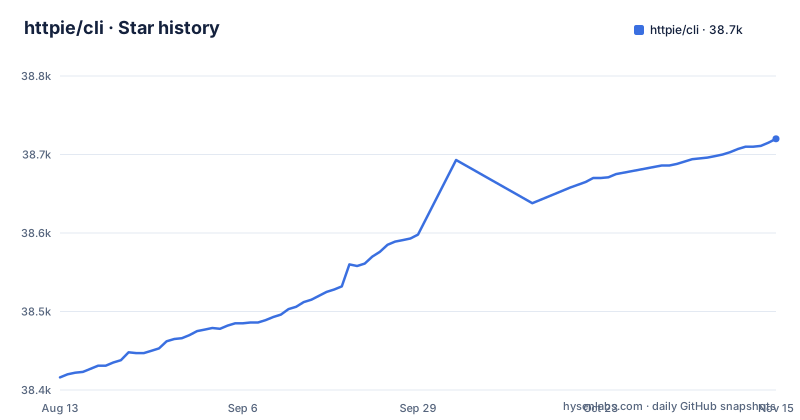
Star history
- httpie/cli38,720 ★ · +304
| Repository | 2026-08-13 | 2026-11-15 |
|---|---|---|
| httpie/cli | 38.4k | 38.7k |
304 Stars in the last 94 days, measured from the daily GitHub snapshot. Compare with other projects
Editorial analysis
The Problem: Raw HTTP Tools Are Hard to Read
Most command-line HTTP clients, like curl, are powerful but terse. They dump raw responses with no formatting, require you to remember flags for headers, data, and methods, and give you no visual hierarchy. HTTPie solves that specific pain. It is built for testing, debugging, and interacting with APIs and HTTP servers, where you often need to see the response structure quickly. The README states its goal is to make CLI interaction with web services as human-friendly as possible. That means the target user is not a shell script writer but a human sitting at a terminal, trying to understand what an API returns. It is for the developer who wants to type a request and immediately see a colorized, formatted JSON response without piping to jq or writing a loop. The project is not trying to replace curl in every context. It is trying to replace the mental overhead of constructing a request from memory.
How HTTPie Works: Syntax, Output, and the Request Pipeline
HTTPie provides two commands, http and https, which send arbitrary HTTP requests. The core mechanism is a positional argument that sets the HTTP method, followed by URL, headers, and data fields. Headers are written as Name:Value, and JSON data is written as key=value. For example, the README shows http PUT pie.dev/put X-API-Token:123 name=John. That single line builds a PUT request with a custom header and a JSON body. The tool then formats and colorizes the output, which is the main differentiator. It also supports offline mode, where you can build and print a request without sending it, using the --offline flag. That is useful for debugging request construction. The data flow is straightforward: you type a command, HTTPie parses the arguments into an HTTP request, sends it over the network, and renders the response with syntax highlighting. The README lists persistent sessions and wget-like downloads as features and points to httpie.io/docs for the full documentation.
Getting Started: Installation and First Commands
The README points to the official installation instructions at httpie.io/docs, but it does not include a single install command. That is a gap. However, since the project is on PyPI, the standard route is pip install httpie. The README does give clear command examples. To test a simple GET, you run https httpie.io/hello. For a custom method and headers, you run http PUT pie.dev/put X-API-Token:123 name=John. For offline mode, you run http --offline pie.dev/post hello=offline. Authentication is supported via the -a flag, as shown in the GitHub API example: http -a USERNAME POST https://api.github.com/repos/httpie/cli/issues/83/comments body='HTTPie is awesome!'. These examples are enough to start, but you will need the full docs for proxies, SSL settings, and session management. The project uses Python, so you need a Python runtime. The latest release, 3.2.4, came out on 2024-11-01.
A Real Limitation: Not Built for Heavy Automation
HTTPie's strength is human interaction, and that is also its weakness. The syntax is expressive, but it is not designed for complex scripting logic like conditionals, retries, or response parsing. For a script that runs unattended, curl is more appropriate because it is lighter, has no Python dependency, and is practically everywhere. Another limitation is that HTTPie's output is oriented toward human eyes. Colorized and formatted output is great in a terminal, but if you need to pipe the response to another tool, you have to disable formatting or parse the output. Also, the README explicitly notes that the project accidentally became private for a moment, which caused GitHub to delete their community and 54k stars. That is not a technical limitation.
The Alternative: curl and Its Different Approach
The obvious alternative is curl, which is not just a competitor but a different philosophy. curl is a library and a command-line tool that focuses on completeness and portability. It has no built-in JSON formatting, no colorized output, and no session concept by default. You get a raw response and you handle it yourself. HTTPie, by contrast, wraps the request and response in a more opinionated presentation layer. The trade-off is clear: curl gives you maximum control and minimal assumptions, while HTTPie gives you readability and convenience. For example, to send a JSON POST with curl, you write curl -X POST -H 'Content-Type: application/json' -d '{"name":"John"}' https://pie.dev/post. With HTTPie, you write http POST pie.dev/post name=John. The curl version is more explicit, but the HTTPie version is faster to type and read. The real difference is not feature count but the default output. curl is a tool, HTTPie is an interface.
Maintenance and License: What You Are Adopting
HTTPie is licensed under BSD-3-Clause, which is permissive and allows commercial use with attribution. That is a low-risk license for most organizations. The project is written in Python and is on PyPI, so you inherit Python's dependency management. The latest release, 3.2.4, was pushed on 2024-11-01, and the repository is not archived, though its last push was on 2024-12-17. However, the README does not mention a deprecation policy or a long-term support plan. You should check the changelog for breaking changes between versions. The 3.2.x series has had releases spread over 18 months, which suggests a stable but slow cadence. For upgrade cost, you need to consider that plugins may break with new versions. The repository description mentions plugins, but the README does not specify a plugin API versioning scheme. If you build internal tooling around HTTPie, you should pin the version and test upgrades in a staging environment. The accidental private incident is a governance risk to note, but the repository is publicly visible and not archived.
Editorial conclusion
Adopt HTTPie if you are a developer or tester who wants a more readable, interactive way to probe APIs from the terminal, especially for ad-hoc debugging and learning. Skip it if you need a tool for large-scale scripted automation where curl's ubiquity and minimal dependencies matter more. Before adopting, verify that your team's workflows tolerate Python as a runtime dependency and that the release cycle (latest 3.2.4, from November 2024) fits your distribution requirements. Also check the documentation for session file formats and plugin compatibility, since those are not fully specified in the README.
Frequently asked questions
How do I install HTTPie?
The README contains no install command. It links installation instructions to httpie.io/docs#installation and the full documentation to httpie.io/docs, and its badges point at a PyPI project page. The repository itself also carries snapcraft.yaml and .packit.yaml for distro packaging, and a Makefile with a development install path.
What are the key differences between cURL and HTTPie?
The README makes no comparison and quotes no benchmark. It states the goal as making CLI interaction with web services as human-friendly as possible, and the differences it does name are expressive syntax, formatted and colorized terminal output, built-in JSON support, forms and file uploads, persistent sessions, custom headers, and wget-like downloads.
Is HTTPie open source?
Yes. The repository carries a LICENSE file at its root and is released under BSD-3-Clause, with the package source in the httpie directory and releases published on GitHub. The most recent release listed is 3.2.4.
how to use httpie cli
The http and https commands create and send arbitrary requests with simple syntax and formatted, colorized output. Data fields are written as name=John, headers as X-API-Token:123, and the method as a bare word such as PUT before the URL, so http PUT pie.dev/put X-API-Token:123 name=John sends a PUT with a header and a field.
httpie cli alternative
The README names no alternative client and makes no comparison to one. What it describes is its own feature set: expressive and intuitive syntax, formatted and colorized terminal output, built-in JSON support, forms and file uploads, HTTPS, proxies and authentication, arbitrary request data, custom headers, persistent sessions, and wget-like downloads, with the full list held on the docs site rather than in the repository.
Official sources
Add this badge to your README
If you maintain this project, the badge below links readers to this analysis and shows its maintenance status from the daily GitHub snapshot. Paste the markdown into your README; add ?metric=license or ?metric=stars to the image URL for a different field.

[](https://hysenlabs.com/projects/httpie-cli)Star history chart for your README
[](https://hysenlabs.com/projects/httpie-cli)Was this useful?