VideoLingo chains Qwen3-ASR, an LLM translator and TTS into one subtitle and dubbing pipeline, and each link has its own failure mode
Netflix-level subtitle cutting, translation, alignment, and even dubbing: a one-click, fully automated AI video subtitle team.
At a glance
- What is it?
- VideoLingo is an Apache-2.0 Python app that downloads or takes a video, transcribes it with word-level timestamps, translates and segments subtitles through an OpenAI-compatible LLM, and optionally dubs the result. This piece walks through each stage, what it depends on, and where the project itself says the output can go wrong.
- Who is it for?
- VideoLingo suits creators and small teams who want subtitles and an optional dub from one local tool, and who can supply an OpenAI-compatible LLM that reliably returns structured JSON. It is a poor fit for multi-speaker dubbing, heavily mixed-language audio, or parallel batch jobs through its API.
- Can I use it commercially?
- Yes. Apache-2.0 is a permissive licence: you can use, modify and sell software built on it, as long as you keep its copyright and licence notices.
- Is it still maintained?
- Yes. The repository last received commits 1 day ago.
- What is it written in?
- Mainly Python, according to GitHub's language statistics.
Answers come from the project's GitHub data, last synced on November 13, 2026, and from our analysis. They are not legal advice.
Star history
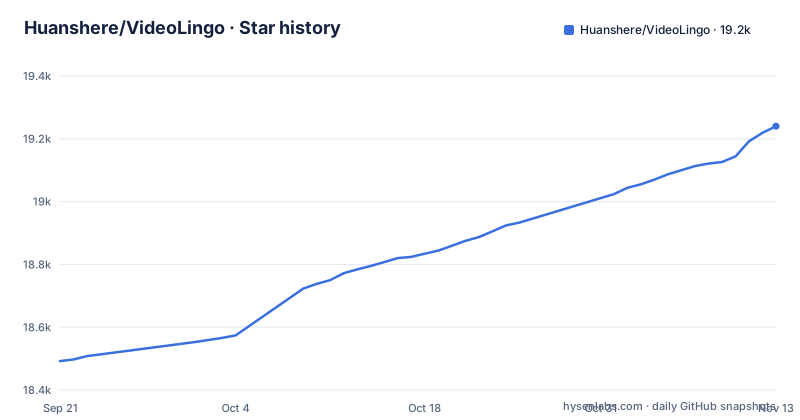
- Huanshere/VideoLingo19,240 ★ · +748
| Repository | 2026-09-21 | 2026-11-13 |
|---|---|---|
| Huanshere/VideoLingo | 18.5k | 19.2k |
748 Stars in the last 53 days, measured from the daily GitHub snapshot. Compare with other projects
Editorial analysis
Word timings come from Qwen3-ASR and ForcedAligner, and everything downstream inherits their errors
The default recognition path runs locally: Qwen3-ASR transcribes and Qwen3-ForcedAligner assigns word-level timestamps. How it runs depends on the machine. Apple Silicon uses MLX through mlx-audio, which needs Transformers 5 and huggingface-hub 1. Windows and Linux use the official qwen-asr package pinned at 0.0.6, which in turn pins Transformers 4.57.6. Intel Macs use the CPU path with the last available macOS x86_64 PyTorch wheels. A bundled CPU voice activity model, silero-vad, keeps non-speech intros from throwing off alignment.
Instead of local recognition you can pick ElevenLabs or MAI-Transcribe-2 in the sidebar. MAI accepts an Azure Speech key or an OpenRouter key, and with either cloud option your audio is sent to that provider and may be billed. WhisperX is not installed by the installer and needs a separate manual setup.
The project is direct about the weak spots. Background noise and language-specific alignment models affect both recognition and word timestamps, and vocal separation may help. Numbers and symbols may lack reliable word timings. Local recognition uses one primary language per audio segment, so speech that switches languages mid-segment is not guaranteed to keep accurate text or timing. Since segmentation, translation and dubbing all hang off these timestamps, a noisy or code-switched source degrades every later stage, and you need to inspect the subtitles yourself.
Translation stalls when the LLM cannot return the workflow's JSON
Translation goes through any OpenAI-compatible Chat Completions provider, configured as an API URL, key and model in the Streamlit sidebar. A model searchbox can fetch your provider's full model list. The hard requirement is that the model returns the structured JSON the workflow expects; json-repair is in the dependency list, but a model that keeps producing malformed output will still fail.
When it fails, the place to look is output/gpt_log/error.json. Successful response caches and finished outputs are reused on retry, with one side effect: switching to a different model alone does not regenerate stages that already completed. The project specifically warns against deleting all output as a first troubleshooting step, because that throws away the caches.
The README recommends OpenLux as a relay at https://api.openlux.ai/v1, with gpt-6-luna for value, gpt-6-sol for better quality and claude-opus-5-5 for best quality. That recommendation link carries an affiliate parameter, so treat it as a suggestion rather than a requirement; any compatible provider that returns valid JSON works.
Terminology lists and length limits shape how subtitles are cut
Before and during translation, VideoLingo builds a terminology list from two sources: terms you supply and terms the AI generates. The repository ships a custom_terms.xlsx file for the custom part. The aim is coherent translation of names and jargon across the whole video.
Translation is direct by default, with optional reflection and natural rewriting passes on top. Subtitle segmentation combines NLP and LLM judgement, and the line length limits are configurable. spaCy 3.8 is pinned in the requirements for the NLP side. The Streamlit app can produce dual subtitles, original and translation together, as well as subtitle files alone or a subtitled video.
Input languages are English, Russian, French, German, Italian, Spanish, Japanese and Chinese. Each stage writes detailed logs and supports progress resumption, and the task controls let you pause, resume or stop at any step, which matters on long videos where a single failed stage would otherwise mean restarting.
Dubbing uses one voice for everyone and speed adjustment cannot guarantee sync
Dubbing is optional and pluggable. Supported TTS backends are OpenAI, Fish Audio, SiliconFlow Fish and CosyVoice2, GPT-SoVITS, Edge TTS and F5-TTS, plus a custom adapter you write in core/tts_backend/custom_tts.py. Which dubbing languages you get depends on the backend you pick, not on VideoLingo. Voice cloning is possible through backends such as GPT-SoVITS and CosyVoice2, and Fish Audio voice clones send reference audio as MessagePack.
Two limits are stated outright. First, the workflow does not automatically assign a separate voice to each speaker, so an interview or panel comes out in a single voice. Second, timing depends on the translation, the TTS service and the speech rate; VideoLingo adjusts speed to fit, but that does not guarantee natural delivery or perfect synchronization.
There is also a platform difference. On Intel Macs, dubbing by default uses the new voice without the original background sound, so music and ambience from the source are dropped unless you change it.
OneKeyStart.bat installs uv, Python 3.12 and FFmpeg on first launch
On Windows the intended path is to download the Source code zip from the latest release, extract it, and double-click OneKeyStart.bat. The first run installs uv, Python 3.12, the app dependencies and FFmpeg, so it needs an internet connection and the window must stay open. When it finishes, the app opens in the browser and asks for the API URL, key and model.
On Windows, macOS (Apple Silicon or Intel) and Linux you can install from source:
git clone https://github.com/Huanshere/VideoLingo.git && cd VideoLingo
uv run start.py
Later starts are just uv run start.py from the same folder. setup.py declares python_requires '>=3.12,<3.13', so Python 3.11 or 3.13 will not satisfy it; letting uv provide 3.12 avoids that conflict. FFmpeg and ffprobe come from the static-ffmpeg package, so no system FFmpeg is needed. The requirements file says to install through installer.py so PyTorch comes from the correct CPU or CUDA wheel index, and it pins older numpy and numba on Intel Macs because recent Numba releases no longer ship Intel macOS wheels.
Recent releases are v3.0.4 on 2026-09-15, then v3.1.0 and v3.1.1 both on 2026-09-27; setup.py reports 3.1.1, and the last push was 2026-09-30.
The Docker image only builds against CUDA 12.8.1 or 12.6.3 on NVIDIA hardware
Docker is the optional route for Linux machines with NVIDIA GPUs. You need Docker, a compatible GPU driver and the NVIDIA Container Toolkit. Build and run with:
docker build -t videolingo .
docker run -d -p 8501:8501 --gpus all videolingo
The Dockerfile starts from nvidia/cuda with cuDNN on Ubuntu 24.04. The CUDA_VERSION build argument defaults to 12.8.1, which maps to the cu128 PyTorch wheels; 12.6.3 maps to cu126. Any other value stops the build with the message "Use CUDA_VERSION=12.8.1 or 12.6.3". If your driver cannot run either, Docker is not an option.
The image copies the checked-out source rather than cloning during the build, so it builds whatever revision you have locally. It runs setup_env.py with --require-demucs, installs fonts-noto-cjk, exposes port 8501 and launches the Streamlit app headless. There is no CPU or Apple image; Mac and non-NVIDIA users stay on the uv install.
The HTTP API processes one job at a time out of a shared output folder
For scripts and agents, VideoLingo replaced its former Excel batch mode with a local HTTP API built on FastAPI and uvicorn. Configure config.yaml and start it from the project root:
uv run start.py --apiThe first run also installs any missing dependencies. Interactive endpoint documentation is served at localhost:8000/docs, and the HTTP API guide in docs/api.md covers input, progress, downloads, retries and serial batch processing.
The constraint to plan around is concurrency. The API shares the Streamlit pipeline and processes one operation at a time using the output/ directory. Batches run serially, so a queue of long videos takes the sum of their run times, and you cannot point two jobs at the same install and expect them to run side by side. YouTube input works through yt-dlp, pinned at 2026.6.9 or newer, so keeping that package current is part of keeping downloads working.
Editorial conclusion
VideoLingo suits creators and small teams who want subtitles and an optional dub from one local tool, and who can supply an OpenAI-compatible LLM that reliably returns structured JSON. It is a poor fit for multi-speaker dubbing, heavily mixed-language audio, or parallel batch jobs through its API. Before committing, check that your LLM passes the JSON stage on a short clip, budget for any cloud ASR or TTS charges, and confirm your machine can meet the Python 3.12 requirement or the two supported CUDA versions for Docker.
Frequently asked questions
How much does a video translator like VideoLingo cost?
VideoLingo itself is Apache-2.0 licensed. Costs come from the OpenAI-compatible LLM you configure and from any cloud ASR or TTS you choose; MAI-Transcribe-2 and other cloud providers may incur charges, while the default Qwen3-ASR recognition runs locally.
Is there a way to auto translate a video with VideoLingo?
Yes. VideoLingo transcribes the audio with word-level timestamps, translates and segments subtitles through an LLM, and can produce subtitle files, a subtitled video or a dubbed video from the Streamlit app or its HTTP API.
Is there an app like VideoLingo that can translate audio from a video?
VideoLingo does this: it recognizes speech in English, Russian, French, German, Italian, Spanish, Japanese or Chinese, translates it, and can dub the translation with TTS backends such as OpenAI, Edge TTS or GPT-SoVITS. It does not give each speaker a separate voice.
Official sources
Add this badge to your README
If you maintain this project, the badge below links readers to this analysis and shows its maintenance status from the daily GitHub snapshot. Paste the markdown into your README; add ?metric=license or ?metric=stars to the image URL for a different field.

[](https://hysenlabs.com/projects/huanshere-videolingo)Star history chart for your README
[](https://hysenlabs.com/projects/huanshere-videolingo)Was this useful?