injetlee/Python: A Script Collection for Zhihu Login, Crawling, Excel and WeChat
Python scripts: simulated login to Zhihu, web scraping, Excel automation, WeChat official account tools, and remote power-on.
At a glance
- What is it?
- injetlee/Python is not a library. It is a folder of standalone Python scripts covering simulated Zhihu login, several crawlers, Excel read and write, a WeChat official account module and remote shutdown. Useful as teaching material, awkward as a dependency.
- Who is it for?
- Adopt injetlee/Python as reading material when you are learning how a simulated login, a Selenium crawler or an Excel-to-database import is put together, and copy the single file you need rather than the repository. Do not adopt it as a dependency: there is no package, no versioned release and no declared licence, so redistribution and commercial reuse are unresolved.
- Can I use it commercially?
- Not without permission. GitHub finds no licence file in the repository, and without a licence all rights are reserved by default: you may read the code but not reuse it. Check the README, or ask the authors, before using it.
- Is it still maintained?
- Activity is slowing. The repository last received commits 6 months ago.
- What is it written in?
- Mainly Python, according to GitHub's language statistics.
Answers come from the project's GitHub data, last synced on November 15, 2026, and from our analysis. They are not legal advice.
Star history
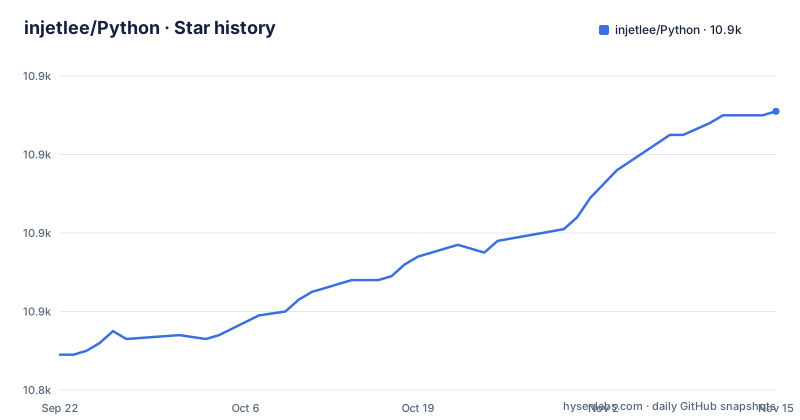
- injetlee/Python10,911 ★ · +62
| Repository | 2026-09-22 | 2026-11-15 |
|---|---|---|
| injetlee/Python | 10.8k | 10.9k |
62 Stars in the last 54 days, measured from the daily GitHub snapshot. Compare with other projects
Editorial analysis
What injetlee/Python actually is, and who it is for
The repository is a personal script collection. The README opens with a WeChat official account promotion, then lists content by topic: Python WeChat official account development, a crawler starter series, a Python black magic section containing remote shutdown, a set of SQL articles hosted on WeChat, and an other section that links to individual files. The top level of the repository contains: login_zhihu.py, qiubai_crawer.py, douban_movie.py, douban_book.py, lagouSpider.py, excelToDatabase.py, readExcel.py, ModifyFilename.py, countFile.py, countPm.py, CpuToInfluxdb.py, biyingSpider.py, image_recognition_zhihu.py, plus the wechat/ and 爬虫集合/ directories.
That layout tells you the intended audience. Each file is a self-contained demonstration of one technique. Someone learning how to simulate a Zhihu login, how to drive Selenium, how to move an Excel sheet into a database, or how a WeChat official account backend is wired will find a worked example per topic. There is no package to install and no API surface to keep stable. If you want a maintained crawler framework or a supported Excel library, this is the wrong shape of project, and the README does not claim otherwise.
How the scripts are organised and how data moves through them
There is no shared architecture. Each script is a separate entry point with its own imports and its own control flow, which is why the repository has no __init__.py, no setup.py and no dependency manifest at the top level. The README links to files by topic rather than describing a pipeline.
The data flow is per script and short. A crawler such as qiubai_crawer.py or douban_movie.py scrapes data from a site (the README links them as crawlers for Qiushibaike and Douban movies). excelToDatabase.py reads a spreadsheet and inserts rows into a database, while readExcel.py reads and writes Excel files. CpuToInfluxdb.py collects CPU state and pushes it into InfluxDB, so its output is a time series rather than a file. login_zhihu.py and image_recognition_zhihu.py sit on the login side: the first simulates a Zhihu login, the second sits beside it at the top level, but the README does not mention it. The wechat/ directory holds the official account work, including the two articles named in the README, one described as a beginner piece and one about face scoring.
The consequence is that you cannot import one script and reuse its internals cleanly.
Installing and running your first script
The README does not give installation steps for the repository as a whole, and there is no requirements.txt at the top level, so the dependencies of each script have to be read from its import lines. The scripts are plain Python files, so the practical route is to clone the repository and run one file directly.
Clone the repository first:
git clone https://github.com/injetlee/Python.git
cd Python
Pick a single script rather than the whole tree. The README points at login_zhihu.py as the simulated Zhihu login example, and at readExcel.py for reading and writing Excel, so a first run looks like this:
python login_zhihu.pyExpect the script to fail on a clean machine unless you have already installed whatever it imports, because nothing in the repository pins or lists those packages. Read the import block at the top of the file you chose, install those names, and run it again. Files that touch a website will also need credentials or a session that the README does not document.
Where the collection breaks down
The most concrete limitation is that every script is a snapshot of a third party interface at the moment it was written. Simulated login against Zhihu in particular depends on a login flow that the site controls, and the README offers no note on whether login_zhihu.py still works or what happens when the flow changes. There is no test suite among the top-level entries.
A second limitation is scope. The scripts are not designed to be composed. If your task is to crawl a site, store the result in a database, and track it over time, you will not find a single script that does all three, and the repository does not present them as a toolkit. You would be assembling the pieces yourself, at which point the value is the example code, not the project.
The third is legal and operational rather than technical. The README's sponsor block for a residential proxy service carries the warning that learners must obey the law, and the crawler scripts target named sites. Whether you may crawl a given site, and whether a simulated login is permitted under its terms, is a question the repository does not answer.
Alternatives: a maintained library versus a script collection
The natural alternative for the crawling side is a maintained Python framework such as Scrapy, or a general HTTP client plus a parser. The difference is not just polish. A framework gives you a scheduler, retry and throttling configuration, and a documented extension model, so a change at one site is a spider edit rather than a rewrite. Here, each site gets its own script and each script carries its own request logic.
For the Excel and database work, the alternative is to use the underlying libraries directly, for example pandas with an Excel engine for reading and writing, or a database driver with a bulk insert path. excelToDatabase.py shows one way to bridge the two, but a library route gives you type handling, chunked reads and a documented API that does not change shape between versions.
For the WeChat official account material, the alternative is the official platform documentation plus a maintained SDK. The wechat/ directory is described in the README as two articles, one a beginner walkthrough and one about face scoring, which is a tutorial shape rather than a supported integration. If you need a long-lived official account service, a tutorial repository is a starting point for understanding the flow, not the component you deploy.
Maintenance, releases and licence
The repository is not archived, and the last push was on 2026-05-09. The repository has no published GitHub releases, so there is no versioned artifact to depend on and no changelog to read. Upgrades in practice mean pulling the latest master and diffing the file you use, which is a manual step and one that can change behaviour without a version number to signal it.
The licence field is unknown. Nothing in the README states a licence either, and there is no LICENSE file listed among the top-level entries. That matters if you plan to redistribute a script, embed it in a product, or publish a derivative. Without a declared licence, the default position is that the author retains rights, so treating these files as freely reusable code is an assumption the repository does not support. This is a description of what the repository contains, not legal advice; if redistribution matters to you, that is the question to resolve before you build on a file rather than after.
What to check before you copy a file out of this repository
Start with the imports. Because there is no dependency manifest, the import block at the top of the file is the only statement of what the script needs, and it is also the fastest way to see whether the script pulls in a browser driver, a database driver or a third party API client.
Then check for embedded credentials and endpoints. The README does not describe a configuration mechanism, so any account, cookie or token a script needs is either typed into the file or expected from the environment, and you cannot tell which without opening it. The same applies to the WeChat work under wechat/, which the README presents as article material rather than a configurable service.
Finally, decide whether you are reading or depending. Reading a script to learn how a simulated login or an Excel-to-database import is structured is the use the repository is built for. Vendoring one into a codebase means inheriting its assumptions and its unknown licence, and neither of those is something the repository will fix for you.
Editorial conclusion
Adopt injetlee/Python as reading material when you are learning how a simulated login, a Selenium crawler or an Excel-to-database import is put together, and copy the single file you need rather than the repository. Do not adopt it as a dependency: there is no package, no versioned release and no declared licence, so redistribution and commercial reuse are unresolved. Before using any file, open it and check which third party endpoints, credentials and account terms it touches, starting with login_zhihu.py and the crawler scripts.
Frequently asked questions
What is injetlee/Python used for?
It is a collection of standalone Python scripts for tasks such as simulating a Zhihu login, crawling sites, reading and writing Excel files, WeChat official account development and remote shutdown. The README groups them by topic and links to the individual files.
How do I install injetlee/Python?
There is no installation step for the repository as a whole and no dependency manifest at the top level. You clone the repository, read the imports at the top of the script you want, install those packages, and run the file directly.
Does injetlee/Python have a licence?
The licence is not stated in the repository metadata or the README, and no LICENSE file appears among the top-level entries. That leaves redistribution and reuse unresolved.
Official sources
Add this badge to your README
If you maintain this project, the badge below links readers to this analysis and shows its maintenance status from the daily GitHub snapshot. Paste the markdown into your README; add ?metric=license or ?metric=stars to the image URL for a different field.

[](https://hysenlabs.com/projects/injetlee-python)Star history chart for your README
[](https://hysenlabs.com/projects/injetlee-python)Was this useful?