GSSquared: An Apple II Emulator That Covers Both 8-bit and 16-bit Machines
gssquared
At a glance
- What is it?
- GSSquared is a cross-platform C++ emulator for the entire Apple II line, from the original 8-bit models to the 16-bit IIgs. It stands out for covering both families in one package, but its build process and dependency on SDL3 deserve scrutiny.
- Who is it for?
- GSSquared is for users who need a single emulator that runs both 8-bit Apple II software and Apple IIgs titles, especially on macOS, Linux, or Windows without extra downloads. It is not for users who want a mature, widely tested codebase or who need official license clarity.
- Can I use it commercially?
- Not without permission. GitHub finds no licence file in the repository, and without a licence all rights are reserved by default: you may read the code but not reuse it. Check the README, or ask the authors, before using it.
- Is it still maintained?
- Yes. The repository last received commits 23 days ago.
- What is it written in?
- Mainly C++, according to GitHub's language statistics.
Answers come from the project's GitHub data, last synced on October 4, 2026, and from our analysis. They are not legal advice.
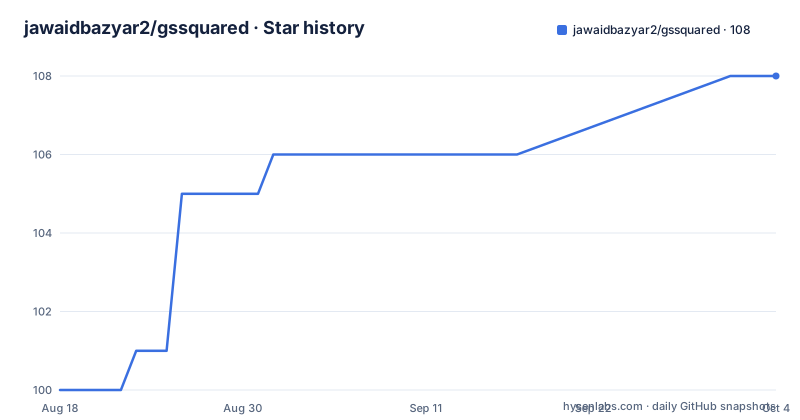
Star history
- jawaidbazyar2/gssquared108 ★ · +8
| Repository | 2026-08-18 | 2026-10-04 |
|---|---|---|
| jawaidbazyar2/gssquared | 100 | 108 |
8 Stars in the last 47 days, measured from the daily GitHub snapshot. Compare with other projects
Editorial analysis
What GSSquared Aims to Solve
Most Apple II emulators pick a side. Some, like AppleWin, focus on the 8-bit line. Others, like KEGS, target the IIgs. GSSquared tries to cover the whole series in one program. The README claims it is the only emulator besides MAME that models most of the 8-bit Apple II and the 16-bit Apple IIgs. That claim is bold, and it is the core reason to look at this project. The intended audience is broad: retro computing enthusiasts, developers testing old software, and educators who need a single tool for multiple Apple II variants. The project promises a simple interface and pre-packaged binaries, so it is aimed at users who want to double-click and play, not just tinkerers.
The Architecture: C++ and SDL3
GSSquared is written in C++ and uses SDL3 for graphics, sound, and input. The README explains that SDL3 is a video game-oriented library, which the author says made cross-platform development feasible. This is a practical choice: SDL3 abstracts windowing, audio, and controllers across Windows, Linux, and macOS. The emulator itself is not a thin wrapper; it includes CPU emulation for the 6502 and 65816, plus chip-level emulation for the Apple II's custom hardware. The README mentions that mouse tracking is based on techniques from KEGS, and the Apple Mouse II Interface Card emulation is adapted from the A2Pico mouse-interface firmware. That shows a mix of borrowed ideas and original code. The dependency on SDL3 is worth noting because SDL3 is newer than SDL2, and some Linux distributions may not package it yet, which affects build reproducibility.
Supported Models and What That Means
The README lists six emulated systems: Apple ][, Apple ][+, Apple //e, Apple //e Enhanced, Apple //e Enhanced with 65816 CPU, and Apple IIgs. That is a wide range. The 8-bit models use the 6502, while the IIgs uses the 65816. The documentation does not specify the level of emulation accuracy for each model. It says 'most' of the 8-bit Apple II is modeled, which is a caveat. Users expecting perfect cycle timing for every chip may be disappointed. The IIgs is a complex machine with a custom sound chip, video circuitry, and memory management, and emulating it accurately is a huge task. The README does not list specific supported peripherals or software compatibility, so you have to test your own disk images and programs. This is a genuine limitation: the project's ambition is high, but the documentation does not back it up with a compatibility list.
Getting It Running: Build and Installation
Pre-compiled binaries are available on the releases page, which is the easiest path. For macOS, the README warns that you must remove the quarantine attribute after downloading: run 'xattr -d com.apple.quarantine gssquared.dmg' or apply it to the installed app. Building from source requires clang or GCC, SDL3 built from the SDL website, and git. The build uses CMake. For a production build, the command is 'cmake -DCMAKE_BUILD_TYPE=Release -S . -B build', followed by 'cmake --build build'. On macOS, you can create an app bundle with 'cmake -DGS2_PROGRAM_FILES=OFF -DCMAKE_BUILD_TYPE=Release -S . -B build', then 'cmake --build build --parallel', and 'cmake --install build'. A DMG is made with 'cmake --build build --target package'. Linux users need libasound2-dev, libpulse-dev, libudev-dev, and libimgui-dev. Windows builds use MinGW and clang, with commands like 'cmake -G "MinGW Makefiles" -DGS2_PROGRAM_FILES=ON ...'. The CMakeLists.txt forces Clang as the compiler, which you can override by editing the file. That is a quirk that may annoy GCC users.
A Real Limitation: The Build Process and Dependencies
The build process is not turnkey. SDL3 must be downloaded and built separately, which is a significant step. The README says GSSquared should build with GCC on Ubuntu 22.04 or later, but it has not been tested. That is a red flag for Linux users who prefer GCC. The forced Clang selection in CMakeLists.txt is another hurdle. Debug builds enable assertions and memory leak checking, which is good for developers, but the release build is what most users will run. The documentation does not mention how to configure the emulator itself, such as keyboard mappings or disk mounting. That is a gap. The affiliated tools, diskid and nibblizer, are for disk image analysis and conversion, but they are not documented beyond their names. If you need to convert a .do file to .nib, you have to figure out the command-line syntax yourself.
Alternatives and How They Differ
The main alternative is MAME, which the README itself references as the only other emulator covering both 8-bit and 16-bit Apple IIs. MAME is a massive project with a different philosophy: it prioritizes accuracy and preservation over ease of use. MAME requires ROMs and often has a steeper learning curve. GSSquared, by contrast, aims to be simple and ready to run. For 8-bit only, AppleWin on Windows is a mature option, but it does not emulate the IIgs. For IIgs only, KEGS is a long-standing emulator, but it is not cross-platform in the same way. GSSquared's advantage is the single package for all models. The trade-off is that MAME has decades of testing, while GSSquared is newer and less proven. If you need the broadest accuracy, MAME is the safer bet. If you want a single, simple emulator for casual use, GSSquared is worth trying.
Maintenance and Licensing Concerns
The project has recent releases, with v0.11.0 from August 2026, so it is actively maintained. The release cadence is about one version per month, which suggests ongoing development. However, the license is listed as unknown in the repository metadata. The README mentions that parts of the code are adapted from OpenEmulator (GPL 3), KEGS (GPL 2.0), and the A2Pico mouse-interface (MIT). That mixing of licenses is a serious issue. If the project is distributed as a whole, the GPL components would likely require the entire project to be GPL-compatible. The lack of a clear license means you cannot legally redistribute or modify the code without clarification. This is a genuine barrier for anyone considering embedding GSSquared in another project. You should contact the maintainer or check the repository for a LICENSE file before using it beyond personal play.
Who Should Adopt It, and What to Verify First
GSSquared is a strong candidate for retro enthusiasts who want one emulator for both 8-bit and IIgs games, especially on macOS where options are limited. It is also a good learning tool for studying Apple II emulation, since the source is available. But it is not for production use or for users who need guaranteed compatibility. Before committing, verify that your specific Apple II software runs, because the README does not list tested titles. Check whether the SDL3 dependency is acceptable for your Linux distribution, and confirm the license with the maintainer. If you plan to build from source, be prepared to install SDL3 manually and possibly edit CMakeLists.txt to use GCC. The project is promising, but it is still in its early versions, and the documentation is thin on emulation accuracy details.
Editorial conclusion
GSSquared is for users who need a single emulator that runs both 8-bit Apple II software and Apple IIgs titles, especially on macOS, Linux, or Windows without extra downloads. It is not for users who want a mature, widely tested codebase or who need official license clarity. Before adopting it, verify that the SDL3 dependency is acceptable, check the license situation with the maintainer, and test your target Apple II models, since the documentation does not guarantee full emulation accuracy for every model.
Frequently asked questions
Which Apple II models does GSSquared emulate?
The Apple ][, the Apple ][+, the Apple //e, the Apple //e Enhanced, the //e Enhanced with a 65816 CPU, and the Apple IIgs. The claim is that it is the only emulator besides MAME modelling most of the 8-bit line as well as the 16-bit IIgs.
Can I download GSSquared without compiling it?
Yes, binary releases are published on the repository releases page. On macOS you then have to clear the quarantine attribute with xattr -d com.apple.quarantine, either on the .dmg or on the installed .app, or the system will refuse to open it.
What do I need to build GSSquared from source?
A clang or GCC C compiler, SDL3 downloaded and built from the SDL web site, and git. On Linux that means libasound2-dev, libpulse-dev, libudev-dev, libcurl4-openssl-dev and libimgui-dev. On macOS you need the Mac OSX 12 SDK. Clone with --recurse-submodules.
Does GSSquared run on Raspberry Pi or Android?
The documentation names Windows, Linux and macOS as the supported platforms and makes no claim about Raspberry Pi hardware or Android, so there is no stated build for either. The Linux instructions assume a desktop distribution with the SDL3 development libraries available.
What other programs come with GSSquared?
Building from source also produces diskid, which analyzes a disk image and prints information about it, nibblizer, which converts 140K 5.25-inch .do, .po and .dsk images into nibblized form such as .nib, and gstrace, which decodes a stored CPU trace file.
What is the GS2_PROGRAM_FILES build option?
With GS2_PROGRAM_FILES=OFF the build produces a platform package, an app bundle on macOS or an installable layout on Linux. With it set to ON you get a bare executable named GSSquared in build/ that you can run directly from a command line.
Official sources
Add this badge to your README
If you maintain this project, the badge below links readers to this analysis and shows its maintenance status from the daily GitHub snapshot. Paste the markdown into your README; add ?metric=license or ?metric=stars to the image URL for a different field.

[](https://hysenlabs.com/projects/jawaidbazyar2-gssquared)Star history chart for your README
[](https://hysenlabs.com/projects/jawaidbazyar2-gssquared)