Termora declares a dual licence in prose while its licence field is empty
Termora is a terminal emulator and SSH client for Windows, macOS and Linux.
At a glance
- What is it?
- A Kotlin/JVM terminal emulator and SSH client for three desktop systems, with a built-in key manager, server-to-server transfers, an SFTP editor, plugins for four object stores, and four distribution channels. Its stated long-term goal is mobile platforms it does not yet support, it calls its terminal emulation partial, and its licence field carries no value even though the readme sets out an open-source and a commercial option.
- Who is it for?
- Termora is worth a look if you want an SSH client with a graphical file manager attached, because the file transfer supports moving data directly between two remote hosts rather than relaying through your machine, the editor writes changes back on save, and the host list is a hierarchy with tags rather than a flat list. Two things to know.
- Can I use it commercially?
- Not without permission. GitHub finds no licence file in the repository, and without a licence all rights are reserved by default: you may read the code but not reuse it. Check the README, or ask the authors, before using it.
- Is it still maintained?
- Yes. The repository last received commits 47 days ago.
- What is it written in?
- Mainly Kotlin, according to GitHub's language statistics.
Answers come from the project's GitHub data, last synced on November 15, 2026, and from our analysis. They are not legal advice.
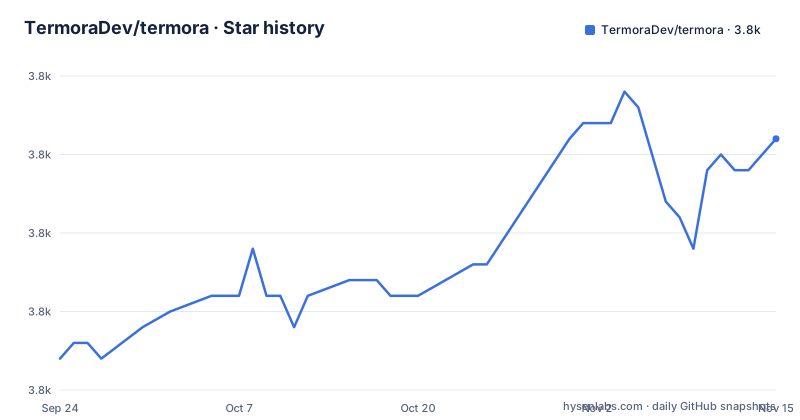
Star history
- TermoraDev/termora3,841 ★ · +14
| Repository | 2026-09-24 | 2026-11-15 |
|---|---|---|
| TermoraDev/termora | 3.8k | 3.8k |
14 Stars in the last 52 days, measured from the daily GitHub snapshot. Compare with other projects
Editorial analysis
The licence is a choice, and the metadata field is empty
The readme's licence section sets out a dual model in plain words. You may take the copyleft-free-of-charge option and use, distribute and modify the software under version three of the GNU Affero licence. Or, if your use is closed-source or proprietary, you contact the author to obtain a commercial licence. That is an unusually clean statement and it leaves no ambiguity about which side you are on. What is ambiguous is the machine-readable side: the repository's licence field comes through with no value at all, so the file that a package scanner reads says nothing. For a dual-licensed project that is a real gap, because a scanner cannot express a choice and will report either a missing licence or the wrong one.
The terminal emulation is described as partial
The readme says the project partially implements the terminal control sequence protocol, and links the protocol specification. That sentence is doing more work than it looks. A terminal emulator's correctness is the sequence handling: cursor movement, erase, modes, alternate screen, bracketed paste, colour. Partial support means some of that behaves differently from a reference terminal, and the difference shows up as escape sequences that appear as stray characters, wrong colours, or a program that mis-detects the terminal type. For a client you use interactively that is tolerable. For one you run a full-screen editor or a curses interface through, it is the first thing to test, and the readme's own admission is the honest starting point rather than something you have to discover.
Mobile platforms are the stated goal and the stated absent
The readme names its long-term goal as full platform support including Android, a phone operating system, and the two tablet platforms, to be reached by moving the codebase to a multiplatform Kotlin setup. Today it is a desktop application for three systems, written against the desktop runtime. So the direction of travel is explicit and the destination is three platforms where a terminal emulator faces problems the desktop version never has: no window manager to resize, a different input model, and a graphics stack that is not the one it draws with. Nothing in the readme gives a timeline, and the default branch is named for the version rather than for a stream, so there is nothing to watch except releases. Read it as a stated intention rather than a plan.
Transfers go between two remote hosts, not through your machine
The file transfer section has three entries and the first is the interesting one: transfers directly between server A and server B. Most graphical file managers attached to an SSH client download to your laptop and then upload, which doubles the traffic and puts your disk in the path. This one supports server-to-server, and it supports recursive folders, up to six transfers at once. That concurrency number is the sort of detail that only appears when someone has tuned it, and it also means the client holds six sessions open, which matters on a remote desktop with a narrow link. The transfer tool is also reachable from the host list, so you can open a transfer against any saved host without navigating to a directory first.
There is a recursive force-delete button, and a key manager
Two features deserve to be read twice because they carry more weight than their bullet length suggests. The first is quick deletion of large folders with recursive force deletion supported, which in a graphical client is a button that issues the command that has no undo. The second is a built-in key manager, in an application whose entire job is holding your keys. Neither is a criticism; a file manager without a recursive delete is not much use, and an SSH client without key management makes you use a different tool for it. They do mean that this application holds your private keys and can destroy a remote tree in one action, so the configuration you import into it is worth thinking about on those two axes specifically.
Plugins cover four object stores and sync your settings to a gist
The plugin list is the clearest signal about who uses this. There are plugins for WebDAV, for SMB, for one Western object store, and for three Chinese ones: a Huawei cloud object service, a Tencent one, and an Alibaba one. Three of four object-storage plugins being non-Western is not a coincidence, and it tells you what the user base looks like more plainly than any marketing line would. Then there is the sync plugin, which pushes your settings to a personal gist or to WebDAV. Your host list, its hierarchy and your tags are exactly the kind of thing people want synchronised, and a gist is the wrong place for anything sensitive, so the setting that decides where those go is worth reading before you turn it on.
Four distribution channels and a vendor JDK for development
Download is offered four ways: the releases page, a Homebrew cask, the Windows package manager, and a store listing that carries a campaign parameter in its address. That is full coverage for a desktop application and it means a user on any of the three systems has a package-manager route rather than a manual download. Development is where the project is opinionated in a way worth noting: it recommends a specific vendor-built runtime rather than the reference build of the same Java version, and the local run command is a single Gradle invocation with both a shell and a batch wrapper committed at the root. Choosing a vendor runtime for development means your local behaviour can differ subtly from what a user gets, which for a terminal client is worth remembering.
Three translated readmes and a version file outside the build
Two small structural details. The readme exists in German, Simplified Chinese and Brazilian Portuguese beside the English one, so documentation is translated rather than machine-generated, which means fixes land unevenly across four files. And the version number lives in a file at the repository root with no extension, separate from both build scripts, so a release is a matter of editing that file and tagging. That is the pattern three of today's projects share, and it has one advantage worth stating: there is exactly one place a version can be wrong, and one place to look when the release page and the application disagree about what version is running. The two package-manager installs are one line each:
brew install --cask termora
winget install termora
Editorial conclusion
Termora is worth a look if you want an SSH client with a graphical file manager attached, because the file transfer supports moving data directly between two remote hosts rather than relaying through your machine, the editor writes changes back on save, and the host list is a hierarchy with tags rather than a flat list. Two things to know. The licence is a choice you make rather than a single term, so if you are shipping this inside a closed-source product that is a commercial conversation, and the empty licence field means an automated check will not tell you either way. And the terminal emulation is described as partial, which for a terminal client is the thing to test before trusting it with your shell.
Frequently asked questions
What is Termora?
A cross-platform terminal emulator and SSH client for Windows, macOS and Linux, written in Kotlin. It includes a built-in key manager, agent integration, graphical forwarding, a file manager over SFTP, and plugins for several storage backends.
What licence is Termora under?
A dual model set out in the readme: version three of the GNU Affero licence for use, distribution and modification, or a commercial licence obtained from the author for closed-source or proprietary use. The repository's licence field itself carries no value.
Can Termora transfer files between two servers directly?
Yes. Transfers go directly between one remote host and another rather than through the local machine, recursive folders are supported, and up to six transfers can run concurrently.
Which platforms does Termora run on?
Windows, macOS and Linux today. The readme states a long-term goal of full support including Android, a phone operating system, and the two tablet platforms, to be reached by moving to a multiplatform Kotlin setup.
How do I install Termora?
Four routes are documented: the releases page, a Homebrew cask, the Windows package manager, and a store listing. For development it recommends a specific vendor-built runtime and a single Gradle run command, with both a shell and a batch wrapper committed at the repository root.
Official sources
Add this badge to your README
If you maintain this project, the badge below links readers to this analysis and shows its maintenance status from the daily GitHub snapshot. Paste the markdown into your README; add ?metric=license or ?metric=stars to the image URL for a different field.

[](https://hysenlabs.com/projects/termoradev-termora)Star history chart for your README
[](https://hysenlabs.com/projects/termoradev-termora)Was this useful?