A minimal Jenkins pipeline for packaging a Python CLI with PyInstaller
For an introductory tutorial on how to use Jenkins to build a simple Python application with PyInstaller.
At a glance
- What is it?
- The simple-python-pyinstaller-app repository is a tutorial fixture for the official Jenkins guide. It packages a two-value adder into a Linux executable and shows the exact Jenkinsfile shape you need.
- Who is it for?
- Adopt this repository if you are following the Jenkins 'Build a Python app with PyInstaller' tutorial and want a known-good starting point for a Linux-only executable. Do not adopt it for production packaging: it has no license, no versioning, no Windows or macOS support, and no dependency pinning.
- Can I use it commercially?
- Not without permission. GitHub finds no licence file in the repository, and without a licence all rights are reserved by default: you may read the code but not reuse it. Check the README, or ask the authors, before using it.
- Is it still maintained?
- Activity is slowing. The repository last received commits 9 months ago.
- What is it written in?
- Mainly Python, according to GitHub's language statistics.
Answers come from the project's GitHub data, last synced on October 21, 2026, and from our analysis. They are not legal advice.
Star history
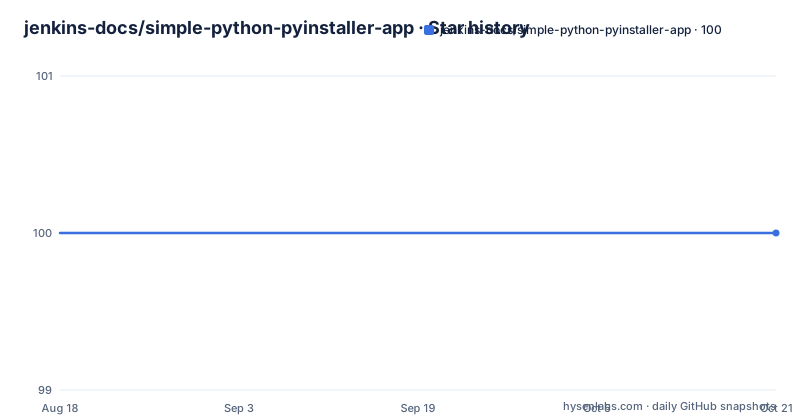
- jenkins-docs/simple-python-pyinstaller-app100 ★ · +0
| Repository | 2026-08-18 | 2026-10-21 |
|---|---|---|
| jenkins-docs/simple-python-pyinstaller-app | 100 | 100 |
0 Stars in the last 64 days, measured from the daily GitHub snapshot. Compare with other projects
Editorial analysis
What this repository actually is
This is not a library or a tool you install. It is a companion repository for a specific Jenkins tutorial. The README states that it exists for the 'Build a Python app with PyInstaller' page in the Jenkins User Documentation. The code is a command line program called add2vals. It takes two values and either adds them numerically or concatenates them as strings if at least one is a string. The logic lives in a calc library with a function called add2. There is also a pytest test suite that checks the function and writes results to a JUnit XML report. The whole point is to demonstrate a Jenkins pipeline that builds a standalone Linux executable with PyInstaller, stores it as an artifact, and lets you download and run it on a machine without Python.
The mechanism: from pytest to PyInstaller artifact
The delivery path is simple. Jenkins checks out the repository, runs pytest to validate the add2 function, saves the test results as JUnit XML, then invokes PyInstaller to produce a single executable for Linux. The executable is exposed as a Jenkins artifact so you can download it and run it at the command line. The README says the executable runs on Linux machines without Python, which is the key benefit of PyInstaller in this context. The Jenkinsfile in the jenkins directory is an example of the Pipeline you would write yourself during the tutorial. The repository does not include the actual Jenkinsfile content in the README, so you must look at the file to see the exact stages. The material gives no details on how the artifact is archived or which PyInstaller options are used, only that the conversion happens.
Getting it running: the tutorial path
To use this repository, you follow the tutorial at the Jenkins documentation link. The README gives no standalone commands. It says the jenkins directory contains an example Jenkinsfile that you will create during the tutorial. That means the intended workflow is: fork or clone the repository, open the tutorial, and build a Jenkins Pipeline that points at your fork. The Pipeline will run pytest and PyInstaller. You need a Jenkins instance with a Linux agent that has Python and PyInstaller installed. The tutorial likely covers installing those dependencies, but the README does not. The repository itself has no requirements.txt or setup.py visible in the material, so you must infer the dependency list from the tutorial. The unit tests are run with pytest, and the output is a JUnit XML report, which Jenkins can parse to show test results.
A genuine limitation: Linux only and no dependency management
The most obvious limitation is platform scope. The README explicitly says the PyInstaller conversion produces a standalone executable for Linux. There is no mention of Windows or macOS builds. If your target environment is not Linux, this repository gives you nothing. The second limitation is dependency management. The README does not mention a requirements file, a virtual environment, or pinned versions for pytest or PyInstaller. In a real project, an unpinned PyInstaller can break when a new version changes the packaging format. The tutorial's simplicity works for a demo, but it hides the complexity of reproducible builds. The third limitation is the lack of a license. The repository metadata shows 'unknown' for license, and the README does not state one. If you plan to copy the code or the Jenkinsfile into your own project, you have no legal clarity.
When this is the wrong tool
If you need a cross-platform installer, this repository is the wrong starting point. PyInstaller itself supports Windows and macOS, but this example does not show how to build for them. If you need a continuously deployed service or a web application, this is also wrong: the output is a command line tool, not a server. If you need to package a complex Python application with data files, hidden imports, or multiple entry points, this minimal example will not show you those PyInstaller options. The repository is a teaching aid, not a template for production packaging. Use it to learn the Jenkins Pipeline syntax and the basic PyInstaller flow, then adapt it heavily for real needs.
A real alternative: building with a Python package manager or container
Instead of using PyInstaller through Jenkins as shown here, you could build a self-contained executable using a tool like Nuitka, or you could skip standalone executables entirely and use a container image. A container approach would package your Python code with its dependencies into a Docker image. The Jenkins pipeline would build the image and push it to a registry. The difference is that PyInstaller produces a single binary that runs without Python, while a container still requires a container runtime on the target machine. For Linux servers, a container is often simpler to maintain because it preserves the Python environment exactly. PyInstaller is better for distributing a tool to end users who do not have Docker or Python. The tutorial's choice of PyInstaller makes sense for a command line utility, but the alternative approach solves the same problem with different trade-offs in portability and deployment complexity.
Maintenance and upgrade cost
The repository is archived? No, the metadata says 'Archived: no', but the last push is unknown and there are no recent releases. That suggests the repository is stable but not actively maintained. The maintenance cost is low because the code is tiny. The main risk is the tutorial itself: if Jenkins changes its Pipeline syntax or if PyInstaller changes its command line interface, the example may become outdated. The README does not mention a specific Jenkins version or a PyInstaller version, so you cannot pin those. The unit tests are minimal, covering only the add2 function, so a change in Python's string handling or a PyInstaller update would likely go unnoticed until you try to build. The license is unknown, which is a legal maintenance issue: you cannot safely redistribute the code without clarifying that. For a tutorial, you accept these costs. For a real project, you would add a requirements file, a license, and a versioning strategy.
Editorial conclusion
Adopt this repository if you are following the Jenkins 'Build a Python app with PyInstaller' tutorial and want a known-good starting point for a Linux-only executable. Do not adopt it for production packaging: it has no license, no versioning, no Windows or macOS support, and no dependency pinning. Before using it, verify that your Python version and PyInstaller version match the tutorial's assumptions, and check whether the JUnit XML output path in the Jenkinsfile matches your Jenkins configuration.
Frequently asked questions
What is PyInstaller used for?
In this project it is the delivery step. Packaging the add2vals tool through PyInstaller converts it into a standalone executable file for Linux, which you can download through Jenkins and execute on Linux machines without Python installed.
Is PyInstaller safe to use?
The repository says nothing about safety. What it describes is the packaging behaviour: a standalone executable for Linux, plus a JUnit XML report from pytest that Jenkins reads. Any assessment of the tool itself has to come from elsewhere.
Is there an alternative to PyInstaller?
The repository names no alternative. It covers a single path, delivering the command line tool add2vals as a standalone executable for Linux through PyInstaller, and says nothing about other packaging approaches.
How do I install PyInstaller for Python in this project?
The repository gives no install commands. It holds the application in sources/ and an example Jenkinsfile in jenkins/, and the tutorial page is where you create the pipeline yourself. The add2 function is tested with pytest and the results are saved to a JUnit XML report.
Official sources
Add this badge to your README
If you maintain this project, the badge below links readers to this analysis and shows its maintenance status from the daily GitHub snapshot. Paste the markdown into your README; add ?metric=license or ?metric=stars to the image URL for a different field.

[](https://hysenlabs.com/projects/jenkins-docs-simple-python-pyinstaller-app)Star history chart for your README
[](https://hysenlabs.com/projects/jenkins-docs-simple-python-pyinstaller-app)