OnnxOCR: local OCR and document processing with ONNXRuntime
基于PaddleOCR重构,并且脱离PaddlePaddle深度学习训练框架的轻量级OCR,推理速度超快 —— A lightweight OCR system based on PaddleOCR, decoupled from the PaddlePaddle deep learning training framework, with ultra-fast inference speed.
At a glance
- What is it?
- OnnxOCR runs PaddleOCR-derived models through ONNXRuntime without requiring PaddlePaddle training code. It covers general OCR and adds optional license plate, table, layout, Markdown, and Qwen extraction workflows.
- Who is it for?
- OnnxOCR fits teams that already have ONNX models or want PaddleOCR-style inference without a PaddlePaddle training runtime, especially for local document-processing pipelines. It is a poor fit for projects that require the included models alone to cover every optional feature, because several capabilities require separate downloads and feature-specific tests.
- Can I use it commercially?
- Yes. Apache-2.0 is a permissive licence: you can use, modify and sell software built on it, as long as you keep its copyright and licence notices.
- Is it still maintained?
- Yes. The repository last received commits 149 days ago.
- What is it written in?
- Mainly Python, according to GitHub's language statistics.
Answers come from the project's GitHub data, last synced on November 7, 2026, and from our analysis. They are not legal advice.
Star history
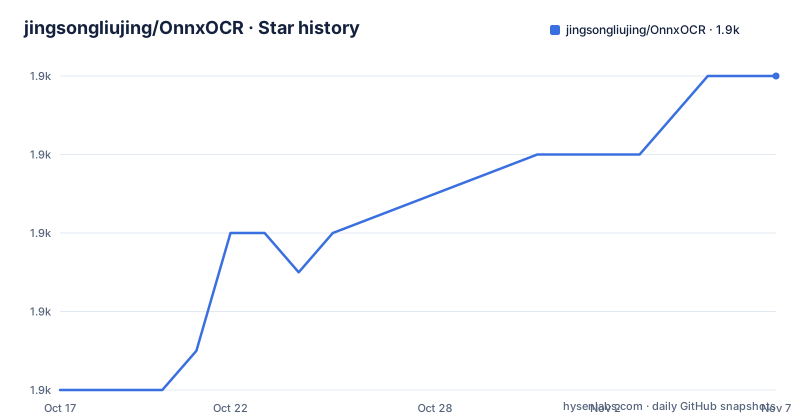
- jingsongliujing/OnnxOCR1,884 ★ · +8
| Repository | 2026-10-17 | 2026-11-07 |
|---|---|---|
| jingsongliujing/OnnxOCR | 1.9k | 1.9k |
8 Stars in the last 21 days, measured from the daily GitHub snapshot. Compare with other projects
Editorial analysis
Why OnnxOCR removes the PaddlePaddle training dependency
OnnxOCR targets developers who need OCR inference in Python applications but do not want the application stack tied to PaddlePaddle, the framework used to train the originating PaddleOCR models. The repository describes itself as based on PaddleOCR and decoupled from PaddlePaddle deep learning training. That distinction matters for deployment planning: the models remain PaddleOCR-derived ONNX files, while application code executes them through ONNXRuntime.
The intended users include engineers building OCR services, local document tools, license plate workflows, and structured extraction pipelines. The documented PP-OCRv5 general OCR model covers Simplified Chinese, Traditional Chinese, Chinese Pinyin, English, and Japanese. The package also exposes narrower workloads for Chinese and English layout analysis, tables, license plates, and Markdown-oriented document processing.
This is not a model training framework. The README provides no training commands, dataset preparation instructions, or PaddlePaddle training examples. The project should therefore be evaluated as an inference and application layer, not as a replacement for PaddleOCR training. The latest documented release, v3.0.0 dated 2026-05-27, also added a separate Qwen3.5-2B extraction workflow, extending the project beyond recognition into field extraction from OCR output.
The ONNXRuntime session path across OnnxOCR models
The central technical choice is a unified inference engine. The README states that all ONNX models create ONNXRuntime sessions through `onnxocr/inference_engine.py`. That gives different recognition and analysis components a common runtime boundary. It also leaves a specific extension point for vendors: the documentation says GPU and NPU providers can be adapted by modifying that unified engine.
The general OCR path accepts an image and produces recognized text associated with detection results. The repository includes `test_ocr.py` for this broad entry point and `tests/test_general_ocr.py` for the bundled PP-OCRv5 path. Optional feature tests show that the package is organized around separate workloads rather than one indivisible OCR function. License plate recognition has its own test, as do tables, layout analysis, and layout Markdown generation.
The Qwen workflow adds a second data path. OnnxOCR first recognizes full-page text and text boxes, then passes the OCR text into a locally stored Qwen3.5-2B ONNX model. The extraction stage can return structured JSON or fields defined by an application template. The end-to-end example described in the release notes is an identity-card workflow: OCR supplies the text, and the language model extracts fields. This separation allows an engineer to replace the extraction template without changing recognition code.
The repository describes the runtime as supporting ARM and x86 devices. It does not provide measured latency, memory use, or device-specific provider configuration in the available documentation, so architecture compatibility should not be treated as proof of equal performance.
Installing OnnxOCR and running its bundled OCR test
The README specifies Python 3.8 or later and installation from `requirements.txt`. The first command uses the Tsinghua PyPI mirror as shown in the project documentation.
pip install -i https://pypi.tuna.tsinghua.edu.cn/simple -r requirements.txtThe dependency file requires `onnxruntime>=1.26.0` and pins `numpy<2.0.0`. It also includes Flask and Gunicorn for the service layer, OpenCV packages for image work, model-hosting clients, and document libraries including `pymupdf`, `pdf2image`, `pypdfium2`, `pypdf`, `pdfminer.six`, and `pdftext`. These dependencies make the general install broader than an ONNX inference-only stack.
For a first local use, run the repository's main OCR example after installation:
python test_ocr.pyThe README says this script runs general OCR by default. Optional examples are present but commented out, which prevents the default path from silently selecting features whose model files may not have been downloaded. The bundled PP-OCRv5 general OCR files are the repository's documented default model set.
A feature-focused check is also provided:
python tests/test_general_ocr.pyThis is the first useful validation for a general OCR adoption. Optional feature tests should be attempted only after their corresponding models are available. The README describes output files and visual results, but the truncated documentation does not specify a stable command-line output schema, so application code should use the package API rather than assume undocumented filenames.
Downloading optional OnnxOCR models before using extra endpoints
A checkout does not contain every model required by the advertised feature set. The README says license plate, table, layout, orientation, and RapidDoc Markdown models are large and are downloaded on demand. International users are directed to the HuggingFace repository `jingsongliu/onnxocr_model`, while the default model downloader uses ModelScope.
The documented HuggingFace download command is:
python scripts/download_models.py --source huggingfaceThe script copies a repository `models/` directory into local `onnxocr/models/` and checks required optional files, including `onnxocr/models/rapid_doc/layout/pp_doclayoutv2.onnx`. Users in mainland China are directed to run the command without that source option:
python scripts/download_models.pyThat command draws from the ModelScope repository `supersong/onnxocr_model`. An application can also use `huggingface_hub.snapshot_download` directly, as shown by the README:
from huggingface_hub import snapshot_download

model_dir = snapshot_download("jingsongliu/onnxocr_model")
Before starting downloads, the project provides a local verification mode:
python scripts/download_models.py --check-onlyThis check is particularly relevant for container images and deployment automation. Feature names in the package do not imply that their model artifacts are bundled. The added `/plate`, `/table`, `/layout`, and `/layout_markdown` HTTP endpoints also require the corresponding models and service code to be present.
Running OnnxOCR through its Flask container service
The repository includes `app-service.py`, `webui.py`, templates, static assets, Gunicorn, and Flask. Its `Dockerfile` provides the clearest documented service deployment path. The image uses `python:3.10-slim`, installs FFmpeg and several shared libraries, copies the repository into `/app`, and exposes port 5005.
The image's startup command is documented directly in the `Dockerfile`:
CMD ["python", "app-service.py"]The container sets `ONNXOCR_PORT=5005` and exposes the same port. A host port mapping still has to be supplied when the container is started, and the README excerpt does not provide a complete `docker run` example. Likewise, it does not enumerate every request body, response schema, authentication rule, or endpoint parameter for `/plate`, `/table`, `/layout`, and `/layout_markdown`.
This makes the container useful as an execution environment but leaves API integration dependent on the repository's route definitions. The service should not be exposed as a finished public endpoint based on this excerpt alone. In particular, the available documentation does not establish an authentication mechanism, request-size limit, concurrency setting, or production readiness beyond Gunicorn being present in the dependency list.
Qwen3.5-2B extraction as a separate OnnxOCR model boundary
The v3.0.0 workflow separates OCR from local information extraction. Qwen3.5-2B ONNX files come from a dedicated ModelScope repository and are stored under `onnxocr/models/qwen_2b`. Download the documented quantized variant and verify it with the project script:
python examples/qwen35_2b_onnx.py download --variant q4
python examples/qwen35_2b_onnx.py verify
The README provides two smoke tests. The first generates text from a prompt:
python examples/qwen35_2b_onnx.py run-python --prompt "Hello, introduce yourself briefly."The second combines an image with a prompt:
python examples/qwen35_2b_onnx.py run-python --image onnxocr/models/qwen_2b/images/demo.jpeg --prompt "Describe this image in one short sentence."Package-level use creates `Qwen35ONNX` with a local model directory. Its `generate` method returns generated text and a stop state:
from onnxocr.qwen35_2b import Qwen35ONNX

qwen = Qwen35ONNX("onnxocr/models/qwen_2b")
text, stopped = qwen.generate("Extract key fields from this OCR text: ...")
print(text)
The important constraint is that the base package does not include vertical-scene prompts. Applications must define their own `ExtractionTemplate` fields and rules. That is a clear division of responsibility, but it also means extraction quality depends on both OCR output and the application's prompt and validation design. The README does not document rollback or an automatic compatibility policy between auxiliary model versions.
OnnxOCR licensing, maintenance, and adoption limits
OnnxOCR is distributed under Apache-2.0. That is the repository's stated license, but adopting it still requires reviewing the license text for the project itself and checking the terms attached separately to downloaded models, sample images, and model-hosting repositories. This article does not provide legal advice or infer rights beyond the declared license.
The repository is not archived, and the last push was on 2026-06-11. The latest listed release is v3.0.0, dated 2026-05-27. These facts indicate recent project activity, but they do not document a long-term compatibility policy, a stable public API commitment, or the cost of migrating between model generations.
OnnxOCR is the wrong tool when its optional model downloads are unacceptable or when the project must remain limited to the bundled general OCR files. It is also a weak choice for developers seeking model training support. The documented project is an ONNX inference and application layer, with additional document workflows. The dependencies include `numpy<2.0.0`, which can affect integration with an existing Python environment that requires NumPy 2.x. The service documentation also leaves security, API validation, and production deployment settings unstated in the available excerpt.
For teams already operating ONNXRuntime, the unified `onnxocr/inference_engine.py` boundary is the central architectural reason to consider adoption. For teams beginning with OCR research, model training, or accuracy evaluation, PaddleOCR offers a broader documented context, while OnnxOCR concentrates on deployment through ONNX models.
Editorial conclusion
OnnxOCR fits teams that already have ONNX models or want PaddleOCR-style inference without a PaddlePaddle training runtime, especially for local document-processing pipelines. It is a poor fit for projects that require the included models alone to cover every optional feature, because several capabilities require separate downloads and feature-specific tests. Before adoption, check the required model files, runtime compatibility for the target CPU architecture, and the documented test for the exact OCR or document workflow. For general OCR, the strongest evidence is that `tests/test_general_ocr.py` uses bundled PP-OCRv5 files; optional workloads still depend on files fetched from HuggingFace or ModelScope.
Frequently asked questions
What is OnnxOCR used for?
OnnxOCR provides ONNXRuntime-based OCR inference in Python. It supports general multilingual OCR plus optional license plate recognition, table recognition, layout analysis, document Markdown export, and Qwen-based field extraction.
How do I install and run OnnxOCR?
Install `requirements.txt` with Python 3.8 or later, then run `python test_ocr.py` for the default general OCR example. Optional features require downloading their separate model files first.
Does OnnxOCR require PaddlePaddle?
The project is based on PaddleOCR-derived models but decouples inference from the PaddlePaddle deep learning training framework. Its models run through ONNXRuntime sessions created in `onnxocr/inference_engine.py`.
Are all OnnxOCR models included in the repository?
No. The repository includes the PP-OCRv5 general OCR files required by `tests/test_general_ocr.py`, while models for license plates, tables, layout analysis, orientation, and RapidDoc Markdown are downloaded on demand.
Can OnnxOCR extract structured fields after OCR?
Yes, but the extraction model is separate. OnnxOCR can pass recognized text to a local Qwen3.5-2B ONNX model, while the application supplies an `ExtractionTemplate` containing scenario-specific fields and rules.
Official sources
Add this badge to your README
If you maintain this project, the badge below links readers to this analysis and shows its maintenance status from the daily GitHub snapshot. Paste the markdown into your README; add ?metric=license or ?metric=stars to the image URL for a different field.

[](https://hysenlabs.com/projects/jingsongliujing-onnxocr)Star history chart for your README
[](https://hysenlabs.com/projects/jingsongliujing-onnxocr)Was this useful?