Home-ops as a learning lab: what joryirving/home-ops shows about Flux, Talos, and GitOps at home
Wife tolerated HomeOps driven by Kubernetes, and Gitops via Flux.
At a glance
- What is it?
- A single-person Kubernetes homelab run as a public monorepo, with Flux, Renovate, and GitHub Actions. The repo is a teaching example more than a turnkey template, and its choices reveal real trade-offs.
- Who is it for?
- Adopt this repo if you want a concrete, working example of Flux kustomization layering, Talos cluster separation, and Renovate-driven updates for a single-operator homelab. Do not adopt it if you need a reproducible template or multi-tenant governance, because it is a personal setup with WTFPL licensing and no release process.
- Can I use it commercially?
- Yes. WTFPL is a permissive licence: you can use, modify and sell software built on it, as long as you keep its copyright and licence notices.
- Is it still maintained?
- Yes. The repository received new commits within the last day.
- What is it written in?
- Mainly YAML, according to GitHub's language statistics.
Answers come from the project's GitHub data, last synced on October 22, 2026, and from our analysis. They are not legal advice.
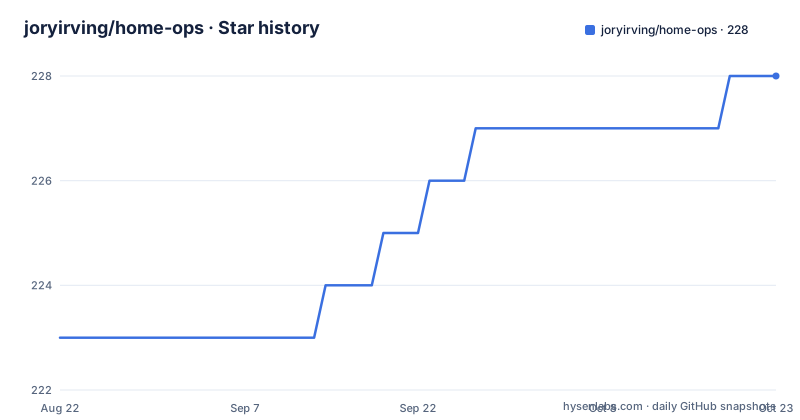
Star history
- joryirving/home-ops228 ★ · +5
| Repository | 2026-08-22 | 2026-10-22 |
|---|---|---|
| joryirving/home-ops | 223 | 228 |
5 Stars in the last 61 days, measured from the daily GitHub snapshot. Compare with other projects
Editorial analysis
What this repository actually is
joryirving/home-ops is a public monorepo for one person's home Kubernetes clusters. The README describes three clusters: a test cluster, a low-power utility cluster, and a semi-hyper-converged cluster where workloads and block storage share node resources. The stated purpose is to learn Kubernetes while practicing GitOps. That framing matters. This is not a product or a framework. It is a living configuration dump, and the value is in reading how the pieces fit, not in copying them wholesale. The author mentions a separate template at onedr0p/cluster-template for people who want to follow along, which suggests this repo is the advanced version of that template, with more moving parts and less hand-holding.
The Flux directory pattern: kustomization as a discovery mechanism
The core GitOps mechanism is described precisely in the README. Flux recursively searches the kubernetes/${cluster}/apps folder until it finds the top-level kustomization.yaml per directory, then applies everything listed in it. That top-level kustomization usually contains only a namespace resource and one or more Flux kustomizations, often named ks.yaml. Under those kustomizations sit HelmRelease resources and other application definitions. This is a layered approach: one kustomization per namespace or app group, with Flux as the controller that walks the tree. The directory layout shows kubernetes/apps/base for shared configuration, kubernetes/apps/main and kubernetes/apps/utility for cluster-specific overlays, and kubernetes/components for reusable parts. This is a clean separation, but it only works if you follow the same naming and nesting conventions. The README does not document the exact schema for ks.yaml, so you would need to inspect the files in the repo to replicate it.
Cloud dependencies and the chicken-egg problem
The README is explicit about why the author uses cloud services: to avoid chicken-egg scenarios and to keep critical services running even when the cluster is offline. The listed dependencies include 1Password for secrets, Cloudflare for DNS and WAF, GitHub for hosting and CI, and Healthchecks.io for monitoring. The author also runs a small OVH VPS called Columbina that fronts public ingress via Towonel and runs a standalone Gatus instance as a buddy monitor. That VPS watches the clusters' status pages and receives Alertmanager heartbeats, so it can alert to Discord if a cluster goes dark. In return, the main cluster's Gatus watches Columbina. This mutual monitoring is a thoughtful pattern for a homelab, but it adds an external dependency that you must maintain separately. The README acknowledges that hosting a cloud Kubernetes cluster would be an alternative but rejects it as too much effort. That is a fair trade-off for a single operator, but it means the setup is not fully self-contained.
Getting it running: commands and config keys from the README
The README does not provide a quickstart command. It points to onedr0p/cluster-template as a starting point, and the core tools are named: Talos for cluster deployment, Flux for GitOps, Renovate for dependency updates, and GitHub Actions for CI. To follow along, you would clone the repo, adjust the kubernetes/clusters/main and kubernetes/clusters/utility directories to match your own cluster names, and ensure the kustomization.yaml files point to the correct paths. The README mentions using tofu-controller as an additional Flux component to run Terraform from within Kubernetes, and external-secrets with 1Password Connect to inject secrets. There is no explicit command like flux bootstrap or talosctl cluster create in the README, so you need to infer the workflow from the tool names. For a working example, the repo itself is the documentation, and you would need to inspect the YAML files directly.
Limitations: where this setup is the wrong tool
This repository is a single-person setup, and that shows in several ways. First, there is no release process or versioning; the default branch is main and there are no recent releases listed. That makes it hard to track changes over time or roll back to a known state. Second, the README is sparse on failure modes. It does not explain what happens when a HelmRelease fails to reconcile, how to debug a stuck Flux kustomization, or how to recover from a bad Renovate PR that gets merged. Third, the semi-hyper-converged cluster, where workloads and block storage share node resources, is a deliberate trade-off that can lead to resource contention. The author does not discuss capacity planning or eviction policies. If you are looking for a battle-tested production pattern, this is not it. It is a learning environment, and the author says so plainly.
Alternatives and how they differ
The most direct alternative is onedr0p/cluster-template, which the README itself recommends. That template is designed to be copied and adapted, with a more structured layout and presumably more documentation. The difference is in intent: home-ops is a record of what one person did, while cluster-template is a starting point for others. Another alternative is to skip Flux and use a simpler tool like Ansible or a shell script to apply manifests, but that loses the GitOps reconciliation loop that Flux provides. A third alternative is to use Argo CD instead of Flux. Argo CD uses a different model: it polls the Git repository or uses a webhook, and it has a UI and an Application CRD that defines the source and destination. Flux, as used here, relies on kustomization files and a controller that watches the cluster. The choice between them often comes down to whether you prefer Flux's kustomize-first approach or Argo CD's application-centric model. The README does not compare them, but the directory structure shows a strong commitment to kustomize overlays, which is Flux's natural fit.
Maintenance, upgrades, and license implications
The README describes Renovate as watching the entire repository for dependency updates and creating pull requests automatically. When those PRs are merged, Flux applies the changes. This is a continuous maintenance loop that requires regular review of PRs, because a bad update can break the cluster. The author also uses self-hosted GitHub Actions runners via actions-runner-controller, which means CI jobs run inside the cluster. That adds a maintenance burden: you must keep the runner images updated and handle runner pod restarts. The license is WTFPL, which is a permissive license that allows you to do almost anything with the code, including copying it into a private repo. However, the README includes no warranty or support statement, so you are on your own. The lack of releases means you cannot rely on semantic versioning for the repository as a whole, though individual components like Flux and Talos have their own release cycles that Renovate tracks.
Editorial conclusion
Adopt this repo if you want a concrete, working example of Flux kustomization layering, Talos cluster separation, and Renovate-driven updates for a single-operator homelab. Do not adopt it if you need a reproducible template or multi-tenant governance, because it is a personal setup with WTFPL licensing and no release process. Before using any part, verify the current Flux and Talos versions, check the kustomization paths against your own cluster names, and confirm that the 1Password Connect and Cloudflare dependencies match your own secret and DNS setup.
Frequently asked questions
How many Kubernetes clusters does joryirving/home-ops manage?
Three Talos clusters. One is a test cluster, one is a low-power utility cluster running important services, and the third is a semi-hyper-converged cluster where workloads and block storage share the same node resources, with a separate ZFS NAS for NFS and SMB shares, bulk storage and backups.
How does Flux decide what to apply in home-ops?
Flux watches the kubernetes folder and applies kubernetes/apps/${cluster}. Each namespace directory has a kustomization.yaml that pulls in the components/namespace component and lists one Flux Kustomization per app, each pointing at that app's manifests under kubernetes/apps/base/<namespace>/<app>.
Why does the home-ops setup need an OVH VPS?
Towonel, run through a towonel-operator, fronts public ingress through a small OVH VPS, so the address the internet sees is a rented one. The same VPS also runs a standalone Gatus as a buddy monitor that watches the clusters and alerts to Discord.
How are updates handled in the home-ops repository?
Renovate watches the entire repository for dependency updates and opens a pull request for each one. When a pull request is merged, Flux applies the change to the cluster, so every update passes through review and a commit.
Official sources
Add this badge to your README
If you maintain this project, the badge below links readers to this analysis and shows its maintenance status from the daily GitHub snapshot. Paste the markdown into your README; add ?metric=license or ?metric=stars to the image URL for a different field.

[](https://hysenlabs.com/projects/joryirving-home-ops)Star history chart for your README
[](https://hysenlabs.com/projects/joryirving-home-ops)