argcomplete for Python argparse: Installation and dynamic shell completion
Python and tab completion, better together.
At a glance
- What is it?
- argcomplete adds Bash and zsh tab completion to Python applications built with argparse, including completions generated at runtime. It suits CLI authors who need dynamic values, but requires source-level integration and careful placement of the completion hook.
- Who is it for?
- Python CLI maintainers should consider argcomplete when Bash or zsh completion and runtime-generated argument values matter. Teams using another parser, expecting broad shell independence, or unable to modify the application entry point should look elsewhere.
- Can I use it commercially?
- Yes. Apache-2.0 is a permissive licence: you can use, modify and sell software built on it, as long as you keep its copyright and licence notices.
- Is it still maintained?
- Yes. The repository last received commits 4 days ago.
- What is it written in?
- Mainly Python, according to GitHub's language statistics.
Answers come from the project's GitHub data, last synced on October 23, 2026, and from our analysis. They are not legal advice.
Star history
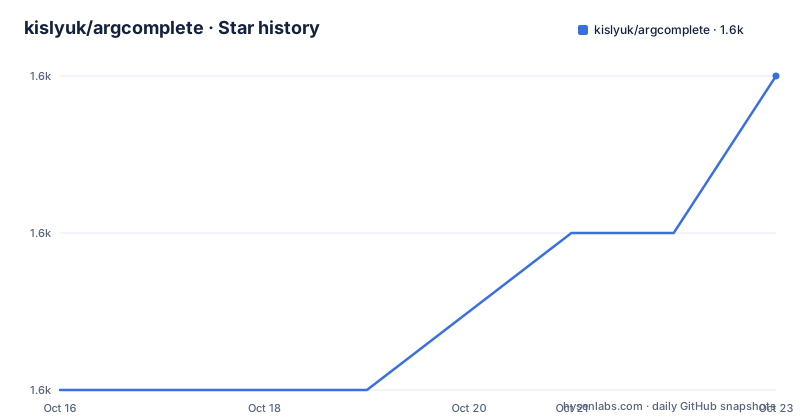
- kislyuk/argcomplete1,587 ★ · +2
| Repository | 2026-10-16 | 2026-10-23 |
|---|---|---|
| kislyuk/argcomplete | 1.6k | 1.6k |
2 Stars in the last 7 days, measured from the daily GitHub snapshot. Compare with other projects
Editorial analysis
Why argcomplete targets argparse-based Python CLIs
argcomplete solves a specific interface problem: an argparse application can define many options and subparsers without providing shell completion for every possible command-line position. It is intended for Python developers who want users to complete option names, argument values, and dynamic resources while working in Bash or zsh. The library is most relevant when a command has enough choices that remembering flags and valid values becomes burdensome.
The project makes two explicit assumptions. The user's shell is Bash or zsh, although the documentation says that limited support exists for other shells, and the application uses Python's argparse module to define its command-line interface. This is not a general terminal user interface library that attaches completion to every Python program. It is an argparse integration layer plus shell hooks that invoke the application through a special completion path.
The README also identifies a use case beyond static option lists. A completer can query network resources or derive values from the command line already entered, allowing suggestions to depend on another argument. For example, a member argument can be completed from organization data once the organization has been parsed. This makes argcomplete relevant to commands with dependent inputs, although network latency becomes part of the shell's tab-completion experience.
The package supports Python 3.10 and later according to pyproject.toml. It describes support for Python 3.10 through 3.14, CPython, and PyPy. The declared license is Apache Software License, while the repository identifies the project as archived no and records its last push on 2026-08-17. Releases v3.7.0, v3.7.1, and v3.7.2 were published between June and August 2026, so the repository has current release activity.
How argcomplete executes a completion request
argcomplete changes the normal execution path of the Python command during a tab request. The application constructs its ArgumentParser, calls argcomplete.autocomplete(parser), and only then calls parser.parse_args(). The autocomplete method checks for an environment variable installed by the shell completion hook. When that variable is absent during an ordinary command invocation, the method returns and normal argument parsing continues.
When the hook is present, argcomplete asks the parser's actions for possible completions, writes them to file descriptor 8 by default, and exits through its configured exit method. The README states that os._exit is the default. This early exit is what prevents the application from continuing into its ordinary command-line workflow after it has answered the shell. It also explains why source integration is required rather than merely installing the package.
The parser must already be complete before autocomplete(parser) runs. Options, subparsers, choices, and associated actions therefore need to exist at that point. The README warns that the application runs whenever the user presses the tab key. Any initialization or other side effects before the hook can execute during completion requests, even though output sent to stdout or stderr is suppressed. This is the central engineering constraint: completion is implemented by launching the command rather than by consulting a separate static completion database.
Startup cost matters for the same reason. If a command performs slow work before reaching argcomplete.autocomplete(parser), tab completion will be slow. The recommended arrangement is to defer large imports or other initialization until after the parser is constructed and the autocomplete hook has had a chance to respond.
Installing argcomplete and enabling the first shell hook
Install the package from Python's package index and run the global activation command. The documentation then says to start a new shell so the updated shell environment is loaded.
pip install argcomplete
activate-global-python-argcomplete
Global activation is convenient when the developer does not want to register every argparse application separately. It is not a substitute for adding the marker and hook to the Python source. Both installation paths still depend on the application calling argcomplete.autocomplete(parser) at the proper location.
For an application file, add the `PYTHON_ARGCOMPLETE_OK` marker near the beginning and call argcomplete after parser construction. If the executable is declared through a `[project.scripts]` entry point, the marker must appear at the beginning of the file containing that entry point.
#!/usr/bin/env python
# PYTHON_ARGCOMPLETE_OK
import argcomplete, argparse
parser = argparse.ArgumentParser()
...
argcomplete.autocomplete(parser)
args = parser.parse_args()
The registration command uses command substitution, and its quotes are significant. This form enables completion for one named executable rather than invoking the global activation command.
eval "$(register-python-argcomplete my-python-app)"After registration, the user should press the tab key in Bash or zsh after typing part of a registered option or argument. The README does not define a separate server process or background daemon. Completion is a shell hook that launches the registered Python program.
Static, dynamic, and readline-style completion sources
argcomplete can complete values declared through argparse `choices` without a separate completer. When no custom completer exists for an action with choices, the available choice strings become completion candidates. This is the simplest path, but `choices` also appears in the default `--help` output. Developers who want a generic display label in help output can set `metavar` while retaining the hidden completion values.
from argcomplete.completers import ChoicesCompleter

parser.add_argument("--protocol", choices=('http', 'https', 'ssh', 'rsync', 'wss'))
parser.add_argument("--proto").completer=ChoicesCompleter(('http', 'https', 'ssh', 'rsync', 'wss'))
The README states that these forms are equivalent for completion purposes. The difference is visibility in argparse's normal help. A custom completer assigned to an action can return either an iterable of strings or a mapping from strings to descriptions. zsh can display those descriptions as context help beside the candidates.
Callable completers receive `prefix`, `action`, `parser`, and `parsed_args`. The prefix can reduce the amount of work needed for dynamic completion, while `parsed_args` makes earlier options available. Built-in completers cover cases such as environment variables, and the documentation shows `EnvironCompleter` assigned to the `completer` attribute of an argument action.
from argcomplete.completers import EnvironCompleter

parser = argparse.ArgumentParser()
parser.add_argument("--env-var1").completer = EnvironCompleter
parser.add_argument("--env-var2").completer = EnvironCompleter
argcomplete.autocomplete(parser)
The documentation also describes readline-style completers. That gives application authors more than one completion interface, but callable completers are presented as the simpler option. Either approach still runs inside the application process selected by the shell hook.
Performance, side effects, and the boundary against argparse choices
The principal failure mode is slow application startup before the completion hook. Because argcomplete runs the program to collect candidates, network clients, database setup, plugin loading, and other expensive imports can all delay the shell response if they occur too early. Output suppression does not remove those costs. It only prevents stdout and stderr from appearing as part of the completion process.
Another limitation is the required source marker. argcomplete is not appropriate for an arbitrary executable that uses a non-argparse parser and does not call `argcomplete.autocomplete(parser)`. The documentation also limits the primary shell support to Bash and zsh. Although it mentions limited support for other shells, it does not present the package as a shell-neutral completion engine.
The closest built-in alternative is argparse's own `choices` handling without argcomplete. That approach is simpler for fixed candidate sets because no completion hook or shell registration is required, and it still validates arguments during normal parsing. Argcomplete's added value is extending that model with callable completers, descriptions for zsh, prefix-aware filtering, and access to `parsed_args`. If all values are fixed and shell completion is not required, argparse choices may be the more appropriate tool.
Dynamic completion introduces another boundary. A completer may perform a network request, as the README's GitHub organization member example does. The library does not promise cached results, request cancellation, a timeout policy, or offline completion. Those behaviors would need to be designed and verified inside the application completer. Without a local fallback, a failed request can leave the shell with no useful candidates.
License, release maintenance, and upgrade work
argcomplete is distributed under the Apache Software License. That designation permits use and modification under the license's stated terms, but teams still need to review the repository's LICENSE.rst and NOTICE files for their own compliance and attribution obligations. The README does not claim that the completion behavior carries no operational responsibilities, and license compatibility does not remove the need to inspect dependencies separately.
The repository is not archived. Its last push was on 2026-08-17, and three recent releases were published in 2026: v3.7.0 on June 30, v3.7.1 on August 4, and v3.7.2 on August 6. These facts indicate recent project activity without establishing compatibility for any particular application.
An upgrade can affect both Python dependencies and user shell environments. pyproject.toml requires Python 3.10 or later, so an upgrade may raise the minimum Python version for older deployments. Applications should also check that `argcomplete.autocomplete(parser)` still runs before `parse_args()`, that custom completers still satisfy the documented callable or readline-style interface, and that their registration or global activation remains valid in the target shell.
The repository's Makefile provides developer commands for tests, linting, documentation, and building distributions. Its test target runs the test suite through coverage, while lint uses Ruff and mypy. These commands describe how maintainers work on the project, but the README does not provide a formal upgrade procedure for applications embedding argcomplete.
Editorial conclusion
Python CLI maintainers should consider argcomplete when Bash or zsh completion and runtime-generated argument values matter. Teams using another parser, expecting broad shell independence, or unable to modify the application entry point should look elsewhere. Before adoption, verify Python 3.10 or later, inspect startup work performed before autocomplete(parser), and test the intended shell registration method.
Frequently asked questions
How do I install argcomplete and enable completion for a Python application?
Run `pip install argcomplete` and `activate-global-python-argcomplete`, then start a new shell. The application must also contain the `PYTHON_ARGCOMPLETE_OK` marker and call `argcomplete.autocomplete(parser)` before `parse_args()`.
Where should argcomplete.autocomplete(parser) be called?
Call it after the ArgumentParser and its options or subparsers have been constructed, but before `ArgumentParser.parse_args()` runs. Calling it early also reduces the startup work repeated during a tab-completion request.
Does argcomplete support dynamic completions in Bash and zsh?
Yes. Custom completers can use the current prefix, argparse actions, the parser, and already parsed arguments. The documentation also describes readline-style completers and description mappings for context help in zsh.
Official sources
Add this badge to your README
If you maintain this project, the badge below links readers to this analysis and shows its maintenance status from the daily GitHub snapshot. Paste the markdown into your README; add ?metric=license or ?metric=stars to the image URL for a different field.

[](https://hysenlabs.com/projects/kislyuk-argcomplete)Star history chart for your README
[](https://hysenlabs.com/projects/kislyuk-argcomplete)Was this useful?