ComfyUI-AnimateDiff-Evolved: AnimateDiff with Context Windows and Evolved Sampling
Improved AnimateDiff for ComfyUI and Advanced Sampling Support
At a glance
- What is it?
- ComfyUI-AnimateDiff-Evolved is the maintained AnimateDiff integration for ComfyUI, adding sliding context windows for long animations, schedulable context options, and a sampling layer that works outside AnimateDiff. It is for ComfyUI users who have already outgrown a single 16-frame generation.
- Who is it for?
- Adopt it if you already run ComfyUI and need animations longer than a single motion module window, or if you want context options and noise scheduling exposed as nodes rather than hardcoded. Do not adopt it if you want a standalone CLI, a hosted API, or a pipeline that does not depend on ComfyUI's graph model; the project is an extension, not an application.
- Can I use it commercially?
- Yes. Apache-2.0 is a permissive licence: you can use, modify and sell software built on it, as long as you keep its copyright and licence notices.
- Is it still maintained?
- Yes. The repository last received commits 118 days ago.
- What is it written in?
- Mainly Python, according to GitHub's language statistics.
Answers come from the project's GitHub data, last synced on November 23, 2026, and from our analysis. They are not legal advice.
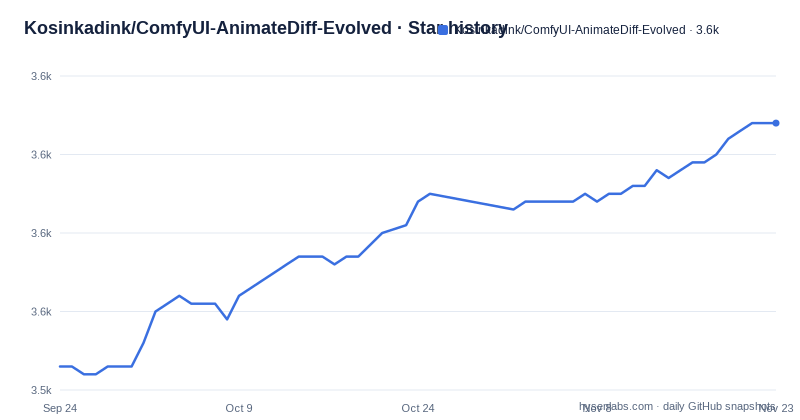
Star history
- Kosinkadink/ComfyUI-AnimateDiff-Evolved3,574 ★ · +31
| Repository | 2026-09-24 | 2026-11-23 |
|---|---|---|
| Kosinkadink/ComfyUI-AnimateDiff-Evolved | 3.5k | 3.6k |
31 Stars in the last 60 days, measured from the daily GitHub snapshot. Compare with other projects
Editorial analysis
What ComfyUI-AnimateDiff-Evolved adds to plain AnimateDiff
AnimateDiff itself is a motion module that sits on top of a Stable Diffusion checkpoint and teaches it to produce a short, temporally consistent clip. The upstream repository documents the core method; this project is the ComfyUI integration, and it goes further than wiring the original nodes into a graph. Two things separate it from a thin wrapper.
The first is length. A motion module has a fixed window of frames it can reason about at once. This project exposes Context Options, described in the README as "infinite animation length support via sliding context windows across whole unet (Context Options) and/or within motion module (View Options)". In practice that means you can generate far more frames than a single window holds by having the sampler walk a window across the sequence, with the context options deciding how much overlap and which latents the window covers. The second is Evolved Sampling, which the README calls "advanced sampling options dubbed Evolved Sampling usable outside of AnimateDiff". That is a meaningful boundary: the sampling machinery is not welded to the motion module, so noise types, noise layers and seed offsets are available to ordinary ComfyUI workflows too.
The intended user is someone already comfortable with ComfyUI node graphs who wants motion control at the sampler level rather than at the prompt level. If you have never built a ComfyUI workflow, this is not the place to start.
How context windows and Evolved Sampling actually work
The mechanism is a window over the latent sequence. Instead of denoising all frames at once, the sampler processes a subset, then advances the window, carrying information across the boundary so that adjacent windows stay consistent. Context Options control that window at the unet level; View Options control it inside the motion module. Because both exist, you can have a wide unet context and a narrower motion context, which is how the project supports motion modules whose temporal attention is limited even when the rest of the network is not.
Context Options are also schedulable, which the README lists as "Scheduling Context Options to change across different points in the sampling process". That matters because early steps and late steps want different things: a wide window early keeps global composition coherent, a narrower one late can sharpen local motion. Rather than a single global setting, the schedule lets the window change as the sampler progresses.
Evolved Sampling sits alongside this. Sample Settings and related nodes expose Noise Types, Noise Layers, and seed_override, seed_offset and batch_offset. Those are the knobs that let you vary noise across a batch or across frames without regenerating the whole graph. FreeInit appears under iteration opts and FreeNoise is a value in SampleSettings' noise_type dropdown, so both are configuration rather than separate code paths.
Motion control is layered on top through Scale and Effect multival inputs, which the README says control "motion amount and motion model influence on generation" and can be a float, a list of floats, or masks. A mask here means motion influence varies spatially across the frame, not just numerically across time.
Installing ComfyUI-AnimateDiff-Evolved and running a first clip
There are two installation paths. Through ComfyUI Manager you search for the display name and check the author, because the README warns to "be sure the author is Kosinkadink". Manually, you clone into custom_nodes. The repository has no runtime dependencies of its own; pyproject.toml lists an empty dependencies array, so the install is the clone plus ComfyUI's own environment.
cd ComfyUI/custom_nodes
git clone https://github.com/Kosinkadink/ComfyUI-AnimateDiff-Evolved
After restarting ComfyUI, the nodes appear in the node menu. Nothing will generate yet, because a motion module is required. The README states you need at least one, and that different modules produce different results. Download one of mm_sd_v14, mm_sd_v15, mm_sd_v15_v2 or v3_sd15_mm from the linked HuggingFace, Google Drive or CivitAI sources, then place it in either of the two supported directories.
# either location works; you can rename the file
ComfyUI/custom_nodes/ComfyUI-AnimateDiff-Evolved/models
ComfyUI/models/animatediff_models
If you keep models somewhere else, the README points at ComfyUI's extra_model_paths.yaml, where the folder id for motion models is animatediff_models and the id for motion LoRAs is animatediff_motion_lora. That is the supported way to avoid duplicating large files.
For a first real generation, load a workflow that uses the AnimateDiff loader node with your motion module, connect it to a standard checkpoint loader and a KSampler, and sample. The README's own guidance is that anything which works for normal image generation "(probably) will work for AnimateDiff generations", and it explicitly lists latent upscales, stacked ControlNets and masked ControlNet conditioning as things to try. The safest first move is to reproduce a plain text-to-video clip before adding context options, so that when something looks wrong you know which layer introduced it. Workflows with samples are included in the repository under workflow_examples, which is the branch path people search for when looking for a starting graph.
Where AnimateDiff-Evolved breaks or is the wrong choice
The most concrete limitation is written into the project itself: motion LoRAs from the original AnimateDiff repository carry a caveat that they "really only work on v2-based motion models" such as mm_sd_v15_v2, mm-p_0.5.pth and mm-p_0.75.pth. If you download a motion LoRA expecting it to steer a v1 or v3 module, the README gives you no reason to expect it to work. The README notes that new motion LoRAs without the v2 limitation can be trained through the AnimateDiff-MotionDirector repository, which is a training project, not a fix you can apply to an existing LoRA.
The SDXL side is explicitly unfinished. The README describes AnimateDiff-SDXL support as "still in beta after several months", and HotshotXL, an SDXL motion module architecture, comes with hard constraints: you need autoselect or linear (HotshotXL/default) as the beta_schedule, an SDXL checkpoint, and roughly 8 frames as the sweetspot for context_length or total frames when not using context. That last point undercuts the long-animation pitch for that particular module. Choosing the wrong beta_schedule is not a soft failure; it changes the noise schedule the sampler follows.
Context windows introduce their own failure mode. Sliding a window across a sequence means the model sees each frame more than once in different contexts, and consistency depends on the overlap and the schedule you chose. There is no documented rollback or automatic validation in the README for a clip that drifts or flickers; you diagnose it by changing context options and resampling. On memory, the README says FP16 and safetensor motion models take less storage "but uses up the same amount of VRAM as ComfyUI loads models in fp16 by default", so converting formats will not relieve a VRAM ceiling. Finally, if your goal is a scripted render farm or a non-ComfyUI pipeline, this is the wrong tool: it is a custom node pack, and its value is inseparable from ComfyUI's graph execution.
Compared with running upstream AnimateDiff directly
The upstream guoyww/AnimateDiff repository is the reference implementation and the source of the motion modules themselves. Its own README and Wiki are where this project tells you to go "for more information about how it works at its core". The difference is not the model; it is the control surface. Upstream gives you a script-driven generation path with a fixed set of options. This project gives you the same motion modules as nodes inside a graph, and then adds things upstream does not expose as user-facing settings: sliding context windows, schedulable context options, noise types and noise layers, seed and batch offsets, and Scale and Effect inputs that accept masks.
That trade is real in both directions. Upstream is easier to reason about if you want a reproducible command line and no GUI state. This project is easier if you want to interleave motion generation with ControlNet, SparseCtrl, IPAdapter or latent upscaling in one graph, which is exactly what the README's feature list targets. The cost is that correctness now depends on graph wiring as well as model choice, and a misconfigured context option can look like a model problem when it is a node problem.
There is also an ecosystem dimension. The README names several companion packs it expects you to use, including ComfyUI-Advanced-ControlNet for ControlNet with Context Options and SparseCtrl, ComfyUI-VideoHelperSuite for video loading and frame operations, comfyui_controlnet_aux for preprocessors, ComfyUI_IPAdapter_plus, ComfyUI-KJNodes and ComfyUI_FizzNodes. AnimateDiff workflows here are rarely one pack deep.
Maintenance, licensing and what an upgrade costs you
The repository is not archived, and the last push was on 2026-07-28. That is recent enough that the project is still receiving changes, but the README does not publish a release cadence, and the repository has no published releases, so version 1.6.0 in pyproject.toml is the only version marker visible. Upgrades are not free: the pack declares requires-comfyui = ">=0.3.68", so an older ComfyUI install will not satisfy it, and because the pack has no Python dependencies of its own, most breakage will come from ComfyUI API changes rather than from pip. The practical upgrade cost is re-validating your workflows after a ComfyUI update, especially any graph that depends on Context Options or Sample Settings, since those are the parts most likely to change shape.
Model management is the other ongoing cost. Motion modules live in ComfyUI/models/animatediff_models or the pack's own models directory, motion LoRAs in animatediff_motion_lora or the pack's motion_lora directory, and large files are duplicated unless you route them through extra_model_paths.yaml. Licence-wise, the repository is Apache-2.0 and pyproject.toml references the LICENSE file. That covers this integration's code. It does not cover the motion modules, motion LoRAs or checkpoints you download from HuggingFace, Google Drive or CivitAI, which carry their own terms, and the README links those sources without restating their licences. Check each model's own page before using output commercially; this is a description of what the repository states, not legal advice.
Editorial conclusion
Adopt it if you already run ComfyUI and need animations longer than a single motion module window, or if you want context options and noise scheduling exposed as nodes rather than hardcoded. Do not adopt it if you want a standalone CLI, a hosted API, or a pipeline that does not depend on ComfyUI's graph model; the project is an extension, not an application. Before committing, verify three things: that your ComfyUI build satisfies the requires-comfyui = ">=0.3.68" constraint in pyproject.toml, that you have downloaded at least one motion module, and that your chosen motion model matches the beta_schedule you select, since the README pairs HotshotXL with autoselect or linear (HotshotXL/default), AnimateDiff-SDXL with autoselect or linear (AnimateDiff-SDXL), and AnimateLCM with autoselect, lcm, or lcm[100_ots].
Frequently asked questions
Is there a tool called AnimateDiff for ComfyUI?
Yes. AnimateDiff is the upstream motion module project, and ComfyUI-AnimateDiff-Evolved is the improved ComfyUI integration for it, published by Kosinkadink. ComfyUI Manager lists it under AnimateDiff Evolved.
What does AnimateDiff do?
AnimateDiff is a motion module that adds temporal consistency to a Stable Diffusion checkpoint so it produces animation rather than still images. This project integrates it into ComfyUI and adds context windows and Evolved Sampling on top.
Can AnimateDiff be used to convert images to videos?
The README treats AnimateDiff as an extension of normal image generation and says that anything which works for image generation will probably work for AnimateDiff generations, including latent upscales and ControlNets. It does not document a dedicated image-to-video node, so the conversion is done by wiring your existing image pipeline into the AnimateDiff loader.
Official sources
Add this badge to your README
If you maintain this project, the badge below links readers to this analysis and shows its maintenance status from the daily GitHub snapshot. Paste the markdown into your README; add ?metric=license or ?metric=stars to the image URL for a different field.

[](https://hysenlabs.com/projects/kosinkadink-comfyui-animatediff-evolved)Star history chart for your README
[](https://hysenlabs.com/projects/kosinkadink-comfyui-animatediff-evolved)Was this useful?