vim-dadbod-ui: the database drawer for Neovim and Vim that wraps vim-dadbod
Simple UI for https://github.com/tpope/vim-dadbod
At a glance
- What is it?
- vim-dadbod-ui adds a file-tree drawer, async query execution and a shared query store on top of tpope/vim-dadbod. It has no database driver of its own and is useless without vim-dadbod installed alongside it.
- Who is it for?
- vim-dadbod-ui makes sense for Vim and Neovim users who already have vim-dadbod set up and want query history, a table tree and async execution inside the editor without switching to a GUI client. Skip it if you need a visual query builder, schema comparison between environments, or database interaction outside of Vim, because none of those are in the feature list.
- Can I use it commercially?
- Yes. MIT is a permissive licence: you can use, modify and sell software built on it, as long as you keep its copyright and licence notices.
- Is it still maintained?
- Yes. The repository last received commits 142 days ago.
- What is it written in?
- Mainly Vim Script, according to GitHub's language statistics.
Answers come from the project's GitHub data, last synced on November 7, 2026, and from our analysis. They are not legal advice.
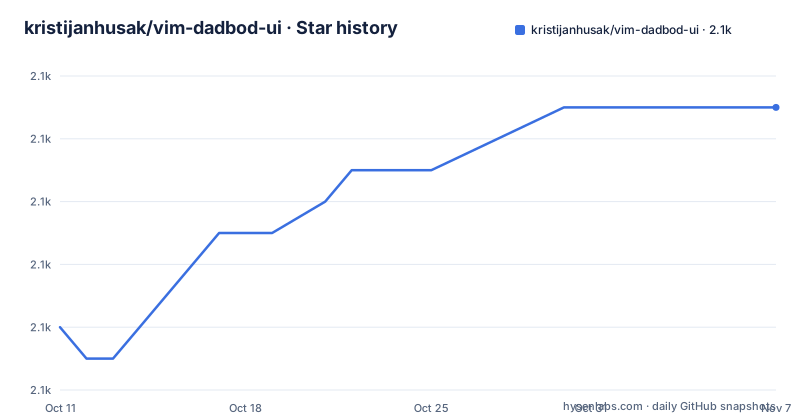
Star history
- kristijanhusak/vim-dadbod-ui2,061 ★ · +7
| Repository | 2026-10-11 | 2026-11-07 |
|---|---|---|
| kristijanhusak/vim-dadbod-ui | 2.1k | 2.1k |
7 Stars in the last 27 days, measured from the daily GitHub snapshot. Compare with other projects
Editorial analysis
vim-dadbod-ui is a UI wrapper, not a database client of its own
vim-dadbod-ui does not connect to databases by itself. It is a layer on top of tpope/vim-dadbod, which handles connections and query execution. Installing vim-dadbod-ui without vim-dadbod gives you a drawer with no backend, because the UI has no driver code of its own.
The project targets Vim and Neovim users who want to query databases and browse schemas without opening a separate client. It runs on Linux, Mac and Windows, requires Vim 8.1 or higher, and works with any current Neovim version.
The central interaction model is write-to-execute. The drawer opens in a split and shows a tree of databases, schemas and tables. Selecting a table opens a buffer containing a query. Saving that buffer with :w sends the query to vim-dadbod, which runs it against the selected database and writes the results into a second buffer. Every user query follows this path, regardless of which database or scheme is active.
Installing with lazy.nvim marks vim-dadbod as a hard dependency and completion as optional
The README gives a lazy.nvim configuration that declares vim-dadbod as a required lazy dependency and vim-dadbod-completion as an optional one. The completion plugin activates only for 3 filetypes: sql, mysql and plsql, leaving other buffers unaffected.
return {
  'kristijanhusak/vim-dadbod-ui',
  dependencies = {
    { 'tpope/vim-dadbod', lazy = true },
    { 'kristijanhusak/vim-dadbod-completion', ft = { 'sql', 'mysql', 'plsql' }, lazy = true }, -- Optional
  },
  cmd = {
    'DBUI',
    'DBUIToggle',
    'DBUIAddConnection',
    'DBUIFindBuffer',
  },
  init = function()
    -- Your DBUI configuration
    vim.g.db_ui_use_nerd_fonts = 1
  end,
}
This registers 4 commands: DBUI, DBUIToggle, DBUIAddConnection and DBUIFindBuffer. Running :DBUI opens the drawer and shows all configured databases. After install, opening the drawer, expanding a database you have running locally, and selecting a table is the first confirmation that the connection layer is working.
For vim-plug, the README gives a shorter block without lazy-loading or filetype constraints.
Plug 'tpope/vim-dadbod'
Plug 'kristijanhusak/vim-dadbod-ui'
Plug 'kristijanhusak/vim-dadbod-completion' "Optional
A complete list of settings and their defaults is at :help vim-dadbod-ui. No wizard or configuration file needs to be generated after install; all settings are set through global Vim variables.
3 connection sources, with an explicit README warning against committing database URLs
The plugin reads connections from 3 places: the $DBUI_URL environment variable, the g:dbs global variable, and a connections file managed by :DBUIAddConnection.
The environment variable path is the lightest option. If $DBUI_URL exists, the plugin adds it as a connection and parses the display name from the URL. Setting $DBUI_NAME alongside it gives the connection a custom name. Both variable names are overridable: g:db_ui_env_variable_url lets you point to DATABASE_URL instead, which fits projects that already export a standard connection string. The README also documents integration with dotenv.vim, which reads a .env file using a prefix that defaults to DB_UI_ and lowercases the trailing part as the connection name, so DB_UI_DEV becomes dev.
For multiple connections, g:dbs accepts either an object or an array. Objects do not preserve definition order; arrays do, and the README states that the array form is required when you want connections listed in the order you define them. The Lua example appears only as an array, which reflects how Lua tables with string keys have no deterministic iteration order.
The README contains an explicit warning: "Just make sure to NOT COMMIT these." It applies to g:dbs entries in vimrc and any init.lua that defines connections with plain URLs. The plugin does not encrypt or mask connection strings anywhere in the documented configuration.
Connections added through :DBUIAddConnection are stored at the path in g:db_ui_save_location and are available from any project. Pressing H in the drawer reveals each connection's source.
Duplicate names across different sources coexist; duplicates within the same source do not
The plugin's duplicate-handling rule depends on source. 2 connections can share a name when they come from different sources: a dev in $DBUI_URL, a dev in g:dbs, and a dev saved by :DBUIAddConnection can all exist at the same time. Pressing H in the drawer distinguishes them by source.
Within 1 source, however, duplicates are rejected. If g:dbs defines dev twice, a warning appears and the first entry is kept. The README does not describe any way to resolve or rename the duplicate from inside the drawer.
This rule has a direct consequence for teams sharing vimrc snippets. If a developer copies a g:dbs block that defines a dev connection and separately has $DBUI_URL pointing to a different dev server, both entries appear in the drawer. The source indicator when pressing H is the only way to tell them apart. Picking the wrong dev entry sends a query to the wrong server with no further confirmation.
PostgreSQL, MySQL and SQLite ship extra helpers; other schemes get only List
Every database scheme in the drawer gets a List helper. For most schemes, List runs g:db_ui_default_query. PostgreSQL, MySQL and SQLite have 3 additional predefined helpers each: Indexes, Foreign Keys and Primary Keys. Other adapters that vim-dadbod supports do not receive those extras.
Custom helpers go in g:db_ui_table_helpers. The query string accepts {table} and {dbname} as runtime injections that are filled in with the current table and database names at the moment the query runs. To add a count helper for PostgreSQL, the configuration looks like this:
let g:db_ui_table_helpers = {
\   'postgresql': {
\     'Count': 'select count(*) from "{table}"'
\   }
\ }
Setting any helper to an empty string removes it from the drawer menu. Overriding List for PostgreSQL replaces only that scheme's built-in default and leaves g:db_ui_default_query unchanged for other schemes.
By default, selecting a helper opens the query in a buffer without running it, so you can review or edit it before pressing :w. Setting g:db_ui_auto_execute_table_helpers to 1 skips that review step and fires the query on selection.
let g:db_ui_auto_execute_table_helpers = 1Async execution keeps Vim responsive while a query runs. With auto-execution on and a large, slow table selected, the query fires immediately, and the editor stays usable but the result buffer will not populate until vim-dadbod finishes.
Saved queries share 1 directory across all projects; bind parameters live only in the help buffer
Queries saved through the DBUI drawer go to the path at g:db_ui_save_location. That path is shared across all projects on the machine, so a query saved for one database appears in the drawer regardless of which project Vim opened. DBUIFindBuffer locates a saved query buffer when you cannot find its drawer entry.
The single-location design works well for utility queries reused across projects. It creates confusion when 2 projects use different databases under the same connection name, because the saved queries land in overlapping drawer folders and there is no per-project scoping.
Bind parameters are documented at :help vim-dadbod-ui-bind-parameters, and foreign key navigation is at :help <Plug>(DBUI_JumpToForeignKey). Both are listed as features in the README but explained only in the Vim help system. The README body gives just the help tags, so anyone who relies on bind parameters must open a help buffer to learn the syntax.
Nerd font icons are enabled with vim.g.db_ui_use_nerd_fonts = 1. Without nerd fonts the drawer uses plain ASCII symbols for the tree. The README shows the beginning of the default icon configuration in a g:db_ui_icons block but does not list the complete set of defaults; the full list is inside the plugin source under autoload/.
The repository uses Themis for testing and a run.sh script sits at the root with no documented purpose
The top-level repository entries include .github/, .gitignore, .themisrc, README.md, autoload/, doc/, ftplugin/, plugin/, run.sh, syntax/ and test/. Among those, .themisrc at the root points to the Themis testing framework for Vim, and a test/ directory sits alongside it, but neither file is explained in the README and no instructions for running the tests appear anywhere in the documentation.
The last push was on 2026-06-19; the plugin is MIT licensed, and the repository carries no tagged releases or changelog, so tracking changes means reading the commit log directly.
A run.sh script appears at the top level. Its purpose is not explained anywhere in the README, and it is not referenced in any of the install or setup steps.
Editorial conclusion
vim-dadbod-ui makes sense for Vim and Neovim users who already have vim-dadbod set up and want query history, a table tree and async execution inside the editor without switching to a GUI client. Skip it if you need a visual query builder, schema comparison between environments, or database interaction outside of Vim, because none of those are in the feature list. Before adopting it on a team, verify that every vimrc or init.lua containing g:dbs connection URLs is listed in .gitignore, and confirm that the directory at g:db_ui_save_location sits outside any version-controlled path. Both are gaps the README identifies explicitly.
Frequently asked questions
Does vim-dadbod-ui work without vim-dadbod installed?
No. vim-dadbod-ui is a UI wrapper that depends entirely on vim-dadbod for database connections and query execution. The lazy.nvim configuration in the README declares vim-dadbod as a required dependency.
How do I add a database connection to vim-dadbod-ui?
There are 3 ways: set the $DBUI_URL environment variable, define connections in g:dbs in your vimrc or init.lua, or use the :DBUIAddConnection command (or press A in the drawer). Connections added by the command are stored at the path in g:db_ui_save_location.
Does vim-dadbod-ui support SQL autocompletion?
Autocompletion is available through the optional vim-dadbod-completion plugin. The lazy.nvim configuration in the README loads it only for the filetypes sql, mysql and plsql.
Can I use vim-dadbod-ui with PostgreSQL, MySQL and other databases?
vim-dadbod-ui works with any database that vim-dadbod supports. PostgreSQL, MySQL and SQLite have additional predefined table helpers (Indexes, Foreign Keys, Primary Keys) in the UI; other schemes receive only the List helper by default.
How do I save and reuse queries in vim-dadbod-ui?
Queries are saved from within the DBUI drawer and stored at the path set by g:db_ui_save_location, which is shared across all projects. The DBUIFindBuffer command locates a saved query buffer when you cannot find its entry in the drawer.
Official sources
Add this badge to your README
If you maintain this project, the badge below links readers to this analysis and shows its maintenance status from the daily GitHub snapshot. Paste the markdown into your README; add ?metric=license or ?metric=stars to the image URL for a different field.

[](https://hysenlabs.com/projects/kristijanhusak-vim-dadbod-ui)Star history chart for your README
[](https://hysenlabs.com/projects/kristijanhusak-vim-dadbod-ui)Was this useful?