Juman++ v2: an RNN-based morphological analyser for Japanese and other unsegmented text
Juman++ (a Morphological Analyzer Toolkit)
At a glance
- What is it?
- Juman++ segments and tags text with an RNN language model over a lattice, ships as a C++14 CMake project, and only the packaged release carries a trained model. Here is what adopting it actually involves.
- Who is it for?
- Adopt Juman++ if you need Japanese word segmentation and POS tagging with lattice output and you can build C++14 with CMake 3.13 or newer; the release tarball is roughly 300 MB because it contains the trained model, and that tarball is the only distribution the README says can be used for analysis.
- Can I use it commercially?
- Yes. Apache-2.0 is a permissive licence: you can use, modify and sell software built on it, as long as you keep its copyright and licence notices.
- Is it still maintained?
- Yes. The repository last received commits 33 days ago.
- What is it written in?
- Mainly C++, according to GitHub's language statistics.
Answers come from the project's GitHub data, last synced on November 15, 2026, and from our analysis. They are not legal advice.
Star history
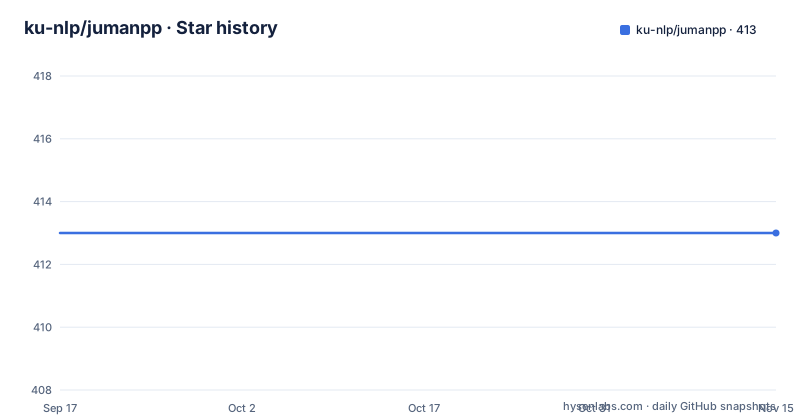
- ku-nlp/jumanpp413 ★ · +0
| Repository | 2026-09-17 | 2026-11-15 |
|---|---|---|
| ku-nlp/jumanpp | 413 | 413 |
0 Stars in the last 59 days, measured from the daily GitHub snapshot. Compare with other projects
Editorial analysis
The problem Juman++ solves: word boundaries that Japanese text does not have
Japanese is written without spaces, so any downstream task (search indexing, parsing, dictionary lookup) has to decide where words begin and end before it can do anything else. Juman++ is a morphological analyser built for that decision. The README describes it as "a new morphological analyser that considers semantic plausibility of word sequences by using a recurrent neural network language model (RNNLM)", and states that version 2 improves accuracy and speeds analysis by more than 250x over the original Juman++.
The intended user is someone building a Japanese NLP pipeline who is willing to compile a C++ program and manage a model file. It is not a hosted API and not a Python package. The repository also frames it as general: the README says Juman++ "does not depend on Jumandic or Japanese Language (albeit there are some Japanese-specific functionality)", and points to a separate tutorial project that applies it to T9-style predictive text, where word boundaries are also absent.
One practical consequence of the design: output is not just a token list. Each line carries surface form, reading, base form, part of speech, subcategory, conjugation type and conjugation form, plus a quoted feature field. That verbosity is the point for Japanese, where the reading and the base form cannot be inferred from the surface string.
How the lattice and beam search actually work
Analysis proceeds over a lattice of candidate segmentations rather than a single left-to-right split. The RNN language model scores word sequences, so the analyser can prefer an interpretation that is semantically plausible even when a locally cheaper segmentation exists. The README's own framing is that semantic plausibility of word sequences is what the RNNLM contributes.
Beam width is the knob that governs how much of that search space is explored. The main options list shows `--beam <int>` with a default of 5, described as the "local beam width used in analysis". A wider beam means more candidates survive at each step; the default is deliberately small. The repository includes a binary for studying exactly this trade-off: `jpp_jumandic_pathdiff` takes a model and an input file and prints sentences where two beam configurations disagree. Its output is in partial annotation format, with the full beam result carrying the real tags and the trimmed beam result written as a comment, as the README example shows with lines such as `# scores: -0.602687 -1.20004` followed by a commented `pos:名詞 subpos:普通名詞` line and then the full-beam tags.
There is also a lattice dump mode. `-s, --specifics` produces "lattice format output" and takes an unsigned int defaulting to 5, which is the same shape of parameter as the beam width. The README does not document the semantics of the `--specifics` integer, so treat it as something to inspect on your own data rather than a documented dial.
Input handling is narrow and stated plainly: UTF-8 only, and lines beginning with `# ` are treated as comments. Feeding another encoding will not produce a useful error path that the README describes.
Installing Juman++ from the release package and running a first sentence
The README is explicit that the package distribution is the one to use for analysis, and that the download should be around 300 MB. If the file you downloaded is much smaller, the README says you have probably got a source snapshot, which does not contain a model. That warning is worth taking literally, because the git build is a different thing: the README states that only the package distribution contains a pretrained model and can be used for analysis, and that the current git version is not compatible with the models of 2.0-rc1 and 2.0-rc2.
The build sequence from the package is three CMake commands. Decompress, configure with Release and an install prefix, build with parallelism, install.
tar xf jumanpp-<version>.tar.xz
cd jumanpp-<version>
cmake -S . -B build \
    -DCMAKE_BUILD_TYPE=Release \
    -DCMAKE_INSTALL_PREFIX=<prefix>
cmake --build build -j<parallelism>
cmake --install build
On Ubuntu 22.04 the README adds one prerequisite step, because protobuf headers and the compiler are needed at configure time.
sudo apt install libprotobuf-dev protobuf-compilerSystem requirements are C++14 (gcc 5.1+, clang 3.4+, MSVC 2017 are given as examples) and CMake v3.13 or later, on Linux, macOS or Windows. The README notes that the project tests GCC and clang on Linux and macOS, and mingw64-gcc and MSVC2017 on Windows. For CentOS, RHEL derivatives or non-CMake builds it points at `docs/building.md` rather than repeating the steps.
Once installed, the quick start is a pipe into the binary. The README example input is 魅力がたっぷりと詰まっている and the expected first line of output begins with the surface form, the reading みりょく, the base form, and the POS fields.
echo "魅力がたっぷりと詰まっている" | jumanppThe output ends with a line reading `EOS`. Each token line has the shape surface, reading, base form, then part of speech and subcategory fields, then a quoted feature string. Expect one token per line, not a single JSON object, unless you post-process it. The `sample/` directory contains `python_juman.py`, which is a reasonable place to look for how the output is consumed in practice.
Where Juman++ is the wrong tool
The most concrete limitation is distribution. There is no pip package described in the README, no Docker image referenced as an official artifact, and no hosted endpoint other than a web demo that the README says still runs v1 and will be updated to v2 "soon". If your constraint is that a Python service must install its tokenizer as a normal dependency, Juman++ does not fit that shape; you are compiling a C++ binary and shipping a roughly 300 MB model alongside it.
Versioning is the second issue. The most recent release listed is v2.0.0-rc4, published on 2023-10-03. The two before it are v2.0.0-rc3 from 2019-08-19 and v2.0.0-rc2 from 2018-03-14. These are release candidates, not a 2.0.0 final, so pinning to a version means pinning to an rc. The repository itself was last pushed on 2026-04-17 and is not archived, but the release line has not produced a stable tag in the period covered by these releases.
Retraining is the third boundary. The README says scripts for training a Jumandic model live in a separate repository, that the system dictionary can be modified to add entries to the trained model, and then adds an attention note: you need access to Mainichi Shinbun for Year 1995 to use the Kyoto University corpus for training. That is a licensing and access barrier, not a technical one, and it means most users will consume the shipped model rather than build their own.
Finally, the performance advice is hardware-specific. The README says to build with extended instruction sets for best performance, suggests `-DCMAKE_CXX_FLAGS="-march=native"` for local-only use, and notes it works best on Intel Haswell and newer because of FMA and BMI. On a shared build artifact or an older CPU, that advice does not carry over, and the README does not offer a portable tuning path.
Juman++ against MeCab and dictionary-based analysers
The clearest alternative in the Japanese ecosystem is MeCab, a dictionary and CRF-based analyser. The difference in approach is the scoring model. MeCab-style analysers decide segmentation and tags from a dictionary plus a locally trained model over adjacent morphemes; Juman++ scores whole word sequences with an RNN language model, which is why the README frames its contribution as considering the semantic plausibility of word sequences. That is a real architectural difference, not a packaging difference, and it is the reason beam search exists as a user-facing option at all: with a sequence model, the number of candidate paths you keep changes the answer.
The practical trade-offs follow from that. Juman++ wants a model file and a beam width; dictionary-based analysers want a dictionary and, if you extend it, a recompile of the dictionary rather than a retrain. Juman++ also exposes lattice output through `-s, --specifics` and a diff tool for beam configurations, which is useful when you are debugging why two runs disagree. If your work is mostly dictionary-driven domain terminology, a dictionary-centric analyser may be the better fit; if your text is messy, unsegmented, or you care about choosing between competing segmentations, the sequence model is the reason to pick Juman++.
The README also positions Juman++ as language-agnostic in principle, pointing to the T9 tutorial project as an example of using it where word boundaries are absent. That is a genuine differentiator against Japanese-only analysers, though the README also concedes there is Japanese-specific functionality in the codebase, so the generality is not absolute.
Maintenance, licence and upgrade cost
The repository is not archived, and the last push was on 2026-04-17. That is recent activity on the codebase, but it is separate from the release cadence: the newest release is v2.0.0-rc4 from 2023-10-03. Anyone planning an upgrade path should treat the release list as the contract and the commit history as a signal, because the two are not moving together.
Upgrade cost is dominated by the model, not the binary. The README warns that the current git version is not compatible with the models of 2.0-rc1 and 2.0-rc2, which means a model and a binary are a matched pair. If you build from git, you do not get a usable analyser at all, per the README's statement that only the package distribution contains a pretrained model. So the upgrade procedure is: fetch the new package, rebuild, and confirm the model that ships with it is the one you are loading. The `--model <file>` option lets you point at a model explicitly, which is how you would check that you are not silently using a stale one.
Licensing is Apache-2.0 per the repository. That is a permissive licence, and it is the part of this project that is easiest to reason about. The complication is not the code licence but the data: the README's training path requires access to Mainichi Shinbun for Year 1995 for the Kyoto University corpus, so any plan to retrain or redistribute a derived model has to be checked against those terms rather than the Apache-2.0 grant. Nothing here is legal advice; the point is that the two licences are different questions.
On performance tuning, the README's suggestion of `-DCMAKE_CXX_FLAGS="-march=native"` is explicitly framed as suitable when you use Juman++ only locally. Distributing a binary built that way to other machines is outside what the README describes.
Editorial conclusion
Adopt Juman++ if you need Japanese word segmentation and POS tagging with lattice output and you can build C++14 with CMake 3.13 or newer; the release tarball is roughly 300 MB because it contains the trained model, and that tarball is the only distribution the README says can be used for analysis. Do not adopt it if you need a pip-installable dependency, if you expect a tagged stable release (the newest is v2.0.0-rc4 from 2023-10-03), or if you want to retrain the Jumandic model without access to Mainichi Shinbun for 1995. Before committing, build the release package with -DCMAKE_BUILD_TYPE=Release, run the README's sample sentence through jumanpp, and check that --beam changes the analysis the way your pipeline expects.
Frequently asked questions
How do I install Juman++?
Download the package from Releases (it should be around 300 MB), decompress it, then run cmake with -DCMAKE_BUILD_TYPE=Release and an install prefix, build, and install. On Ubuntu 22.04 the README also requires libprotobuf-dev and protobuf-compiler, and the build needs C++14 and CMake v3.13 or later.
Why does Juman++ built from git fail to analyse text?
The README states that only the package distribution contains a pretrained model and can be used for analysis, and that the current git version is not compatible with the models of 2.0-rc1 and 2.0-rc2. Building from git gives you the binaries but not a usable model.
What does the --beam option in Juman++ change?
It sets the local beam width used in analysis, with a default of 5. Widening it keeps more candidate paths in the lattice search, and the repository ships jpp_jumandic_pathdiff, which prints sentences where two beam configurations produce different analyses.
Official sources
Add this badge to your README
If you maintain this project, the badge below links readers to this analysis and shows its maintenance status from the daily GitHub snapshot. Paste the markdown into your README; add ?metric=license or ?metric=stars to the image URL for a different field.

[](https://hysenlabs.com/projects/ku-nlp-jumanpp)Star history chart for your README
[](https://hysenlabs.com/projects/ku-nlp-jumanpp)Was this useful?