KAMP: mesh only the area you are printing on, and purge where you can see it
A unique leveling solution for Klipper-enabled 3D printers!
At a glance
- What is it?
- A Klipper configuration package that reads the slicer's object exclusion data to size a bed mesh to the job, then draws a logo with the nozzle right next to the print.
- Who is it for?
- KAMP is a good fit if your printer runs Klipper, your probe moves with the printhead, and you have been annoyed by paying for a 30 by 30 point mesh across a bed where you only ever print a small object. The exclusion object mechanism is the load-bearing idea, since it removes the slicer parameter passing that most adaptive mesh setups depend on, and the fact that it is plain Klipper configuration rather than a plugin means you can read every line it runs.
- Can I use it commercially?
- Yes, with conditions. GPL-3.0 is a copyleft licence: if you distribute software that includes it, you must release that software's source code under the same licence. Running it internally without distributing it does not trigger that obligation.
- Is it still maintained?
- Yes. The repository last received commits 40 days ago.
- What is it written in?
- GitHub does not report a main language for this repository.
Answers come from the project's GitHub data, last synced on October 23, 2026, and from our analysis. They are not legal advice.
Star history
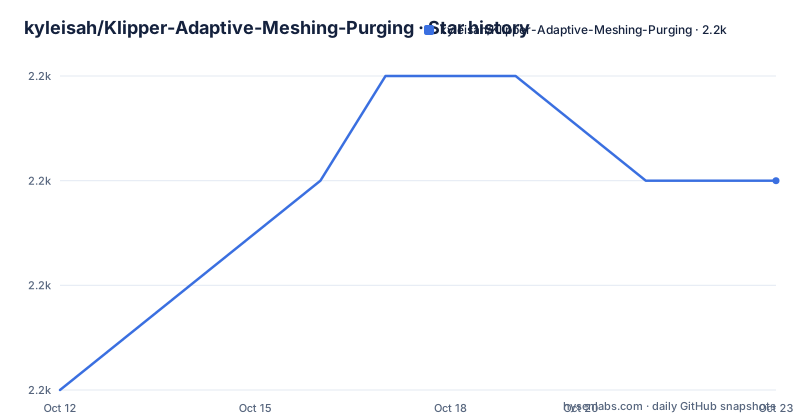
- kyleisah/Klipper-Adaptive-Meshing-Purging2,227 ★ · +2
| Repository | 2026-10-12 | 2026-10-23 |
|---|---|---|
| kyleisah/Klipper-Adaptive-Meshing-Purging | 2.2k | 2.2k |
2 Stars in the last 11 days, measured from the daily GitHub snapshot. Compare with other projects
Editorial analysis
Why a smaller mesh is the whole idea
Most Klipper bed meshing routines probe a fixed grid across the whole build plate. That is a lot of probing for a 40 millimeter model, and the points get spread thin over the rest of the surface. KAMP inverts that. It reads the coordinates that your slicer already marked as excluded and builds a mesh only in the area where the object actually is, which the README illustrates by suggesting a 3x3 mesh covering roughly the footprint of a 3DBenchy.
Because the area is smaller, the same number of probe points can be much denser. The practical difference shows up in two places. First layer accuracy across the part improves because the mesh resolution under the object goes up. Second, probing takes less time, because a large slow nozzle-based probe over a full grid is the main cost in a print start.
The mechanism is worth understanding because it is what makes the project unusual. Klipper has an `exclude_object` feature, normally used to skip already-printed regions, and KAMP uses the exclusion data as its input for mesh bounds. The README is explicit that this removes the need to pass parameters from the slicer. The requirement list says you need `exclude_object` defined in `printer.cfg`, and that your slicer has to be labelling objects. That is the trade: no parameter passing in exchange for a requirement on slicer configuration that most modern slicers satisfy by default.
Installation through Moonraker's update manager
The recommended path is Moonraker's Update Manager, which also gives you update notifications later. The install is four shell commands over ssh: change to the home directory, clone the repository, symlink the `Configuration` directory into your printer config folder as `KAMP`, and copy the settings file up one level so it sits next to your other configs.
cd

git clone https://github.com/kyleisah/Klipper-Adaptive-Meshing-Purging.git

ln -s ~/Klipper-Adaptive-Meshing-Purging/Configuration printer_data/config/KAMP

cp ~/Klipper-Adaptive-Meshing-Purging/Configuration/KAMP_Settings.cfg ~/printer_data/config/KAMP_Settings.cfg
The symlink is the important part. Pointing at `Configuration` rather than cloning into the config folder means the repo can be replaced by an update without losing your edits, which is why your own settings live in a separate copied file. The README flags the case where an older Klipper or Moonraker layout uses a different config path, in which case both the symlink target and the copy destination need adjusting.
You then add an update manager block to `moonraker.conf` so the manager knows where the repo lives:
[update_manager Klipper-Adaptive-Meshing-Purging]
type: git_repo
channel: dev
path: ~/Klipper-Adaptive-Meshing-Purging
origin: https://github.com/kyleisah/Klipper-Adaptive-Meshing-Purging.git
managed_services: klipper
primary_branch: main
Note the `channel: dev` line. Updates track the main branch rather than tagged releases, which is how a configuration package stays current with Klipper itself.
Finally you add `[include KAMP_Settings.cfg]` to `printer.cfg` and, inside that settings file, include only the feature files you want. The configuration is deliberately split up so that people without a bed probe can still get adaptive purging. Restart Moonraker after editing its config, and restart the firmware after changing your includes.
mesh_margin and fuzz_amount, the two numbers that matter
Almost all KAMP configuration lives in `KAMP_Settings.cfg`, which is what you copy out of the repo and edit. Two variables control meshing behaviour and both are worth understanding before you change them.
`mesh_margin` extends the mesh beyond the print area by a number of millimetres. The README's example is precise: rather than a mesh starting at X50 Y50, setting `mesh_margin` to 10 stretches the bounds to start at X40 Y40. It defaults to 0. The stated use case is brims, since a brim extends past the model footprint and a mesh that stops exactly at the object edge will not correct underneath the brim.
`fuzz_amount` is different in kind. It is the maximum amount, in millimetres, by which the mesh bounds may be increased randomly. Its purpose is wear distribution rather than accuracy. If you probe with a nozzle, the same part at the same place every time wears a small crater in the bed surface, and nudging the mesh bounds randomly each time spreads that wear. The README says it is really only intended for nozzle-based probes such as strain gauges and Voron Tap, defaults to 0, and recommends a maximum of 3.
That word maximum is doing real work. Release v1.1.2 specifically updated adaptive meshing so buildplate bounds are no longer exceeded by accident when the margin or the fuzz setting changes. If you have ever had a mesh run off the edge of the bed because of a setting, that is the fix, and it means a version before v1.1.2 was involved.
Probes that detach and probes that do not
Klicky, Euclid, BLTouch and Voron Tap are all named as working probes, and inductive probes are mentioned generally. The difference between them is whether the probe is part of the printhead assembly or has to be attached before meshing, and this is where the configuration has one trap.
If your probe is not integrated into the printhead, you probably already have macros in your own config that attach and detach it around bed meshing. KAMP calls the docking and undocking itself, so those macros must be removed or commented out. The README calls this out directly: leaving them in will cause issues, which usually means the probe getting commanded to dock twice or moving into the bed.
Three settings handle this instead. `probe_dock_enable` defaults to False, and you set it to True if your machine needs the probe attached by a macro before probing. `attach_macro` names the macro that attaches it, and `detach_macro` names the one that detaches it. So for a Klicky-style setup you declare both macros here and delete the older copy from your main config.
There is a related setting for nozzle-based probes called fuzzing mesh points, which the README frames as helping spread out wear. That is the feature `fuzz_amount` serves, so a nozzle probe means you are likely to want both mentioned above.
Purge next to the part, optionally with a Voron logo
The purging half is what made version v1.1 worth releasing, and the README is unembarrassed about it. KAMP lets you purge immediately next to the print area rather than at the usual corner, so you can draw a Voron logo with your nozzle before starting. Smart Park is the companion feature: park the printhead right beside the area you are about to print, heat the nozzle to final temperature there, and purge before travelling back to the start of the print. The idea is that the nozzle reaches printing temperature in the shortest possible path rather than idling cold while it crosses to a fixed purge point.
The README says there are provisions for more simplistic purges as well, so the logo is an option rather than the only mode. That matters for people who dislike drawing on the bed and for anyone who prints on a surface they do not want marked.
The same release also changed line_purge behavior, adding a small rapid move to clear the nozzle away from the purge line before printing starts. Without that, the nozzle could move back through the line it just drew, or drop into it on the way to the print. It is a small change and it is the kind of detail you only notice when it goes wrong.
The repository tree is unusually small, which is worth noticing for a project with 2,220 stars: `Configuration/`, `Photos/`, `LICENSE.md`, `README.md` and a `.github/` directory. There is no source code and no macro library. KAMP is configuration, and everything it does is Klipper macros and includes that you can read.
Version history and what the docs leave out
The tags are short. v1.1 landed on 2023-07-08, v1.1.1 the same day, and v1.1.2 on 2023-08-20. The last push to the repository was on 2026-09-14, so the code moves even though the version numbers have not moved in a while. The v1.1 notes describe the Voron purge and Smart Park going live with an easier setup, and credit a contributor for a README link fix. The v1.1.2 notes cover spelling fixes, the buildplate bounds fix and the line_purge rapid move.
What the README does not do is give you a reference manual for the macros it generates. `mesh_margin`, `fuzz_amount`, `probe_dock_enable`, `attach_macro` and `detach_macro` are documented in prose, which is enough to configure meshing but leaves the purge macros and Smart Park defined only by the files themselves. Since the configuration is symlinked from the repo, reading `Configuration/` on your own printer is the practical way to see what your build actually runs, and that is the point of the design.
The related searches for this project cluster around the questions a reader would expect, notably people reporting that adaptive bed mesh is not working and looking for setup instructions. That is a fair signal that the install prerequisites, particularly the slicer object labelling and the update manager step, are where people get stuck.
Editorial conclusion
KAMP is a good fit if your printer runs Klipper, your probe moves with the printhead, and you have been annoyed by paying for a 30 by 30 point mesh across a bed where you only ever print a small object. The exclusion object mechanism is the load-bearing idea, since it removes the slicer parameter passing that most adaptive mesh setups depend on, and the fact that it is plain Klipper configuration rather than a plugin means you can read every line it runs. The two settings worth understanding before anything else are mesh_margin, which buys room for brims, and fuzz_amount, which spreads wear when a nozzle probes the bed. Install it through Moonraker's update manager so future versions can be pulled, then check that your probe's dock and undock macros are commented out in your own config, since that is the most common source of trouble.
Frequently asked questions
What is adaptive mesh leveling?
It is meshing only the region of the bed a print will occupy, instead of probing a fixed grid across the whole plate. KAMP does this by reading the object coordinates your slicer marks as excluded, so the mesh bounds match the part. The payoff is that the same probe points cover a much smaller area, so they can be denser and the first layer comes out better.
How do I calibrate bed mesh?
With KAMP you calibrate by setting the mesh bounds rather than running a full-bed grid. `mesh_margin` extends the mesh past the object footprint, which you want if you use brims, and `fuzz_amount` adds a small random offset, capped at a recommended 3, to spread wear when a nozzle does the probing. Installation also needs `exclude_object` defined in `printer.cfg` and your slicer labelling objects.
Can I use bed mesh in Klipper?
Yes, that is what this package configures. It works with inductive probes, Klicky, Euclid, BLTouch and Voron Tap, and it calls your own attach and detach macros when your probe is not built into the printhead. The requirement is that `[exclude_object]` is defined in your `printer.cfg` and that object processing is enabled in `moonraker.conf`.
Official sources
Add this badge to your README
If you maintain this project, the badge below links readers to this analysis and shows its maintenance status from the daily GitHub snapshot. Paste the markdown into your README; add ?metric=license or ?metric=stars to the image URL for a different field.

[](https://hysenlabs.com/projects/kyleisah-klipper-adaptive-meshing-purging)Star history chart for your README
[](https://hysenlabs.com/projects/kyleisah-klipper-adaptive-meshing-purging)Was this useful?