Laravel Pulse: an application dashboard shipped inside the framework
Laravel Pulse is a real-time application performance monitoring tool and dashboard for your Laravel application.
At a glance
- What is it?
- Laravel Pulse is the first-party performance dashboard for Laravel applications, published as a Composer package with its own Tailwind and Chart.js front end. Its README is almost entirely a pointer to laravel.com, so the interesting parts of the evaluation come from the repository structure and the version history rather than from documentation.
- Who is it for?
- Adopt Laravel Pulse if you run a Laravel application and want performance visibility that lives inside the same codebase and the same release cycle as the app, and if you are willing to instrument your own application rather than attach an external agent. Do not adopt it as a replacement for distributed tracing, an external profiler or a multi-tenant observability product, since it is a first-party dashboard for one application.
- Can I use it commercially?
- Yes. MIT is a permissive licence: you can use, modify and sell software built on it, as long as you keep its copyright and licence notices.
- Is it still maintained?
- Yes. The repository last received commits 8 days ago.
- What is it written in?
- Mainly PHP, according to GitHub's language statistics.
Answers come from the project's GitHub data, last synced on October 23, 2026, and from our analysis. They are not legal advice.
Star history
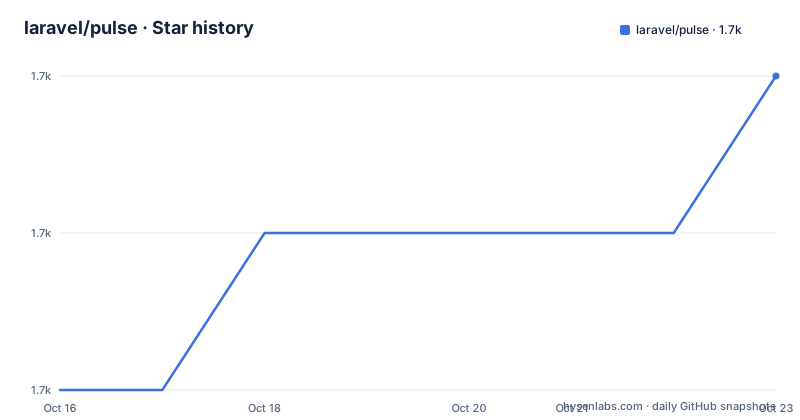
- laravel/pulse1,729 ★ · +2
| Repository | 2026-10-16 | 2026-10-23 |
|---|---|---|
| laravel/pulse | 1.7k | 1.7k |
2 Stars in the last 7 days, measured from the daily GitHub snapshot. Compare with other projects
Editorial analysis
A dashboard for one application, maintained by the framework team
Laravel Pulse is described in the repository description as a real-time application performance monitoring tool and dashboard for your Laravel application, and that single sentence sets the scope. This is not a general APM agent and not a hosted observability product. It is a package published under the laravel organisation, MIT licensed, that lives inside an application and reports on that application. The audience is a Laravel developer who wants to see what their app is doing without standing up a second system, and the fact that it ships from the framework's own organisation is the main reason to expect it to keep tracking Laravel's own release cycle. The housekeeping parts of the repository read like any other Laravel package. There is a contribution guide pointed at the Laravel documentation, a code of conduct the community is asked to review and abide by, and a security policy explaining how to report vulnerabilities. The licence is MIT, which for a first-party package is a permissive choice, and the project's homepage is pulse.laravel.com, distinct from the documentation site.
The README is a signpost, so evaluate the code
The most striking thing about this repository is how little its README contains. After the badges and a one-line introduction, the substance is a link to the documentation for Pulse on the Laravel website, a link to the contributing guide, the code of conduct notice, the security policy note and the licence statement. There is no feature list, no configuration reference, no screenshot and no installation snippet in the file itself. That is a deliberate choice, and it is defensible for a package whose documentation lives with the framework, but it has a practical consequence for anyone evaluating the project from the repository. The questions you would normally answer by reading a README, such as what data is collected, where it is stored, what the overhead is and how access to the dashboard is controlled, have to be answered by reading laravel.com/docs/pulse or by reading the code. The repository does give you the static facts a reader needs: the licence is MIT, the default branch is 1.x, and the release history is public with v1.8.1 published on 2026-08-25, v1.8.0 on 2026-08-04 and v1.7.4 on 2026-06-03. The last push to the repository was on 2026-10-15, so the 1.x line is being worked on.
A Composer package with a database, a config directory and its own front end
The tree shows the shape of the thing, and it is the shape of a full application component rather than a small library. There is src/ for the PHP source, config/ for the package configuration, database/ for migrations and related files, and resources/ for the dashboard's own assets and views. A dist/ directory holds built front-end output, and workbench/ is the local development harness, which is a Laravel convention for building a package with a real application around it. The testing setup is equally conventional: phpunit.xml.dist for the test suite, phpstan.neon.dist and a phpstan-baseline.neon for static analysis, and testbench.yaml, which is the file that points the package's tests at Orchestra's Testbench so the framework's own test harness can boot the package. Two files are worth singling out for anyone planning an upgrade. CHANGELOG.md is there for the release history, and UPGRADE.md is a separate document, which in a package that ships inside someone else's application is a useful signal that the maintainers expect the version boundary to be crossed, and sometimes with steps to take. The repository also carries an .editorconfig, a .gitattributes, an art/ directory for the logo assets and a CHANGELOG, plus the usual CI and issue templates under .github/.
The dashboard front end: Vite, Tailwind 4 and Chart.js
The dashboard is a modern JavaScript application rather than server-rendered Blade with a little script, and the package.json makes that explicit. The build tooling is Vite, with the two scripts that matter being the production build and the watch mode:
"scripts": {
    "build": "vite build",
    "watch": "vite build --watch"
}
The styling stack is Tailwind at 4.3.3 with the forms plugin and the container-queries plugin, plus postcss 8.5.23 and autoprefixer 10.4.13, which is the standard Tailwind 4 toolchain, and there is a tailwind.config.js and a postcss.config.js at the root to go with it. Charts come from Chart.js 4.4.0. The Vite build is version 4.5.3, and there is a vite.config.js defining the build. Two details in the tree explain how the front end and the PHP package fit together. The dist/ directory is where the built assets land, and the package.json build script is what puts them there, so the Composer package ships compiled assets rather than requiring the consumer's application to run a JavaScript toolchain. The presence of package-lock.json next to composer.json also tells you the project keeps its front-end dependencies pinned, which matters for a package that is installed into other people's applications and where a drifting dependency would be a support problem rather than a feature.
The one-line introduction is a category, not a feature list
It is worth sitting with the phrase real-time application performance monitoring tool and dashboard, because it defines the boundary of the product precisely. Two words do the work. Real-time says the dashboard is meant to be looked at while the application is running, which is a different activity from collecting traces and analysing them later. And dashboard says the output is a set of views, which is what the Chart.js and Tailwind dependencies are for, and not an API for your own tooling to query. That is a real constraint for an organisation. A framework-provided dashboard is excellent for one engineer on one application, where the questions are things like which route is slow, which query is expensive, or which job is failing, and it is a poor fit for a fleet of services with a shared incident process. It is also a constraint on the deployment side, because the dashboard runs inside your application, which means the data it shows is the data your application process can see. A separate observability agent sees things the application itself does not report, and a tracing backend keeps history rather than a current state. Pulse is the first of those three things, not the second or third, and knowing that up front saves an evaluation.
Where Laravel Pulse is the wrong tool
The boundaries follow from the design. First, it is scoped to a single Laravel application, so a team with a dozen services and a shared on-call rotation is looking at a set of dashboards rather than a single place, and correlating across them is work the package does not do. Second, it observes from inside the application process, so anything outside the request and job lifecycle is out of reach, and the instrumentation is limited to what the framework can see and what the application records. Third, the overhead question is unanswered in the repository. The README publishes no benchmark and the documentation on the site is where to look, but a team running a high traffic application should measure the cost of the data collection on their own workload before enabling it in production, because the storage of metrics is a database concern and the database directory in the tree suggests a real write path. Fourth, the coupling to the framework version matters. With a 1.x branch and a separate UPGRADE.md, Pulse tracks Laravel's own release cadence, and a team that pins Laravel versions for stability will find Pulse pinned with them.
Editorial conclusion
Adopt Laravel Pulse if you run a Laravel application and want performance visibility that lives inside the same codebase and the same release cycle as the app, and if you are willing to instrument your own application rather than attach an external agent. Do not adopt it as a replacement for distributed tracing, an external profiler or a multi-tenant observability product, since it is a first-party dashboard for one application. Before you deploy it, read the Pulse documentation on laravel.com, check the UPGRADE.md file against the Laravel version you run, and confirm that the data collection overhead is acceptable for your traffic, because the framework does not publish a performance benchmark for it.
Frequently asked questions
What is Laravel Pulse?
It is a real-time application performance monitoring tool and dashboard for a Laravel application, published by the laravel organisation as a Composer package and licensed under the MIT license.
Where is the Laravel Pulse documentation?
The README points to the Laravel website for the Pulse documentation at laravel.com/docs/pulse. The repository itself contains no feature list or installation instructions, so that page is where the usage detail lives.
What front-end stack does the Pulse dashboard use?
The package.json shows Vite 4.5.3 for the build with a vite build script and a watch mode, Tailwind CSS 4.3.3 with the forms and container-queries plugins, postcss and autoprefixer, and Chart.js 4.4.0 for the charts. The built output is committed under dist/.
How is the Laravel Pulse package tested?
The tree carries phpunit.xml.dist for the test suite, phpstan.neon.dist with a phpstan-baseline.neon for static analysis, and testbench.yaml, which is the file used to run package tests against the framework's own test harness. There is also a workbench/ directory for local development.
What is the current version of Laravel Pulse?
The most recent tagged release is v1.8.1 from 2026-08-25, after v1.8.0 on 2026-08-04 and v1.7.4 on 2026-06-03. The default branch is 1.x and the last push to the repository was on 2026-10-15.
Official sources
Add this badge to your README
If you maintain this project, the badge below links readers to this analysis and shows its maintenance status from the daily GitHub snapshot. Paste the markdown into your README; add ?metric=license or ?metric=stars to the image URL for a different field.

[](https://hysenlabs.com/projects/laravel-pulse)Star history chart for your README
[](https://hysenlabs.com/projects/laravel-pulse)Was this useful?