LibreYOLO: twenty vision tasks behind one checkpoint argument
LibreYOLO is a MIT licensed open source computer vision library
At a glance
- What is it?
- LibreYOLO is an MIT-licensed Python computer vision library that puts detection, segmentation, pose, depth, OCR and more behind a single constructor call, with training and twelve export formats in the same package. The API surface is genuinely small, but the install is heavy and the catalogue of model families runs well past what the base install covers.
- Who is it for?
- Adopt LibreYOLO if your team already works in YOLO-format datasets and wants detection plus segmentation, pose or export paths under one import, and accept pulling torch 2.4 into every environment. Do not adopt it if you need a single fixed model family, if you cannot supply a Hugging Face token for weight downloads, or if non-commercial weight terms in the catalogue are a problem for your product.
- Can I use it commercially?
- Yes. MIT is a permissive licence: you can use, modify and sell software built on it, as long as you keep its copyright and licence notices.
- Is it still maintained?
- Yes. The repository last received commits 1 day ago.
- What is it written in?
- Mainly Python, according to GitHub's language statistics.
Answers come from the project's GitHub data, last synced on November 6, 2026, and from our analysis. They are not legal advice.
Star history
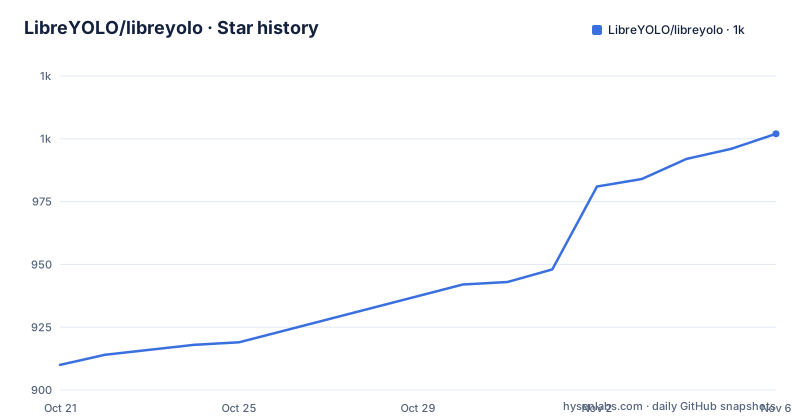
- LibreYOLO/libreyolo1,002 ★ · +92
| Repository | 2026-10-21 | 2026-11-06 |
|---|---|---|
| LibreYOLO/libreyolo | 910 | 1k |
92 Stars in the last 16 days, measured from the daily GitHub snapshot. Compare with other projects
Editorial analysis
Twenty tasks, one constructor, one checkpoint argument
The design bet of LibreYOLO is that the family of a model should not change your code. Everything in the catalogue, from YOLOv9 and RF-DETR to RT-DETR, SAM, MiDaS, PP-OCR and Qwen3-VL, is reached through the same class, and the checkpoint file is the only argument that differs. The result is a task list that covers detection, instance and semantic segmentation, panoptic segmentation, pose, oriented boxes, depth, surface normals, image and video embeddings, restoration, background removal, OCR, gaze, open vocabulary and vision language models.
That is a wide surface, and the catalogue makes clear that coverage is not uniform. The rows are populated by model family, and some rows carry a caveat rather than a plain model list. 3D detection is marked as needing a separate runtime, and video embeddings mention a trainable classification probe alongside clip embeddings. Per-family sizes, checkpoints and parity evidence are pointed at an external model reference rather than kept in the repository, so a reader has to leave the README to judge whether a given family is a real peer of YOLOv9 or a thinner wrapper.
The API shape is what makes that breadth usable. If each task needed its own loader, the catalogue would read as a list of unrelated projects. Because it does not, the practical question for an engineer is not which models exist but which ones are worth the weight download and the extra dependency.
The install matrix, not the model list, drives the dependency decision
The base install is a single pip line, and the package metadata states the floor clearly: requires-python is 3.10 or above, and the dependency list pins torch at 2.4.0 or newer and torchvision at 0.19.0 or newer alongside numpy, Pillow, opencv-python, PyYAML, pycocotools, safetensors, scipy, typer, click, tqdm, requests and mss.
Everything beyond that base set is a named extra, and the extras are grouped by purpose rather than by model. Export backends sit in one group, serving in another, model families in a third, training integrations and speed options in others. The base install is documented as covering YOLOv9, the other core detectors, training and inference, so a detection-only project never pays for the segmentation or export stacks.
Two details in the extras table deserve a close read. First, three extras are excluded from the catch-all install on purpose: executorch, coreai and neptune are left out because they pin torch or protobuf in ways that would drag the rest of the environment with them. That is a packaging decision you can feel in a real deployment, since the full stack is not a single safe install. Second, the Speed group contains fast-eval and hub-kernels, which are opt-in performance paths rather than defaults.
Predicting on a webcam or RTSP feed without writing Python
The quickest first run is two lines of Python, and the package ships a sample image so the example does not depend on anything you have to fetch yourself. Install the wheel, import the class and the sample, point it at a checkpoint and let save=True write the result out.
pip install libreyolofrom libreyolo import LibreYOLO, SAMPLE_IMAGE
model = LibreYOLO("LibreYOLO9t.pt")
result = model(SAMPLE_IMAGE, save=True)The checkpoint naming is worth noting. Each task has its own prefixed checkpoint, and the suffix encodes the family and size, so a depth model is named differently from a pose model rather than reusing a generic tag. After the base install, the same class handles the other tasks by swapping that argument.
from libreyolo import LibreYOLO

LibreYOLO("LibreYOLO9t.pt")("street.jpg", save=True)             # detection
LibreYOLO("LibreDeepLabv3mv3-sem.pt")("street.jpg", save=True)   # semantic segmentation
LibreYOLO("LibreHRNetw32-pose.pt")("street.jpg", save=True)      # pose
LibreYOLO("LibreMiDaSs-depth.pt")("street.jpg", save=True)       # depth
LibreYOLO("LibreFeyNobgl-matte.pt")("portrait.jpg", save=True)   # background removal
LibreYOLO("LibreRTDETRv2n-obb.pt")("aerial.jpg", save=True)      # oriented boxes
For live sources there is a command line path that avoids a Python script entirely. The source argument accepts a webcam index, an RTSP URL, a screen capture target, and the project also lists video files, directories and YouTube URLs as accepted sources.
libreyolo predict --model yolo9-t --source 0 --show          # webcam
libreyolo predict --model yolo9-t --source rtsp://camera/1   # network camera
libreyolo predict --model yolo9-t --source screen            # screen capture
Training reuses the same object and the same YAML dataset file
Training is a method on the same instance, not a separate training script or a separate package. The call takes a dataset file, an epoch count and an image size, which is the familiar shape, and the training entry point is available from the command line as well.
from libreyolo import LibreYOLO

model = LibreYOLO("LibreYOLO9t.pt")
model.train(data="dataset.yaml", epochs=100, imgsz=640)libreyolo train --model yolo9-t --data dataset.yaml --epochs 100The documented feature list for training covers multi-GPU, LoRA, layer freezing, distillation and from-scratch training, plus a long list of experiment trackers: TensorBoard, MLflow, Weights and Biases, Comet, ClearML, Neptune and DVCLive. Those trackers are extras, so you install only the one you use.
Two things are not documented, and both matter for planning. There is no rollback or checkpoint resume procedure described for a training run that dies partway through a long schedule, and there is no statement of which families support training at all. The project description is careful to say training and export are available where a family supports them, which means the boundary is per family and the README does not enumerate it. The model reference is the place to check that before committing a training budget to a given architecture.
The dataset format is the other known quantity. The library reads common YOLO-format datasets, so an existing detection project can point at its dataset.yaml with minimal changes, and the environment example file shows a Roboflow key used for downloading RF5 and RF100 datasets.
Twelve export targets, and the three extras that stay out of the all bundle
Export is treated as a first-class part of the library rather than an afterthought, with twelve formats named: ONNX, TorchScript, TensorRT, OpenVINO, CoreML, Core AI, TFLite under the LiteRT alias, NCNN, MNN, RKNN, Paddle and ExecuTorch, plus NVIDIA Triton for serving.
That breadth has a cost, and the project is explicit about where the cost lands. The onnx, tensorrt, openvino, coreml, coreai, tflite, ncnn, mnn, paddle and executorch extras each bring their own toolchain. Three of them are excluded from the catch-all: executorch, coreai and neptune, because they pin torch or protobuf versions that would constrain the rest of the environment. Installing everything at once is therefore not the path the project suggests.
The serving story is a single extra, triton, which keeps a heavyweight server dependency out of the default install while leaving inference clients lightweight. Model-family extras follow the same logic: rfdetr, vlm, sam, openvocab, clip, siglip2, eomt, midas, modus, sensenova and gaze each pull in what that family needs.
For an engineer choosing a deployment target, the practical reading is that LibreYOLO is a good fit when you want to change the export format without rewriting the model code, and a poor fit when your serving stack is already fixed and you would only ever use one backend. In the second case the base install plus one extra is smaller and easier to reason about than the full set.
MIT in the package metadata, a custom licence on GitHub, and non-commercial weights in the catalogue
The licensing picture needs three separate facts, and the last one is the one that surprises people. The package metadata declares license as MIT and the project description calls it MIT licensed, with a LICENSE file at the root. GitHub, however, classifies the repository licence as a custom licence it cannot categorise, which is why a licence badge on the README and a licence field in the metadata are not quite the same statement.
The repository layout backs up the difference. Alongside LICENSE there are NOTICE, THIRD_PARTY_NOTICES.txt, a weights directory with its own LICENSE_NOTICE.txt, and a licenses directory that includes an Apache-2.0 text. A separate notice file for weights only makes sense if the weights carry terms of their own, and they do: the video embeddings row names LeVJEPA with CC BY-NC 4.0 weights, and LeVJEPA is listed for both clip and patch embeddings. CC BY-NC 4.0 is a non-commercial licence, so a subset of the catalogue cannot be used in a product without a separate check. This is a factual reading of the licence identifiers on offer, not legal advice.
The project also publishes a Zenodo record, a CITATION.cff file and a RELEASING.md, plus sponsorship and contributing files. A default branch named release is the one a plain clone checks out, matching the published package, while unreleased work sits on a dev branch. The release history shows v1.4.0 on 2026-07-24, v1.5.0 on 2026-08-09 and v1.6.0 on 2026-09-27, with the last push on 2026-10-17. The repository is not archived, and the last push is days before the current date, so the codebase is being worked on.
The environment example file shows what still lives outside the package
Two lines in the environment example file are the clearest signal about where the friction sits. One is a Roboflow API key, described as the key used for downloading RF5 and RF100 datasets, with a pointer to the Roboflow settings page. The other is a Hugging Face token, described as enabling faster model weight downloads.
This is the real cost model of a wide catalogue. The code API is small, but the artefacts a run needs are hosted elsewhere, so a first inference pulls weights from Hugging Face, and a dataset step may need Roboflow credentials. On a locked-down or air-gapped machine, that is the first thing to check. The token is described as making downloads faster, which suggests the package can work without it, but the project does not document an offline mirror or a vendor-directory workflow, and that is a gap worth asking about directly.
The development side of the repository is also organised for contributors rather than for end users. A Makefile exposes setup, format, lint, typecheck, test, test_pr_gate, test_install_smoke and test_e2e targets, and the install smoke target takes a mode of editable, wheel, sdist or pypi. End-to-end tests need a GPU and model weights, and the nightly suite excludes several markers, with a per-test wall clock cap that exists so one stalled weight download cannot consume the whole nightly budget. A developer installing from source clones the repository, enters the directory and installs in editable mode.
git clone https://github.com/LibreYOLO/libreyolo.git
cd libreyolo
pip install -e .
That Makefile surface is a reasonable place to look for the project's own view of maturity. The presence of an install smoke test and a type checker suggests the maintainers care about the package as a distribution, not only as a source tree.
Editorial conclusion
Adopt LibreYOLO if your team already works in YOLO-format datasets and wants detection plus segmentation, pose or export paths under one import, and accept pulling torch 2.4 into every environment. Do not adopt it if you need a single fixed model family, if you cannot supply a Hugging Face token for weight downloads, or if non-commercial weight terms in the catalogue are a problem for your product. Before committing, run the clean install smoke target and confirm the extras you actually need install on your target Python, which the project requires at 3.10 or above.
Frequently asked questions
How do I install LibreYOLO and run a first detection?
Run pip install libreyolo, then import LibreYOLO and SAMPLE_IMAGE from the package, construct LibreYOLO with the LibreYOLO9t.pt checkpoint and call it with the sample image and save=True. The README uses exactly that snippet as its opening example, so the first run needs no external image file.
Which LibreYOLO extra do I need to export a model to ONNX or TensorRT?
Both onnx and tensorrt are extras in the Export group, alongside openvino, coreml, coreai, tflite, ncnn, mnn, paddle and executorch. You install them by name, and the base install does not include any export backend.
Does LibreYOLO include training or only inference?
It includes training. The same LibreYOLO object exposes a train method taking a dataset YAML, epoch count and image size, and there is a matching libreyolo train command. Training features listed include multi-GPU, LoRA, layer freezing, distillation and several experiment trackers, each of which sits in its own extra.
What Python and PyTorch versions does LibreYOLO need?
The package metadata sets requires-python to 3.10 or newer and requires torch 2.4.0 or newer with torchvision 0.19.0 or newer. The classifiers also mark the project as Python 3 only and operating system independent.
Is LibreYOLO MIT licensed and can I use it commercially?
The package metadata declares license as MIT and the project describes itself as MIT licensed, though GitHub classifies the repository licence as a custom one and the repository ships separate NOTICE, THIRD_PARTY_NOTICES.txt and weight licence files. Some individual weights in the catalogue carry their own terms, with LeVJEPA listed under CC BY-NC 4.0, so check the licence for the specific checkpoint you plan to ship rather than relying on the top level label.
Official sources
Add this badge to your README
If you maintain this project, the badge below links readers to this analysis and shows its maintenance status from the daily GitHub snapshot. Paste the markdown into your README; add ?metric=license or ?metric=stars to the image URL for a different field.

[](https://hysenlabs.com/projects/libreyolo-libreyolo)Star history chart for your README
[](https://hysenlabs.com/projects/libreyolo-libreyolo)Was this useful?