LoreanXavier/pt-pc: A Native Vulkan Port of P.T.
Native PC port of P.T. (runs from your own PS4 game files)
At a glance
- What is it?
- pt-pc rebuilds the PS4 teaser in C++ and reads game assets from a compatible dump folder at runtime. It suits players with the required P.T. data and a Vulkan 1.3 system, not collectors expecting an emulator or a self-contained release.
- Who is it for?
- Adopt pt-pc if you own compatible P.T. data, meet its Vulkan 1.3 requirement, and want the full teaser on a supported desktop system. Do not choose it as an emulator, for a store PKG, or where portable data violates the custom LICENSE.
- Can I use it commercially?
- Check first. The repository uses a licence we do not classify automatically, so read its LICENSE file before any commercial use.
- Is it still maintained?
- Yes. The repository received new commits within the last day.
- What is it written in?
- Mainly C++, according to GitHub's language statistics.
Answers come from the project's GitHub data, last synced on October 23, 2026, and from our analysis. They are not legal advice.
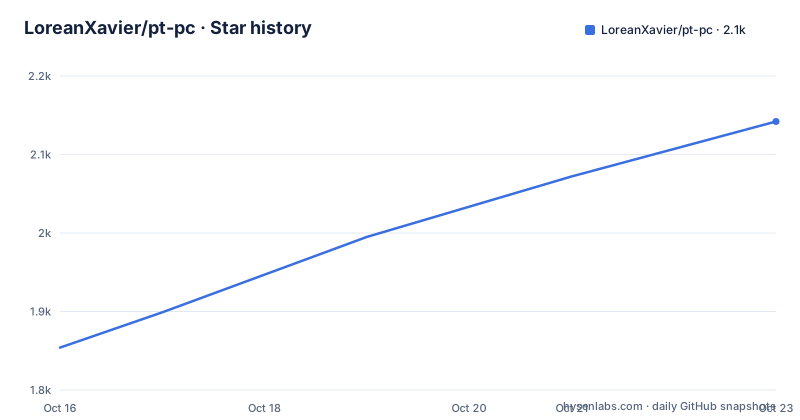
Star history
- LoreanXavier/pt-pc2,142 ★ · +288
| Repository | 2026-10-16 | 2026-10-23 |
|---|---|---|
| LoreanXavier/pt-pc | 1.9k | 2.1k |
288 Stars in the last 7 days, measured from the daily GitHub snapshot. Compare with other projects
Editorial analysis
Why pt-pc Exists Beyond the PS4
LoreanXavier/pt-pc addresses a specific preservation problem: P.T. can still exist on PCs even when access is limited to consoles that retain the original game. The README describes a native port covering the complete 2014 teaser, from the first wake-up through the street sequence, including the voice interaction. Its audience is therefore not simply anyone interested in the horror game. It is for people who already possess a compatible copy and want that copy to run on a current desktop platform.
This is not an emulator. The game logic was rebuilt in C++ from observed behavior, while a Vulkan renderer replaces the PS4 presentation layer. Assets are not redistributed. Levels, models, textures, sounds, scripts, and cutscenes are loaded from the user's files at runtime. The repository and installer contain no P.T. game data.
That distinction matters for evaluation. A buyer does not receive a standalone game, and the project does not decrypt console-bound packages. The README specifically identifies the US release CUSA01127 as the version with which the port was built and tested. It says the European and Japanese releases install with a note, but their data has not been inspected by the author. Compatibility is therefore strongest for the named US release, not every P.T. package.
The port targets Windows 10 or 11 x64, Linux x86-64 with glibc 2.38 or newer, and macOS 14 or newer. Its rendering path depends on Vulkan 1.3. On Apple systems, MoltenVK maps Vulkan onto Metal, but this is still a native application with platform-specific compatibility boundaries rather than a universal binary.
Runtime Assets, Vulkan Rendering, and Save Data
The architecture separates reconstructed executable logic from licensed game content. During setup, the installer selects a dump folder or fake PKG, then copies three archives beside the port: `chunk1.psarc`, `texture.qar`, and `pathid_list_ps4.bin`. It also reads `icon0.png` from the selected game files for the desktop shortcut. The eboot, modules, and the remaining `sce_sys` content are not used.
At runtime, the C++ implementation reads levels, models, textures, scripts, sounds, and cutscenes from those local resources. Rendering is handled through Vulkan rather than emulating the PS4 graphics stack. Hardware capabilities affect which optional controls are available. Ray-traced effects require Vulkan ray queries and are unavailable on macOS. DLSS requires a GeForce RTX card. The README associates FSR and XeSS with recent GPUs on Windows. Unsupported settings are disabled and explained in the PC settings interface.
Save files, settings, logs, and caches reside in `data/` beside the executable on Windows and Linux. This makes the installation relocatable and supports copying the complete game folder. Older profiles are migrated once, with newer files protected from replacement. macOS uses a different fixed location under the user's application-support directory.
Optional image processing can add work. Enhanced textures are upscaled once from the user's files with Real-ESRGAN and cached on disk. Frame generation has stricter device conditions, including Radeon RX 5000 or newer for FSR 3, RTX 40 or newer for DLSS Frame Generation, and Apple silicon with macOS 26 or newer for experimental MetalFX Frame Interpolation. These are optional settings rather than baseline requirements.
Installing pt-pc and Selecting Compatible P.T. Data
On Windows and Linux, download the appropriate setup binary from the repository's Releases page. The Windows installer is `P.T.PC.Port.Setup.exe`. Select an extracted dump folder or fake PKG, choose the destination, and let the installer copy the required archives. The README does not document a source-build or package-manager installation path, so the Releases page is the documented starting point.
On Linux, make the setup binary executable. The following command uses the README's documented file mode change:
chmod +xRun the setup from a terminal or file manager. Its dialogs use `zenity` or `kdialog`, depending on the system. On a Steam Deck, the README specifically directs users to install from desktop mode and add `pt` as a non-Steam game.
macOS has separate archives. Use `P.T.PC.Port-macOS-arm64.zip` for M1 and later systems, or `P.T.PC.Port-macOS-x64.zip` for Intel Macs. After extraction, open `P.T. PC Port.app` once and permit it under `Privacy & Security`, because it does not have a Developer ID signature. Fake PKGs must first be extracted on Windows or Linux.
Portable Windows and Linux archives are also published. After unpacking one, place an extracted `CUSA01127` folder beside `pt.exe` on Windows or `pt` on Linux, or select it when prompted at first startup. Do not select a normal encrypted store PKG. The README states that it is encrypted for the owning console and that pt-pc contains no decryption support.
Starting the Teaser and Handling the Microphone Input
The first real use begins with normal desktop controls. Movement uses WASD and mouse look. Right mouse button zooms, while left mouse button, Enter, or E interacts. Esc opens the pause menu, Alt+Enter changes fullscreen mode, and F10 opens PC settings. A gamepad is also presented as a PS4 pad, with prompts following the input device used most recently.
The voice part ordinarily asks for a microphone and listens for the spoken trigger. pt-pc does not make that hardware mandatory. In `PC settings > Sound`, enable `Assign J / L2 + R2 for the microphone trigger`. When the game is waiting for the voice input, press J on the keyboard or both triggers together on a controller. The README does not require a file edit or external microphone configuration for this fallback.
Before adjusting image quality, open F10 and inspect which settings the application has disabled. The interface is expected to explain unavailable hardware features. This matters because the full control set extends well beyond the original PS4 presentation, including fullscreen modes, selectable render resolution, upscalers, frame generation, ray tracing, depth of field, motion blur, and texture enhancement.
The in-game options remain closer to the original console experience. They include brightness, subtitles, and camera inversion. According to the README, the option screen and preface play only on first start, matching PS4 behavior. PC settings are separate additions that are disabled or set to original behavior unless enabled.
Port Boundaries, Unsupported Data, and Hardware Limits
The clearest failure mode is an invalid asset source. A store PKG is not interchangeable with the accepted inputs because console encryption remains unresolved. The named US dump CUSA01127 is the documented baseline. European and Japanese releases may install, but the author states that their data has not been examined, so successful selection should not be treated as confirmed runtime compatibility.
The macOS x64 build has a more explicit limitation. It was written without access to a Mac and, according to the README, had not been run on an Intel Mac at publication. Apple silicon has separate documentation and an archive, while Intel support also depends on whether MoltenVK can run the renderer on the installed GPU. The experimental MetalFX Frame Interpolation path adds another boundary through its macOS 26 and Apple silicon requirements.
Ray-traced shadows, ambient occlusion, and reflections depend on Vulkan ray queries, which are unavailable on macOS. Native Vulkan 1.3 support is therefore a real adoption gate. Optional upscalers and frame generators introduce narrower GPU restrictions, but none should be selected before the base renderer works.
The port also loads content at runtime instead of shipping it. Users must retain compatible game data through upgrades and relocations. Portable installations depend on the archive remaining beside the executable or being selected again. The update check contacts GitHub Releases at startup and can be disabled through the documented network setting rather than by blocking application files generally.
Updates, Custom Licence, and Maintenance Burden
The repository is not archived. Its last push was on 2026-10-16, and the Releases section lists v1.0.3 dated 2026-10-11, following v1.0.2 on 2026-10-10 and v1.0.1 on 2026-10-07. This sequence provides recent project activity, although the README's account of spare-time development means release timing should be judged from those dates rather than assumed to follow a fixed schedule.
pt-pc reports that it checks GitHub Releases for a newer version at startup. Users who prefer no update request can use the documented configuration key:
[network]
check_updates = 0
That key disables the version check; it does not describe automatic game-data migration, settings conversion beyond the stated one-time profile migration, or a general rollback mechanism. The README does not document rollback, so an upgrade path should not be assumed reversible.
The repository identifies its license as a custom license that GitHub cannot classify. Users must inspect the `LICENSE` file before copying, modifying, redistributing, or repackaging the port. This is a compliance requirement rather than legal advice. It is especially relevant because installers consume local game archives and a desktop icon, even though those files are not included in the repository. The documentation does not say that permission to use P.T. game files transfers through the port's license.
Upgrade cost includes more than downloading a release. Platform archives differ, optional settings depend on hardware detection, and user data remains outside a conventional package-manager path on macOS. The three recent releases arrived across several days, but compatibility notes and custom license terms should be checked separately for every release.
Editorial conclusion
Adopt pt-pc if you own compatible P.T. data, meet its Vulkan 1.3 requirement, and want the full teaser on a supported desktop system. Do not choose it as an emulator, for a store PKG, or where portable data violates the custom LICENSE. Check the license terms, validate your release and dump files, then confirm the detected Vulkan features before configuring optional graphics effects.
Frequently asked questions
Does pt-pc include P.T. game files or work as an emulator?
No. It is a native C++ port rather than an emulator, and it reads game content from the user's own compatible files at runtime. Neither the repository nor the installer includes that game data.
Can pt-pc run an encrypted P.T. store PKG?
No. The README says a store PKG is encrypted for the console that owns it, and pt-pc does not decrypt it. Use a compatible dump folder or an extracted fake PKG instead.
Can I play the microphone sequence without a microphone in pt-pc?
Yes. Enable `Assign J / L2 + R2 for the microphone trigger` under `PC settings > Sound`, then use J on the keyboard or both controller triggers when prompted.
Official sources
Add this badge to your README
If you maintain this project, the badge below links readers to this analysis and shows its maintenance status from the daily GitHub snapshot. Paste the markdown into your README; add ?metric=license or ?metric=stars to the image URL for a different field.

[](https://hysenlabs.com/projects/loreanxavier-pt-pc)Star history chart for your README
[](https://hysenlabs.com/projects/loreanxavier-pt-pc)Was this useful?