PowerPC Ports: Keeping Snow Leopard Relevant with a MacPorts Overlay
Modern software for macOS PowerPC: overlay with fixes and new ports to use with MacPorts
At a glance
- What is it?
- An overlay repository that patches and adds ports for macOS 10.6 PowerPC, usable with PPCPorts or mainstream MacPorts. It extends the life of aging G5 and G4 hardware, but support is limited and the user must handle integration.
- Who is it for?
- Adopt PowerPC Ports if you run macOS 10.6.8 on PowerPC and need current software that mainstream MacPorts no longer builds. Skip it if you expect turnkey support or if you use modern macOS without willingness to debug.
- Can I use it commercially?
- Yes. BSD-3-Clause is a permissive licence: you can use, modify and sell software built on it, as long as you keep its copyright and licence notices.
- Is it still maintained?
- Yes. The repository last received commits 1 day ago.
- What is it written in?
- Mainly Tcl, according to GitHub's language statistics.
Answers come from the project's GitHub data, last synced on October 22, 2026, and from our analysis. They are not legal advice.
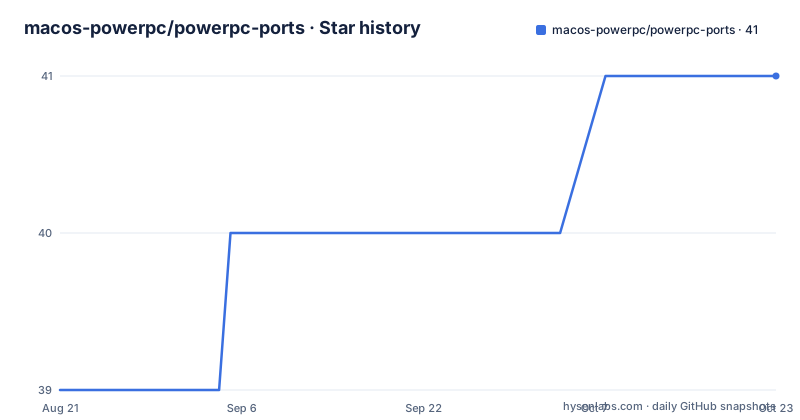
Star history
- macos-powerpc/powerpc-ports41 ★ · +2
| Repository | 2026-08-21 | 2026-10-22 |
|---|---|---|
| macos-powerpc/powerpc-ports | 39 | 41 |
2 Stars in the last 62 days, measured from the daily GitHub snapshot. Compare with other projects
Editorial analysis
The Problem: Modern Software on a Dead Architecture
Apple dropped PowerPC support after macOS 10.6, and most open source projects stopped shipping binaries for that architecture years ago. Users of G5 and G4 Macs who want current versions of tools like compilers, libraries, or utilities face a wall: the official MacPorts tree has moved on, and building from source often fails because patches no longer apply. PowerPC Ports exists to fill that gap. It is an overlay repository, meaning it sits on top of the standard MacPorts ports tree and provides fixes and entirely new ports specifically for macOS 10.6 PowerPC. The target user is someone who owns a PowerPC Mac, refuses to throw it away, and needs software that still compiles and runs on that hardware. The README is clear that the primary target is 10.6.8 on PowerPC, with limited support for 10.5.8 on a G5 for ppc64 builds. This is a niche project for a niche audience, but the niche is real.
How the Overlay Works: Layering on MacPorts
The repository is written in Tcl, which is the language MacPorts uses for portfiles. The overlay mechanism is not a fork of MacPorts; it is a set of portfiles and patches that override or augment the ones in the main tree. When you configure MacPorts to use this repository as an additional source, it reads the overlay first, so any port defined here takes precedence over the upstream version. The README mentions that PPCPorts, a base distribution from the same project, is already configured to use this repo on top of mainstream MacPorts. That means the data flow is: PPCPorts installs MacPorts, then points it at this overlay, then you run normal port commands like `port install`. The overlay contains both fixes to existing ports and new ports that do not exist upstream. The commit history is preserved, and pull requests are accepted, which suggests the project is open to contributions. This is not a binary distribution; you are building from source on your PowerPC machine, which is slow but works.
Getting Started: Setup and Installation
The README gives a two-step setup. First, install macOS 10.6.8 Snow Leopard on your PowerPC Mac. If you have a G5, you can install 10.5.8 instead and build for ppc64, but the README warns that Leopard support is limited. Second, install PPCPorts from the MacOS PowerPC website. PPCPorts is configured to use this overlay automatically, so after that you are ready to install ports. The commands are not spelled out in the README, but the mechanism is standard MacPorts: you would use `port install <portname>`. If you want to use this overlay with mainstream MacPorts instead of PPCPorts, the README says it is possible but you are on your own. That is a significant caveat: the project does not support that configuration, so any setup issues are yours to solve. The recommended path is to use PPCPorts, which handles the integration.
What Is Inside: Ports, Fixes, and a Monthly Release Cycle
The repository contains portfiles that either fix broken builds or add new software. The release notes show a monthly archive: 2026.07, 2026.06, and 2026.05, each dated on the first of the month. This indicates a regular release cadence, which is good for users who want stable snapshots. The 2026.07 archive is the latest as of the last push. The README notes that R ports have been moved to a separate repository, so if you need R, you must go to https://github.com/macos-powerpc/R-ports. That is a concrete example of how the project is organized: not everything is in this overlay. The primary language is Tcl, which is expected for MacPorts, but it also means the codebase is only relevant to MacPorts users. The license is BSD-3-Clause, which is permissive and allows reuse, but you should check the individual portfiles because they may inherit licenses from upstream software.
Limitations and Failure Modes
The biggest limitation is hardware and OS scope. The README states the primary target is macOS 10.6 PowerPC. If you have a G3 or an earlier PowerPC Mac, or if you run Mac OS X 10.4, this overlay is likely not for you. Leopard support is explicitly limited, so do not expect full functionality on 10.5.8. Another failure mode is using mainstream MacPorts instead of PPCPorts: the README says you are on your own, which means you might hit configuration errors that the project will not help with. Also, because this is a source-based build system, compiling large software on a G5 can take hours or days, and some ports may fail due to missing dependencies or compiler issues. The project accepts bug reports via Issues, but the README warns not to open tickets on MacPorts Trac because this is not an official MacPorts project. So if a port fails, your only support channel is the GitHub or CodeBerg issue tracker, and there is no guarantee of a fix.
Alternatives and Comparisons
The obvious alternative is to use the official MacPorts tree directly without this overlay. That works for a small set of ports that still build on PowerPC, but the reason this overlay exists is that many ports no longer do. Another alternative is TenFourFox or other legacy browsers, but those are applications, not a general package manager. A more direct alternative is to use a different package manager like pkgsrc, which has some PowerPC support, but pkgsrc targets NetBSD and other Unix-like systems, not macOS specifically. The difference in approach is that PowerPC Ports stays within the MacPorts ecosystem, reusing its infrastructure and portfile format, rather than inventing a new system. That means you get the benefit of MacPorts' dependency resolution and build system, but you also inherit its complexity. If you want a more radical solution, you could run Linux on PowerPC, but that is a different path entirely and not comparable to this overlay.
Maintenance and Upgrade Cost
The monthly release cycle suggests active maintenance, but the cost of upgrading is on you. When a new archive is released, you need to update your overlay and rebuild any ports that changed. Because the project is not associated with MacPorts, you cannot expect upstream fixes to trickle down; the maintainers here have to apply patches themselves. The move of R ports to a separate repository indicates that the project is willing to reorganize, which can break your setup if you were using R from this overlay. The license is BSD-3-Clause, which is permissive, but that only applies to the portfiles themselves. The software you install through these ports has its own licenses, so you must comply with those. There is no mention of a migration tool or an upgrade script, so you will likely need to manually track changes. The commit history is preserved, which helps you understand what changed, but it is not a substitute for testing on your own hardware.
Editorial conclusion
Adopt PowerPC Ports if you run macOS 10.6.8 on PowerPC and need current software that mainstream MacPorts no longer builds. Skip it if you expect turnkey support or if you use modern macOS without willingness to debug. Before adopting, verify that the specific ports you need are present in the 2026.07 archive, check the PPCPorts base setup, and confirm your hardware is a G5 or G4 with Snow Leopard. The project is not associated with MacPorts, so do not expect upstream fixes; you must rely on the Issues tracker and your own testing.
Frequently asked questions
Is PowerPC still a thing for powerpc-ports users today?
The overlay is still being cut. Releases named 2026.06, 2026.07 and 2026.08 were published on 1 July, 1 August and 10 September 2026, and the most recent commit is dated 29 September 2026.
What is a PowerPC computer according to powerpc-ports?
The documentation names one model directly: on a G5 you may install 10.5.8, Leopard, instead and build for ppc64. Beyond that machine it says only that the primary target system is macOS 10.6 PowerPC, without describing the architecture itself.
How is powerpc-ports meant to be combined with MacPorts?
It is an overlay rather than a standalone tree. Install PPCPorts from macos-powerpc.org, which is already configured to use this repository on top of the mainstream MacPorts ports tree. Combining it with plain MacPorts is possible, but the documentation says you are on your own there.
Does powerpc-ports still ship R packages itself?
R ports have been moved to a separate repository, macos-powerpc/R-ports, where PowerPC support is maintained too. An R directory is still present at the top level of this repository, so the pointer to R-ports is the reliable place to look.
Official sources
Add this badge to your README
If you maintain this project, the badge below links readers to this analysis and shows its maintenance status from the daily GitHub snapshot. Paste the markdown into your README; add ?metric=license or ?metric=stars to the image URL for a different field.

[](https://hysenlabs.com/projects/macos-powerpc-powerpc-ports)Star history chart for your README
[](https://hysenlabs.com/projects/macos-powerpc-powerpc-ports)