Maple OpenTelemetry Observability Platform Review
OpenTelemetry observability platform
At a glance
- What is it?
- Maple combines OpenTelemetry traces, logs and metrics with ClickHouse storage, hosted or local deployment, alerting, browser replay and agent access through MCP. Its breadth is useful, but custom licensing and infrastructure complexity require review.
- Who is it for?
- Adopt Maple when an engineering team needs an OTLP-native interface for traces, logs and metrics and can support its custom license and data infrastructure. Do not choose it when a standard license or a minimal single-service deployment is mandatory.
- Can I use it commercially?
- Check first. The repository uses a licence we do not classify automatically, so read its LICENSE file before any commercial use.
- Is it still maintained?
- Yes. The repository received new commits within the last day.
- What is it written in?
- Mainly TypeScript, according to GitHub's language statistics.
Answers come from the project's GitHub data, last synced on November 7, 2026, and from our analysis. They are not legal advice.
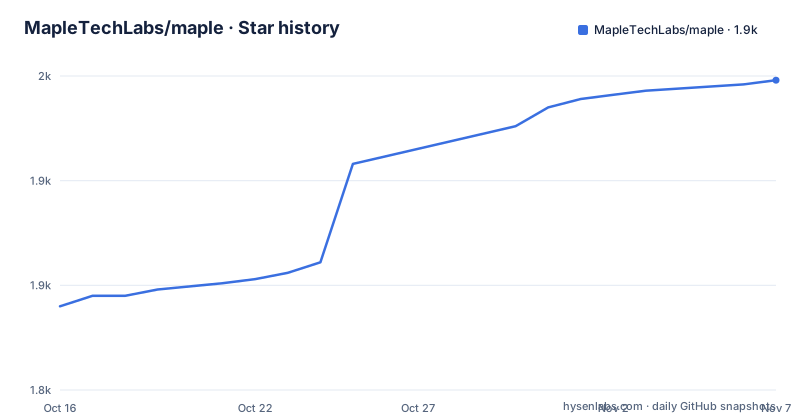
Star history
- MapleTechLabs/maple1,948 ★ · +108
| Repository | 2026-10-16 | 2026-11-07 |
|---|---|---|
| MapleTechLabs/maple | 1.8k | 1.9k |
108 Stars in the last 22 days, measured from the daily GitHub snapshot. Compare with other projects
Editorial analysis
Maple's OpenTelemetry data boundary
Maple addresses the problem of collecting telemetry without requiring a proprietary agent or application SDK. Its documented interface is OTLP, so an existing OpenTelemetry SDK or Collector can send data by setting an OTLP endpoint and an authorization header. The README positions Maple as a unified destination for traces, logs and metrics rather than three separate observability products.
That design has a practical consequence. Applications can retain their existing OpenTelemetry instrumentation while the telemetry destination changes. Maple can receive data through maple.dev, through a self-hosted stack, or through its local binary. This is useful for teams comparing a hosted service with infrastructure they control. The README does not provide a complete feature-parity or pricing comparison across those modes, so deployment claims should be checked against the current documentation.
The primary audience is an engineering team that needs to investigate traces, logs and metrics together. Shared filters and time ranges are central to that workflow. The README says log search can jump directly to the trace that emitted an entry, while a trace waterfall shows attributes, logs and infrastructure per span. A service map presents dependencies with request rate, error rate and latency on each edge. These are documented interface claims, not measured performance results.
Maple also extends beyond storage and search. Its feature list includes error issues with assignment and resolution states, alert rules, browser session replay and a hosted MCP server. Agent access targets clients such as Claude Code and Cursor. This makes the project relevant to development teams that want a coding agent to query telemetry during an investigation, not merely inspect charts.
Maple's service boundaries in the repository
The repository separates ingestion, API access, presentation, alerting and AI functions into distinct TypeScript applications. `apps/ingest` is the OTLP gateway. The README assigns key authentication, organization enrichment and forwarding to this service. It is the documented entry boundary for telemetry: incoming data passes through ingest before Maple associates it with an organization and forwards it to the storage and query stack.
`apps/api` is described as an Effect HTTP API with authentication and OAuth. `apps/ai` contains the MCP server, chat agent and investigations. `apps/alerting` contains the alert evaluation worker. The main dashboard lives in `apps/web`, while `apps/cli` and `apps/local-ui` provide the Maple CLI and local dashboard. Shared workspaces under `packages/*` contain domain, query-engine, backend, database, UI and SDK code. Libraries under `lib/*` are described as independent of Maple's domain.
The Cloudflare deployment arrangement adds more specialized components. According to the README, `apps/api/src/worker.ts` provides Hyperdrive-backed Postgres access, KV, queues, workflows and a `ChatSession` Durable Object. A separate Worker under `apps/alerting` performs cron-driven alert evaluation. ElectricSQL provides synchronization support, and static web or landing applications are deployed through asset-serving Workers.
Deployment behavior differs by environment. The README says production binds a dashboard-managed Hyperdrive configuration, while development stages may require `MAPLE_PG_URL`. Pull-request preview profiles intentionally bind no database. Consequently, database-backed preview routes return HTTP 500 even though routes that do not need a database can continue to work. This restriction makes preview environments unsuitable for validating every persisted workflow.
Installing Maple and sending the first telemetry
The shortest documented local installation uses Homebrew. Starting Maple in local mode exposes OTLP ingest on port `4318`, starts an embedded ClickHouse and opens the dashboard. The commands are:
brew install Makisuo/tap/maple
maple start
For a machine without Homebrew, the README provides a shell installer:
curl -fsSL https://maple.dev/cli/install | shThe documentation points readers to `docs/local-mode.md` for details after installation. The README excerpt does not include that file's full configuration reference, so it does not establish how to change the local ingest address, persistence location or authentication settings.
For hosted telemetry, create an ingest key in Maple settings and configure an OpenTelemetry SDK or Collector. The exact environment variables shown in the README are:
export OTEL_EXPORTER_OTLP_ENDPOINT="https://ingest.maple.dev"
export OTEL_EXPORTER_OTLP_HEADERS="Authorization=Bearer YOUR_INGEST_KEY"
Replace `YOUR_INGEST_KEY` with the key created in Settings. These variables target maple.dev. Local mode listens on `4318`, so it requires a different endpoint from the hosted URL. The README does not provide a complete Collector pipeline or application SDK example for local mode.
Agent access is a separate setup path. Connecting Claude Code to the hosted MCP endpoint uses this command:
claude mcp add --transport http maple https://api.maple.dev/mcpThis command configures client access to Maple's MCP server. It does not create an ingest key, direct OTLP traffic to Maple, or configure local mode. Operators need to validate ingestion and agent access independently.
Developing Maple with Bun and Docker
Development requires Bun `>=1.3`. The repository uses Bun workspaces across `apps/*`, `packages/*`, `lib/*` and `examples/*`. Install dependencies from the repository root with:
bun installThe `dev` script runs `scripts/dev.ts`, and the complete local development environment starts with:
bun devThe README says this launches Cloudflare Workers under Alchemy's local runtime and runs other applications as child processes. The resulting applications use `https://<app>.localhost` hostnames. A narrower command can start selected services such as `api` and `web`:
bun dev api webA non-Worker application can also run directly through its package filter. The repository gives `@maple/web` as the example:
bun --filter=@maple/web devFor a Docker-based local stack, the README documents API, web, ingest and OpenTelemetry Collector services. Its command is:
docker compose -f docker-compose.yml up --buildThe documented service addresses are API on `http://localhost:3472`, web on `http://localhost:3471` and ingest on `http://localhost:3474`. The Collector exposes `4317` for gRPC, `4318` for HTTP and `13133` for health and extensions. The compose file also maps PostgreSQL to `5499` and ElectricSQL to `3473`. A second development compose file provides ClickHouse, so these are not interchangeable definitions of the same stack.
The repository's validation scripts cover the main source, build and test tasks:
bun run typecheck
bun run build
bun run test
Additional package scripts cover ClickHouse end-to-end tests, migrations, formatting, linting, demo data, query benchmarks and backup restoration. Those commands indicate that upgrades can require validation across storage, API and UI boundaries, although the README does not define a formal production upgrade procedure.
Maple's self-hosting and maintenance costs
Maple has several deployment models, and each carries a different maintenance burden. Hosted use sends OTLP data to maple.dev and accesses the managed dashboard and related services. Local binary mode combines the Maple executable, OTLP ingest and embedded ClickHouse. The repository's Docker path introduces several additional services and environment variables. Self-hosting should therefore not be treated as equivalent to installing a single stateless API.
The compose configuration includes PostgreSQL 17 with `wal_level=logical`. ElectricSQL tails the PostgreSQL write-ahead log to serve table shapes. Its comments state that the web application does not connect to ElectricSQL directly. Instead, the API exposes a shape proxy that authenticates requests and applies organization scope. That boundary requires the API, PostgreSQL configuration and ElectricSQL publication state to remain compatible.
Storage configuration has further choices. `.env.example` defines `CLICKHOUSE_URL`, `CLICKHOUSE_PROVIDER`, `CLICKHOUSE_USER`, `CLICKHOUSE_DATABASE` and `CLICKHOUSE_PASSWORD`. It also contains `TINYBIRD_HOST`, `TINYBIRD_TOKEN` and several JWT configuration keys. Comments distinguish managed Tinybird access from a self-managed ClickHouse deployment and say that raw ClickHouse access at environment level is limited to single-organization self-hosted mode.
The repository is not archived, and its last push was on 2026-10-16. Releases `v0.0.24`, `v0.0.25` and `v0.0.26` were published on 2026-10-13. This shows recent repository and release activity, but the README does not publish a supported-version policy, migration cadence or rollback procedure. Operators still need to inspect changesets, migrations and Compose definitions before upgrading.
The license is a separate adoption constraint. GitHub classifies it as a custom license, and the repository directs users to `LICENSE`. The README does not summarize permitted use, redistribution, hosted-service rights or modification conditions. Anyone planning to operate Maple for clients should review that file directly.
Maple's limitations and narrower OpenTelemetry alternative
The main limitation is operational breadth. A repository deployment can include Cloudflare-oriented application code, PostgreSQL, ElectricSQL, ClickHouse, Tinybird-related configuration and an OpenTelemetry Collector. Even local mode has more moving pieces than a standalone visualization service. Teams with limited operations capacity should compare this footprint with their ability to update storage schemas, network configuration and multiple application services.
Preview environments expose another boundary. The README states that PR previews bind no database, causing database-backed routes to return HTTP 500. This is deliberate, but it prevents previews from proving that persistence, migrations and data-dependent interactions work together. A passing preview should not be treated as equivalent to validation against a fully configured environment.
The documentation is also selective. It does not give retention defaults, ingestion limits, query performance, agent permissions, MCP audit logs, migration procedures between hosted and self-hosted deployments, or a complete feature comparison. Those are adoption criteria, but the README does not provide enough detail to fill them in reliably.
A narrower alternative is an OpenTelemetry Collector connected to storage dedicated to one required signal. That approach reduces reliance on Maple's API, AI and alerting applications when an engineering team mainly needs a dependable pipeline. The tradeoff is direct: a Collector setup can have a smaller application surface, while Maple adds a shared traces, logs and metrics interface, service map, error workflows, session replay and hosted MCP access. Maple is also not a straightforward fit for a policy that requires a standard open-source license, because its license is custom.
Choosing between Maple's hosted, local and self-hosted modes
Maple's clearest use case is an engineering organization that already emits OTLP and wants to investigate traces, logs and metrics through one interface. Correlated views can reduce context switching: a log can lead back to its trace, and spans expose their attributes, logs and infrastructure context. The error, alerting and service-map features extend that workflow beyond basic telemetry search.
Hosted operation has the smallest documented local infrastructure burden because telemetry goes to `https://ingest.maple.dev` and coding agents can connect to `https://api.maple.dev/mcp`. That convenience comes with data-governance questions that the README does not answer in detail. It does not specify agent permissions, MCP audit behavior, retention defaults or which hosted features correspond to every self-hosted component.
Local binary mode is simpler than the repository's full Compose environment because it presents one command and embeds ClickHouse. It is still a separate operational product, and `docs/local-mode.md`, not the main README excerpt, is the next source to check for its configuration details. The Docker path is more appropriate when an operator needs separate API, web, ingest and Collector services or the repository's development infrastructure.
Agent-assisted investigation deserves a separate acceptance test. Maple documents MCP access for Claude Code, Cursor and other clients, but its governance details are not specified in the README. Before connecting production telemetry, reviewers should confirm the client's access boundary and Maple's data handling through current product documentation. The core observability interface can be evaluated independently of that agent path.
Editorial conclusion
Adopt Maple when an engineering team needs an OTLP-native interface for traces, logs and metrics and can support its custom license and data infrastructure. Do not choose it when a standard license or a minimal single-service deployment is mandatory. Before adoption, verify where telemetry is stored, whether hosted and self-hosted modes cover the required features, and what operating work an upgrade entails.
Frequently asked questions
What is Maple used for?
Maple is an observability platform built on OpenTelemetry and ClickHouse. It combines traces, logs and metrics and also documents error grouping, alerting, session replay and MCP access for coding agents.
How do I install Maple locally?
The README documents `brew install Makisuo/tap/maple` followed by `maple start`. It also provides `curl -fsSL https://maple.dev/cli/install | sh` for installations without Homebrew.
How does Maple receive telemetry?
Maple accepts telemetry through OTLP. The hosted example configures `OTEL_EXPORTER_OTLP_ENDPOINT` with `https://ingest.maple.dev` and passes the ingest key through `OTEL_EXPORTER_OTLP_HEADERS`.
Does Maple support coding agents?
Yes. The README documents a hosted MCP server and an HTTP MCP configuration command for Claude Code. It does not document the agent's permissions, audit model or complete governance controls.
Can Maple be self-hosted?
The README says Maple can be self-hosted. It documents a local binary with embedded ClickHouse and a Docker Compose environment containing separate API, web, ingest and Collector services.
Official sources
Add this badge to your README
If you maintain this project, the badge below links readers to this analysis and shows its maintenance status from the daily GitHub snapshot. Paste the markdown into your README; add ?metric=license or ?metric=stars to the image URL for a different field.

[](https://hysenlabs.com/projects/mapletechlabs-maple)Star history chart for your README
[](https://hysenlabs.com/projects/mapletechlabs-maple)Was this useful?