MDAnalysis for Molecular Dynamics Trajectory Analysis
MDAnalysis is a Python library to analyze molecular dynamics simulations.
At a glance
- What is it?
- MDAnalysis loads molecular dynamics trajectories, exposes simulation data through a Python object model, and supplies analysis algorithms for structural calculations. It is suited to researchers who need repeatable analysis across GROMACS, Amber, NAMD, CHARMM, DL_POLY, HOOMD, LAMMPS, and other supported inputs.
- Who is it for?
- Researchers should adopt MDAnalysis when their analysis must combine supported trajectory and topology formats with a reusable Python object model and established analysis modules. Projects that depend on undocumented input details or calculations absent from the documentation should verify format compatibility and licensing first.
- Can I use it commercially?
- Check first. The repository uses a licence we do not classify automatically, so read its LICENSE file before any commercial use.
- Is it still maintained?
- Yes. The repository last received commits 1 day ago.
- What is it written in?
- Mainly Python, according to GitHub's language statistics.
Answers come from the project's GitHub data, last synced on November 6, 2026, and from our analysis. They are not legal advice.
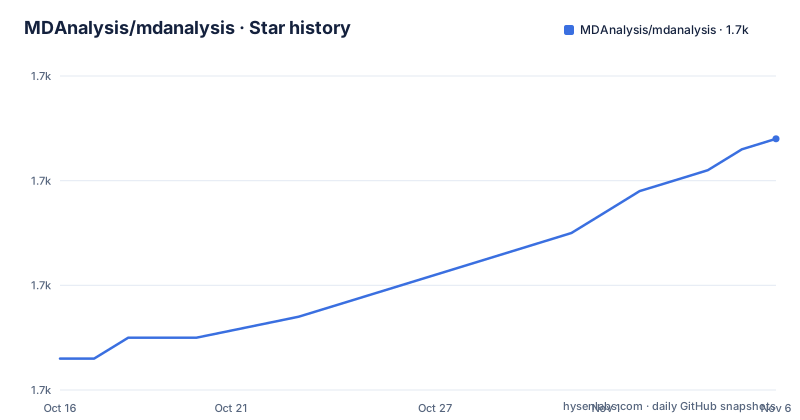
Star history
- MDAnalysis/mdanalysis1,684 ★ · +21
| Repository | 2026-10-16 | 2026-11-06 |
|---|---|---|
| MDAnalysis/mdanalysis | 1.7k | 1.7k |
21 Stars in the last 21 days, measured from the daily GitHub snapshot. Compare with other projects
Editorial analysis
MDAnalysis for heterogeneous simulation outputs
MDAnalysis addresses a specific problem in molecular dynamics research: simulation data is produced by multiple packages, but analyzing that data should not require every project to invent its own loading, selection, and frame traversal layer. The library targets simulations of many-body systems at the molecular scale, including drug and protein interactions and materials research. Its intended users are scientists and engineers who already have trajectory output and need to select atoms, inspect simulation properties, iterate through frames, or apply established molecular analysis methods.
The project supports trajectory and topology inputs associated with GROMACS, Amber, NAMD, CHARMM, DL_POLY, HOOMD, LAMMPS, and other simulation packages. That breadth matters because a molecular study may combine files produced by one simulation engine with preprocessing or analysis written in Python. MDAnalysis does not present itself as the simulator in this workflow. It is the layer that consumes simulation results and turns them into objects and arrays that Python code can process.
The object model also gives analysis code a common vocabulary around universes, frames, atoms, selections, positions, velocities, and forces. The README identifies the `MDAnalysis.analysis` module as the home for widely used analysis algorithms. The tutorial collection covers RMSD calculations, structural alignment, distance analysis, and contact analysis. This is a better fit than a general-purpose numerical script when the work is specifically about molecular trajectories and the required topology and coordinate formats are supported.
Universe loading and NumPy-backed trajectory access
The central loading operation is `MDAnalysis.Universe`, which receives a topology file and a trajectory file. The README example uses `topol.tpr` and `traj.trr`. Once loaded, the resulting `Universe` exposes atom groups through `select_atoms`. A selection expression such as `name OH` narrows the data to atoms matching the named criterion.
Selected atom groups expose quantities such as `positions`, `velocities`, and `forces` as NumPy arrays. That design keeps the data model compatible with the wider Python numerical ecosystem. It also separates selecting a molecular group from calculating a derived property. The example obtains an atom group named `ag`, then calls `ag.center_of_mass()` while moving through the trajectory.
Trajectory iteration uses `u.trajectory`. Each loop iteration represents the current frame exposed by the trajectory interface, so frame-by-frame calculations can be written directly in Python. The README does not document memory mapping, caching policy, frame correction, unit conversion, or handling for unsupported topology fields. Those details should be checked in the User Guide for the formats and calculations relevant to a study. The interface is clear, but the README does not justify assumptions about performance or automatic validation.
First analysis with a GROMACS example
The README says the latest release can be installed through `pip` or `conda` and points to the `Installation Quick Start`. It does not provide the exact installation command, package spelling, environment setup steps, or version constraints. Those details should be taken from the linked installation guide rather than reconstructed without confirmation.
After installation, the following README example loads `topol.tpr` and `traj.trr`, selects atoms whose name is `OH`, accesses selected atom data as NumPy arrays, and prints the selected group's center of mass for each trajectory frame.
import MDAnalysis as mda

u = mda.Universe('topol.tpr','traj.trr')
ag = u.select_atoms('name OH')
ag.positions
ag.velocities
ag.forces

for ts in u.trajectory:
    print(ag.center_of_mass())
A reader should confirm that the two files exist, that the topology and trajectory are compatible with MDAnalysis, and that `name OH` selects the intended atoms before relying on the result. The final statement prints one center-of-mass value for each accessible trajectory iteration. The README does not specify the printed formatting, coordinate units, mass conventions, or handling for files outside the example. Format-specific documentation should answer those questions before the result enters a scientific pipeline.
Analysis modules for structural calculations
Using `Universe` directly does not limit a workflow to selections and basic group properties. The `MDAnalysis.analysis` module provides commonly used molecular analysis algorithms, while the tutorial collection documents workflows for RMSD, structural alignment, distance, and contact calculations. This creates a path from manual exploration to reusable analysis code without requiring the entire research pipeline to be built from array operations alone.
The distinction matters for analysis intent. A one-off script can select a named atom group and iterate frames. A study that needs structural alignment or a recognized contact calculation can use the documented analysis modules and their associated parameters. The repository also points to a references page for citations covering included algorithms and submodules. That is useful for scientific work because the general MDAnalysis citation does not replace citations for the particular method being applied.
The README does not enumerate every algorithm in `MDAnalysis.analysis`, explain parameter defaults, or reproduce the tutorials for structural alignment, distance, and contact analysis. It supports the claim that analysis modules exist and that tutorials cover those topics, but not a comparison of algorithm coverage against another package. Researchers should consult the API documentation and algorithm-specific references before selecting a module and citing a method in published work.
Format coverage and analysis failure points
The main technical boundary is input coverage. MDAnalysis advertises support for many popular simulation packages, but the README sends readers to separate supported trajectory and topology format lists rather than claiming that every file produced by every version is interchangeable. A file can be scientifically valid yet still require a specific topology parser, coordinate reader, or naming convention before a selection or analysis makes sense.
The `Universe` example makes topology interpretation central. Selecting `name OH` assumes that atom names were parsed into the `name` attribute and that the selection is intended for this system. The README does not say how missing attributes, duplicated atoms, malformed files, or mismatched topology and trajectory files are reported. It also does not document what happens to a partially completed analysis if a later operation fails. Those are concrete cases where an apparently small loading script can stop before producing results.
MDAnalysis is therefore a poor fit for a workflow whose files depend on undocumented extensions or custom fields that the relevant format documentation does not cover. It is also a poor choice if the requested calculation is absent from the documented analysis modules and cannot reasonably be expressed from the exposed atom data. A direct, custom script may fit those cases better, although it will carry its own parser, selection, units, and validation burden.
Licensing and version-specific adoption
The repository's `LICENSE` file is the controlling source for licensing details. The README states that the project package is offered under the GNU Lesser General Public License, version 3 or any later version, written as `LGPLv3+`. It also states that individual source components may be under the GNU Lesser General Public License, version 2.1 or any later version, written as `LGPLv2.1+`. A project that distributes or modifies individual components should inspect `LICENSE` rather than treating the repository's license category as a complete legal analysis.
Upgrade planning is supported by the release history. The listed releases include `package-2.10.0` on 2025-10-17, `package-2.9.0` on 2025-03-11, and `package-2.8.0` on 2024-11-22. The repository is not archived, and the last push was on 2026-10-15. That establishes repository activity, but it does not remove the need to review release notes and format-specific changes before changing a production analysis version. The README does not provide a compatibility policy or a rollback procedure.
The mix of `LGPLv3+` and `LGPLv2.1+` also makes component-level review necessary. The README does not enumerate which files carry which license, so it cannot support a conclusion about the obligations of a particular copied module. Distribution planning should begin with the named licenses in `LICENSE`, then proceed to the component documentation for anything being modified or redistributed.
Adoption boundary for scientific Python workflows
MDAnalysis occupies a more specialized position than a general numerical library and a more integrated position than a collection of unrelated file readers. Its approach is to combine topology and trajectory loading, selection by molecular attributes, NumPy-backed atom data, frame iteration, and analysis modules under one Python interface. The alternative described by its architecture is a bespoke pipeline that loads or converts files separately and performs selection and frame analysis with project-specific code. That route can fit an unusual format, but it transfers responsibility for format handling and scientific calculations to the adopting project.
For researchers working with supported GROMACS, Amber, NAMD, CHARMM, DL_POLY, HOOMD, or LAMMPS inputs, the standard selection and analysis workflow is the main adoption case. The first verification should be concrete: open the intended topology and trajectory with `MDAnalysis.Universe`, inspect the required atom attributes, and confirm that a representative selection behaves as expected. If that succeeds, the project provides a documented base for moving into the `MDAnalysis.analysis` module. If it does not, the supported format lists, installation guide, and `LICENSE` file are the specific next documents to inspect before adopting it.
Editorial conclusion
Researchers should adopt MDAnalysis when their analysis must combine supported trajectory and topology formats with a reusable Python object model and established analysis modules. Projects that depend on undocumented input details or calculations absent from the documentation should verify format compatibility and licensing first. For a supported molecular trajectory and NumPy-based analysis, MDAnalysis is a practical choice after checking the relevant format list.
Frequently asked questions
How do I install MDAnalysis?
The README says the latest release can be installed via pip or conda and directs readers to the Installation Quick Start. It does not include the exact installation command or environment details.
How do I load and analyze an MDAnalysis Universe?
Create a `Universe` with a topology file and trajectory file, select atoms with `select_atoms`, and iterate through `u.trajectory`. The README demonstrates accessing `positions`, `velocities`, and `forces` as NumPy arrays.
Which molecular dynamics formats does MDAnalysis support?
The README names GROMACS, Amber, NAMD, CHARMM, DL_POLY, HOOMD, LAMMPS, and other packages. It links to separate trajectory format and topology format lists for detailed coverage.
What license does MDAnalysis use?
The README states that the project package is licensed under `LGPLv3+`, while individual source components may be licensed under `LGPLv2.1+`. The repository's `LICENSE` file provides the detailed licensing information.
Official sources
Add this badge to your README
If you maintain this project, the badge below links readers to this analysis and shows its maintenance status from the daily GitHub snapshot. Paste the markdown into your README; add ?metric=license or ?metric=stars to the image URL for a different field.

[](https://hysenlabs.com/projects/mdanalysis-mdanalysis)Star history chart for your README
[](https://hysenlabs.com/projects/mdanalysis-mdanalysis)Was this useful?