Infinite Mac: Browser-Based Classic Mac Emulation and Software Libraries
A classic Mac loaded with everything you'd want
At a glance
- What is it?
- Infinite Mac turns classic Macintosh computers into browser-based systems backed by WebAssembly emulators, prepared disk images, and a broad software catalog. It fits retrocomputing visitors and website developers who need an embeddable Macintosh environment, but its local build also requires substantial asset and emulator tooling.
- Who is it for?
- Infinite Mac fits browser-based retrocomputing and embedded classic Mac use. Do not choose it for an arbitrary local emulator setup or an unprocessed offline library.
- Can I use it commercially?
- Yes. Apache-2.0 is a permissive licence: you can use, modify and sell software built on it, as long as you keep its copyright and licence notices.
- Is it still maintained?
- Yes. The repository last received commits 6 days ago.
- What is it written in?
- Mainly TypeScript, according to GitHub's language statistics.
Answers come from the project's GitHub data, last synced on November 7, 2026, and from our analysis. They are not legal advice.
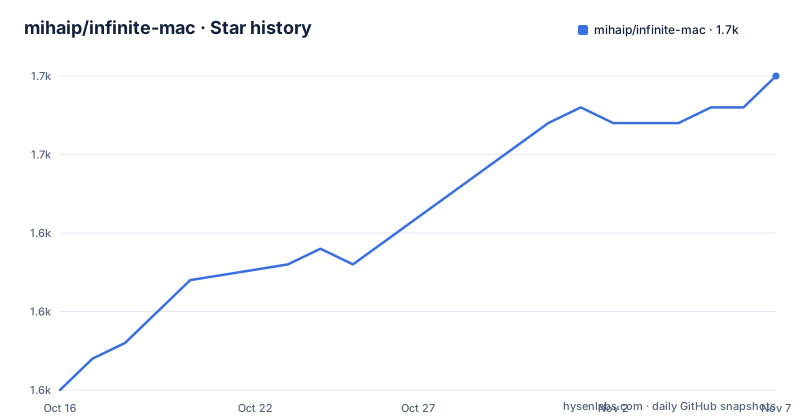
Star history
- mihaip/infinite-mac1,655 ★ · +20
| Repository | 2026-10-16 | 2026-11-07 |
|---|---|---|
| mihaip/infinite-mac | 1.6k | 1.7k |
20 Stars in the last 22 days, measured from the daily GitHub snapshot. Compare with other projects
Editorial analysis
Why Infinite Mac Puts Macintosh Software in a Browser
Infinite Mac addresses a specific gap between static software catalogs and traditional emulator setup. Its stated goal is to make classic Macs from the 1980s, 1990s, and early 2000s load instantly in a browser while giving users access to a large software library. The hosted collection includes shortcuts for System 6, System 7, Mac OS 8, Mac OS 9, and the Japanese KanjiTalk environment. That makes it useful for opening period software without asking each visitor to assemble a disk image, locate an emulator binary, and configure a compatible Macintosh system.
The audience has two distinct sides. Retrocomputing visitors can use the hosted collection as an application environment for classic Macintosh software. Web developers can embed an emulated Mac in another site and control it programmatically through a separate embedding interface. Infinite Mac is therefore not merely a catalog with downloadable files. Its architecture combines the emulator, operating-system image, input, audio and video, networking support, storage, and a software library into one browser-facing product.
There is still a hardware-emulation boundary. The project can recreate selected classic Macintosh environments, not every machine in that period. Disk compatibility, included software, system revisions, and emulator core support determine what actually works. The repository names Basilisk II, SheepShaver, several Mini vMac variants, DingusPPC, Previous, PearPC, and Snow as supported cores, which also shows that Infinite Mac spans different processor architectures and Macintosh generations rather than presenting one universal emulator.
How Infinite Mac Connects WebAssembly, Disk Data, and the React UI
The public application is a TypeScript React frontend backed by emulator integration code. Under `src/emulator/ui`, code in the main thread drives configuration, files, audio, video, and input. Under `src/emulator/worker`, the emulator runtime and helpers execute separately from those interface responsibilities. Shared types and utilities sit in `src/emulator/common`, while generated Emscripten binaries live in `src/emulator/worker/emscripten`.
This split is visible in the repository layout. The main-thread layer handles browser-facing controls, while the worker side runs the WebAssembly emulator. Inputs travel from the React interface to the emulated system, and the emulator returns display, sound, or other runtime activity through the integration layer. The repository also contains networking helpers for Ethernet connections between emulated computers, which is a notable departure from a page that merely displays a captured screenshot of an old Macintosh.
Prepared data is equally important. OS images receive some dynamic customization, while separate "Infinite HD" images contain third-party material from `Library/`. The import process creates chunked image files plus JSON manifests under `src/Data`. At runtime, those manifests describe the disk assets and related metadata. CD-ROM and floppy content use separate manifests, with options for self-hosted files, offsets into multi-track discs, data sizes, and platform-specific subsets.
The hosted path also has infrastructure beyond the React application. `worker/` contains Cloudflare Worker code for server-side rendering, asset delivery, and APIs. Deployment commands build for either local assets or Cloudflare Worker use. This means the repository is not a static React site alone. It is an asset pipeline, emulator runtime, frontend, media index, and Cloudflare delivery system.
Running the System 1 Through System 7.5.5 Build Locally
A contributor needs Node.js 22 or later and Python 3.10 or later. The Python side is managed through the `infinite-mac` package, whose dependencies include `machfs`, `beautifulsoup4`, `Pillow`, and `xattr`. The repository must also be cloned recursively because emulator implementations are represented as submodules.
For a new checkout, this command retrieves the project and initializes those submodules:
git clone --recursive https://github.com/mihaip/infinite-mac.gitAn existing checkout can be brought into the same state with the repository's documented submodule command:
git submodule update --init --recursiveNext, install the JavaScript dependencies and build the helper tools:
npm install
npm run build-tools
The minimal import commands generate enough supporting data to run System 1 through System 7.5.5. The first prepares disk images, the second creates a placeholder CD-ROM collection, and the third creates a minimal software library that does not require a Macintosh Garden data dump.
npm run import-disks minimal
npm run import-cd-roms placeholder
npm run import-library placeholder
Start the development server after those files exist:
npm run startThe README states that the server will be available at `http://localhost:3127`. Opening that address is the first practical use of the local build. A developer can then inspect the available classic Macintosh systems and application library in the browser. This path is deliberately smaller than the full hosted collection because it avoids populating Infinite HD and does not download the complete library.
The official `Dockerfile` provides a more specialized preparation environment for emulator-core work. It installs Node.js 22, Emscripten 6.0.11, Rust 1.95.0, native build dependencies, and `wasm-bindgen-cli` 0.2.128. That container is aimed at rebuilding emulator binaries, which is a different task from running the frontend with imported binaries.
Why Disk and Media Import Is the Hardest Build Boundary
Infinite Mac's browser experience depends on data that the npm commands do not create automatically. A normal contributor can start with placeholder content, but producing the complete hosted library requires disk, CD-ROM, and library inputs. The repository includes directories for `CD-ROMs/`, `Library/`, disk-related images, ROMs, fonts, and other assets, yet the README makes clear that much third-party software metadata and some media are sourced elsewhere.
Disk generation has an operational wrinkle. The final preparation stage invokes native macOS versions of Mini vMac and Basilisk II so the generated disk receives a valid desktop database. If those applications are absent, the script logs a warning and the generated disk may take longer to mount. The emulated applications must also be shut down and quit cleanly after mounting Infinite HD. A developer on Linux or Windows should not expect the documented disk path to behave exactly like the native macOS path.
CD-ROM processing introduces additional choices. Most discs remain hosted elsewhere, while floppies and local media can be self-hosted. Setting `"self_hosted": true` permits local serving and post-processing of items from compressed discs. Manifests can select a filesystem using `data_offset` and `data_size`, then limit a guest's library to Macintosh, NeXT, or BeOS through `"platform"`. These are data-pipeline concerns, not user preferences stored by the frontend.
This build boundary makes Infinite Mac less approachable than a small React package. A frontend contributor can use the minimal commands, but someone preparing the production library must understand disk formats, manifests, storage synchronization, emulator-generated metadata, and object storage. The README also says that `sync-disks` requires `rclone` and targets a Cloudflare R2 bucket. That operation belongs to deployment and media operations rather than ordinary local development.
Embedding Infinite Mac Versus Running a Standalone Emulator
The closest practical alternative is to configure a standalone emulator for each Macintosh system and distribute its software separately. Infinite Mac takes a different approach. It packages compatible WebAssembly emulator cores, prepared media, browser controls, networking helpers, and library metadata behind hosted shortcuts. A visitor can open `macos9.app` or another system page without first assembling that stack.
Standalone emulation can still be the better choice when the objective is local control over native emulator configuration rather than browser delivery. Infinite Mac's own supported-core list includes Basilisk II, SheepShaver, Mini vMac variants, DingusPPC, Previous, PearPC, and Snow. The repository does not document a general point-and-click route for substituting every local emulator configuration, nor does it claim that Infinite Mac reproduces arbitrary hardware combinations. Its browser collection is assembled around known system profiles and prepared assets.
Embedding is the more distinctive use. The project documentation provides an embedding guide and describes emulated Macs that websites can embed and control programmatically. That avoids treating the hosted collection as the only interface. A developer can evaluate the embed API, host the required assets, and expose a controlled Macintosh experience inside an existing site.
The trade-off is coupling to the project's delivery model. Hosting, manifests, generated disks, emulator binaries, and Worker infrastructure are separate concerns in the repository, but they work together to create the finished experience. A site that only needs one prepared native emulator installation may find that extra machinery unnecessary. A site seeking browser access to a known Infinite Mac system, or an interactive exhibit based on classic Macintosh software, has a more direct starting point.
Validation, Maintenance, and Apache-2.0 Responsibilities
The repository provides specific checks for a contributor's code rather than leaving validation to browser inspection. `npm run check` checks TypeScript types, while linting and formatting have separate commands. The README also documents a pre-commit script that runs all three checks and shows how to link it from `.git/hooks/pre-commit`.
ln -s ../../scripts/pre-commit.sh .git/hooks/pre-commitThe script invokes the repository's type, ESLint, and formatting checks according to the documented setup. This is useful because emulator code crosses browser boundaries and shares types between main-thread and worker code. Static checks can catch contract mismatches that a minimal System 7 page may never exercise.
The repository is not archived, and its last push was on 2026-10-15. Recent named releases focus on prepared media rather than a conventional sequence of library packages: `beos-disk-images-2026-09-30`, `aux-disk-images-2026-09-23`, and `mac-os-disk-images-2025-11-30`. Those release names indicate that disk-image preparation is a substantial recurring product operation. They do not establish a guarantee that every emulator core changes on the same schedule.
The project is licensed under Apache-2.0. That permits use and modification under the license's conditions, including preservation of applicable notices and handling of the license's express terms. This review does not interpret licensing for a particular deployment. Projects that redistribute modified code or media should examine which files, dependencies, ROM assets, and third-party library content are covered by separate terms. The repository is marked as private in `package.json`, so it is an application repository rather than a published npm library intended for normal package installation.
Adoption Fit for Infinite Mac Visitors and Web Teams
Infinite Mac is suited to visitors who want immediate access to curated classic Macintosh systems and software, plus web teams that want to embed a prepared classic Mac experience. It is a poor fit for a developer who needs only a small TypeScript emulator component, a complete offline library with no content-generation step, or support for every Macintosh hardware profile. The minimal build works only after disk, media, library, and development-tool preparation.
Before adoption as software, verify that the intended System 6, System 7, Mac OS 8, Mac OS 9, KanjiTalk, BeOS, or other profile is actually offered by the hosted collection or embedding setup. A developer evaluating the source should first verify the Node.js and Python prerequisites, run the minimal import sequence, and confirm that a required system boots at `http://localhost:3127`. Deployment owners must separately verify emulator rebuilding, media licensing, Cloudflare storage, and clean desktop-database generation. Infinite Mac fits browser-based retrocomputing and embedded classic Mac use, provided the required system profile is present and the media build is prepared successfully.
Editorial conclusion
Infinite Mac fits browser-based retrocomputing and embedded classic Mac use. Do not choose it for an arbitrary local emulator setup or an unprocessed offline library. Verify the intended system profile, required media pipeline, supported assets, and Node.js and Python build prerequisites first.
Frequently asked questions
How do I run Infinite Mac locally?
Clone the repository recursively, install dependencies, run `npm run build-tools`, generate minimal disk and library data, and start `npm run start`. The development server is documented at `http://localhost:3127`.
Which classic Mac systems does Infinite Mac support?
The README lists shortcuts for System 6, System 7, Mac OS 8, Mac OS 9, and KanjiTalk. Its emulator integration also names Basilisk II, SheepShaver, Mini vMac variants, DingusPPC, Previous, PearPC, and Snow.
Can I embed an Infinite Mac emulator in my website?
Yes. The README states that emulated Macs can be embedded in other websites and controlled programmatically, with details available through the Infinite Mac embedding guide.
Official sources
Add this badge to your README
If you maintain this project, the badge below links readers to this analysis and shows its maintenance status from the daily GitHub snapshot. Paste the markdown into your README; add ?metric=license or ?metric=stars to the image URL for a different field.

[](https://hysenlabs.com/projects/mihaip-infinite-mac)Star history chart for your README
[](https://hysenlabs.com/projects/mihaip-infinite-mac)Was this useful?