Milvus Bootcamp: A Practical Guide to Vector Search Demos and Notebooks
Dealing with all unstructured data, such as reverse image search, audio search, molecular search, video analysis, question and answer systems, NLP, etc.
At a glance
- What is it?
- The Milvus bootcamp repository collects Jupyter notebooks and demos for image search, RAG, drug discovery, and more. It is a hands-on starting point for engineers evaluating Milvus, but it is not a substitute for the official documentation.
- Who is it for?
- Adopt the bootcamp if you are an engineer or data scientist who wants to see Milvus in action before committing, especially for RAG, semantic search, or image similarity use cases. Skip it if you need production deployment guidance or deep performance tuning, because the repository offers examples, not operational advice.
- Can I use it commercially?
- Yes. Apache-2.0 is a permissive licence: you can use, modify and sell software built on it, as long as you keep its copyright and licence notices.
- Is it still maintained?
- Yes. The repository last received commits 25 days ago.
- What is it written in?
- Mainly Jupyter Notebook, according to GitHub's language statistics.
Answers come from the project's GitHub data, last synced on November 15, 2026, and from our analysis. They are not legal advice.
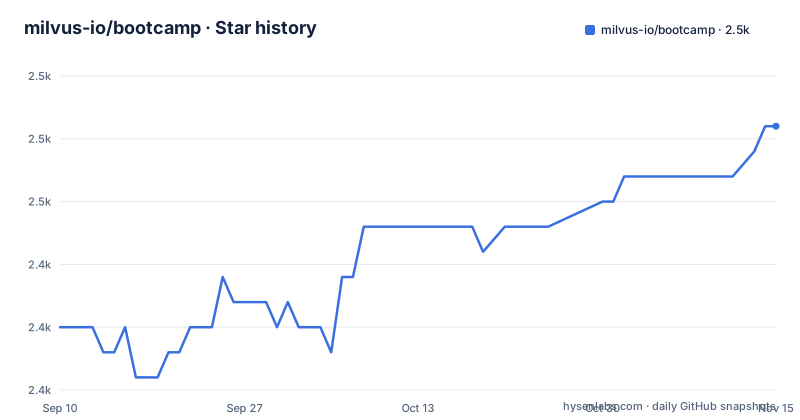
Star history
- milvus-io/bootcamp2,453 ★ · +8
| Repository | 2026-09-10 | 2026-11-15 |
|---|---|---|
| milvus-io/bootcamp | 2.4k | 2.5k |
8 Stars in the last 66 days, measured from the daily GitHub snapshot. Compare with other projects
Editorial analysis
What the Bootcamp Actually Provides
The repository is organized around two kinds of content. First, there are tutorial notebooks that walk through a specific use case, such as building a RAG pipeline or performing image similarity search. Second, there are demos that you can deploy, like the image search, RAG, and drug discovery examples shown in the README with animated previews. The README links to a tutorials overview on the Milvus site, which suggests the bootcamp is the companion code to those documents. If you are evaluating Milvus for a project, this repository gives you a way to see the database working with real embeddings and queries without starting from a blank file. The value is in the breadth of examples: you can compare how Milvus handles sparse embeddings in hybrid search versus dense vectors in a simple semantic search.
The Architecture You See in the Examples
The data flow in most notebooks is straightforward: load data, generate embeddings with a model such as a sentence transformer or an image encoder, insert those vectors into Milvus, then run a similarity search. The README mentions that the repository includes example data as a release, which suggests some notebooks come with pre-prepared datasets so you can run them without sourcing your own files. The demos, like the drug discovery example, likely follow the same pattern but with a web interface or a script. The bootcamp is not a framework; it is a set of recipes. You take the pattern and adapt it to your own data and model choices. That is useful for learning, but it also means you are responsible for understanding the embedding step and the search parameters, which the notebooks may not fully explain.
Getting Started: Commands and Configuration
The release named "data" from May 2025 suggests that example datasets are distributed through GitHub releases. You may need to download those files separately and place them in the expected directory. The README does not document the download steps. For an engineer familiar with Jupyter, the path is clear: clone, open, and run. But the lack of a unified setup guide means you might spend time figuring out which notebook requires which data file. The official documentation is the better source for exact connection strings and collection schema definitions. The bootcamp is a complement to that documentation, not a replacement.
Limitations and When It Is the Wrong Tool
The bootcamp is also the wrong tool if you need to understand Milvus internals, such as indexing algorithms or consistency models. The examples treat Milvus as a black box. For a deep dive, you need the official documentation or the source code. Additionally, the repository focuses on vector search applications, not on vector database administration. There are no notebooks for backup, monitoring, or tuning. If your goal is to evaluate Milvus for a specific production workload, you would be better served by running your own benchmark with representative data. The bootcamp can give you a starting point, but it will not answer the question of whether Milvus can handle your scale.
Alternatives and How They Differ
For a specific use case like RAG, you could also use a framework such as LangChain or LlamaIndex, which have their own Milvus integrations. The bootcamp includes examples of using Milvus as a LangChain vector store and with LlamaIndex. Those frameworks abstract away the direct Milvus API, which can speed up development. The bootcamp shows both the direct approach and the framework approach, so you can choose. The key difference is the level of control. Using Milvus directly gives you more control over the collection schema and search parameters, while using a framework simplifies the integration but may hide important details. The bootcamp does not make that trade-off explicit, but you can infer it from the examples.
Maintenance and Upgrade Cost
The upgrade cost is moderate if you use the bootcamp as a learning resource only. You run the notebooks once to understand the workflow, then write your own code. If you try to deploy a demo directly, you will need to manage the underlying Milvus instance and its upgrades. The bootcamp does not include any scripts for upgrading Milvus or migrating data. That work falls on you. The example data release is a single point of maintenance; if the data files become outdated or the download links change, the notebooks will break. The community mailing lists are the place to report such issues. In short, the bootcamp is a low cost way to get started, but it does not reduce the operational cost of running Milvus in production.
Editorial conclusion
Adopt the bootcamp if you are an engineer or data scientist who wants to see Milvus in action before committing, especially for RAG, semantic search, or image similarity use cases. Skip it if you need production deployment guidance or deep performance tuning, because the repository offers examples, not operational advice. Before relying on any notebook, verify the Milvus version it targets and the state of the underlying data files, since the only recent release is an example data package from 2025. Check the official Milvus documentation for the current API and configuration details, as the bootcamp may lag behind feature changes.
Frequently asked questions
What is the Milvus bootcamp repository?
A notebook repository and link index for learning a vector database, described as covering tasks from image and audio search to molecular search, video analysis, question answering and natural language processing. Its primary language is a notebook, and its README points at hosted documentation for the tutorials themselves.
Do the Milvus bootcamp notebooks run locally?
The environment template asks for a model hub token and a model provider key, and it says nothing about a database host, port or credential. The README's tutorial table links to the documentation site rather than to notebook paths in the repository, so the connection details come from elsewhere.
Which Milvus features does the bootcamp tutorial list cover?
The third column of the table maps each tutorial to a feature, and across thirteen rows those are vector search, full text search, hybrid search, multi-vector search, dense and sparse embedding, a dynamic field for image search, graph search, and clustering.
Does the Milvus bootcamp repository have releases?
One, and it is not a software release: the only tag is named for example data and was published in May 2025. There is no versioned notebook release to pin a tutorial against.
How is the Milvus project governed?
The README lists three mailing lists hosted on a foundation domain, covering a technical steering committee, technical discussions and announcements, alongside Discord, Slack and a set of social accounts. The steering committee list is the governance signal in the repository.
Official sources
Add this badge to your README
If you maintain this project, the badge below links readers to this analysis and shows its maintenance status from the daily GitHub snapshot. Paste the markdown into your README; add ?metric=license or ?metric=stars to the image URL for a different field.

[](https://hysenlabs.com/projects/milvus-io-bootcamp)Star history chart for your README
[](https://hysenlabs.com/projects/milvus-io-bootcamp)Was this useful?