mistletoe parses CommonMark into an AST you can render any way
A fast, extensible and spec-compliant Markdown parser in pure Python.
At a glance
- What is it?
- mistletoe is an MIT licensed pure Python Markdown parser that follows the CommonMark specification, parses into an abstract syntax tree, and ships renderers for HTML, LaTeX, Markdown and a set of contrib formats. It suits Python developers who want a spec-correct parser with a small, hackable core, and it is a parser rather than a document converter.
- Who is it for?
- Adopt mistletoe if you need CommonMark-correct parsing in Python and want the AST rather than a string of HTML, especially if you plan to write a renderer for your own output format. Do not adopt it for a one-off conversion where a command line tool is enough, since the library's value is the AST and the extension points.
- Can I use it commercially?
- Yes. MIT is a permissive licence: you can use, modify and sell software built on it, as long as you keep its copyright and licence notices.
- Is it still maintained?
- Yes. The repository last received commits 7 days ago.
- What is it written in?
- Mainly Python, according to GitHub's language statistics.
Answers come from the project's GitHub data, last synced on November 7, 2026, and from our analysis. They are not legal advice.
Star history
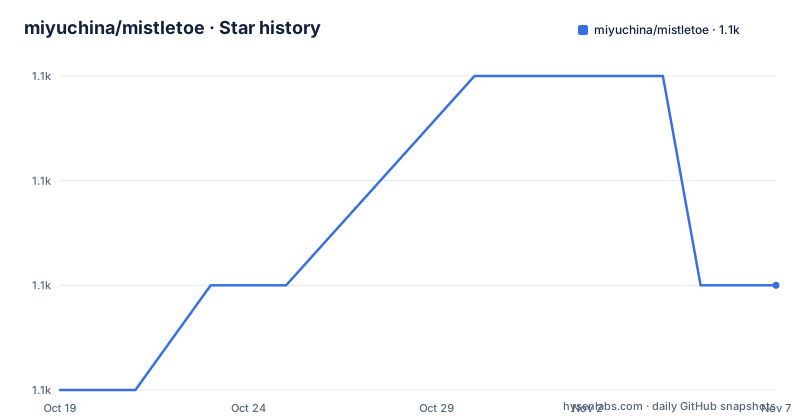
- miyuchina/mistletoe1,069 ★ · +1
| Repository | 2026-10-19 | 2026-11-07 |
|---|---|---|
| miyuchina/mistletoe | 1.1k | 1.1k |
1 Stars in the last 19 days, measured from the daily GitHub snapshot. Compare with other projects
Editorial analysis
The AST is the product, and the renderers are interchangeable
mistletoe is a Markdown parser in pure Python, designed to be fast, spec-compliant and fully customizable. Apart from being the fastest CommonMark-compliant Markdown parser implementation in pure Python, it also supports easy definitions of custom tokens. Parsing Markdown into an abstract syntax tree also allows us to swap out renderers for different output formats, without touching any of the core components.
That sentence contains the design in full. The parser produces a tree of token objects, and a renderer walks that tree and produces output. Because the two halves are separated, adding a new output format means writing a renderer and nothing else, and the README says writing a new renderer for mistletoe is a relatively trivial task.
The core output formats ship in the main package. There is HTML, LaTeX, AST, which is described as handy for debugging the parsing process, and Markdown, which can be used to reflow the text or make other types of automated changes to Markdown documents.
That last one is the most interesting and the least obvious. A Markdown renderer over a Markdown parser gives you a document reflow tool, and mistletoe's MarkdownRenderer takes a max_line_length argument for exactly that. Rewrapping a document to a different width while preserving its structure is a genuinely useful operation for a documentation pipeline, and it is only possible because the parser and the emitter are separable.
The Python usage is three lines:
import mistletoe

with open('foo.md', 'r') as fin:
    rendered = mistletoe.markdown(fin)
The default settings allow HTML mixins and render to HTML, and the function accepts an additional renderer argument. For LaTeX output the renderer is imported from its own module:
import mistletoe
from mistletoe.latex_renderer import LaTeXRenderer

with open('foo.md', 'r') as fin:
    rendered = mistletoe.markdown(fin, LaTeXRenderer)
The fact that LaTeX has its own module while the default HTML renderer is imported from the package root reflects which ones are considered core.
Parsing is tied to the renderer's lifetime, and that is the sharp edge
There is one API constraint in the README that is worth understanding before you write any code against this library.
The rendering API is a context manager, and the README's example shows the pattern: you open the renderer, parse the document inside the with block, and render it, and the comment explains that the internal lists of tokens to be parsed are automatically reset when exiting this with block.
from mistletoe import Document, HtmlRenderer

with open('foo.md', 'r') as fin:
    with HtmlRenderer() as renderer:     # or: `with HtmlRenderer(AnotherToken1, AnotherToken2) as renderer:`
        doc = Document(fin)              # parse the lines into AST
        rendered = renderer.render(doc)  # render the AST
And then the warning, which is stated as important: the parsing phase is currently tightly connected with initiation and closing of a renderer, therefore you should never call Document(...) outside of a with ... as renderer block, unless you know what you are doing.
The reason is that the renderer holds the list of registered tokens, and the parser reads that list. The renderer is not just a strategy object for output, it is also the registry of what the parser should look for. Opening a renderer installs the token set, parsing uses it, closing it restores the previous state. That design is what makes the per-renderer token extension work, since a renderer can add its own token classes to the mix.
The practical consequence is that a caller who constructs a Document outside the block, or who keeps a parsed document and renders it later with a different renderer, is outside the contract. It is a coupling that a more conventional design would avoid, and it is a reasonable thing for the project to have decided given that the extension point matters more than the flexibility, but it does mean the API has sharp edges that are easy to trip over.
The README also shows the extension mechanism in the same example, with the comment noting you can pass additional token classes to the renderer constructor, which is how a caller adds custom block or span tokens without modifying the library.
A contrib package for the formats nobody ships by default
The contrib package is where the less common output formats live, and the list is a good indication of what people actually need.
There is HTML with MathJax, HTML with code highlighting using Pygments, HTML with a table of contents for programmatic use, HTML with support for GitHub wiki links, and then two wiki and issue-tracker formats, Jira Markdown and XWiki Syntax. The last one is Scheme, and the README's features section says you can even write a Lisp in it.
The Scheme renderer is the detail worth dwelling on, because it is the clearest demonstration of what the architecture buys you. A Lisp renderer is not a flavour of HTML, it is a different notation entirely, with a different syntax for structure, a different escaping model and a different evaluation of what a code span means. Writing that as a special case inside a Markdown to HTML converter would be a mess. Writing it as a renderer over the token tree is a bounded task.
The same applies to the MathJax renderer, which is HTML with a different treatment of mathematics, and the table of contents renderer, which needs to walk the document and collect headings before it can render them, which is something the AST makes natural and a string-based converter makes awkward.
The separation of the core and contrib packages is a distribution decision as well as a design one. The main package stays small, and the extras are opt-in. The requirements.txt in the repository reflects that with a single optional entry, Pygments, pinned between 2.11.2 and 2.16 with a comment explaining that 2.11.2 is the last version supporting the old Python 3.5, which is a good example of a dependency pin carrying a piece of history rather than a security constraint.
The setup.py ships both mistletoe and mistletoe.contrib as packages, and the entry point is mistletoe = mistletoe.__main__:main, which is what gives the command line utility.
The command line tool doubles as a REPL for checking how Markdown parses
The command line interface is more than a converter, and the interactive mode is the part that shows the project's character.
A pip installation enables the mistletoe command line utility, and the basic use is:
mistletoe foo.mdwhich transpiles the file into HTML and dumps the output to stdout, and redirecting that into a file saves it. A different renderer is selected with a -r or --renderer flag followed by the full path to the renderer class:
mistletoe foo.md --renderer mistletoe.latex_renderer.LaTeXRendererand the same works for a renderer in the contrib package, for example mistletoe foo.md --renderer mistletoe.contrib.jira_renderer.JiraRenderer.
Then there is the interactive mode, entered by running mistletoe with no file. The README describes it as being like Python's REPL, allowing you to test how your Markdown will be interpreted by mistletoe, and the transcript shows the round trip:
mistletoe [version 0.7.2] (interactive)
Type Ctrl-D to complete input, or Ctrl-C to exit.
>>> some **bold** text
... and some *italics*
...
<p>some <strong>bold</strong> text
and some <em>italics</em></p>
>>>
The same session with a renderer selected shows the LaTeX document wrapper appearing around the same content, which is a neat demonstration that the renderer is what determines the output shape.
The interactive mode matters more than it appears. When a Markdown parser does something you did not expect, the question is usually which construct it matched, and a REPL that renders a snippet as you type it answers that in a second. The same trick in a non-interactive tool is a test file and a rebuild cycle.
One note for anyone reading the transcript closely: the version shown in the example is 0.7.2, which is older than the current release, so the banner text in the README is out of date even though the behaviour it describes is current.
CommonMark compliance is the feature that decides the trade
The compliance argument is the one that matters when you choose a Markdown parser, and the README states it in terms of ambiguity rather than feature counts.
CommonMark is described as a useful, high-quality project, and mistletoe follows the CommonMark specification to resolve ambiguities during parsing. The consequence is that outputs are predictable and well-defined.
That is a real differentiator. A Markdown parser that resolves edge cases by guessing produces output that differs between implementations, and a project that renders documentation with one parser and validates it with another ends up with documentation that fails its own checks. A spec-compliant parser gives you the same answer as the reference implementation, and it gives you an answer you can reason about when someone asks why a construct rendered the way it did.
The extensions are layered on top of the spec rather than replacing it. Strikethrough and tables are supported natively, and custom block-level and span-level tokens can easily be added. That is the right order: the spec behaviour stays predictable, and the non-standard constructs are opt-in.
The performance claim is stated plainly, that mistletoe is the fastest implementation of CommonMark in Python, with a link to a performance section, and the repository carries a performance.md file at the root. A fast, spec-compliant, pure Python implementation is a somewhat unusual combination, because the usual reason to write a parser in pure Python rather than use an existing one is either that you want to extend it or that you want to avoid a compiled dependency. Doing it at the top of the Python performance range is what makes the choice defensible for a library that other tools depend on.
The adoption evidence in the README is modest but real. The project points at the Used by section on Libraries.io and at the Dependents list that GitHub tracks directly, and it says the list is not complete. The named user is CopyQ, the clipboard manager, which uses mistletoe as a Markdown converter through a custom script command, and David Beazley is quoted on why mistletoe exists with the answer: For fun.
MIT licensed, a wide Python support range, and an old floor
The licence is MIT, with the LICENSE file in the repository as the authoritative text, and this is a licensing statement rather than legal advice. The setup.py records the license field as MIT and the classifier as License :: OSI Approved :: MIT License.
The Python support range is unusual and worth understanding. The README says mistletoe is tested for Python 3.5 and above, and the setup.py has python_requires of ~=3.5 with the classifiers listing every version from 3.5 through 3.14, plus both CPython and PyPy as implementations.
A floor of 3.5 is very old for a library that is otherwise current, and it comes with a cost that the requirements file documents. Pygments is pinned to a range ending at 2.16, with the comment that 2.11.2 is the last version supporting the old Python 3.5, and the upper bound at 2.16 means the library is not picking up newer Pygments releases. The optional dependency for code highlighting is therefore effectively frozen for anyone on an old Python.
The development status classifier is Production/Stable, and the release record is steady rather than fast. The recent versions are v1.6.0 on 2026-07-11, v1.5.1 on 2025-12-07 and v1.5.0 on 2025-10-18, and the last push was on 2026-09-16 with the repository not archived.
The repository layout is the standard Python packaging arrangement, with setup.py rather than a pyproject, a requirements.txt holding the single optional dependency, a test-requirements.txt for the test tooling, and a tox.ini for the test matrix. There is a makefile, a cutting-a-release.md documenting the release procedure, dev-guide.md as the Developer's Guide, a docs/ directory, and the mistletoe package itself with a py.typed marker shipped as package data, which is what makes the type hints usable by a downstream type checker.
The contributor guide is linked from the README, and the maintainer has asked people to remember to spell mistletoe in lowercase, which is a small sign of how much the name matters to the project.
Editorial conclusion
Adopt mistletoe if you need CommonMark-correct parsing in Python and want the AST rather than a string of HTML, especially if you plan to write a renderer for your own output format. Do not adopt it for a one-off conversion where a command line tool is enough, since the library's value is the AST and the extension points. Before you integrate, read the developer's guide in dev-guide.md, and be aware of the coupling the README warns about, that parsing is currently tied to the opening and closing of a renderer, so Document() should not be called outside a with block.
Frequently asked questions
How do I install and use mistletoe?
Run pip3 install mistletoe, then import mistletoe and call mistletoe.markdown(fin) on an open file, which uses the default settings of allowing HTML mixins and rendering to HTML. You can also clone the repo and run pip3 install -e . for an editable install where source changes are visible immediately.
What output formats does mistletoe support?
The core package has renderers for HTML, LaTeX, AST and Markdown, the last of which can reflow text or make automated changes to a Markdown document. The contrib package adds HTML with MathJax, HTML with Pygments highlighting, HTML with a table of contents, HTML with GitHub wiki links, Jira Markdown, XWiki Syntax and Scheme.
Why must Document() be called inside a with block in mistletoe?
The README explains that the parsing phase is currently tightly connected with the initiation and closing of a renderer, because the renderer holds the list of tokens to be parsed and restores it on exit. It says you should never call Document(...) outside a with ... as renderer block unless you know what you are doing.
How do I use the mistletoe command line tool?
Run mistletoe foo.md to transpile to HTML on stdout, and mistletoe foo.md --renderer mistletoe.latex_renderer.LaTeXRenderer to select another renderer by its full path. Running mistletoe with no file enters an interactive mode like a REPL, where you can type Markdown and see how it is interpreted.
Is mistletoe actively maintained and what Python versions does it support?
The repository is not archived, the last push was on 2026-09-16, and the recent releases are v1.6.0 on 2026-07-11, v1.5.1 on 2025-12-07 and v1.5.0 on 2025-10-18. It is MIT licensed and is tested for Python 3.5 and above, with classifiers for CPython and PyPy.
Official sources
Add this badge to your README
If you maintain this project, the badge below links readers to this analysis and shows its maintenance status from the daily GitHub snapshot. Paste the markdown into your README; add ?metric=license or ?metric=stars to the image URL for a different field.

[](https://hysenlabs.com/projects/miyuchina-mistletoe)Star history chart for your README
[](https://hysenlabs.com/projects/miyuchina-mistletoe)Was this useful?