Minimax-H3-Turbo: 4-step LoRA distillation for MiniMax-H3 video and audio generation
Distill Minimax-H3 into 4 steps
At a glance
- What is it?
- Minimax-H3-Turbo packages LoRA checkpoints that cut MiniMax-H3 inference to four or eight NFE, with Diffusers scripts and ComfyUI workflows. This article covers the model table, the shift math, the reference-resize policies, and where the setup documentation runs out.
- Who is it for?
- Adopt Minimax-H3-Turbo if you already run MiniMax-H3 in Diffusers or ComfyUI and want four or eight NFE instead of a longer schedule, and if you can accept 544p mixed-aspect or 1344x768 output. Do not adopt it if you need documented quality comparisons against the base model, a non-LoRA fine-tune, or a Windows path that the setup guides spell out.
- Can I use it commercially?
- Yes. Apache-2.0 is a permissive licence: you can use, modify and sell software built on it, as long as you keep its copyright and licence notices.
- Is it still maintained?
- Yes. The repository last received commits 80 days ago.
- What is it written in?
- Mainly Python, according to GitHub's language statistics.
Answers come from the project's GitHub data, last synced on November 15, 2026, and from our analysis. They are not legal advice.
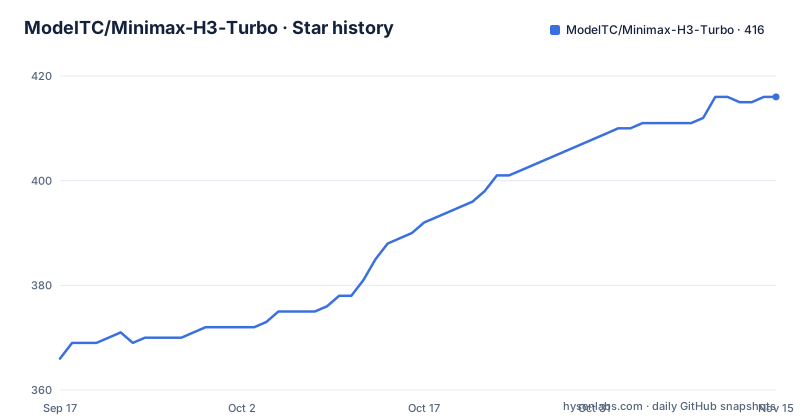
Star history
- ModelTC/Minimax-H3-Turbo416 ★ · +50
| Repository | 2026-09-17 | 2026-11-15 |
|---|---|---|
| ModelTC/Minimax-H3-Turbo | 366 | 416 |
50 Stars in the last 59 days, measured from the daily GitHub snapshot. Compare with other projects
Editorial analysis
What Minimax-H3-Turbo actually ships, and who needs it
This repository is not a model. It is a distribution point for LoRA checkpoints distilled from MiniMax-H3, plus the code and workflows needed to run them. The README describes the project as providing "MiniMax-H3 Turbo LoRA checkpoints, plus Diffusers batch inference and ComfyUI workflows." That sentence is the whole scope.
The intended user already has MiniMax-H3 running. If you have not set up the base model, these LoRAs are useless to you, because nothing here replaces the base weights. What the checkpoints change is the number of transformer evaluations (NFE) per sample. The model table lists distillation steps of 4 or 8, and recommended inference steps that match or, in one row, fall below them: the FL2VA 8-step v1.0 checkpoint was distilled at 8 NFE but is recommended at 8 or 4.
The task coverage is narrow and explicit. FL2VA checkpoints handle first-last-frame and text-to-video-audio (FL2VA / T2VA). Ref2VA checkpoints handle reference-image-to-video-audio. There is no checkpoint in the table for any other task. If your pipeline needs a task outside those two families, this repository does not cover it.
The table's resolution column is worth reading carefully because it is not a free choice. The 544p checkpoints were trained on mixed aspect ratios, while the two 768p checkpoints were trained at 1344x768 specifically. If your target canvas is 16:9 at roughly 768p, the 768p checkpoints are the ones distilled against your geometry. If you are producing vertical or square output, the 544p mixed-aspect checkpoints are the ones whose training distribution includes your shape. Picking a checkpoint by step count alone and ignoring the resolution column puts you off the geometry the LoRA saw during distillation, and the README does not describe what happens when you do that.
The shift grid is the part most users will get wrong
The README devotes a section to shift because the video and audio streams use different sigma schedules on a shared evaluation grid. For NFE = N, the N transformer evaluation points on the unshifted grid are q_i = (N - i) / N for i = 0 to N - 1. With NFE = 4, video shift 12, and audio shift 3, the shared grid is q = [1, 0.75, 0.5, 0.25]. The video sigmas become [1, 0.9730, 0.9231, 0.8000] and the audio sigmas [1, 0.9000, 0.7500, 0.5000], each terminating at 0.
That is a concrete, checkable definition rather than a vague recommendation, which is better than most LoRA cards manage. It also means the shift values are not free parameters you can tune by feel. The training shifts are fixed per checkpoint in the table: 12/3 for the 544p models, 6/3 for the 768p models. If you run a 768p checkpoint at shift 12/3, you are off the schedule the LoRA was distilled against. The README does not state what happens in that case, and no fallback behaviour is described.
The Studio section adds a second configuration to keep straight. The online app currently runs the FL2VA Turbo 8-step v1.0 768p LoRA at 8 NFE, video shift 6, audio shift 3. Those numbers match the table row for that checkpoint, so the Studio is consistent with the published spec. The README does note that the deployed model version may change over time, so the Studio is not a stable reference for what a given checkpoint does.
Notice what the shift mechanism implies about the 4-step and 8-step checkpoints. They do not share a sampling trajectory with different truncation points; each was distilled at its own NFE, so the 8-step v1.0 checkpoint recommended at 4 NFE is being asked to work at a step count it was not distilled at. The README presents that as a supported recommendation, but it does not explain how the schedule is reduced from 8 points to 4 or whether the shift values should change when you do it. That is the single largest ambiguity in the published configuration.
Reference-image resizing: three policies, one default, and a training mismatch to avoid
Ref2VA users face a choice the FL2VA users do not. The repository exposes three reference-image resizing policies through the --reference-resize-mode flag, and they are not interchangeable.
match scales the reference pixel area to the target canvas while preserving aspect ratio, and never upscales a smaller reference. Its factor is min(1, sqrt(target_area / ref_area)). max preserves aspect ratio and only scales down references whose short edge exceeds 2048 pixels, with factor min(1, 2048 / ref_short_edge). diffusers preserves aspect ratio and forces the short edge to 2048 pixels, which the README identifies as the original Diffusers behaviour.
All three round to the H3 resolution grid in multiples of 32 and avoid cropping. The important line in the README is that distillation training used match, and that the Ref2VA entry point defaults to match for that reason. Passing --reference-resize-mode diffusers restores the fixed 2048-pixel short edge. If you are porting an existing Ref2VA pipeline that used the old Diffusers sizing, you will get the old behaviour by default only if you pass that flag; otherwise the default silently changes your input geometry relative to your previous runs. That is a real migration hazard, and it is the kind of thing that produces confusing before-and-after comparisons.
The three policies also differ in what they do to small references. match will upscale a small reference up to the target area, capped at a factor of 1, so it never enlarges beyond the original. max leaves any reference with a short edge at or below 2048 pixels completely untouched, which means a 512-pixel-wide reference stays 512 pixels wide and is fed to the model at that size. diffusers forces the short edge to 2048 either way, so a small reference gets enlarged. If your reference images are consistently small, match and max will produce very different conditioning inputs, and only match matches the distillation training. The README frames the choice as a policy selection, but for small-reference workflows it is closer to a correctness decision.
Installing it and running a first Diffusers job
The repository root contains DIFFUSERS_SETUP_AND_INFERENCE.md and COMFYUI_SETUP_AND_INFERENCE.md, and the README points to both. The README itself does not reproduce install commands, so the setup guides are the place to look for the exact dependency list and Python version. Treat anything below as a skeleton that you should reconcile with those two files before running it.
The Diffusers entry point is inference_minimax_h3.py, with minimax_h3_ref2va_pipeline.py for the reference-image path and resolution_util.py for the resolution grid. The example prompts live under examples/, split into prompts_i2va_test.json, prompts_ref2va_test.json, and prompts_t2va_test.json, with matching testsets in examples/i2va_testset/ and examples/ref2va_testset/. A first run therefore means pointing the script at one of those JSON files rather than writing a prompt from scratch.
A minimal first invocation against the reference-image test set looks like this:
python inference_minimax_h3.py --reference-resize-mode matchThe flag name is the one the README documents, and match is the default, so passing it explicitly is a way to make the configuration visible in your command history rather than relying on the default. The README does not list the remaining arguments for this script, so read DIFFUSERS_SETUP_AND_INFERENCE.md for the checkpoint path, prompt file, and output arguments before running it.
For ComfyUI, the repository ships example_workflows/ alongside the ComfyUI checkpoints. The README's model table links a separate ComfyUI safetensors file for each checkpoint, hosted under Kijai/MiniMax-H3_comfy for the 4-step v0.1 FL2VA model and under lightx2v/Minimax-h3-Turbo for the rest. Do not mix the Diffusers and ComfyUI files; the table lists them as distinct downloads for the same checkpoint.
One verification step is worth doing before any long run: confirm that the shift values you pass match the checkpoint's training shifts from the table (12/3 for 544p, 6/3 for 768p), and confirm the NFE you pass matches the recommended column.
What the repository does not document
There are no releases listed for this repository, so there is no changelog to consult when a checkpoint changes. The README's model table is versioned by filename (v0.1, v1.0), which is the only versioning signal available.
The bigger gap is quality. The table gives training resolution, training shifts, distillation steps, and recommended inference steps. It gives no comparison against the undistilled MiniMax-H3 baseline at the same resolution. A four-step distillation is a compression of the sampling trajectory, and the whole question a prospective user has is what that compression costs in motion coherence, audio sync, or detail. The README does not answer it, and neither does the model table. Anyone choosing between the 4-step and 8-step checkpoints is choosing on step count alone.
Hardware requirements are also absent. The 768p checkpoints are bf16, and the 544p checkpoints are a mix of safetensors formats, but no VRAM figure, batch size guidance, or expected runtime appears in the README. The Diffusers setup guide may cover this; the README does not.
Finally, the online API is mentioned with a link to x2v.light-ai.top/api-docs. Anyone planning to call the hosted endpoint rather than run locally should read the API docs directly rather than relying on this repository.
There is also no statement about what the LoRA does to the audio branch specifically. The shift table separates video and audio schedules, which implies the distillation touched both, but the README gives no per-modality quality note and no guidance on whether audio degrades differently from video at 4 NFE versus 8 NFE. Given that the tasks are named for combined video and audio output (T2VA, FL2VA, Ref2VA), that omission affects every checkpoint in the table.
Where it fits against running MiniMax-H3 without the LoRA
The alternative is the base MiniMax-H3 model at full step count, and the difference is a straight trade of sampling cost against fidelity. The base model's sampling schedule is the one the LoRA was distilled from; the LoRA substitutes a four- or eight-point trajectory for it. Nothing in this repository changes the underlying architecture, the tokenizer, or the audio path, so a Diffusers pipeline that already runs MiniMax-H3 accepts a Turbo LoRA as an adapter rather than a replacement.
That matters for how you evaluate the choice. You are not picking between two projects. You are picking between two schedules on the same model, and the LoRA is the only artifact that changes. If your existing pipeline is latency-bound and your acceptance criteria tolerate the compression, the LoRA is the cheaper path. If your acceptance criteria were set against full-step output, you need a side-by-side at your target resolution before switching, and this repository does not provide one.
The second alternative is simpler: use the hosted Studio or API instead of running anything locally. The README states the Studio currently serves the FL2VA Turbo 8-step v1.0 768p LoRA at 8 NFE with video shift 6 and audio shift 3, which is a fixed configuration you do not control. Local inference is what gives you the 4-step checkpoints, the 544p variants, and the --reference-resize-mode choice. If none of those matter to you, the hosted path skips the setup guides entirely.
The distinction between a LoRA and a full fine-tune is worth stating plainly, because the repository name invites confusion. A LoRA is an adapter applied on top of the base weights. It does not remove the need to download and load MiniMax-H3, and it does not reduce the memory footprint of the base model. What it reduces is the number of forward passes. Anyone expecting a smaller or cheaper base model will be disappointed by what is actually in these safetensors files.
Licence, maintenance, and what upgrading costs you
The repository is Apache-2.0. That covers the code and the workflows in this repository. It does not automatically cover the LoRA weights, which are hosted on Hugging Face under the lightx2v organization and under Kijai/MiniMax-H3_comfy for one ComfyUI file. Model weight licences are set by the model publisher, and the README does not restate them. Check the licence shown on each Hugging Face repository before commercial use; Apache-2.0 on the GitHub side is not the whole answer.
The last push to this repository was on 2026-08-27, which is recent enough that the project is not dormant. There are no tagged releases, so there is no upgrade channel in the usual sense. Upgrading means noticing that a checkpoint filename has changed (v0.1 to v1.0, for example) and re-downloading. The README does not document rollback, and it does not say whether an older checkpoint will keep working with a newer version of the inference scripts. If you pin a checkpoint, pin the script commit alongside it.
The practical upgrade cost is the shift values. A new checkpoint can carry different training shifts, and the README's table is the only place those are recorded. A checkpoint swap without a shift update is a silent configuration change, not a version bump.
The two setup guides are separate files with their own instructions, and nothing in the README says they are kept in sync with each other or with the model table. If you run both Diffusers and ComfyUI, verify the checkpoint, NFE, and shift values in each guide independently rather than assuming one guide's numbers carry over to the other runtime.
Editorial conclusion
Adopt Minimax-H3-Turbo if you already run MiniMax-H3 in Diffusers or ComfyUI and want four or eight NFE instead of a longer schedule, and if you can accept 544p mixed-aspect or 1344x768 output. Do not adopt it if you need documented quality comparisons against the base model, a non-LoRA fine-tune, or a Windows path that the setup guides spell out. Before you commit, open DIFFUSERS_SETUP_AND_INFERENCE.md and COMFYUI_SETUP_AND_INFERENCE.md and confirm the exact checkpoint, NFE, and shift values they prescribe for your task, because the README's table and the Studio's deployed settings are not the same configuration.
Frequently asked questions
What is Minimax-H3-Turbo used for?
It provides MiniMax-H3 Turbo LoRA checkpoints that reduce inference to 4 or 8 NFE, together with Diffusers batch inference scripts and ComfyUI workflows. It covers FL2VA, T2VA, and Ref2VA tasks at 544p or 768p.
Is Minimax-H3-Turbo free to use?
The repository is licensed Apache-2.0, and the README also links a hosted Studio and API at x2v.light-ai.top. The README does not state the terms for the hosted service, and the LoRA weights are hosted separately on Hugging Face, so check the licence shown there.
Who is behind Minimax-H3-Turbo?
The repository is published under the ModelTC organization on GitHub, and the LoRA weights are hosted under the lightx2v organization on Hugging Face, with one ComfyUI file under Kijai/MiniMax-H3_comfy. The README does not describe the team further.
Official sources
Add this badge to your README
If you maintain this project, the badge below links readers to this analysis and shows its maintenance status from the daily GitHub snapshot. Paste the markdown into your README; add ?metric=license or ?metric=stars to the image URL for a different field.

[](https://hysenlabs.com/projects/modeltc-minimax-h3-turbo)Star history chart for your README
[](https://hysenlabs.com/projects/modeltc-minimax-h3-turbo)Was this useful?