AiZynthFinder: retrosynthetic route finding with Monte Carlo tree search
A tool for retrosynthetic planning
At a glance
- What is it?
- AiZynthFinder takes a target molecule and searches backwards for a synthesis route, breaking the molecule down into purchasable precursors with a Monte Carlo tree search whose expansions come from a neural network trained on a library of known reaction templates. The tool ships a command line interface and a browser application, and the policies and stock files it needs are downloaded rather than trained by the user.
- Who is it for?
- Adopt AiZynthFinder when you are doing computational retrosynthesis and want a proven search implementation with published policies rather than a pipeline you have to assemble. Do not adopt it as a general reaction predictor, because the expansion policy suggests precursors from a template library and the filter policy is optional, so a missing filter means unfiltered suggestions.
- Can I use it commercially?
- Yes. MIT is a permissive licence: you can use, modify and sell software built on it, as long as you keep its copyright and licence notices.
- Is it still maintained?
- Activity is slowing. The repository last received commits 6 months ago.
- What is it written in?
- Mainly Python, according to GitHub's language statistics.
Answers come from the project's GitHub data, last synced on November 7, 2026, and from our analysis. They are not legal advice.
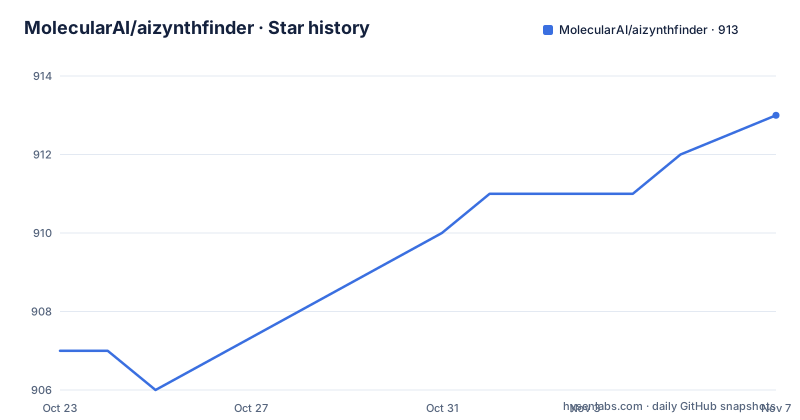
Star history
- MolecularAI/aizynthfinder913 ★ · +6
| Repository | 2026-10-23 | 2026-11-07 |
|---|---|---|
| MolecularAI/aizynthfinder | 907 | 913 |
6 Stars in the last 15 days, measured from the daily GitHub snapshot. Compare with other projects
Editorial analysis
Searching backwards from a molecule to purchasable precursors
AiZynthFinder is a tool for retrosynthetic planning, and the default algorithm is based on a Monte Carlo tree search that recursively breaks down a molecule to purchasable precursors.
Retrosynthetic planning is a search problem with a specific shape. You start with the target molecule and work backwards, asking at each step how it might have been made, until every remaining piece is something you can buy. The space of possible routes is enormous, which is why this is done with a search algorithm rather than by enumeration, and why the quality of the search depends entirely on which expansions it tries.
That is where the neural network comes in. The tree search is guided by a policy that suggests possible precursors by using a neural network trained on a library of known reaction templates. The policy is not proposing reactions from scratch, it is proposing retrosynthetic disconnections it has seen analogues of in the template library, and the search then explores the routes that look promising.
The setup is described as completely customizable, because the tool supports multiple search algorithms and expansion policies. That is the design decision worth noting. The tree search and the policy are separate components, so the search machinery is not welded to one model, and a research group can swap in a different expansion model without rewriting the search.
The software comes from the Molecular AI group at AstraZeneca, given the authors field in the project metadata, and the project is MIT licensed and provided as is.
Three artefacts you need before anything runs
The usage section is blunt about the prerequisites, and it is worth reading them as a checklist rather than as a footnote.
To use the tool you need three things. A stock file, which is the catalogue of what you can buy and therefore the boundary the search stops at. A trained expansion policy network. And a trained filter policy network, which is optional.
The first two are the tool. Without a stock file the search has no stopping condition, and without an expansion policy the tree search has nothing to expand with, so a fresh installation is not usable until both are in place. The filter policy is the optional third, and the difference it makes is that a filter scores candidate reactions for feasibility and removes the implausible ones, so leaving it out means the routes come back with suggestions your chemist will have to filter by hand.
The good news is that you do not have to train them. The stock file and the expansion policy can be downloaded from figshare, as can the filter policy dataset, and there is a command that does it for you.
download_public_data my_folderYou pass the folder you want to download into, and it will create a config.yml file in the process that you can use with either of the two interfaces. That last detail is the convenient part, because the configuration file is the thing both interfaces need, and the tool writes it for you.
Two interfaces over the same algorithm
Installing the tool installs two commands, aizynthcli and aizynthapp, which are the interfaces to the algorithm.
aizynthcli --config config_local.yml --smiles smiles.txtaizynthapp --config config_local.ymlThe command line version takes a configuration file and a file of SMILES strings, so it is the batch interface, and it fits naturally into a script that runs many targets overnight.
The application version takes only the configuration file, and it opens a browser interface. The project also publishes a Colab notebook in the contrib directory, which is linked with a badge in the README, and that gives you the tool with no local environment at all, which is the fastest way to try the algorithm before committing to an install.
The notebook is worth more than a demo, because for a research tool the ability to run it in a hosted notebook with a stock file and a policy means the barrier to evaluating it is close to zero.
The documentation is hosted separately at molecularai.github.io/aizynthfinder, and the repository has a docs directory, so there is a proper manual alongside the README.
Installing with conda, and the Python version you have to accept
The prerequisites are specific, and the Python constraint is the one to note before you start.
Linux, Windows and macOS are supported, as long as the dependencies are supported on those platforms, and the tool has been developed on Linux but tested on Windows 10 and macOS Catalina. You need anaconda or miniconda with Python 3.10 to 3.12.
The end user install is two commands.
conda create "python>=3.10,<3.13" -n aizynth-envconda activate aizynth-env
python -m pip install aizynthfinder[all]The extras syntax gives you everything, and the plain form gives you a smaller package without all the functionality, which is the trade the documentation offers explicitly.
Developers get a separate path: clone the repository, create the environment from env-dev.yml, activate aizynth-dev, and run poetry install with all extras, which puts the package into editable mode.
conda env create -f env-dev.yml
conda activate aizynth-dev
poetry install --all-extras
That the project standardises on conda rather than a bare virtualenv is not unusual for a tool with a chemistry dependency stack, since RDKit and its compiled parts are the usual reason a plain pip install goes wrong.
The dependency list is a map of the machinery
Reading the dependency list tells you what the tool is actually made of.
The chemistry core is rdkit for molecular handling and rdchiral for the reaction transformation work, with reaction-utils on top. The policy networks run through onnxruntime, with tensorflow, grpcio and tensorflow-serving-api as optional extras, which tells you the neural network part is an inference-time dependency you could serve remotely instead of bundling locally. networkx is there for the graph structures the search works on.
The data layer is pandas, tables for the HDF5 files that hold large catalogues, dask for parallel processing, and numpy pinned below 2.0, which is a compatibility pin worth noticing because a numpy 2 upgrade is a common source of breakage in this kind of scientific stack.
The exploratory side is unusually well equipped for a chemistry tool: jupyter, jupytext, notebook, ipywidgets, jinja2 for templated reports, matplotlib and seaborn for plots, paretoset for the multi-objective comparisons the search produces, and pillow for images.
Two optional extras stand out. pymongo suggests results can be written to MongoDB, and route-distances suggests the routes can be scored against a distance model. molbloom is a bloom filter, and timeout-decorator bounds long running calls.
Taken together, this is a tool built for a research group that produces figures as well as answers, and the optional MongoDB and route distance extras are the signs of a pipeline that runs at scale rather than a single analysis.
Who maintains it, and what support looks like
This is a commercial research group's open source release, and the README is explicit about what that means for support.
The contributors are listed by handle, six of them, and the README states plainly that the contributors have limited time for support questions, while still asking people to submit issues. That sentence is a fair summary of how open source from a pharmaceutical company usually works: the code is public and the maintainers are listed, but the budget behind answering questions is small.
The contribution process is the conventional fork, branch, commit, push, pull request sequence, and the code style requirements are named: the black package for formatting and the pep8 style guide. The pytest configuration sets a complexity limit with the mccabe-complexity option set to 9, and the pylint configuration sets a maximum line length of 120, a maximum of 8 arguments and 20 attributes per class, with a long disable list for the checks that do not fit the codebase.
The development workflow is driven by invoke tasks defined in tasks.py. Running the tests is pytest with the verbose flag, the full command the CI server uses is invoke full-tests, and the documentation is generated by Sphinx from hand-written tutorials and docstrings with invoke build-docs.
There is also a plugins directory in the repository, and a CITATION.cff file, which is the file format that tells tooling how to cite the project. The README closes the technical section with two references, the 2019 Chemical Science paper on how datasets influence the development of computer assisted synthesis planning tools in the pharmaceutical domain, and the ChemRxiv preprint describing AiZynthFinder itself as a fast, robust and flexible open-source software for retrosynthetic planning.
Versions, and the gap between the release and the branch
The release history is steady and the version numbers follow the usual scheme.
The tagged releases are v4.4.1 from 2025-12-09, v4.4.0 from 2025-07-03 and v4.3.2 from 2025-04-07, and the package metadata in the repository declares version 4.4.1. The last push was on 2026-04-13, which is the date to keep in mind if you are deciding whether to pin a release or to track the branch, because the newest tagged release is several months older than the most recent commit.
The project is not archived, and the presence of a CHANGELOG.md at the root is the place to look for what changed between the minor versions, which for a tool like this is where you will find the new policies and the new optional extras.
The version number itself is worth a comment, because it tracks the field rather than the software alone. The package description is Retrosynthetic route finding using neural network guided Monte-Carlo tree search, and the version is at 4.4.x, so a major bump usually means the search or the interface changed in a way that will break a pipeline, not that the algorithms were replaced. The paper describing the tool is from 2020 and the project has been on version 4 since well before, which tells you the core design has been stable for years and the churn has been at the edges.
For an adopter, the practical choice is between pinning v4.4.1 for reproducibility and tracking master for the newest policy files, and the CHANGELOG is the only reliable way to tell what that choice costs.
Editorial conclusion
Adopt AiZynthFinder when you are doing computational retrosynthesis and want a proven search implementation with published policies rather than a pipeline you have to assemble. Do not adopt it as a general reaction predictor, because the expansion policy suggests precursors from a template library and the filter policy is optional, so a missing filter means unfiltered suggestions. Before the first run, run download_public_data to fetch the stock file and the trained expansion policy and to generate the config.yml, and check whether you need the optional filter policy, then plan for the fact that the last push was on 2026-04-13 and the newest tagged release is v4.4.1 from 2025-12-09.
Frequently asked questions
What does AiZynthFinder do?
It is a tool for retrosynthetic planning. The default algorithm is a Monte Carlo tree search that recursively breaks a molecule down to purchasable precursors, guided by a policy that suggests possible precursors using a neural network trained on a library of known reaction templates.
What files do I need to run AiZynthFinder?
A stock file, a trained expansion policy network, and optionally a trained filter policy network. They can be downloaded from figshare, or you can run download_public_data with a folder name, which also creates a config.yml you can pass to aizynthcli or aizynthapp.
How do I install AiZynthFinder?
Create a conda environment with Python 3.10 to 3.12, activate it, and run python -m pip install aizynthfinder[all] for the full package or aizynthfinder for a smaller one without all the functionality. Developers instead create the environment from env-dev.yml and run poetry install --all-extras.
Which interfaces does AiZynthFinder provide?
Two: aizynthcli, which takes a config file and a file of SMILES strings for batch use, and aizynthapp, which opens a browser interface from the same config. There is also a Colab notebook in the contrib directory for running the tool without a local install.
Who maintains AiZynthFinder and under what licence?
It comes from the Molecular AI group at AstraZeneca, with six contributors listed in the README, who state that they have limited time for support questions. The software is licensed under the MIT licence and is provided as is.
Official sources
Add this badge to your README
If you maintain this project, the badge below links readers to this analysis and shows its maintenance status from the daily GitHub snapshot. Paste the markdown into your README; add ?metric=license or ?metric=stars to the image URL for a different field.

[](https://hysenlabs.com/projects/molecularai-aizynthfinder)Star history chart for your README
[](https://hysenlabs.com/projects/molecularai-aizynthfinder)Was this useful?