One OTA link flashes every model, and a Makefile target exists for each
Apple HomeKit firmware for Shelly's
At a glance
- What is it?
- shelly-homekit replaces a Shelly device's stock firmware with an Apple HomeKit build flashed over the air. It works without the cloud, which is the point, and it drops MQTT, webhooks and timer support along the way.
- Who is it for?
- shelly-homekit suits someone who already owns a Shelly device, wants it in Apple Home without buying a bridge, and prefers hardware that talks only to the hub on the local network. It does not suit Shelly Pro hardware, which is listed as unsupported, nor anyone whose existing automation depends on MQTT or remote web hooks.
- Can I use it commercially?
- Check first. The repository uses a licence we do not classify automatically, so read its LICENSE file before any commercial use.
- Is it still maintained?
- Yes. The repository last received commits 63 days ago.
- What is it written in?
- Mainly C++, according to GitHub's language statistics.
Answers come from the project's GitHub data, last synced on October 23, 2026, and from our analysis. They are not legal advice.
Star history
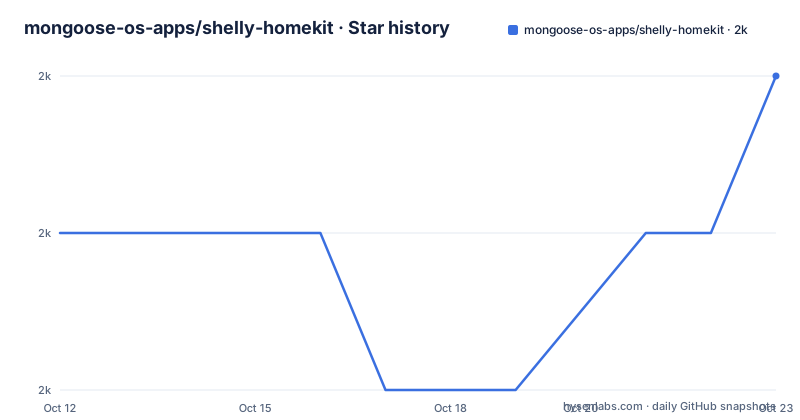
- mongoose-os-apps/shelly-homekit2,049 ★ · +1
| Repository | 2026-10-12 | 2026-10-23 |
|---|---|---|
| mongoose-os-apps/shelly-homekit | 2k | 2k |
1 Stars in the last 11 days, measured from the daily GitHub snapshot. Compare with other projects
Editorial analysis
Flashing happens over the air from the stock firmware
The install path is a URL typed into a browser on the device's local network, which is unusual enough to be worth spelling out. The firmware is compatible with stock and can be uploaded over the air, and there is a two minute video showing the whole process. One link covers every device type:
http://A.B.C.D/ota?url=http://shelly.rojer.cloud/updateA.B.C.D is the device's own address on your network, and the ota endpoint on the device does the rest. The important precondition comes first, in bold in the README: update to the latest stock firmware before converting, and for Plus and Gen 3 devices that means at least 2.0.0. If the single link does not work, the usual cause is a stock firmware version that is too old, and the fallback is a per-model URL naming a specific zip, for example the Shelly 1 using shelly-homekit-Shelly1.zip and the Shelly Plus 1 using shelly-homekit-ShellyPlus1.zip. Reverting to stock is documented as well, so the operation is reversible rather than a one-way door, and both the flashing and the reverting instructions live in the project wiki.
The feature matrices distinguish impossible from merely unfinished
Support is documented as five separate tables with a legend that carries more information than the checkmarks do. A tick means supported. A dash means possible but not supported yet. A cross means not possible at all, and the difference matters when you are deciding whether to wait. Each table covers Switch and Co., which includes lock, outlet and valve; Stateless Input, which includes doorbell; Sensors, which includes motion, occupancy, contact, smoke and leak; garage door opener; roller shutter mode; power measurement; and temperature and humidity measurement. Temperature and humidity carries its own footnote: it needs a Sensor AddOn or Shelly Plus AddOn with DS18B20 sensors, at most five for the Plus AddOn and three for the Sensor AddOn, or a single DHT sensor. Pro devices are called out in their own section as currently not supported, which is the single clearest gap in the list.
Roller shutters exist on three models and nowhere else
Roller shutter mode is the feature that shows how narrow some of these gaps are. In the Gen 3 table it is supported on the 2PM G3 and on nothing else, so the 1 G3, the 1PM G3, the I4 G3, the Mini1 G3, the Mini1PM G3 and the PlugS G3 all carry a cross. In the Plus table it is supported on the +2PM alone. In the Gen 1 table it is supported on the 2.5 and not on the 1, 1PM, 1L, Plug, PlugS, 2 or i3. So across three generations the answer is one model per generation, and in the Plus line it is also the only model in that table with it. Power measurement follows a similar pattern with a wider spread: it is absent on the Gen 3 1 G3 and the I4 G3, present on the 1PM G3, 2PM G3, Mini1PM G3 and PlugS G3, and the Mini1 G3 carries a cross rather than a dash, meaning the hardware will never do it. That distinction between a dash and a cross is the one to check first when you own a device and want to know whether to wait for a build.
Gen 3 loses sensors and input on the plug
Comparing the Gen 3 row across models shows that hardware support is not uniform even inside one generation. The PlugS G3 is the outlier, carrying crosses for stateless input and for sensors, so it works as a switch but will not accept a doorbell or report motion or contact. The Mini1 G3 carries a tick for stateless input and sensors but crosses for power measurement and for temperature and humidity, so it is a sensor-capable switch that cannot report its own consumption. The I4 G4 row, spelled I4 G3 in the table, has stateless input and sensors but crosses for switch, garage door opener and power measurement, which is consistent with an input-only device. Temperature and humidity measurement is supported across every Gen 3 model that has a tick, including the PlugS G3, but only with the add-on hardware named in the footnote. None of these are firmware gaps; they are constraints the table records so you do not discover them after flashing.
The cloud, MQTT and webhooks are gone on purpose
Three capabilities are listed as not yet supported, and together they describe the trade this firmware makes. There are no cloud connections, meaning neither Shelly Cloud nor MQTT, so the device stops talking to the vendor's infrastructure and to your broker. Remote actions, described as web hooks, are also absent, so the device cannot call out to a service when something happens. Valve with timer support is the third gap. The first two are the reason most people choose this firmware at all: a Shelly that only speaks to the HomeKit hub on your own network is a smaller attack surface and one fewer account to manage. The cost is real, because MQTT is how these devices usually join a broader home automation stack, and webhooks are how they trigger scenes elsewhere. If your existing setup is built on either, this firmware removes the piece you were using rather than replacing it.
The Makefile has one target per device, thirty-three in total
Building the firmware locally is a Mongoose OS build, and the Makefile is where the supported device list becomes concrete. The phony targets are named after the hardware: Shelly1, Shelly1L, Shelly1PM, Shelly25, Shelly2, ShellyColorBulb, ShellyDuo, ShellyI3, ShellyPlug, ShellyPlugS, ShellyPlusPlugS, ShellyPlus1, ShellyPlus1PM, ShellyPlus2PM, ShellyPlusI4, ShellyRGBW2, ShellyVintage, ShellyU, ShellyU25, ShellyUDuo, ShellyURGBW2, ShellyUNI, ShellyPlus1Mini, ShellyPlusRGBWPM, and the Gen 3 set Mini1Gen3, Mini1PMGen3, 2PMGen3, 1PMGen3, 1Gen3, I4Gen3, PlugSGen3 and PlusUni. That is thirty-three targets covering the hardware the tables describe. The toolchain defaults are visible too: MOS is mos, LOCAL becomes 1 when docker is on the path so the build runs locally, and there are variables for VERBOSE, RELEASE_SUFFIX, MOS_BUILD_FLAGS, ALLOW_DIRTY_FS and BUILD_DIR, with CLEAN as a separate switch. The presence of an upload target alongside build tells you the project supports pushing a build to a device as well as producing one.
The badge, the root files and the manifest disagree
There is a mismatch worth resolving before you rely on this code. The README carries an Apache 2.0 badge linking to the Open Source Initiative page, while the repository terms are classified as custom and cannot be categorized by GitHub, with a pointer to the LICENSE file. So the badge is an assertion in the documentation rather than a machine-detected fact, and the authoritative text sits at the root of the repository. That distinction matters for firmware other people may base work on, and it is exactly the kind of thing an automated compliance scan will not flag, because the metadata offers no standard identifier to complain about. The same root holds AUTHORS.md for attribution and mos.yml, the Mongoose OS manifest describing the application, alongside src/, fs/, fs_src/, tools/, docs/ and libreset/. The 2.16.1 tag is the newest published build and the last push to master was on 2026-08-21.
Editorial conclusion
shelly-homekit suits someone who already owns a Shelly device, wants it in Apple Home without buying a bridge, and prefers hardware that talks only to the hub on the local network. It does not suit Shelly Pro hardware, which is listed as unsupported, nor anyone whose existing automation depends on MQTT or remote web hooks. Before flashing, update to the latest stock firmware, check the feature row for your exact model, and read the wiki page on reverting before you start.
Frequently asked questions
How do I flash HomeKit firmware onto a Shelly device?
Update the device to the latest stock firmware first, then open http://A.B.C.D/ota?url=http://shelly.rojer.cloud/update on a browser on the same network, substituting the device address. Per-model URLs exist as a fallback if the single link fails.
Does shelly-homekit support Shelly Pro devices?
No. The Pro devices section of the support documentation states they are currently not supported.
Does shelly-homekit support MQTT or the Shelly cloud?
No. Cloud connections, meaning Shelly Cloud and MQTT, and remote actions such as web hooks are listed as not yet supported.
Which Shelly models support roller shutter mode?
The 2PM G3, the +2PM and the Gen 1 2.5. Every other model in the tables is marked as not possible for that feature.
What do the symbols in the support tables mean?
A tick means supported, a dash means possible but not supported yet, and a cross means not possible. The distinction tells you whether to wait for a build.
Can I go back to the stock firmware?
Yes. Reverting to stock firmware is documented in the project wiki alongside the flashing instructions, so the operation is reversible.
Official sources
Add this badge to your README
If you maintain this project, the badge below links readers to this analysis and shows its maintenance status from the daily GitHub snapshot. Paste the markdown into your README; add ?metric=license or ?metric=stars to the image URL for a different field.

[](https://hysenlabs.com/projects/mongoose-os-apps-shelly-homekit)Star history chart for your README
[](https://hysenlabs.com/projects/mongoose-os-apps-shelly-homekit)Was this useful?