LunaTV (MoonTechLab): a self-hosted media aggregator that ships without sources
Licensed under CC BY-NC-SA; commercial use of any kind is prohibited, and any derivative project must retain a link to this project and remain open-source under the same license.
At a glance
- What is it?
- LunaTV is a Next.js 14 front end that searches multiple third-party media APIs and plays the results through HLS.js and ArtPlayer. It ships as an empty shell: the operator supplies both the sources and the storage backend.
- Who is it for?
- Adopt LunaTV only if you are willing to source your own media APIs, run Kvrocks or Redis next to it, and accept the non-commercial CC BY-NC-SA terms. If you want a player that works after a one-click install with content included, this is the wrong project, because the README states it deploys as an empty shell.
- Can I use it commercially?
- Check first. The repository uses a licence we do not classify automatically, so read its LICENSE file before any commercial use.
- Is it still maintained?
- Yes. The repository last received commits 76 days ago.
- What is it written in?
- Mainly TypeScript, according to GitHub's language statistics.
Answers come from the project's GitHub data, last synced on November 25, 2026, and from our analysis. They are not legal advice.
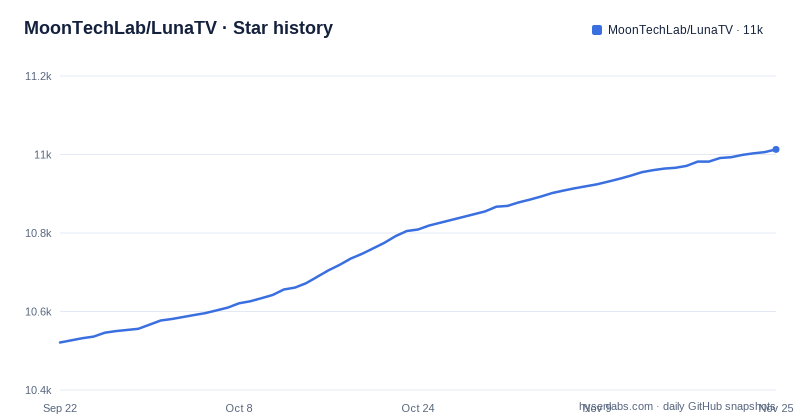
Star history
- MoonTechLab/LunaTV11,013 ★ · +492
| Repository | 2026-09-22 | 2026-11-25 |
|---|---|---|
| MoonTechLab/LunaTV | 10.5k | 11k |
492 Stars in the last 64 days, measured from the daily GitHub snapshot. Compare with other projects
Editorial analysis
The problem LunaTV solves, and the operator it assumes
The project is a front end for content that lives somewhere else. Its README describes it as a cross-platform media aggregation player built on Next.js 14, Tailwind CSS and TypeScript, with multi-source search, online playback, favourites, watch history and cloud storage. The aggregation is the point: instead of opening five sites to find one title, you search once and the app queries every configured source.
The README is unusually blunt about the boundary: after deployment the project is an empty shell with no built-in playback sources and no live sources, and the operator has to collect them. That single sentence defines the audience. LunaTV is for someone who already knows where their media APIs are, or is prepared to find out, and who wants a single interface over them. It is not a service you sign up for, and it is not a media library you fill with your own files. There is no scanner, no metadata agent for local disks, and no torrent client in the dependency list.
The licence reinforces the same boundary. The repository description states the project is licensed under CC BY-NC-SA, that commercial use of any kind is prohibited, and that derivative projects must keep a link to this project and remain open-source under the same license. Anyone planning to run this behind a paid subscription is outside the terms the repository states for itself.
How the aggregation and playback path actually work
The stack is a Next.js 14 App Router application. package.json lists artplayer and hls.js as runtime dependencies, so playback is an HLS stream handed to ArtPlayer in the browser rather than server-side transcoding.
Configuration is a JSON document the administrator pastes into the admin panel. The README shows the shape: a cache_time value and an api_site object whose keys are source identifiers. Each entry carries an api URL such as http://xxx.com/api.php/provide/vod, a name, and a detail field. That structure tells you what LunaTV expects from a source: an endpoint that returns search results and detail records in a known format, not a raw video file. The README describes cache_time as the interface cache time in seconds.
State lives outside the app. Favourites and watch progress go to Kvrocks, Redis or Upstash depending on NEXT_PUBLIC_STORAGE_TYPE, which is why the compose examples always pair the app container with a database container. The image is built in three Docker stages and runs as a non-root user with the custom start.js entrypoint, which the Dockerfile comments say preloads configuration before starting the server. The README also notes that the ad-skipping feature is experimental, so treat it as a convenience rather than a guarantee.
Installing LunaTV with Docker and adding your first source
The README states the project supports only Docker or Docker-based platforms, so there is no bare-metal path to follow. The recommended compose file pairs the app image with Apache Kvrocks and wires them over a shared network.
services:
  moontv-core:
    image: ghcr.io/moontechlab/lunatv:latest
    container_name: moontv-core
    restart: on-failure
    ports:
      - '3000:3000'
    environment:
      - USERNAME=admin
      - PASSWORD=admin_password
      - NEXT_PUBLIC_STORAGE_TYPE=kvrocks
      - KVROCKS_URL=redis://moontv-kvrocks:6666
    networks:
      - moontv-network
    depends_on:
      - moontv-kvrocks
Bring it up with docker compose up -d, then open port 3000. The compose example sets USERNAME and PASSWORD first, and those are the credentials you use to reach the admin panel. Change the placeholder password before the container is reachable from anywhere but localhost.
After login the app is still empty. You supply a configuration document in the admin panel. The README's example begins like this:
{
  "cache_time": 7200,
  "api_site": {
    "dyttzy": {
      "api": "http://xxx.com/api.php/provide/vod",
      "name": "示例资源",
      "detail": "http://xxx.com"
    }
  }
}
Replace the placeholder api value with a real endpoint you have the right to query. If the panel accepts the JSON and a search returns titles, the source is wired correctly. If search stays empty, the problem is almost always the source endpoint, not the player, because the player only receives what the source returned.
Where LunaTV breaks, and when it is the wrong tool
The empty-shell design is the first failure mode, and it is a deliberate one. A fresh deployment looks broken to anyone who has not read the README, because search returns nothing until a source is configured. There is no bundled demo source to confirm the pipeline works end to end.
Storage choice is the second. The README labels the Redis option as carrying some risk of data loss and tells you to enable persistence, because a restart or upgrade without a volume loses watch history and favourites. The Kvrocks example mounts kvrocks-data at /var/lib/kvrocks, while the Zeabur walkthrough insists the volume path must be /var/lib/kvrocks/db so the database files, not the whole data directory, are the thing persisted. Get that path wrong and the container starts clean every time.
Source rot is the third and least avoidable. Every entry in api_site points at an external endpoint that can change format, rate-limit, or disappear. LunaTV cannot repair a dead source; the cache_time value only delays how often you discover it. A deployment with three sources and no plan for replacing them degrades quietly.
Finally, if what you actually want is a personal library of files you own, this is the wrong tool. Nothing in the dependency list mentions local media scanning, and the whole configuration model is built around remote APIs.
LunaTV compared with a self-hosted media server
The closest familiar category is a self-hosted media server such as Jellyfin or Plex. The difference is not the player, it is where content comes from. Those tools index files you already have, generate metadata from your library, and stream from your own disk. LunaTV does none of that. It holds no media, indexes no folders, and depends entirely on external API endpoints for both discovery and playback.
That flips the operational burden. A media server's hard part is storage and transcoding; LunaTV's hard part is curating and maintaining a list of working sources. A media server keeps working when the internet is down. LunaTV is useless without reachable sources, because there is nothing local to fall back on.
The practical consequence: if you have a library, LunaTV adds nothing. If you do not have a library and want a single search box over sources you already trust, the aggregation layer is exactly the missing piece, and the trade-off is that you own the source list.
Maintenance, releases and what the licence means for forks
The last push to the default branch was on 2026-09-10, and the most recent tagged release in the repository history is v100.1.3 from 2026-05-28, preceded by v100.1.2 in March 2026 and v100.1.1 in February 2026. The repository is not archived. The README's own update instructions note that Zeabur does not pull new images automatically: you restart the service to fetch the latest tag, and the README suggests pinning a fixed version tag in production instead of latest to avoid surprise upgrades.
The licence situation needs care. GitHub reports the licence as NOASSERTION, while the repository description states CC BY-NC-SA and adds conditions: no commercial use of any kind, and derivatives must keep a link to the project and remain open-source under the same license. CC licences are not designed for software, so if you plan to modify and redistribute LunaTV, read the LICENSE file in the repository rather than the badge. This is a description of what the project states, not legal advice.
Editorial conclusion
Adopt LunaTV only if you are willing to source your own media APIs, run Kvrocks or Redis next to it, and accept the non-commercial CC BY-NC-SA terms. If you want a player that works after a one-click install with content included, this is the wrong project, because the README states it deploys as an empty shell. Before committing, verify that the config file you plan to paste into the admin panel actually returns results, and that your Kvrocks volume is mounted at /var/lib/kvrocks/db so a container restart does not wipe viewing history.
Frequently asked questions
Does LunaTV include any media sources out of the box?
No. The README states that after deployment the project is an empty shell with no built-in playback sources and no live sources, and that the operator has to collect them and enter them in the admin panel configuration.
Which storage backends does LunaTV support for favourites and watch history?
The README gives compose examples for Kvrocks, Redis and Upstash, selected through the NEXT_PUBLIC_STORAGE_TYPE environment variable with a matching connection URL such as KVROCKS_URL or REDIS_URL.
Can LunaTV be installed without Docker?
The README states the project supports only Docker or other Docker-based platforms for deployment, so there is no documented non-Docker installation path.
Is LunaTV free to run commercially?
The repository description states the project is licensed under CC BY-NC-SA, that commercial use of any kind is prohibited, and that derivative projects must keep a link to this project and remain open-source under the same license.
How do you update a LunaTV container deployed on Zeabur?
The README says Zeabur does not update images automatically: you open the service status page and restart the current version, which pulls the latest tag, and it recommends pinning a fixed version tag in production instead.
Official sources
Add this badge to your README
If you maintain this project, the badge below links readers to this analysis and shows its maintenance status from the daily GitHub snapshot. Paste the markdown into your README; add ?metric=license or ?metric=stars to the image URL for a different field.

[](https://hysenlabs.com/projects/moontechlab-lunatv)Star history chart for your README
[](https://hysenlabs.com/projects/moontechlab-lunatv)Was this useful?