Omnizart: transcription across instruments, vocals, chords, drums, and beats
Omniscient Mozart, being able to transcribe everything in the music, including vocal, drum, chord, beat, instruments, and more.
At a glance
- What is it?
- Omnizart is a Python toolbox for automatic transcription of polyphonic music, with separate applications for pitched instruments, vocal melody, chords, drum events, and beat positions. It suits research and prototyping teams willing to provision model checkpoints and accept its Linux and Python dependency constraints.
- Who is it for?
- Omnizart is a reasonable choice for research prototypes that need several automatic music transcription tasks behind one Python package, particularly on a compatible non-ARM environment. It is a poor fit for ARM-based macOS users, production workflows requiring documented drum-model training, or teams that need guarantees about output formats and quality before committing.
- Can I use it commercially?
- Yes. MIT is a permissive licence: you can use, modify and sell software built on it, as long as you keep its copyright and licence notices.
- Is it still maintained?
- Yes. The repository last received commits 161 days ago.
- What is it written in?
- Mainly Python, according to GitHub's language statistics.
Answers come from the project's GitHub data, last synced on November 6, 2026, and from our analysis. They are not legal advice.
Star history
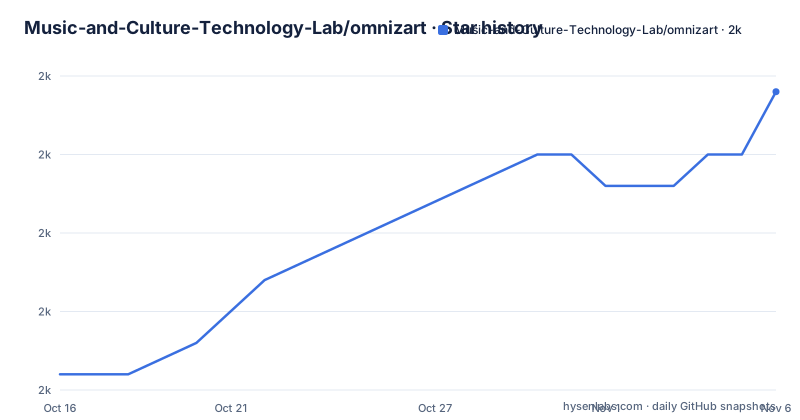
- Music-and-Culture-Technology-Lab/omnizart1,997 ★ · +9
| Repository | 2026-10-16 | 2026-11-06 |
|---|---|---|
| Music-and-Culture-Technology-Lab/omnizart | 2k | 2k |
9 Stars in the last 21 days, measured from the daily GitHub snapshot. Compare with other projects
Editorial analysis
What Omnizart Transcribes Beyond a Single MIDI Melody
Omnizart targets automatic music transcription from polyphonic audio. That is a broader task than recognizing one lead melody: the package divides analysis into applications for pitched instruments, drum events, vocal melody, frame-level vocal F0, chord progressions, and beat positions. The README describes the `music` application as transcription of notes for pitched instruments, while `vocal` produces note-level vocal melody and `vocal-contour` produces frame-level F0. This distinction matters for engineers choosing between a note sequence and a continuous vocal contour.
The intended audience is broader than consumers looking for a desktop notation tool. Project classifiers identify science and research users as well as Python developers, and the package exposes command-line transcription commands. The MIT licence permits reuse, modification, distribution, and sublicensing under its terms, subject to the licence conditions. That makes the code comparatively open for research work, although generated model outputs and third-party dependency terms require separate review rather than legal assumptions.
Omnizart does not present itself as a single universal estimator. Its application table separates supported transcription tasks and also distinguishes inference support from training support. The drum application supports transcription and is marked with uncertainty for training. Applications such as `music`, `vocal`, `vocal-contour`, `chord`, and `beat` are marked for both transcription and training. This organization gives researchers an explicit task boundary, but it also means that adopting the toolbox means adopting a collection of model-backed applications rather than one uniform transcription pipeline.
Omnizart's Checkpoint-Backed Application Pipeline
The visible workflow has three concrete layers: an audio path supplied to the CLI, a task-specific application selected by the user, and pretrained checkpoints downloaded separately after installation. Commands such as `omnizart music transcribe <path/to/audio.wav>` select the transcription application rather than asking a single command to infer every symbolic layer. Equivalent commands are documented for drums and chords.
Checkpoint distribution is an explicit part of setup. `omnizart download-checkpoints` follows package installation in every documented installation path, including pip, Docker, and source-based Conda installation. The repository therefore treats the Python package and its model assets as separate deployment concerns. This makes resource planning possible, but the README excerpt does not state the checkpoint total, download size, cache location, output file format, or supported audio sampling rate. Those details must be resolved from the full documentation or a local installation before designing automation around the commands.
The declared dependency set reveals the processing stack. It includes `librosa` and `soundfile` for audio-related work, `mir_eval` for evaluation, `pretty_midi` for MIDI representation, and TensorFlow for versions below Python 3.14. It also includes specialized packages such as `vamp`, `madmom`, `sherpa-onnx`, `pyfluidsynth`, and `pillow`. The repository's Docker image starts from `tensorflow/tensorflow:2.21.0-gpu` and installs system libraries including `libsndfile1`, `ffmpeg`, `fluidsynth`, and `portaudio19-dev`.
This is not a lightweight, dependency-free command-line utility. The Docker route supplies a fixed GPU-oriented image and native media dependencies, while the source route asks Conda to create an environment from `environment.yml`. The architecture is suited to a controlled research workstation or container, not an arbitrary Python environment.
Installing Omnizart and Running a First Transcription
The shortest documented setup uses pip. It installs the package first, downloads pretrained checkpoints as a separate step, and then invokes an application-specific transcription command. The example audio path is a placeholder, so replace it with the path to a local WAV file.
pip install omnizart
omnizart download-checkpoints
omnizart drum transcribe <path/to/audio.wav>
The final command should target the drum application for a first use. The README does not document where the resulting transcription is written or what the console reports, so inspect the complete command output before expecting a particular file path or format.
A second run can select chords or pitched-instrument notes without reinstalling the package:
omnizart chord transcribe <path/to/audio.wav>
omnizart music transcribe <path/to/audio.wav>
The project also documents Docker installation:
docker pull mctlab/omnizart:latest
docker run -it mctlab/omnizart:latest bash
The resulting shell is the documented entry point for using the image. The README does not provide a containerized transcription command, so the pip commands remain the only explicit transcription examples available here.
For installation from source, the documented Conda sequence creates an environment from the repository file, activates it, installs the local package, and fetches checkpoints:
git clone https://github.com/Music-and-Culture-Technology-Lab/omnizart
cd omnizart
conda env create -f environment.yml
conda activate omnizart
pip install .
omnizart download-checkpoints
Choose this route when working against the repository rather than only consuming the published package.
Training Support and the Drum Model Failure Boundary
Omnizart distinguishes inference with provided checkpoints from training new models. According to the application table, `music`, `vocal`, `vocal-contour`, `chord`, and `beat` support both transcription and training. The `drum` application supports transcription, but its training entry carries an uncertainty marker.
The README then gives a direct warning: the drum model implementation has unknown bugs that prevent loss convergence when training from scratch. The supplied checkpoints can still be used for drum transcription. This creates a sharp boundary. A team can adopt pretrained drum inference without inheriting a working from-scratch training workflow, but it cannot treat the documented package as evidence that drum training is ready.
For research groups changing the model architecture, data pipeline, or objective, that limitation may be decisive. For a group evaluating transcription outputs with published checkpoints, it is narrower. The project also lists `pytest` coverage, `flake8`, `pylint`, `black`, and `yapf` in its development configuration. The Makefile defines test and formatting targets, but the README does not state the accuracy achieved by any application, nor does it publish dataset or evaluation instructions for each task.
Compared with a commercial transcription service, Omnizart gives direct access to Python code, task modules, checkpoints, and training entry points. Compared with a specialized beat tracker or chord recognizer, it offers several tasks in one toolbox but provides less isolation between model requirements. The README does not document rollback, checkpoint migration, or output versioning. The `CHANGELOG.md` exists in the repository, so release-specific migration details should be checked there before changing an existing deployment.
Platform Constraints Behind the Python and Docker Choices
Omnizart supports Python 3 as declared by its package metadata, with `requires-python` represented dynamically and the dependency configuration specifying `>=3.8,<3.15`. TensorFlow is selected for Python versions below 3.14, while `tf-nightly` is selected for Python 3.14. Packages such as `tf-keras` apply from Python 3.10 onward. These markers show that installation behavior changes across Python releases, so recording the interpreter version is important when reproducing a transcription.
The clearest documented operating-system boundary is ARM-based macOS. The README states that Omnizart is incompatible with that platform because of underlying dependencies. It points readers to issue #38 for details. This means the documented Docker path should not be treated as evidence that every host platform is supported, especially when container emulation or local runtime constraints have not been evaluated for the target Mac.
The Docker image provides `tensorflow/tensorflow:2.21.0-gpu` as its base and installs native audio and rendering libraries. It is a practical isolation boundary for the dependency stack, but the README does not document host GPU requirements, image size, audio-device mapping, or whether every transcription application works in the published `latest` tag. The unpinned tag also means that a future pull is not guaranteed to resolve to the same image content as version 0.6.3.
A pip deployment offers less packaging overhead but exposes native dependency resolution to the host. A Docker deployment reduces host-level installation conflicts but adds container image and hardware decisions. Neither route removes the checkpoint download, and neither is documented as a production server interface.
Maintenance Signals, Release Packaging, and Adoption Cost
The repository is not archived. Its last push was on 2026-05-31, and the listed releases v0.6.1, v0.6.2, and v0.6.3 were published on 2026-05-30, 2026-05-30, and 2026-05-31 respectively. These dates show recent project activity, but they do not by themselves establish suitability for a particular production dependency set.
Version 0.6.3 is declared in `pyproject.toml`, matching the newest listed release. The package metadata uses dynamic fields for dependencies, optional dependencies, Python requirements, and scripts, while the repository also contains `setup.py`, `poetry.lock`, and `environment.yml`. Updating through pip can therefore involve both Python packages and separately downloaded checkpoints. The README does not state whether old checkpoints remain compatible across releases, so an upgrade should not assume that an existing cached model directory is interchangeable.
Installation also has an operational cost beyond the initial package command. `setup.py` pre-installs build tools and packages such as Cython, numpy, madmom, and vamp to avoid PEP 517 build-isolation issues. The Docker image installs several operating-system packages and invokes `scripts/install.sh`. Checkpoint acquisition adds another network and storage requirement that is not quantified in the README. Teams need to account for model assets, TensorFlow compatibility, native libraries, and any GPU allocation used by their chosen environment.
The MIT licence is permissive for code reuse, with its standard notice and conditions applying. Omnizart also uses third-party packages with their own licences, while pretrained checkpoints may have separate asset terms that are not reproduced in the README. Licence review should therefore cover the exact distribution being deployed, including container contents and checkpoint files, rather than treating the top-level licence as the whole operational picture.
Editorial conclusion
Omnizart is a reasonable choice for research prototypes that need several automatic music transcription tasks behind one Python package, particularly on a compatible non-ARM environment. It is a poor fit for ARM-based macOS users, production workflows requiring documented drum-model training, or teams that need guarantees about output formats and quality before committing. The first checks should be checkpoint download and execution on the intended Python and machine environment, followed by inspection of the generated transcription against a small, known audio example.
Frequently asked questions
How do I install Omnizart and download its model checkpoints?
Run `pip install omnizart`, then run `omnizart download-checkpoints`. The checkpoint command is documented as a separate step in the pip, Docker, and Conda installation sequences.
Which transcription tasks does Omnizart support?
The application table lists pitched-instrument notes, drum events, note-level vocal melody, frame-level vocal F0, chord progressions, and beat positions. The README marks transcription support for all six applications.
Can I train the Omnizart drum model from scratch?
The README warns that the drum implementation has unknown bugs that prevent loss convergence when training from scratch. It says that drum transcription remains available through the provided checkpoints.
Does Omnizart support ARM-based macOS?
No. The README explicitly states that Omnizart is incompatible with ARM-based macOS because of its underlying dependencies and refers readers to issue #38 for details.
Official sources
Add this badge to your README
If you maintain this project, the badge below links readers to this analysis and shows its maintenance status from the daily GitHub snapshot. Paste the markdown into your README; add ?metric=license or ?metric=stars to the image URL for a different field.

[](https://hysenlabs.com/projects/music-and-culture-technology-lab-omnizart)Star history chart for your README
[](https://hysenlabs.com/projects/music-and-culture-technology-lab-omnizart)Was this useful?