xiaogpt: Connecting Xiaomi Speakers to LLMs
Play ChatGPT and other LLM with Xiaomi AI Speaker
At a glance
- What is it?
- xiaogpt connects compatible Xiaomi AI speakers to ChatGPT and other language models, then returns spoken answers through Xiaomi text-to-speech. It suits owners who want API-based or account-based conversations on existing speakers, but it requires device-specific setup and accepts several authentication paths.
- Who is it for?
- Adopt xiaogpt if you own a supported Xiaomi AI speaker, can identify its hardware model and DID, and accept a local Python service that connects Xiaomi credentials or cookies to a separate LLM provider. Do not adopt it as a generic speaker client or as a replacement for Xiaomi's own assistant.
- Can I use it commercially?
- Yes. MIT is a permissive licence: you can use, modify and sell software built on it, as long as you keep its copyright and licence notices.
- Is it still maintained?
- Yes. The repository last received commits 16 days ago.
- What is it written in?
- Mainly Python, according to GitHub's language statistics.
Answers come from the project's GitHub data, last synced on October 23, 2026, and from our analysis. They are not legal advice.
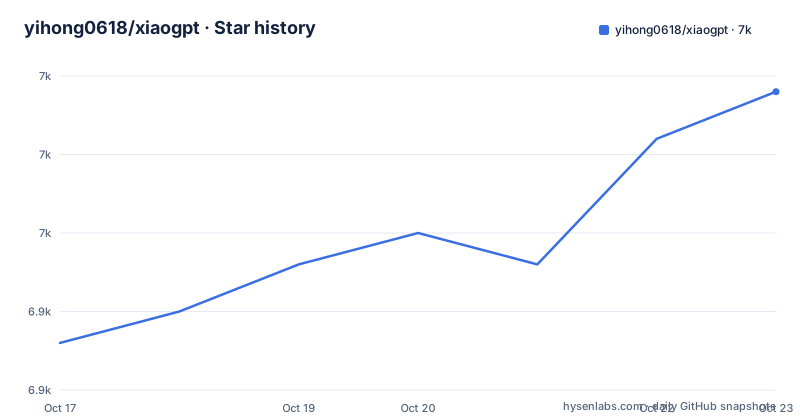
Star history
- yihong0618/xiaogpt6,959 ★ · +16
| Repository | 2026-10-17 | 2026-10-23 |
|---|---|---|
| yihong0618/xiaogpt | 6.9k | 7k |
16 Stars in the last 6 days, measured from the daily GitHub snapshot. Compare with other projects
Editorial analysis
Why xiaogpt Exists for Xiaomi Speaker Owners
xiaogpt solves a hardware integration problem rather than a general chat interface problem. Its purpose is to let an existing Xiaomi AI speaker exchange requests with ChatGPT or another supported LLM and speak the returned answer. The target user is a Xiaomi speaker owner who wants to replace or supplement the speaker's normal question-answering behavior without building a separate client from scratch.
The bridge is selective. According to the README, a question beginning with `帮我` is sent to the selected language model, and the Xiaomi speaker then delivers the result through TTS. The user can also enter a continuous conversation state with `开始持续对话` and leave it with `结束持续对话`. This means xiaogpt does not necessarily forward every utterance. That prefix rule is a central part of its behavior and should be considered before installing it on a shared or frequently used speaker.
The project supports ChatGPT, New Bing, ChatGLM, Gemini, Doubao, Moonshot, 01, Llama3, and 通义千问. Its CLI exposes separate options for these providers rather than hiding provider selection behind one generic configuration file. The repository also includes LangChain integration, with the README describing web search and mathematics capabilities through that route.
The Xiaomi-to-LLM Request and Speech Path
The visible architecture has four practical stages. First, MiService authenticates with a Xiaomi account and locates the speaker. The resulting device identifier is supplied through `MI_DID`, while `--hardware` selects a device model such as the README's `LX06` example. Second, xiaogpt listens for a matching spoken request. Third, the selected backend generates an answer through the requested ChatGPT, Gemini, Qwen, Moonshot, Yi, Doubao, Llama, GLM, or LangChain path. Finally, the answer is spoken by the Xiaomi speaker.
The default output mechanism uses the speaker's `ubus` interface. If a device does not support `ubus`, the README provides `--use_command` as an alternative for TTS. These are materially different integration paths: `ubus` is the default local device route, while the command route exists for hardware that cannot use the default mechanism. Other playback choices include Edge TTS, OpenAI TTS, Azure TTS, and Fish Audio, selected through `--tts` and provider-specific flags.
The user can stop Xiaomi's own spoken response with `--mute_xiaoai`, which is useful when only the LLM answer should be heard. The `--stream` option is presented as a way to begin receiving streamed output sooner. The repository layout places the implementation under `xiaogpt/`, exposes the command through the `xiaogpt.cli:main` entry point, and retains `xiaogpt.py` as a script-style entry path. The README does not provide a deeper protocol diagram or explain every internal interface, so this request, backend, and speech flow is the most specific architecture it documents.
Preparing the Xiaomi Device DID Before Installation
Before installing xiaogpt, obtain the Xiaomi speaker's DID with MiService. The README requires Python 3.12 through 3.14, a Xiaomi AI speaker, a ChatGPT identifier, and a network connection or proxy. It pins `miservice` to version 3.0.1.
On Linux with `sh`, install the helper, set the account variables, list devices, and retain the displayed DID:
pip install miservice==3.0.1
export MI_USER=xxx
export MI_PASS=xxx
miservice list
export MI_DID=xxx
The README says `miservice list` should produce the speaker information from which `MI_DID` can be copied. If discovery fails, it recommends changing the wireless network, stating that this may resolve the problem.
PowerShell uses `$env:` assignments rather than the `export` syntax:
pip install miservice==3.0.1
$env:MI_USER="xxx"
$env:MI_PASS="xxx"
miservice list
$env:MI_DID="xxx"
This distinction matters because the README specifically warns about PowerShell quoting. Authentication behavior is also stateful. MiService reads the current user's `~/.mi.token`, attempts to reuse saved credentials, and may prompt for an SMS or email verification code during first login or when saved credentials are no longer accepted. Running `miservice mina` can complete that login first. The xiaogpt token path can be changed with `XIAOGPT_MI_TOKEN_PATH`.
Installing xiaogpt and Starting a First API Conversation
Install the published package with its locked extra. The README specifically gives this command:
pip install -U --force-reinstall xiaogpt[locked]For an upgrade from an older environment, the README advises uninstalling `miservice-fork` before installing the current dependencies. It warns that both distributions can provide a `miservice` module, causing a conflict. After installation, ensure that `MI_DID` is set, determine the model printed on the speaker, or use `miservice mina` if the label is absent or inaccurate.
A first ChatGPT API run requires the API key in the environment. Replace the documented key placeholder with the reader's key, but keep the command flags unchanged:
export OPENAI_API_KEY=${your_api_key}
xiaogpt --hardware LX06 --use_chatgpt_api
With this configuration, speak a question beginning with `帮我`. The README says xiaogpt should send that request to ChatGPT and have the Xiaomi speaker deliver the answer by TTS. This is an installation and configuration tutorial, not a claim about observed runtime output; the repository documentation states the expected interaction.
Streaming and muting Xiaomi's own response can be added without changing the selected backend:
xiaogpt --hardware LX06 --mute_xiaoai --streamThe Docker image uses Python 3.14, stores configuration under `/config`, exposes port `9527`, and mounts `/config` as a volume. Its environment defines `XIAOGPT_MI_TOKEN_PATH=/config/.mi.token`, `XDG_CONFIG_HOME=/config`, and `XIAOGPT_PORT=9527`.
Authentication, Provider, and TTS Trade-offs
xiaogpt offers several ways to authenticate to Xiaomi, and they differ in security exposure and setup friction. MiService login through `MI_USER`, `MI_PASS`, and its token file is the documented path for obtaining the DID and controlling the device. The CLI can also accept `--account` and `--password`. A separate fallback uses a captured `--cookie`, which the README says should be wrapped in single quotes. This fallback is presented for situations where the normal method is unavailable, but the README does not document cookie expiration, capture procedure, or rollback behavior.
The backend and speech provider are independent choices. `--use_chatgpt_api`, `--use_gemini`, `--use_qwen`, `--use_moonshot_api`, `--use_llama`, `--use_yi_api`, `--use_doubao`, and `--use_glm` select model integrations. `--tts edge`, `--tts openai`, and `--tts azure` select alternative speech systems. Fish Audio requires both `--fish_api_key` and `--fish_voice_key`. A provider that works for text generation may therefore still need separate TTS credentials if Xiaomi's local speech path is not suitable.
For networks that cannot reach the default API endpoint directly, the README documents `--api_base ${url}` and requires an address shaped like `https://xxxx/v1`, with the domain quoted. LangChain is an alternative backend approach. Instead of selecting the direct provider integration, `--use_langchain` uses LangChain, with the default service documented as ChatGPT. The repository depends on `langchain-classic`, `langchain-core`, `langchain-openai`, `langchain-community`, and `google-search-results`. The README says its LangChain route is currently supported only in stream mode and shows SerpApi configuration for web search or other local services.
Xiaomi Language Models, Maintenance Signals, and Adoption Limits
The direct comparison inside xiaogpt is between a Xiaomi speaker's native assistant path and an externally selected LLM path. `--mute_xiaoai` suppresses the speaker's own response, while `--use_command` replaces the default `ubus` output route for hardware that lacks the expected interface. For teams evaluating a general speaker platform instead, the difference is architectural: a native assistant is operated by the vendor, whereas xiaogpt runs a local Python process, communicates with Xiaomi through MiService, sends prompts to a chosen model API, and injects the returned speech through one of several TTS mechanisms. xiaogpt is therefore appropriate for device integration, not for users who need a vendor-supported support contract or a voice assistant that already provides the desired model.
There are several concrete constraints. The hardware label must map to a usable model, and the README says `miservice mina` can help when it does not. The local Xiaomi account, token, or cookie must remain usable. The selected LLM may require its own key, while Azure or Fish TTS adds separate credentials. Python is limited to versions from 3.12 up to, but not including, 3.15. The repository also has a sizable dependency set, including OpenAI, LangChain, Google GenAI, DashScope, Volcengine, Groq, HTTP clients, speech packages, and `miservice`.
The repository is not archived. Its last push was on 2026-10-07, and the listed releases include v3.23 from 2025-10-26, v3.22 from 2025-08-11, and v3.21 from 2025-06-10. The release list therefore shows releases older than the latest push, but it does not explain the changes made after v3.23. `pdm.lock`, the generated `requirements.txt`, and the install command's `[locked]` extra indicate a dependency-controlled installation path. Upgrades still carry configuration work because Xiaomi tokens, API credentials, hardware selection, and provider flags are external runtime concerns.
The project is distributed under the MIT License. Its metadata labels the project as OS Independent, although the documented workflow is tied to Xiaomi hardware and includes shell-specific environment setup. The MIT terms permit use and modification under that license, but this review does not substitute for legal advice about deployment obligations.
Editorial conclusion
Adopt xiaogpt if you own a supported Xiaomi AI speaker, can identify its hardware model and DID, and accept a local Python service that connects Xiaomi credentials or cookies to a separate LLM provider. Do not adopt it as a generic speaker client or as a replacement for Xiaomi's own assistant. Verify first that the device can be discovered with `miservice list`, that the selected `--hardware` value matches it, and that your chosen authentication and TTS path works in your network environment.
Frequently asked questions
How do I install xiaogpt on a Xiaomi AI speaker?
Use Python 3.12 through 3.14, install `miservice==3.0.1`, obtain the speaker's DID with `miservice list`, and set `MI_DID`. Then install `xiaogpt[locked]` and run `xiaogpt` with the correct `--hardware` value.
What authentication methods can xiaogpt use with a Xiaomi account?
The documented paths include MiService login using `MI_USER` and `MI_PASS`, direct CLI credentials through `--account` and `--password`, or a cookie supplied with `--cookie`. MiService normally reads `~/.mi.token`, while `XIAOGPT_MI_TOKEN_PATH` can change the token path used by xiaogpt.
Can xiaogpt use TTS and multiple language model providers?
Yes. The CLI lists integrations for ChatGPT, Gemini, Qwen, Moonshot, Yi, Doubao, Llama, and ChatGLM. TTS can use Xiaomi `ubus` by default, `--use_command` for compatible hardware, or Edge, OpenAI, Azure, and Fish Audio options.
Official sources
Add this badge to your README
If you maintain this project, the badge below links readers to this analysis and shows its maintenance status from the daily GitHub snapshot. Paste the markdown into your README; add ?metric=license or ?metric=stars to the image URL for a different field.

[](https://hysenlabs.com/projects/yihong0618-xiaogpt)Star history chart for your README
[](https://hysenlabs.com/projects/yihong0618-xiaogpt)Was this useful?