Amazon Clone: A React and Firebase Storefront With a Familiar Look
Amazon Clone is a web application developed using React and Firebase technologies. It is a project that replicates the core functionalities of Amazon.com, such as product browsing, searching, adding to cart, and checkout with a great UI experience.
At a glance
- What is it?
- This review of the mwakidenis/Amazon-clone project looks at how it uses React, Firebase, and the FakeStore API to replicate Amazon's core shopping flow, and where it falls short for production use.
- Who is it for?
- Adopt this project if you are a front-end learner who wants a complete shopping flow (browse, wishlist, cart, checkout) wired to Firebase Authentication and Firestore, and you are comfortable adapting the UI that is openly borrowed from Dribbble. Do not use it for a commercial store: the FakeStore API is a demo backend, payment details are not specified, and the repository shows no recent releases or maintenance signals.
- Can I use it commercially?
- Not without permission. GitHub finds no licence file in the repository, and without a licence all rights are reserved by default: you may read the code but not reuse it. Check the README, or ask the authors, before using it.
- Is it still maintained?
- Yes. The repository received new commits within the last day.
- What is it written in?
- Mainly JavaScript, according to GitHub's language statistics.
Answers come from the project's GitHub data, last synced on October 23, 2026, and from our analysis. They are not legal advice.
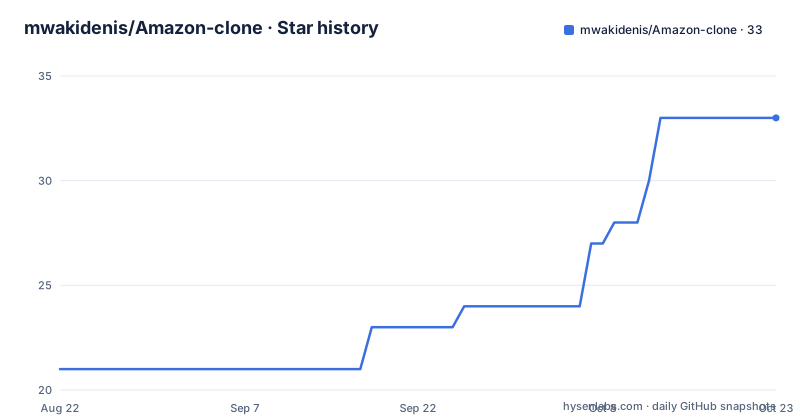
Star history
- mwakidenis/Amazon-clone33 ★ · +12
| Repository | 2026-08-22 | 2026-10-23 |
|---|---|---|
| mwakidenis/Amazon-clone | 21 | 33 |
12 Stars in the last 62 days, measured from the daily GitHub snapshot. Compare with other projects
Editorial analysis
What This Project Actually Delivers
The Amazon Clone is a web application built with React and Firebase that mimics the shopping journey of Amazon.com. The README lists the core features: product browsing by category, searching, adding items to a wishlist, managing a cart, entering shipping details, and making a payment. It also includes a user profile tab for personal information. The intended audience is a developer who wants a ready-made front-end for an e-commerce flow, or a learner who wants to see how React components and Firebase services can be combined. The project does not claim to be a full Amazon replica; it says 'clone' and 'replicates the core functionalities.' The UI is not original. The README credits Dribbble designs for the home page and profile section, and says the UI is 'completely inspired and even taken from' those sources. That matters for anyone who plans to use this in a real product: the visual design is not original and may carry licensing constraints from the Dribbble assets.
How the Data Flow Is Wired
The architecture is a standard React single-page application talking to Firebase services. Firebase Authentication handles user sign-in and sign-up, which gates the wishlist, cart, and order features. Firestore stores user-specific data such as wishlist items, cart contents, shipping details, and order history. Product data comes from the FakeStore API, a public mock e-commerce API that returns product listings, categories, and prices. The flow is: the user browses products fetched from FakeStore, adds items to the cart, which is persisted to Firestore, then proceeds to a checkout page where shipping information is collected and a payment is made. The README does not specify which payment provider is used or how the payment step is implemented. It only says 'user can make payment for the products.' This is a gap. The repository layout is not described in detail, but the feature list implies separate pages for authentication, home, wishlist, product detail, cart, payment, orders, and profile. The use of FakeStore API means product data is not real and will not reflect actual inventory or prices.
Getting It Running: Commands and Configuration
The installation steps are straightforward and follow the typical React and Firebase setup. First, clone the repository. Then navigate to the project directory and run `npm install` to install dependencies. You need a Firebase account. Enable Firebase Authentication and Firestore in the Firebase console. Create a new Firebase project and copy its configuration details. Rename the `.env.sample` file to `.env` and replace the Firebase configuration values with your own. Finally, run `npm start` to launch the application in development mode. That is the entire setup process as documented. There is no mention of environment variables for the FakeStore API; it likely points to the public endpoint by default. The README does not mention testing commands, build commands, or deployment steps. For someone who wants to deploy, the Vercel homepage link suggests it can be hosted there, but no deployment instructions are included. The setup is simple enough for a developer comfortable with npm and Firebase.
Where It Falls Short: Limitations and Failure Modes
The most obvious limitation is the dependency on the FakeStore API. That API is a demo service. It is not designed for production traffic and its data is static. If the API goes down or changes its schema, the clone breaks. The README does not mention any error handling for network failures or API timeouts. A second limitation is the payment flow. The README says 'make payment' but gives no details about the payment gateway, whether it is real or mocked, or how sensitive data is handled. In a real e-commerce app, payment integration is the most security-sensitive part. This project does not document it. Third, the UI is explicitly taken from Dribbble designs. That creates a legal and ethical grey area. The README credits the designers, but it does not state that the designs are licensed for reuse. If you plan to use this code in a commercial project, you need to verify the licensing of those Dribbble shots. Fourth, the project has no recent releases and no license declared. The default branch is `main`, but the last push date is unknown. This suggests the project may not be actively maintained. Bugs may go unfixed.
The Right Tool for Learning, Not for Production
This project is best suited as a learning resource. A developer who wants to understand how to wire React with Firebase Authentication and Firestore for a shopping cart can study this codebase. It shows a complete feature set: authentication, product listing, wishlist, cart, and checkout. The code is likely structured in a way that mirrors common React patterns, though the README does not describe the component hierarchy. For a production store, this is the wrong tool. The use of a mock API, the lack of payment details, and the borrowed UI make it unsuitable. If you need a real storefront, you would be better off with a dedicated e-commerce platform like Shopify or a headless commerce solution like Medusa. Those tools handle payments, inventory, and legal compliance. This clone does not. The README does not mention any server-side logic, so all Firebase operations are client-side. That raises security concerns. Firestore security rules are not discussed in the README. Without proper rules, any user could read or write another user's data. That is a critical consideration for anyone deploying this.
Maintenance and Upgrade Considerations
The repository shows no recent releases and no license. That is a red flag for maintenance. The README invites contributions and says 'Contributions to this project are always welcome,' but that does not guarantee active upkeep. Firebase and React libraries change frequently. Breaking changes in Firebase SDK versions or the FakeStore API would require manual updates. The README does not mention a test suite, so upgrading dependencies could introduce regressions without warning. The `.env.sample` file suggests that configuration is externalized, which is good practice. However, the lack of a license means you have no legal permission to use, modify, or distribute the code beyond what copyright law allows. Without a license, the default is all rights reserved. That is a serious constraint if you plan to fork or build upon this project. You should contact the author or find a project with an explicit open-source license. The UI credits to Dribbble designers add another layer of uncertainty. In short, the maintenance cost is low in terms of setup, but the long-term cost is high if you depend on it.
Alternatives and How They Differ
The most direct alternative is to build your own storefront with a headless commerce platform. Medusa is an open-source headless commerce engine that uses Node.js and React. It provides real product management, payment integration, and order handling. Unlike this clone, Medusa has a backend with a database and an admin dashboard. You would not need to rely on a mock API. Another alternative is to use a full-service platform like Shopify, which handles hosting, payments, and legal compliance out of the box. The difference is in the approach: this clone is a front-end demo that leans on Firebase for auth and data, while Medusa and Shopify provide a complete commerce backend. If you want to learn React and Firebase, this clone is sufficient. If you want to sell products, you need a backend that handles inventory, taxes, and shipping. This clone does not. The README does not mention any backend logic beyond Firebase, so you would have to build that yourself.
Editorial conclusion
Adopt this project if you are a front-end learner who wants a complete shopping flow (browse, wishlist, cart, checkout) wired to Firebase Authentication and Firestore, and you are comfortable adapting the UI that is openly borrowed from Dribbble. Do not use it for a commercial store: the FakeStore API is a demo backend, payment details are not specified, and the repository shows no recent releases or maintenance signals. Before you rely on it, verify that your Firebase security rules restrict Firestore access, confirm how payment is actually processed (the README only says 'make payment'), and check the license, which is not declared. If you need a production-ready storefront, look at dedicated e-commerce platforms instead. The project is a useful scaffold for learning, not a finished product.
Frequently asked questions
What is an Amazon clone?
In this repository it is a web application built with React and Firebase that replicates the core functionalities of Amazon.com: product browsing, searching, adding to cart, and checkout.
what is amazon clone
It is a responsive ReactJS web app covering wishlist, product categories, cart, shipping details, payment options and a user profile tab, deployed at shubho-amazon-clone.vercel.app.
What is the Amazon Clone project?
A JavaScript project by mwakidenis using ReactJS, Firebase Authentication, Firebase Firestore and the FakeStore API, with UI inspired by two linked Dribbble design shots.
what is amazon clone project
A private package at version 0.1.0 with no GitHub releases and no license file, last pushed on 30 September 2026, where contributions are invited through issues and pull requests.
Official sources
Add this badge to your README
If you maintain this project, the badge below links readers to this analysis and shows its maintenance status from the daily GitHub snapshot. Paste the markdown into your README; add ?metric=license or ?metric=stars to the image URL for a different field.

[](https://hysenlabs.com/projects/mwakidenis-amazon-clone)Star history chart for your README
[](https://hysenlabs.com/projects/mwakidenis-amazon-clone)Was this useful?