iloader: a desktop sideloader that installs SideStore and imports your pairing file
User friendly sideloader
At a glance
- What is it?
- iloader is a Tauri desktop app that talks to an iPhone or iPad over usbmuxd, signs in with an Apple ID, and installs SideStore or any IPA while handling the pairing files itself. It is convenient, it is not a replacement for understanding what sideloading does to your Apple ID.
- Who is it for?
- Use iloader if you want SideStore on a device without hand-editing pairing files, and you accept signing in with an Apple ID on a desktop app. Skip it if you want a fully self-hosted or audited toolchain, or if your device is jailbroken and you do not need Apple's signing path at all.
- Can I use it commercially?
- Yes. MIT is a permissive licence: you can use, modify and sell software built on it, as long as you keep its copyright and licence notices.
- Is it still maintained?
- Yes. The repository last received commits 1 day ago.
- What is it written in?
- Mainly TypeScript, according to GitHub's language statistics.
Answers come from the project's GitHub data, last synced on October 23, 2026, and from our analysis. They are not legal advice.
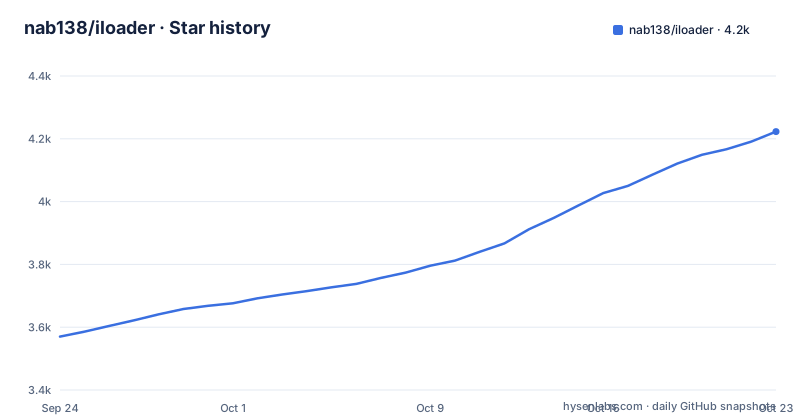
Star history
- nab138/iloader4,223 ★ · +653
| Repository | 2026-09-24 | 2026-10-23 |
|---|---|---|
| nab138/iloader | 3.6k | 4.2k |
653 Stars in the last 29 days, measured from the daily GitHub snapshot. Compare with other projects
Editorial analysis
What iloader actually removes from the SideStore setup
SideStore is normally installed by hand: you generate a pairing file, move it to the device, sign an IPA with your Apple ID, and keep the certificate alive. iloader compresses that into a desktop app. The README says it will "Install SideStore (or LiveContainer + SideStore), import certificate and place rppairing+lockdown pairing files automatically". The pairing file step is the part most people get wrong, so automating it is the real product.
The app is built with Tauri, so the UI is a web front end and the device work happens in a Rust backend. It is aimed at someone who owns an iPhone or iPad, has a computer, and wants sideloaded apps without reading a wiki page about lockdown pairing. It is not aimed at jailbroken devices or at people who want to build their own signing pipeline.
How iloader talks to the device and signs the app
Every operation goes through usbmuxd, the daemon that lets a computer reach an iOS device over USB. That is why the README lists usbmuxd as a prerequisite and notes that macOS includes it while Linux may or may not, depending on the distribution. If usbmuxd is not running, the app has nothing to talk to, which is the most likely cause of a "no devices found" screen.
Above that layer, iloader depends on two Rust projects. The idevice crate handles communication with the device, and isideload handles installation. isideload in turn uses apple-codesign-quick for codesigning and entitlements, and the README credits Impactor and Sideloader as references for cryptography operations and Apple's private developer endpoints. That last detail matters: the app is using endpoints Apple does not document for third parties, so breakage after an Apple-side change is a structural risk, not a bug you can file away.
The front end is React with i18next for localisation, and the repository ships translation files under src/locales. The README also documents certificate and app ID management, meaning you can see and revoke development certificates and app IDs from inside the app rather than through a web portal.
Installing iloader on Windows, macOS or Linux
The README gives a short sequence: install usbmuxd for your platform, install the latest release for your platform, plug in the device, open the app, sign in with your Apple ID, then pick an action. On Windows the README points at iTunes as the way to get usbmuxd. On macOS it is included. On Linux it may already be present and otherwise comes from your package manager.
The official download locations are the GitHub repository and iloader.app. The README is explicit that community packages exist but are unofficial: a Homebrew cask, an AUR package and a Fedora COPR repository. It also warns against downloading from any other source. NixOS users are told to use the flake.
nix run github:nab138/iloaderIf you would rather build it, the README lists bun or Node.js plus Rust. After cloning and entering the directory, install dependencies with bun or npm, then run the Tauri dev command for hot reload or the build command for a production binary.
bun i
bun tauri dev
In the running app, the first real task is signing in and choosing an action. The README's example action is installing SideStore, which also imports the certificate and places the pairing files. On success you should see the device listed and the installation progress reported in the app, with logs available under View Logs.
Where iloader gets in your way
The Apple ID requirement is the biggest constraint and the README states it plainly: you sign into your Apple ID inside a desktop application. That is how free provisioning works, but it means your account credentials pass through a third-party tool and its dependencies. Anyone evaluating iloader for a managed or shared device should treat that as a stopping point rather than a detail.
Second, the app is a thin layer over undocumented Apple endpoints. When Apple changes those endpoints, the failure appears as a login or signing error, not as a clear message about the API. The README's troubleshooting answer is to copy the full error and ask on the idevice Discord server or open an issue, which tells you the maintainers expect this class of breakage.
Third, iloader is not a substitute for a jailbreak or for a self-hosted signing service. It installs what Apple's free developer program allows, with the certificate lifetime that implies, and it needs a computer and a cable. If your device is already jailbroken, or if you need to install apps on a device you cannot physically connect, iloader is the wrong shape of tool.
iloader compared with doing it by hand
The obvious alternative is the manual SideStore install: fetch the pairing file yourself, place it on the device, and sign the IPA with a separate tool. The difference is not capability, it is where the failure lands. Manual installs put every step in front of you, so you can see which one broke. iloader hides the steps and reports an error at the end, which is faster when it works and slower to debug when it does not.
A second alternative is a general sideloading utility that only installs an IPA and leaves pairing files alone. iloader's distinguishing feature is the pairing file and certificate handling for SideStore specifically, plus certificate and app ID management. If you already have a working signing setup and only need to push an IPA, the extra surface area buys you little.
The README also mentions LiveContainer as an install option alongside SideStore. That is a different runtime model for running apps, and the README does not explain the trade-offs between the two, so treat that choice as something to research elsewhere.
Maintenance, licence and what the release history shows
The repository is not archived, and the last push was on 2026-09-23. Releases are frequent: v2.3.3 on 2026-09-10, v2.3.2 earlier the same day, and v2.3.1 on 2026-08-01. A patch release hours after another patch release usually means a regression was fixed quickly, which is a reasonable sign for a project that depends on external services.
The licence is MIT, with a separate LICENSE-BRANDING file at the repository root. MIT covers the code; the branding file means the name and logo are carved out separately, so redistributing a modified build under the iloader name is not what the licence grants. That is a packaging consideration, not a legal opinion, and anyone shipping a fork should read both files.
Upgrade cost is low in the normal case: the app has a Tauri updater plugin in its dependencies, so updates can be delivered in-app. The real maintenance cost is external. Apple can change provisioning behaviour at any time, and the app's usefulness depends on the maintainers keeping pace with that.
Editorial conclusion
Use iloader if you want SideStore on a device without hand-editing pairing files, and you accept signing in with an Apple ID on a desktop app. Skip it if you want a fully self-hosted or audited toolchain, or if your device is jailbroken and you do not need Apple's signing path at all. Before adopting it, confirm that usbmuxd is working on your platform by checking that the app lists your device, and read the troubleshooting section in the README for where logs live on your OS.
Frequently asked questions
What is iloader used for?
It installs SideStore, or LiveContainer plus SideStore, and imports the certificate and pairing files automatically. It can also import any IPA and manage pairing files in apps such as StikDebug, SideStore and Protokolle.
How to install iloader on Windows?
Install iTunes so usbmuxd is available, then install the latest release from the repository or iloader.app. After that, plug in the device, open the app and sign in with your Apple ID.
How to install iloader on Linux?
Install usbmuxd through your package manager if it is not already present, then install the release for your platform. NixOS users are directed to the flake at github:nab138/iloader.
Is iloader free?
The repository is licensed MIT, and the README lists the GitHub repository and iloader.app as the only official download locations. Community packages for Homebrew, AUR and Fedora COPR exist but are described as unofficial.
I can't log in to iloader. What should I do?
The README suggests copying the full error message and asking on the idevice Discord server or opening an issue. It also points to View Logs, and to raising the log level to Debug if nothing appears.
Is iloader safe?
The README does not make a safety claim. What it does say is that the repository and iloader.app are the only official download locations, and that the Homebrew, AUR and Fedora packages are community-maintained and unofficial. Note that using the app means signing in with your Apple ID inside it.
Official sources
Add this badge to your README
If you maintain this project, the badge below links readers to this analysis and shows its maintenance status from the daily GitHub snapshot. Paste the markdown into your README; add ?metric=license or ?metric=stars to the image URL for a different field.

[](https://hysenlabs.com/projects/nab138-iloader)Star history chart for your README
[](https://hysenlabs.com/projects/nab138-iloader)Was this useful?