Nestri: GPU Sharing Through Micro-VMs and QUIC Streaming
You have a GPU. Now make it shareable and accessible from anywhere in the world.
At a glance
- What is it?
- Nestri is an open source GPU-sharing platform for Linux hosts and remote players. Its design places games in hardware-accelerated micro-VMs, streams the result over QUIC, and currently offers `nesdoctor` as the main component a new user can operate directly.
- Who is it for?
- Nestri is appropriate for Linux operators evaluating a GPU-sharing architecture and for developers examining its Rust capture, compositor and transport components. It is not yet a complete end-to-end product for ordinary users, so adoption should first verify host requirements, `nesdoctor` output, the availability of the separate `nesbox` hypervisor, and whether the documented interfaces remain unchanged.
- Can I use it commercially?
- Yes. Apache-2.0 is a permissive licence: you can use, modify and sell software built on it, as long as you keep its copyright and licence notices.
- Is it still maintained?
- Yes. The repository last received commits 3 days ago.
- What is it written in?
- Mainly Rust, according to GitHub's language statistics.
Answers come from the project's GitHub data, last synced on November 7, 2026, and from our analysis. They are not legal advice.
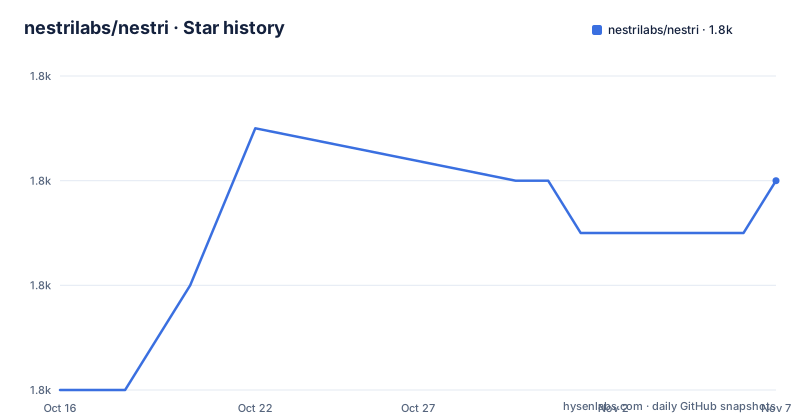
Star history
- nestrilabs/nestri1,758 ★ · +4
| Repository | 2026-10-16 | 2026-11-07 |
|---|---|---|
| nestrilabs/nestri | 1.8k | 1.8k |
4 Stars in the last 22 days, measured from the daily GitHub snapshot. Compare with other projects
Editorial analysis
Nestri's GPU-sharing problem and intended users
Nestri addresses the gap between a machine that owns a capable NVIDIA GPU and a player who cannot use that machine directly. The README describes the goal as running games on a GPU the player does not own, or making a GPU available remotely. The intended users are therefore two groups. A host operates a Linux machine with a supported GPU and wants to provide access to games. A client wants to interact with a game running elsewhere rather than receive a passive video broadcast.
The project is not presenting itself as a generic remote desktop application. Its architecture separates the host-side control plane from code that runs inside the virtual machine beside the game. Nestri combines identity, teams, machines, games and pairing in a public REST API, while the guest handles display, capture, audio and outbound connectivity. That split matters for the intended cloud-streaming and cloud-gaming use case.
The README also makes the current boundary explicit. `nesdoctor` is described as the only finished part that a stranger can operate today. The API, authentication, domain model and guest components are part of the repository, but the documentation says the project is mid-rewrite and that the guest-side documentation is thin. The assembler for a complete box is not open yet. A potential user should therefore distinguish interest in Nestri's architecture from the ability to run a complete hosted game session with the published materials.
Nestri targets Linux hosts with `/dev/kvm`, a Wayland-capable GPU stack and NVIDIA support. Arch Linux is recommended, while Ubuntu is described as working. Docker is not suitable for the host-side virtual machine itself because a container cannot provide the required `/dev/kvm` device. The control plane can run as ordinary containers, which is a separate deployment concern from the machine that owns the GPU.
Micro-VM isolation and the outbound guest architecture
Nestri chooses micro-VMs instead of containers for the game workload. The stated reason is isolation. A container shares the host kernel, which makes strong isolation difficult, and GPU use is also harder to control in that arrangement. A micro-VM boots in a similar time frame according to the README and provides a stronger isolation boundary. With virtio-gpu native context, the project says the approach gets close to bare-metal graphics while allowing one GPU to host several boxes.
The hypervisor is not part of this repository. It is `nesbox`, maintained separately at the address given by the README. Nestri describes it as a micro-VM with a real GPU and native context rather than full GPU passthrough. This distinction is important for capacity planning: the intended model is multiple sandboxes sharing one card, not one tenant receiving an entire physical GPU.
Inside the VM, `nescope` acts as a headless Wayland compositor for one fullscreen client. `nescapture` is described as a Vulkan implicit layer. It captures frames from inside the workload's own process and encodes them on the GPU that drew them. The README specifically says this avoids copying frames to the CPU and back. `neswire` handles audio capture and transport, while `neshub` establishes one connection from the VM and muxes video, audio, cursor and input into a single QUIC stream. Shared wire types live in `crates/nesprotocol`, intended to prevent the two ends from silently drifting apart.
None of these guest components talk to the control plane according to the repository documentation. The data path is therefore expected to be inward-facing at the service boundary and outward-facing at the VM network boundary. `neshub` makes one connection out of the box, and the resulting client stream carries the interactive inputs as well as the media. The repository layout supports that split, but it does not document a complete client implementation in the excerpt.
The control plane and the components available for local development
The TypeScript half is a control plane rather than the streaming engine. `apps/api` provides the public REST API for identity, teams, machines, games and pairing. `apps/auth` is a self-hosted OpenAuth issuer with Steam and SSH-key login. `packages/core` contains the domain model, including tables and operations without HTTP concerns, and `packages/auth` provides shared authentication types and subjects.
State is stored in Postgres. The README states that the API and issuer currently run on Cloudflare Workers and can also run as ordinary containers. Each app has a `Dockerfile`, and the repository includes `docs/deploy.md` and `docs/dns.md`. This gives a self-hosted control plane a different operational shape from the guest VM. The control plane can be built and run through Docker, but the host GPU and its `/dev/kvm` requirement remain outside that container model.
The local setup sequence is documented in the README. It starts with Bun dependency installation, copies the environment template, starts Postgres, applies migrations and then launches the local Cloudflare runtime. The package scripts confirm the relevant commands. `bun dev` runs the Wrangler development processes for both the issuer and API, while `docker compose up --build` starts the complete control-plane container deployment. The repository's Compose file deliberately has no credential defaults. It reads `POSTGRES_USER`, `POSTGRES_PASSWORD`, `POSTGRES_DB`, `DATABASE_URL` and other values from `.env`, and refuses to start when a required variable is missing.
The environment example points tests at the same database as local development. `TEST_DATABASE_URL` must point to `DATABASE_URL`, because route tests and core tests use different access paths and will otherwise place fixtures and assertions in different databases. That is a concrete self-hosting constraint, not a general performance claim.
Installing nesdoctor and performing the first host check
For a first real use, `nesdoctor` is the documented entry point. The README gives separate installation commands for Linux, macOS and Windows. On Linux and macOS, the installer downloads one binary, verifies its checksum, runs it and deletes it. It does not install software, require administrator rights or modify a system directory. On Windows, the PowerShell command performs the corresponding documented installation path.
Linux and macOS users can run:
curl -fsSL https://doctor.nestri.io/install.sh | shWindows users can run:
powershell -c "irm https://doctor.nestri.io/install.ps1 | iex"The tool is not a game streamer. It reports whether the machine could host games for other people, and it measures connection latency added while the link is busy. The README says this is more relevant to interactive streaming than raw download speed. Its output can include idle latency, loaded latency, added latency under load, a grade, the presentation path, display details and Vulkan decode capabilities.
If you are working from a Rust checkout instead, the workspace command is:
cargo run --release -p nesdoctorThe README says the tool reads the display's EDID, including resolution, refresh rate, colour depth, HDR transfer functions, BT.2020 and chroma information. It also checks hardware decode capabilities. Nothing is uploaded. The tool prints a link, lists exactly what the link contains and opens it only if the user presses Enter. Most machines will return `CLIENT`, according to the README. That result does not mean the tool failed; it means the machine is being classified as a client rather than a host.
Host requirements and the experimental Unraid path
The documented host requirements are narrow enough to affect the decision before any game is installed. Nestri spawns micro-VMs and therefore needs Linux with `/dev/kvm`. The host needs a Wayland-capable GPU stack, and NVIDIA is the supported GPU vendor named by the README. Ext4 is described as suitable. The README recommends Arch and says Ubuntu works, but it does not provide a complete compatibility matrix for every distribution, driver version or laptop configuration.
The `nesdoctor` check is intended to validate disk, network and display characteristics that a static requirements list cannot establish. That is particularly useful for the latency claim in the README: an uplink with enough nominal bandwidth can still be unsuitable if busy traffic adds substantial queuing delay. The tool's example shows upstream speed separately from idle and loaded latency, which makes its diagnostic model clear. It does not claim that one number guarantees playability.
Unraid is explicitly labelled experimental and untested. The proposed route places an Arch or Ubuntu VM inside Unraid, passes the GPU to that VM, enables nested virtualisation with `kvm_intel nested=1` or `kvm_amd nested=1`, and uses host-passthrough CPU mode so the inner VM has its own `/dev/kvm`. The README then says to run `nesdoctor` inside the VM and install as usual. It also states that performance and driver behaviour under nested KVM are unmeasured. Consequently, this path should be treated as an experiment rather than a supported configuration.
Docker Compose is appropriate for the control plane, not for making a host GPU shareable. The Compose deployment starts application services and Postgres, while the GPU host still needs direct access to `/dev/kvm` and the host operating system. Mixing those deployment models can produce a control plane without the missing VM execution layer.
Why nesdoctor and a full Nestri session are different products
The repository's clearest limitation is incomplete assembly. The README says the guest components are pieces of a box, and that the thing which assembles a box is not open yet. The control-plane components exist in the tree, but the documentation does not provide a complete procedure for launching a game, pairing a client, establishing a playable session and operating the full hosted environment.
This distinction affects licensing, support planning and expectations. The repository carries an Apache-2.0 license, but that license does not make an incomplete deployment path complete. It also does not remove the need to obtain and operate the separate `nesbox` repository, host operating-system support, GPU drivers and the client side of the streaming path. The README does not state that Nestri is ready for unattended production hosting, so it would be inaccurate to describe it as a finished cloud-gaming service.
The architecture may still be useful to a particular class of user. A developer who wants to study implicit Vulkan frame capture, a Wayland compositor for a single fullscreen client, or audio and input transport over one QUIC connection can inspect the Rust workspace. An operator who only needs to determine whether a machine qualifies can use `nesdoctor`. A team expecting to deploy a public game-streaming service today has a different evaluation, because the documented repository does not yet provide the complete box assembly path.
The README also warns that directories may move and interfaces may change. That warning is consistent with the listed release names and the explicit mid-rewrite note. The repository is not archived, and the last push was on 2026-10-16, but the documentation remains more cautious than a stable release contract. Maintenance activity should not be confused with interface stability.
Nestri compared with direct game streaming and containerized hosting
The nearest alternative is a direct streaming stack that runs a game on the host or in a VM and sends video, audio and input to a client without Nestri's control-plane and guest split. Such an approach can simplify the relationship between a host and a session, but it leaves the isolation and multi-tenant design decisions to the operator. Nestri's stated reason for choosing micro-VMs is stronger workload isolation, combined with GPU sharing through native context rather than assigning one physical card to one tenant.
A container-based game server is a different alternative. Containers are easier to deploy and generally fit existing container workflows, but Nestri's README explicitly argues that a container shares the host kernel and is therefore less suitable for strong isolation. Containers also do not provide the micro-VM boundary needed by the project's stated model. Nestri accepts more setup around `/dev/kvm`, Wayland, GPU support and a separate hypervisor in exchange for a different isolation and sharing model.
The control plane itself is not a replacement for the streaming client or VM runtime. Its REST API manages identity, teams, machines, games and pairing. The media path remains inside `nescapture`, `neswire` and `neshub`, while `nesbox` supplies the micro-VM. Anyone comparing systems should separate control-plane deployment from guest execution rather than treating the entire repository as one container image.
Editorial conclusion
Nestri is appropriate for Linux operators evaluating a GPU-sharing architecture and for developers examining its Rust capture, compositor and transport components. It is not yet a complete end-to-end product for ordinary users, so adoption should first verify host requirements, `nesdoctor` output, the availability of the separate `nesbox` hypervisor, and whether the documented interfaces remain unchanged.
Frequently asked questions
Can Nestri be used to share a Linux GPU with remote players?
Nestri is designed to share a supported NVIDIA GPU by running workloads in micro-VMs and streaming them over QUIC. The repository documents the architecture, but it also says that the assembler for a complete box is not open yet.
What does nesdoctor check on a computer?
It checks whether the machine could host games for other people, including network latency under load, display information from EDID and hardware decode capabilities. It does not stream a game, and the README says most machines will return `CLIENT`.
Can Nestri run in Docker?
The control plane can run as ordinary containers, with Docker Compose used for its application services and Postgres. The GPU host itself is not supposed to run in Docker because the micro-VM requires `/dev/kvm`.
What license does Nestri use?
The repository identifies its license as Apache-2.0. The license covers the repository's published code, while a separate `nesbox` repository and external host or infrastructure components may have their own terms.
Official sources
Add this badge to your README
If you maintain this project, the badge below links readers to this analysis and shows its maintenance status from the daily GitHub snapshot. Paste the markdown into your README; add ?metric=license or ?metric=stars to the image URL for a different field.

[](https://hysenlabs.com/projects/nestrilabs-nestri)Star history chart for your README
[](https://hysenlabs.com/projects/nestrilabs-nestri)Was this useful?