Numbersf/Action-Build for OnePlus GKI 2.0 Kernel Customization
Build SukiSU-Ultra/KernelSU/KernelSU-Next/BakaSU Kernels For All OnePlus QCOM & MTK Devices (GKI2.0), Supporting SUSFS, KPM, ZRAM and more feats.
At a glance
- What is it?
- Numbersf/Action-Build is a GitHub Actions kernel build project for supported OnePlus QCOM and MTK devices. It offers device selection, SukiSU Ultra variants, SUSFS, KPM, ZRAM configuration and build configuration, but flashing the generated kernel remains a high-risk operation outside the documented workflow.
- Who is it for?
- Adopt Action-Build if you own a listed OnePlus QCOM or MTK model, can map its Android codename to the manifest, and intend to maintain a kernel between device updates. Do not adopt it for an unlisted device or expect the README to provide a complete flashing procedure.
- Can I use it commercially?
- Check first. The repository uses a licence we do not classify automatically, so read its LICENSE file before any commercial use.
- Is it still maintained?
- Yes. The repository last received commits 5 days ago.
- What is it written in?
- Mainly Kotlin, according to GitHub's language statistics.
Answers come from the project's GitHub data, last synced on November 7, 2026, and from our analysis. They are not legal advice.
Star history
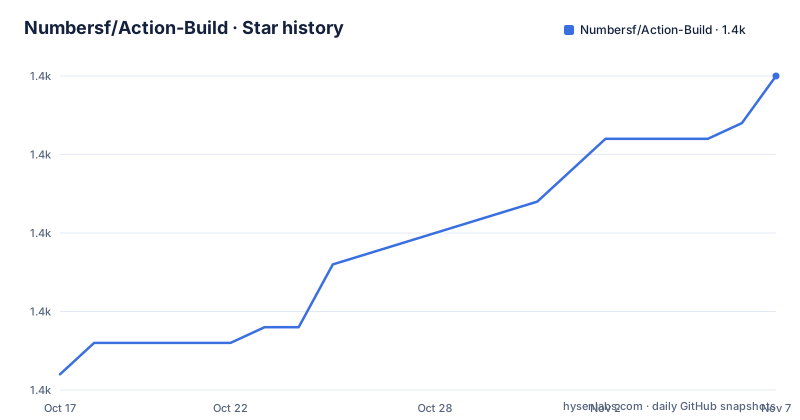
- Numbersf/Action-Build1,395 ★ · +19
| Repository | 2026-10-17 | 2026-11-07 |
|---|---|---|
| Numbersf/Action-Build | 1.4k | 1.4k |
19 Stars in the last 21 days, measured from the daily GitHub snapshot. Compare with other projects
Editorial analysis
Action-Build's target devices and kernel problem
Numbersf/Action-Build addresses a specific Android kernel maintenance problem: building SukiSU Ultra, KernelSU, KernelSU-Next or BakaSU kernels for supported OnePlus devices using Qualcomm and MediaTek platforms. The intended audience is experienced users who own compatible hardware and need to build the kernel through GitHub Actions rather than by preparing a local toolchain. The repository describes coverage across OnePlus QCOM and MTK devices using the GKI 2.0 generation, with device-specific entries and build information handled by repository manifests.
This is not a general kernel builder for arbitrary phones. Device compatibility depends on entries in the manifests and on the paths and kernel sources available to the workflow. The topics also include Oppo and Realme because related device trees or source arrangements may be connected to the supported kernel projects, but the repository description specifically frames the build target as OnePlus hardware. The README also warns that newer features may not work on older devices. OnePlus Ace 5, for example, does not support the Fengchi option.
The project sits between a kernel source tree and a flashable AnyKernel3 package. Its workflows collect device and kernel information, apply patches, include selected root and compatibility components, and package the output. That makes Action-Build useful when several kernel configurations must be reproduced across multiple devices. It also means users are selecting a device-specific build path, not requesting one generic GKI artifact.
Repository structure and the Action-Build build path
The repository layout shows where the implementation lives. Workflow definitions are under `.github/`, reusable logic is under `lib/` and `scripts/`, kernel changes are stored under `patches/`, and `ZRAM.zip` is included as a repository asset. The manifests linked by the README come from separate OnePlusOSS and Numbersf repositories. This separation matters because the build logic depends on device manifests, upstream sources and optional third-party dynamic manifests.
The documented workflow has a user-facing selection stage and later build stages. A `Debug Show Selected Inputs` step displays values entered by the user, while the workflow name can expose some selected information. The process then obtains kernel and build information, applies the requested choices, compiles the kernel and writes an AnyKernel3 package. The changelog names additional mechanisms for configuration and patching, including `FakeConfig(HideConfig)`, `FakePatch`, KPN patching, `Baseband-guard(LSMBBG)`, `DroidSpaces`, `Ntsync` and `Re:Kernel` support.
Configuration is passed to the workflow rather than being limited to kernel source files. The README gives this pair of forms for ordinary and hidden kernel configuration entries.
set_config "CONFIG_IP_NF_TARGET_ECN=y"
set_hide_config "CONFIG_IP6_NF_NAT=y"
The first entry writes a conventional configuration value. The second uses the project's hidden configuration mechanism so that the relevant setting is less visible in `proc/config.gz`. These features add another layer between user selection and the final kernel configuration, which is convenient for maintaining a fork but makes careful review important.
Forking, synchronization and the first workflow run
The README directs new users to fork the repository through GitHub. Its fork instructions are presented as screenshots under a collapsible section rather than as copyable commands, so there is no documented command-line installation procedure to reproduce. Forking creates the user's own GitHub repository from which Actions can run. The default branch shown for this repository is `SukiSU-Ultra`.
If the user plans to manage another supported branch manager, the README specifically says to disable the option that copies only the `SukiSU-Ultra` branch when creating the fork. That setting matters because GitHub forks normally copy only the default branch, and this project uses that option as part of its setup flow.
The first real use begins in the fork's Actions interface. The linked workflow status identifies `Build Kernel OnePlus.yml`, while the README says the workflow collects kernel information and selected inputs. Users must select a listed device and the correct Android version codename before starting it. After completion, the workflow should produce an AnyKernel3 archive whose name includes the SukiSU Ultra build identifier, device, Android version, kernel version and enabled feature markers.
The README does not provide a complete flashing tutorial. It discusses module installation order around a reboot but does not document how to unlock the bootloader, obtain the stock boot image, enter the required mode, or flash AnyKernel3 from `fastboot`. Those operations must not be inferred from the package format. The repository is a build project, not a complete device provisioning guide.
Fork synchronization is also part of normal use. The README warns that updates can make older forks fail, advises synchronizing promptly, and says to delete and recreate a fork if synchronization does not resolve the problem. That statement is unusually direct: users are expected to treat their fork as a maintained deployment copy rather than a permanent one-time installation.
Android codenames and device selection constraints
Device selection is not just a model-name choice. The last configuration suffix in a relevant file represents the Android version codename used by the current system, while most unsuffixed entries represent the factory Android version. From Android 16 onward, the project restarts its suffix scheme with `_b`. The README lists `_b` for Android 16, `_c` for Android 17, `_v` for Android 15, `_u` for Android 14, `_t` for Android 13 and `_s` for Android 12. Future entries shown are placeholders for Android 18 and Android 19 rather than confirmed codenames.
Users must open the manifest and manually change the codename only when another valid entry exists. This is a hard configuration boundary. Choosing a plausible suffix because it matches an Android marketing version can send the workflow toward the wrong source or configuration set. The manifest is the authority for device availability and version naming.
Third-party dynamic source manifests can add devices that were previously incompatible, but only when the source manifest and channel branch follow the naming rules expected by Action-Build. Its README also permits a placeholder `CPUD` when the third-party repository does not define one. Fast Build must remain enabled for these external manifests, removing one of the usual configuration choices.
MTK is another explicit boundary. MTK devices cannot disable Fast Build, so a workflow that treats this option as universally optional is not suitable for those entries. The kernel version also affects available behavior. The README says kernel versions `5.10-5.15` use one documented build-time range, while `6.1-6.12` take longer. Those times are repository-reported reference ranges, not independent measurements.
Fast Build, ccache and the reported build-time boundary
Action-Build offers a Fast Build path and says support covers kernel lines beginning with `5.10` and `5.15`, plus `6.1` and later versions in its stated range. The README reports two broad modes: fast building all device configurations, and official-script builds for selected kernel versions. It lists first-run and second-run ranges for Fast Build, followed by longer ranges for official scripts.
These figures are documented by the repository, but they remain reference values affected by GitHub Actions conditions, upstream repository tools and cache state. The README explicitly warns that different versions of the `repo` tool can change elapsed time. It singles out `Initialize Repo and Sync` as a frequent source of failure and suggests retrying when that step exceeds 15 minutes. If the retry also fails, its stated response is to wait for repair.
Caching uses `ccache-ECS`, `ltothin-cache` and `apt-cache`, but only when Fast Build is enabled. First use and major updates can be slower because cache keys may need to be regenerated. The repository includes a `delete.yml` workflow named `Workflow and Cache Cleanup`, which can delete all cache keys, and users can also remove them through their repository's Actions cache page. This is a maintenance operation, not a routine reset for a single failed build.
Fast Build reduces dependence on the full official compilation path, but it does not remove the need to validate output. The README records a correction for kernel versions between `5.15.0` and `5.15.123`, where official scripts and Fast Build could produce different or unsuccessful results. Such version-specific fixes are a reason to check the changelog before reusing an older workflow.
SUSFS, KPM, ZRAM and flashing hazards
Action-Build combines kernel distribution with optional modules and patches. The README says SUSFS can be configured, its hash values can be modified for fallback, and entering `-1` disables it. A development branch from `SUSFS-DEV` can also be selected. KPM support is present, as are KPN patches, `DroidSpaces`, `Ntsync`, `Re:Kernel` and other compatibility components.
ZRAM has stricter operational constraints. Users can enable ZRAM, select an algorithm and set its size. The workflow also handles a separate ZRAM module sourced from another contributor. Supported documented algorithms include `LZ4K` and `LZ4KD`. Kernel `5.10` cannot enable the ZRAM algorithm because the project reports that it could not find a `zram.ko` path, although the generated AnyKernel3 package remains usable. This distinction matters: a usable package does not mean every optional feature was built into the kernel.
The README warns users not to install a module with the volume-down key during a root-preserving update. It says to use volume-up to skip and notes that SukiSU Ultra add-on modules are now generally preferred. When ZRAM is enabled, its module must be installed before flashing Anykernel3 and rebooting. Parameters may require adjustment.
These warnings reveal the largest adoption risk. The workflow can produce an archive, but it does not guarantee that optional modules are enabled, compatible or correctly ordered. A build succeeding in GitHub Actions is not evidence that the resulting kernel will boot the device.
Maintenance, custom licensing and manual kernel alternatives
The repository is not archived, and its last push was on 2026-10-07. That indicates recent repository activity, although the README still requires fork synchronization because updates can invalidate older copies. Releases listed for the project include build `40069` from 2025-11-09, build `13422` from 2025-10-14 and build `13351` from 2025-09-22. These are build releases rather than evidence that every device configuration remains equally current.
The LICENSE uses a custom license that GitHub cannot classify. The only confirmed restriction visible in the README is a prohibition on promoting an unmodified fork repository. The README also says users should not change manager-layer or built-in-layer branch settings unless they are developers, and it describes custom version identifiers and rollback hashes. A fork therefore carries both technical update work and license obligations. The complete `LICENSE` file must be reviewed directly for permissions, conditions and redistribution terms; the README is not enough for a compliance decision.
The real alternative is a device vendor kernel build performed with the model's official kernel source and official scripts. That approach avoids Action-Build's manifest selection, root-solution variants and feature patch stack, but requires reproducing the original source revision, toolchain and build configuration. Action-Build offers more device-aware automation for the devices it covers. A manual vendor build offers fewer project-specific transformations, yet it places more responsibility on the builder to establish a known-good baseline. For devices absent from the manifests, the manual route may be the only defensible starting point.
Editorial conclusion
Adopt Action-Build if you own a listed OnePlus QCOM or MTK model, can map its Android codename to the manifest, and intend to maintain a kernel between device updates. Do not adopt it for an unlisted device or expect the README to provide a complete flashing procedure. Verify the device entry, Android codename, kernel source, selected root solution and boot-partition recovery options before starting a workflow.
Frequently asked questions
Which devices does Numbersf/Action-Build support?
The repository describes OnePlus QCOM and MTK devices with GKI 2.0 build paths. Exact compatibility is defined by entries in the linked kernel manifests, so the device and Android codename must be checked there before a workflow is started.
How do I start the first Numbersf/Action-Build kernel build?
Fork the repository, synchronize it when needed, open the GitHub Actions workflow named `Build Kernel OnePlus.yml`, and select a listed device and valid Android codename. The README uses screenshots for the fork steps and does not provide a command-line installation sequence.
Does Numbersf/Action-Build support every kernel feature on every OnePlus device?
No. OnePlus Ace 5 does not support Fengchi, MTK devices cannot disable Fast Build, and kernel `5.10` cannot enable the documented ZRAM algorithm because `zram.ko` was not found. Older devices may also be unable to use features even when the kernel source contains related changes.
What does Numbersf/Action-Build produce?
According to the changelog and README examples, the workflow packages the selected kernel configuration into an AnyKernel3 ZIP. The archive name includes the build identifier, device, Android version, kernel version and markers for selected features, but the repository does not document the complete bootloader flashing procedure.
What happens if a forked Action-Build workflow fails after a repository update?
The README advises synchronizing the fork promptly because updates can cause older forks to fail. If synchronization does not resolve the problem, it says to delete and recreate the fork before reporting a remaining issue.
Can I use Action-Build's custom license without restrictions?
The repository has a custom LICENSE that GitHub cannot classify, so its complete terms must be checked in that file. The README confirms at least one restriction: unmodified fork repositories must not be promoted.
Official sources
Add this badge to your README
If you maintain this project, the badge below links readers to this analysis and shows its maintenance status from the daily GitHub snapshot. Paste the markdown into your README; add ?metric=license or ?metric=stars to the image URL for a different field.

[](https://hysenlabs.com/projects/numbersf-action-build)Star history chart for your README
[](https://hysenlabs.com/projects/numbersf-action-build)Was this useful?