Nutlope/self.so: a LinkedIn to personal site generator you can self-host
LinkedIn -> personal site generator
At a glance
- What is it?
- Self is an open source Next.js app that turns an uploaded PDF resume into a published personal site using Together.ai and Kimi K2.6. It is a working reference implementation, not a finished product: the README's own task list shows editing, previews and cleanup are still missing.
- Who is it for?
- Adopt Self if you want a working Next.js reference for PDF to structured JSON generation with Together.ai, and you are willing to supply your own Clerk, Upstash, S3 and Braintrust accounts. Do not adopt it if you need a finished product: the README's future tasks list still includes editing links, editing sections, reaching the preview page for an existing site, and deleting a previously uploaded resume, so the current build is a one-shot generator.
- Can I use it commercially?
- Yes. MIT is a permissive licence: you can use, modify and sell software built on it, as long as you keep its copyright and licence notices.
- Is it still maintained?
- Yes. The repository last received commits 19 days ago.
- What is it written in?
- Mainly TypeScript, according to GitHub's language statistics.
Answers come from the project's GitHub data, last synced on November 14, 2026, and from our analysis. They are not legal advice.
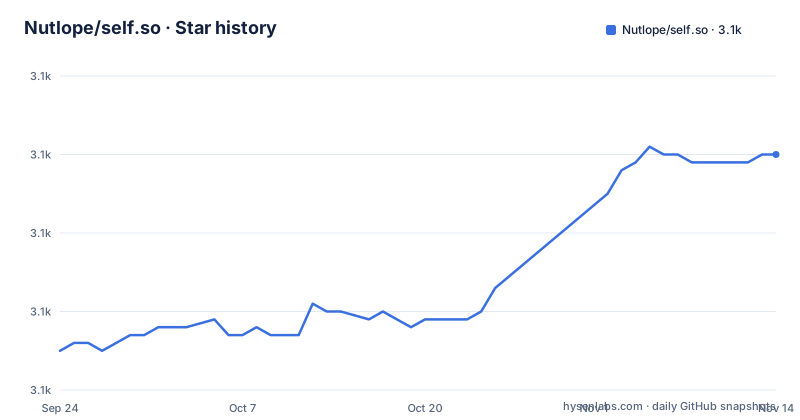
Star history
- Nutlope/self.so3,110 ★ · +25
| Repository | 2026-09-24 | 2026-11-14 |
|---|---|---|
| Nutlope/self.so | 3.1k | 3.1k |
25 Stars in the last 51 days, measured from the daily GitHub snapshot. Compare with other projects
Editorial analysis
The problem Self solves, and who actually needs it
Self targets a narrow, specific task: taking a resume PDF and producing a personal website without writing the site by hand. The README describes the flow in four steps, starting with account creation through Clerk, then a PDF upload, then extraction, then a dynamic route the user can view and publish. That is the whole product surface.
The intended user is a developer or technically comfortable job seeker who already has a resume PDF and wants a public page quickly. The repository is a Next.js app router project written in TypeScript under the MIT licence, so the realistic audience is people who either want to run the hosted version at self.so or fork the code and wire it to their own accounts. It is not aimed at non-technical users who expect a drag-and-drop editor, because the README's own future tasks list admits that editing links and editing sections are not implemented yet.
There is a second audience the project serves by accident: engineers who want a small, readable example of structured extraction from a document using Vercel's AI SDK and JSON mode. The dependency list is unusually explicit about that stack, and the flow is short enough to read end to end.
How the PDF to JSON pipeline is wired
The mechanism is a linear pipeline with four external services. Clerk handles authentication. The uploaded PDF goes to S3 for object storage, and according to the README it also passes a safety check with Llama Guard before being used. The PDF is then sent as context to Kimi K2.6, which extracts relevant information using structured outputs, which the README describes as JSON mode. The resulting object is placed on a dynamic route so the user can view and publish the site.
Two details are worth noting. First, extraction is one-shot: the model reads the PDF and emits JSON, and that JSON becomes the site. There is no editing layer documented between extraction and rendering, which matches the future tasks list. Second, the README says Braintrust is used for "privacy-safe resume-generation tracing and observability", which means resume content can flow into a third-party tracing service unless you configure it otherwise or skip it, since the README lists Braintrust as optional.
The dependency set confirms the shape of the app: @ai-sdk/togetherai for the model provider, ai for the SDK, @upstash/redis for the database, aws-sdk for S3, pdfjs-dist for PDF handling, and @clerk/nextjs for auth. The README calls Upstash Redis "my DB", which is a candid way of saying the persistence layer is a key-value store rather than a relational schema. For a single generated site per user, that is adequate. For anything with querying or relational integrity, it is the wrong foundation.
Installing Self locally and generating your first site
The README gives a seven-step setup. You clone or fork the repository, create accounts at Together AI, Upstash and AWS, optionally create a Braintrust account for tracing, create a .env using .example.env as reference and replace the API keys, then install and run. Bun is the package manager used in the instructions.
The install and dev commands are exactly these:
bun install
bun run dev
After `bun run dev`, Next.js starts its development server and you should be able to open the local app, sign in through Clerk, and upload a PDF. The README does not state a port, so check the terminal output for the URL Next.js prints.
The test commands are documented separately in the README:
bun run test:run
bun run test:ui
bun run test
`test:run` runs the Vitest suite once, `test:ui` opens the Vitest UI, and `test` runs in watch mode. These map to the scripts in package.json, which also defines `dev`, `build` and `start` as `next dev`, `next build` and `next start`.
One practical warning: the README does not document a rollback or reset path, and the future tasks list includes deleting a previously uploaded resume when a new one is uploaded. Until that is done, expect stale PDFs to remain in your S3 bucket after re-uploading.
What Self does not do yet
The honest limitation section is the README's own future tasks checklist, and it is longer than most project roadmaps. It lists adding error logging, adding a way to reach the preview page if you already have a site, editing links, editing any section, adding themes, and deleting a previously uploaded resume on re-upload. Every one of those is a gap in the current build, not a nice-to-have.
The most consequential gap is editing. If the model extracts a job title incorrectly, or drops a bullet, the documented flow gives you no in-app way to fix it. You regenerate or you edit the underlying data by hand. That makes Self a poor fit for anyone whose resume is unusual in layout, or whose PDF is a scan rather than text, since the README describes sending the PDF as context rather than describing OCR.
The second gap is operational. The README's first future task is adding error logging, which means the current version is thin on diagnostics when extraction fails. Combined with the absence of a documented rollback, a failed generation leaves you inspecting S3 and Redis manually.
Self is also the wrong tool if you want a static site you own outright. The output lives on a dynamic route served by the Next.js app, backed by Upstash Redis and Clerk. If your goal is a folder of HTML you can drop on any host, this architecture adds three services you do not need.
How Self differs from a static site generator
The natural alternative is a static site generator such as Astro or Eleventy paired with a hand-written content file. The difference in approach is where the data comes from. A static site generator assumes you already have structured content, usually Markdown or YAML, and its job is templating and build output. Self assumes you have an unstructured PDF and its job is the conversion step, then rendering. It moves the effort from writing content to extracting it.
That trade has a real cost. With Astro or Eleventy, the content file is the source of truth and you can edit any word directly. With Self, the source of truth is whatever JSON the model produced, and the README does not document an editing interface. You gain speed on the first draft and lose control on every revision.
A second alternative is a hosted resume builder with a visual editor. Those give you editing but not the code, and they do not run on your own S3 bucket or your own Redis instance. Self sits between the two: more automated than a static generator, more inspectable than a hosted builder, and less finished than either.
Maintenance, licence and upgrade cost
The last push to the repository was on 2026-09-04, and the repository is not archived, so the code is recent. That said, the README's future tasks list is unchecked, which suggests the listed gaps are still open rather than shipped and undocumented.
The maintenance burden is dominated by the dependency surface, not the app code. The project depends on Clerk, Upstash, AWS S3, Together.ai, Braintrust and the Vercel AI SDK, and package.json pins major versions for each. A breaking change in any one of them, particularly @ai-sdk/togetherai or the Clerk Next.js package, lands on you because the repository has no published releases, so there is no changelog to read before upgrading. You are tracking the main branch.
On licensing: the repository is MIT, which permits commercial use and modification with attribution. That covers the code. It does not cover the services the code calls. Together.ai, Clerk, Upstash, AWS and Braintrust each have their own terms, and the README's setup steps assume you create accounts with all of them. The MIT grant on this repository tells you nothing about what those providers charge or how they handle the resume data you send them. Read those terms separately; this is not legal advice.
Editorial conclusion
Adopt Self if you want a working Next.js reference for PDF to structured JSON generation with Together.ai, and you are willing to supply your own Clerk, Upstash, S3 and Braintrust accounts. Do not adopt it if you need a finished product: the README's future tasks list still includes editing links, editing sections, reaching the preview page for an existing site, and deleting a previously uploaded resume, so the current build is a one-shot generator. Before committing, verify the .example.env keys against your Together.ai and Upstash projects, confirm the Kimi K2.6 model name is still available on Together.ai, and decide whether the MIT licence is compatible with how you plan to host the Clerk and S3 dependencies.
Frequently asked questions
What is Nutlope/self.so?
It is an open source personal site builder written in TypeScript on Next.js. According to the README, it uploads a resume PDF to S3, sends it to Kimi K2.6 for structured extraction, and renders the result on a dynamic route the user can publish.
How do I install and run Nutlope/self.so locally?
The README says to clone the repo, create accounts at Together AI, Upstash and AWS (and optionally Braintrust), create a .env from .example.env, then run `bun install` and `bun run dev`. Bun is the package manager used in those instructions.
Can I edit my site after Nutlope/self.so generates it?
Not through a documented interface. The README's future tasks list still includes editing links, editing any section, and reaching the preview page if you already have a site, so those features are not described as available.
What licence does Nutlope/self.so use?
The repository is MIT licensed, which permits commercial use and modification with attribution. That covers the code only; the README's setup requires separate accounts with Together.ai, Clerk, Upstash, AWS and optionally Braintrust, each with its own terms.
Official sources
Add this badge to your README
If you maintain this project, the badge below links readers to this analysis and shows its maintenance status from the daily GitHub snapshot. Paste the markdown into your README; add ?metric=license or ?metric=stars to the image URL for a different field.

[](https://hysenlabs.com/projects/nutlope-self-so)Star history chart for your README
[](https://hysenlabs.com/projects/nutlope-self-so)Was this useful?