TypeChat: Turning TypeScript Types into a Contract for LLM Output
TypeChat is a library that makes it easy to build natural language interfaces using types.
At a glance
- What is it?
- TypeChat is a Microsoft library that uses TypeScript types as the schema for validating and repairing large language model responses. It targets developers who want structured, safe LLM output without writing long prompts.
- Who is it for?
- Adopt TypeChat if you are a TypeScript developer building a natural language interface that needs structured intents and you want to avoid prompt engineering. Do not adopt it if your schema is highly dynamic or you cannot tolerate extra LLM calls for validation and repair.
- Can I use it commercially?
- Yes. MIT is a permissive licence: you can use, modify and sell software built on it, as long as you keep its copyright and licence notices.
- Is it still maintained?
- Yes. The repository last received commits 3 days ago.
- What is it written in?
- Mainly TypeScript, according to GitHub's language statistics.
Answers come from the project's GitHub data, last synced on November 13, 2026, and from our analysis. They are not legal advice.
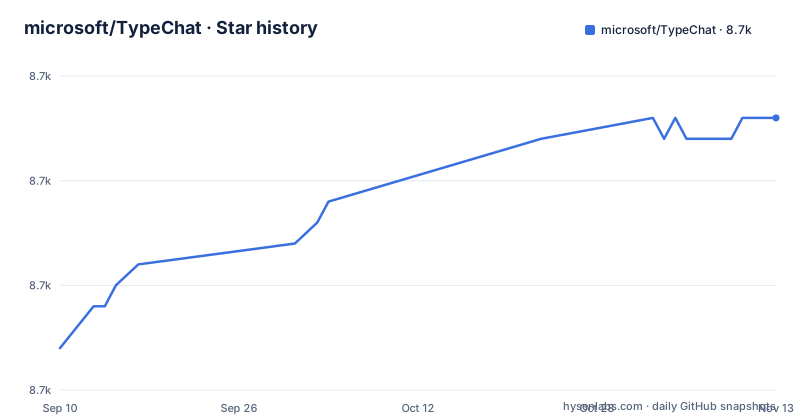
Star history
- microsoft/TypeChat8,693 ★ · +11
| Repository | 2026-09-10 | 2026-11-13 |
|---|---|---|
| microsoft/TypeChat | 8.7k | 8.7k |
11 Stars in the last 64 days, measured from the daily GitHub snapshot. Compare with other projects
Editorial analysis
The Problem TypeChat Solves
Building a natural language interface usually meant writing decision trees to map user input to intent, then collecting the inputs needed for an action. Large language models removed the need for those trees, but introduced a new problem: how to force the model to reply in a shape your code can process. The README argues that prompt engineering is fragile and has a steep learning curve as prompts grow. TypeChat replaces prompt engineering with schema engineering. Instead of writing instructions, you define TypeScript types that represent the intents your application supports. The library then constructs a prompt from those types, validates the model's response against them, and repairs invalid output. This is aimed at developers who already know TypeScript and want a typed contract for LLM output, not at researchers experimenting with prompt techniques.
How Schema Engineering Works
The mechanism is visible in the README's three steps. First, TypeChat builds a prompt to the LLM using your types. That means the type definitions themselves become the specification the model is asked to follow. Second, the library validates the LLM response against the schema. If validation fails, it repairs the non-conforming output through further language model interaction. This is a key design choice: rather than rejecting bad output, TypeChat sends it back to the model with feedback. Third, it summarizes the instance and confirms it aligns with user intent, and this step does not use an LLM. The summary is done with code, which keeps cost down. The README gives examples of simple sentiment interfaces and more complex shopping cart or music schemas. To add an intent, you add a type to a discriminated union. To make schemas hierarchical, you use a meta-schema that picks one or more sub-schemas based on input.
Getting Started and Running It
Installation is a single command: npm install typechat. The package targets TypeScript and JavaScript. The README links to example projects in the typescript/examples directory, and suggests trying them locally or in a GitHub Codespace. There is also documentation at microsoft.github.io/TypeChat. The repository contains separate language implementations: TypeScript is in the typescript folder, Python is in python, and C#/.NET is a separate repository at microsoft/TypeChat.net. The README shows a commented-out section for PyPI and NuGet, which implies those package managers were not yet published at the time of writing. For a TypeScript developer, the path is straightforward: define your types, import the library, and pass a user message. The examples and the docs show how to wire a model client.
Where TypeChat Falls Short
The most obvious limitation is that validation and repair rely on further LLM interaction. That adds latency and cost for every request that initially fails validation. In a high-volume application, this could be prohibitive. Another limitation is that the schema is defined in TypeScript types, which are erased at runtime. The library builds its prompt from those type definitions. If your intent requires complex logic, like conditional constraints based on user history, a type definition cannot express it. TypeChat is also wrong for applications where the set of intents is not known in advance. A discriminated union requires you to enumerate all possible intents at compile time. For open-ended tasks like free-form summarization, a schema is the wrong tool.
Alternatives: Prompt Engineering vs. TypeChat
The direct alternative is prompt engineering, where you write detailed instructions in the prompt to constrain the model's output. That approach has no schema validation; you rely on the model to follow the prompt, and you parse the output yourself. TypeChat's difference is that the schema is a type, not prose. That means the validation is programmatic and the repair loop is automated. Another alternative is using a structured output feature from an LLM provider, such as OpenAI's JSON mode, but that only guarantees valid JSON, not that the JSON matches your specific shape. TypeChat goes further by mapping the response to your TypeScript types and repairing mismatches. The README positions TypeChat as a replacement for prompt engineering. If you need dialogue management or entity extraction beyond intents, TypeChat is not that.
Maintenance and License Considerations
The repository is under the MIT license, which is permissive. The project is not archived and had a push on 2026-11-02, but the repository has no published GitHub releases. That absence of release tags is worth noting: the README's install route is the typechat package on npm. The README points to a separate repository for the C#/.NET implementation, while Python lives in this repository's python folder, so maintenance is split across repos. For TypeScript, the package is on npm, and the README states it requires Node.js 24.22.1 or newer. You should verify that your toolchain supports the language features used in the type definitions, especially advanced types like discriminated unions and template literal types. The documentation site is the place to check for upgrade notes.
Editorial conclusion
Adopt TypeChat if you are a TypeScript developer building a natural language interface that needs structured intents and you want to avoid prompt engineering. Do not adopt it if your schema is highly dynamic or you cannot tolerate extra LLM calls for validation and repair. Before adopting, verify your TypeScript version matches the library's requirements, test with your target LLM. TypeChat is a pragmatic middle ground, but it is not a full NLU framework and its value depends on your willingness to treat types as the single source of truth.
Frequently asked questions
What is TypeScript used for?
In this repository TypeScript is one of three implementations. The readme points at a TypeScript source readme and a Python source readme inside this repository and at a separate repository for the .NET implementation, with the design being that you define types for the intents your application supports and the library handles the prompt, the validation and the repair.
What is TypeChat?
A library for building natural language interfaces using types instead of prompts. You declare types for the intents your application supports, the library builds a prompt from them, validates the model's reply against the schema, repairs it through another model interaction if it does not conform, and summarises the resulting instance without using a model.
How do I install TypeChat?
One command against the package index for the TypeScript and JavaScript version. The readme carries a commented-out block mentioning two other package registries with the details elided, and points at source-level instructions for Python and for the .NET implementation, the latter in a separate repository.
Which language models does TypeChat work with?
The environment template covers two: OpenAI, with a model name and a key, and Azure OpenAI, with an endpoint and a key. The model names appear only as examples in a comment while the values are left empty.
Official sources
Add this badge to your README
If you maintain this project, the badge below links readers to this analysis and shows its maintenance status from the daily GitHub snapshot. Paste the markdown into your README; add ?metric=license or ?metric=stars to the image URL for a different field.

[](https://hysenlabs.com/projects/microsoft-typechat)Star history chart for your README
[](https://hysenlabs.com/projects/microsoft-typechat)Was this useful?