FlowGram: a framework for building AI workflow canvases
FlowGram is an extensible workflow development framework with built-in canvas, form, variable, and materials that helps developers build AI workflow platforms faster and simpler.
At a glance
- What is it?
- FlowGram is a TypeScript toolkit from ByteDance that supplies the canvas, node form, variable scope and ready-made nodes for a workflow product. The framework packages provide the building blocks for your own workflow platform, and the repository also offers FlowGram Desktop, a native Agent workspace for macOS and Windows.
- Who is it for?
- Adopt FlowGram if you are building a node-based workflow editor and want the canvas, form and variable layers already solved; skip the framework packages if you need a finished workflow tool, and look at FlowGram Desktop instead. Before committing, scaffold the create-app template, confirm your node data model fits the form engine, and read the runtime and variable guides on flowgram.ai to check that the scope chain matches how your backend executes graphs.
- Can I use it commercially?
- Yes. MIT is a permissive licence: you can use, modify and sell software built on it, as long as you keep its copyright and licence notices.
- Is it still maintained?
- Yes. The repository last received commits 11 days ago.
- What is it written in?
- Mainly TypeScript, according to GitHub's language statistics.
Answers come from the project's GitHub data, last synced on November 13, 2026, and from our analysis. They are not legal advice.
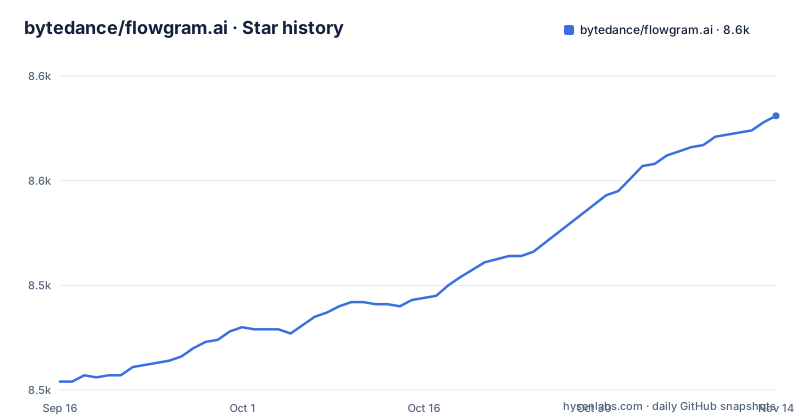
Star history
- bytedance/flowgram.ai8,578 ★ · +124
| Repository | 2026-09-16 | 2026-11-13 |
|---|---|---|
| bytedance/flowgram.ai | 8.5k | 8.6k |
124 Stars in the last 58 days, measured from the daily GitHub snapshot. Compare with other projects
Editorial analysis
What FlowGram solves, and who is on the other side of it
Building a workflow editor from scratch means solving three unglamorous problems at once: a canvas that handles panning, zooming and connections; a per-node configuration form that validates and reacts to other fields; and a variable system that knows which upstream node outputs are visible at the cursor. FlowGram packages all three. The README describes it as "a composable, visual, easy-to-integrate, and extensible workflow development framework & toolkit" and states the goal plainly: help developers build AI workflow platforms faster and simpler.
The target user is a product team building its own workflow product, not someone who wants to run an existing one. The README draws the boundary itself: the framework packages "provide the building blocks for your own workflow platform", while FlowGram Desktop, a native Agent workspace for macOS and Windows, brings them together to build, run and debug workflows. If you want the editor that a workflow product sits on, the framework packages are the layer to use. The repository is TypeScript, MIT licensed, and the package layout under packages/ plus the create-app flow confirm it is distributed as npm libraries rather than a server you deploy.
Canvas, form and variable: the three engines inside the framework
The feature table splits the canvas into two models. Free Layout places nodes anywhere and connects them with free-form lines; Fixed Layout constrains nodes to specified positions and supports compound nodes such as branches and loops. That second model is what you want if the workflow has to map onto a sequential or tree-shaped execution order, because branches and loops are containers, not just edges.
The Form engine is described as managing CRUD operations on node data and providing rendering, validation, side effects, linkage and error capturing. In practice that means a node's configuration UI is declared rather than hand-written, and cross-field behaviour is handled by the engine. The Variable engine adds scope constraints, structure inspection and type inference over the data flowing between nodes. Scope constraints are the interesting part: a variable reference is only valid where the producing node is reachable, which is the check you would otherwise write by hand and get subtly wrong.
On top of those sit the materials, listed as LLM, Condition and Code Editor among others. The demo in the README walks a list of cities through an HTTP fetch, a Code node for parsing temperatures, an LLM for outfit suggestions, a Condition gate, loop aggregation, and a final Advisor LLM that picks a city before the End node. That is a useful read on intended scale: small graphs, mixed node types, real data flow.
Installing FlowGram and running the free layout template
The README's quick start is a scaffolder rather than a manual install. Run it with npx; it creates a new project directory and asks you to pick a template. The README recommends the Free Layout Demo template.
npx @flowgram.ai/create-app@latestAfter scaffolding, the README's example project directory is demo-free-layout. Move into it, install dependencies and start the dev server.
cd demo-free-layout
npm install
npm start
The README states the app is then reachable at http://localhost:3000. There is also a CodeSandbox and a StackBlitz link for the demo if you want to read the source before installing anything locally.
One caveat worth stating: the README's quick start documents the scaffolder and the template, not a bare npm install of @flowgram.ai/editor into an existing app. The npm badge in the README points at @flowgram.ai/editor, so the package exists, but the getting-started path the project promotes is the template. If you are adding FlowGram to an existing codebase, expect to read the Canvas, Form and Variable guides on flowgram.ai rather than follow the quick start.
The React assumption is the first real constraint
Check which UI framework the packages target in the Canvas guide and API Reference on flowgram.ai before planning an integration into your product shell.
The second constraint is scope. Because FlowGram ships the editor and the runtime guide separately, the framework does not execute your workflow for you in any hosted sense. The README's Runtime section is documentation, and the materials are node implementations, not a scheduler. You still own persistence, execution, retries and the backend that runs the graph. Teams that read "workflow development framework" as "workflow engine" will be disappointed at the point where they need to run the thing.
Third, the fixed layout model with compound nodes is more opinionated than the free layout one. Branch and loop containers impose a structure on your node data. If your execution model is a flat DAG, the free layout canvas is the better fit and the fixed layout features become overhead.
How FlowGram differs from React Flow and from Coze Studio
React Flow is the obvious comparison, and the difference is altitude. React Flow gives you a graph rendering library: nodes, edges, viewport, interactions. You supply the node configuration UI, the variable model and the node semantics. FlowGram adds the Form engine and the Variable engine on top of the canvas, which is the part that takes the longest to build and the part most likely to be rebuilt badly. The cost is that FlowGram's canvas is FlowGram's, with its own free and fixed layout models, rather than the generic graph abstraction React Flow offers.
The other comparison is inside the README's own adoption list. Coze Studio is described as an all-in-one AI agent development tool, and it uses FlowGram. That is the clearest statement of the relationship: Coze Studio is the finished product, FlowGram is the framework underneath it. If you want to deploy an agent platform today, look at Coze Studio. If you want to build a product in that shape with your own nodes, branding and execution backend, FlowGram is the layer to start from. Certimate, an SSL certificate management tool with a visual workflow, is listed too, which shows the framework is not limited to AI-agent products.
Maintenance, licence and what upgrading costs you
The repository is not archived and the last push was on 2026-11-02, which is recent. Recent releases: v1.0.14 on 2026-08-20, v1.0.16 on 2026-10-13, and a FlowGram Desktop Preview on 2026-10-21. The version numbers are still in the 1.0.x range, so expect minor releases to carry behavioural changes rather than only fixes, and read CHANGELOG.md before bumping.
The licence is MIT, which is permissive and places few obligations on how you redistribute or modify the code. This is not legal advice; if you are shipping a commercial product, have your own counsel confirm the terms and check the licences of transitive dependencies.
The upgrade cost is concentrated in the node data model. The Form engine manages node data CRUD and the Variable engine infers types across scopes, so both read your node schema. A change to either engine can ripple into every node definition you have written. Pinning versions and testing the template after each bump is cheaper than discovering the ripple in production.
Editorial conclusion
Adopt FlowGram if you are building a node-based workflow editor and want the canvas, form and variable layers already solved; skip the framework packages if you need a finished workflow tool, and look at FlowGram Desktop instead. Before committing, scaffold the create-app template, confirm your node data model fits the form engine, and read the runtime and variable guides on flowgram.ai to check that the scope chain matches how your backend executes graphs.
Frequently asked questions
Is FlowGram free to use in a commercial product?
The repository is MIT licensed, which is permissive and allows commercial use and modification. Check the licences of transitive dependencies as well, and treat that as an engineering check rather than legal advice.
Does FlowGram work with Vue?
The README's quick start does not name a UI framework; check the Canvas guide and API Reference on flowgram.ai for the supported rendering setup before planning a Vue integration.
Do I need to build the workflow execution backend myself with FlowGram?
Yes, if you build on the framework packages. The README says they provide the building blocks for your own workflow platform, and the runtime is covered in a documentation section. FlowGram Desktop is a separate native workspace that builds and runs workflows. Persistence and graph execution remain your responsibility.
How do I start a FlowGram project?
Run npx @flowgram.ai/create-app@latest, choose the Free Layout Demo template, then cd into demo-free-layout, run npm install and npm start. The README says the app opens at http://localhost:3000.
Official sources
Add this badge to your README
If you maintain this project, the badge below links readers to this analysis and shows its maintenance status from the daily GitHub snapshot. Paste the markdown into your README; add ?metric=license or ?metric=stars to the image URL for a different field.

[](https://hysenlabs.com/projects/bytedance-flowgram-ai)Star history chart for your README
[](https://hysenlabs.com/projects/bytedance-flowgram-ai)Was this useful?