GEN3C world-consistent video generation with camera control
[CVPR 2025 Highlight] GEN3C: 3D-Informed World-Consistent Video Generation with Precise Camera Control
At a glance
- What is it?
- GEN3C is an open source NVIDIA Research video generation project for creating temporally consistent views from a 3D-informed cache, with explicit camera trajectories and support for image or video input. Its main tradeoff is a substantial GPU-oriented setup and a dependency on predicted scene geometry.
- Who is it for?
- Adopt GEN3C when the task requires camera-controlled video or sparse-view generation and the team can provide the required CUDA, checkpoint, and 3D-input workflow. Do not choose it for a lightweight CPU deployment or a pipeline that needs guaranteed geometric accuracy from arbitrary scenes.
- Can I use it commercially?
- Yes. Apache-2.0 is a permissive licence: you can use, modify and sell software built on it, as long as you keep its copyright and licence notices.
- Is it still maintained?
- Yes. The repository last received commits 145 days ago.
- What is it written in?
- Mainly Jupyter Notebook, according to GitHub's language statistics.
Answers come from the project's GitHub data, last synced on November 6, 2026, and from our analysis. They are not legal advice.
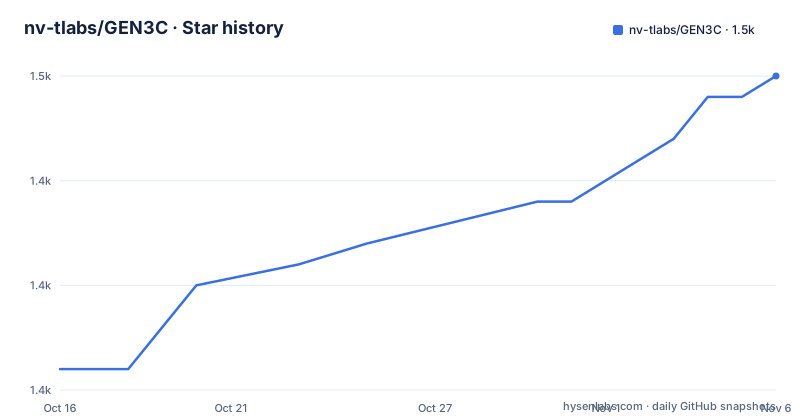
Star history
- nv-tlabs/GEN3C1,450 ★ · +14
| Repository | 2026-10-16 | 2026-11-06 |
|---|---|---|
| nv-tlabs/GEN3C | 1.4k | 1.5k |
14 Stars in the last 21 days, measured from the daily GitHub snapshot. Compare with other projects
Editorial analysis
Why GEN3C targets camera drift
GEN3C addresses a specific weakness of conventional video generation: the model may produce convincing frames while losing track of scene structure as time and viewpoint change. The README identifies popping objects and imprecise camera control as problems caused by relying on little explicit 3D information. Camera parameters may be passed to a neural network, but the network still has to infer how those parameters affect the generated image.
GEN3C instead builds a 3D cache from point clouds. According to the project description, these point clouds come from predicted pixel-wise depth in a seed image or in previously generated frames. When the model creates later frames, it receives 2D renderings of that cache under the camera trajectory supplied by the user. The intended user is a researcher or engineer working on novel view synthesis, dynamic scenes, driving scenes, or controlled video generation where camera motion matters more than unconstrained visual variation.
This is a narrower goal than producing a video with no user-defined path. GEN3C is designed around a known camera trajectory and a scene representation that can be revisited from different views. That distinction is central to evaluating the project.
The 3D cache and conditioning path
The documented mechanism has two parts. First, GEN3C predicts depth and converts the corresponding pixels into a point-cloud cache. Second, it renders that cache from the requested camera pose and conditions the video model on those renderings. The README says the model does not need to remember all previously generated imagery and does not need to infer image structure from the camera pose alone.
Instead, the generative model focuses on regions that have not already been observed and on advancing the scene state to the next frame. This separation makes temporal and view consistency part of the input construction rather than a property the network must discover entirely from a sequence of 2D images. It also explains why the project describes its results as results in sparse-view novel view synthesis.
The cache is not a conventional editing interface that users can directly inspect as a complete scene database. The README does not document a general scene import format, manual point-cloud editing workflow, or guarantees about depth accuracy. It does document an interactive GUI where inputs can be visualized in 3D and camera trajectories can be authored. The cache therefore appears to be an inference-time guide whose quality depends on the image or video input and the geometry prediction used by the project.
Image, video, and multiview entry points
The repository exposes both a Python inference path and an interactive GUI. The README lists `gen3c_single_image.py` for a single image, and it states that GEN3C supports images and videos as input. The project has also released code for multiview inference and integration with ViPE, a separate pipeline for jointly predicting depth and camera pose from video.
The distinction matters because GEN3C is not only an image-to-video preset. The documented interface accepts predefined camera trajectory patterns, while the GUI is intended for arbitrary trajectories and a single-window workflow. The available trajectory names include `left`, `right`, `up`, `down`, `zoom_in`, `zoom_out`, `clockwise`, and `counterclockwise`. Camera rotation modes include `center_facing`, `no_rotation`, and `trajectory_aligned`.
The README does not fully specify every option or claim that arbitrary trajectories are automatically available through the command line. It points users to the dedicated GUI instructions for that workflow. For engineering evaluation, the multiview and ViPE additions are relevant, but they also increase the number of moving parts that need to be understood before deployment.
Checkpoint setup and first image inference
The README sends installation work to `INSTALL.md`, so the repository does not give a complete environment setup sequence in the main README. It does provide the checkpoint download and first inference commands. The model weights are hosted on Hugging Face at `nvidia/GEN3C-Cosmos-7B`, and the instructions require an access token with `Read` permission.
Log in to Hugging Face before downloading the weights:
huggingface-cli loginFrom the repository root, download the GEN3C checkpoints into `checkpoints`:
CUDA_HOME=$CONDA_PREFIX PYTHONPATH=$(pwd) python scripts/download_gen3c_checkpoints.py --checkpoint_dir checkpointsThe first documented use generates a 121-frame video from one image:
CUDA_HOME=$CONDA_PREFIX PYTHONPATH=$(pwd) python cosmos_predict1/diffusion/inference/gen3c_single_image.py \
    --checkpoint_dir checkpoints \
    --input_image_path assets/diffusion/000000.png \
    --video_save_name test_single_image \
    --guidance 1 \
    --foreground_masking
The command writes the result using `test_single_image`. The repository also documents an 8-GPU `torchrun` form, which uses `--num_gpus ${NUM_GPUS}`. The presence of `CUDA_HOME`, `PYTHONPATH`, and the pinned `torch==2.6.0` dependency indicates that this is a GPU-oriented setup rather than a general desktop application.
Camera options and longer sequences
GEN3C exposes camera movement as inference arguments. The README documents `--trajectory`, `--camera_rotation`, and `--movement_distance`. The trajectory selects the path, while the rotation mode controls whether the camera looks toward the estimated scene center, keeps its original orientation, or follows the trajectory alignment. The default trajectory is `left`, and the default rotation mode is `center_facing`.
The CLI also supports autoregressive generation with `--num_video_frames`. The documented frame count must follow the pattern `121 * N - 1`, with examples including 241 and 361 frames. `--save_buffer` saves buffer images alongside the output video. These are useful controls for an experiment, but the README does not state the memory cost of longer sequences or whether output quality changes with the number of frames.
The GUI is the documented route for authoring arbitrary trajectories and viewing inputs in 3D. That distinction prevents a common misreading of the project. GEN3C does not merely attach a camera label to a conventional text-to-video model. It expects the generation process to be aligned with a geometric scene cache and an authored viewpoint path. Users who need unconstrained camera motion, or who cannot provide meaningful image or video conditioning, are outside the clearest use case.
Deployment limits, licensing, and maintenance
The repository lists a large, version-pinned Python environment, including `diffusers`, `transformers`, `megatron-core`, `warp-lang`, `opencv-python`, and CUDA-oriented PyTorch packages. The Dockerfile starts from `nvcr.io/nvidia/pytorch:24.10-py3`, installs Miniconda, creates the `cosmos-predict1` environment, and installs the requirements file. It also links CUDA library paths into the environment. This setup carries the practical cost of a GPU inference stack, large checkpoints, and environment-specific CUDA compatibility.
The repository is not archived, and its last push was on 2026-06-15. That is a recent maintenance signal under the stated freshness window, but the repository has no GitHub releases. The README records code and model release news dated in 2025, including ViPE integration and multiview inference. It does not provide a versioned release schedule or a documented upgrade path for existing checkpoints.
GEN3C uses the `Apache-2.0` license. The Dockerfile and repository license metadata indicate the project's licensing basis, but model weights, assets, dependencies, and commercial deployment questions may involve separate terms or obligations. The README also directs business inquiries to NVIDIA Research Licensing. An engineering team should inspect the exact license files and model terms rather than treating the repository license as a complete deployment clearance.
When GEN3C is the wrong tool
GEN3C is a poor fit when the requirement is a general-purpose video generator with minimal setup. The documented workflow requires a Hugging Face token, GEN3C checkpoints, CUDA-oriented dependencies, and an inference environment described separately in `INSTALL.md`. It is also a poor fit for workloads where precise depth or camera-pose recovery must be guaranteed. The README describes predicted depth and camera pose as inputs and supporting machinery, but it does not publish numerical error guarantees for arbitrary real-world scenes.
Compared with a conventional video diffusion model that accepts text and samples motion without a user-specified path, GEN3C imposes a more structured problem. In exchange, the user receives an explicit camera trajectory and a 3D-informed cache. That is a meaningful difference for virtual camera work, sparse-view synthesis, and scene exploration. It is less suitable for users seeking simple text-driven clips with no geometry preparation.
The practical adoption boundary is therefore clear. Choose GEN3C for controlled, view-dependent generation. First verify `INSTALL.md`, checkpoint download requirements, GPU capacity, input acceptance, and the expected output for the intended camera path.
Editorial conclusion
Adopt GEN3C when the task requires camera-controlled video or sparse-view generation and the team can provide the required CUDA, checkpoint, and 3D-input workflow. Do not choose it for a lightweight CPU deployment or a pipeline that needs guaranteed geometric accuracy from arbitrary scenes. Check the INSTALL.md requirements, checkpoint access, input format, and the documented camera options before committing.
Frequently asked questions
How do I install GEN3C?
The README directs users to `INSTALL.md` for environment setup. It separately documents Hugging Face login and downloading the model weights with `scripts/download_gen3c_checkpoints.py`.
What input does GEN3C support?
The README states that GEN3C supports both images and videos as input. It provides a single-image command using `gen3c_single_image.py` and describes separate multiview inference support.
How does GEN3C control the camera?
GEN3C uses a 3D cache rendered from a user-provided camera trajectory. The documented CLI options include `--trajectory`, `--camera_rotation`, and `--movement_distance`, while the GUI supports interactive trajectory authoring.
Official sources
Add this badge to your README
If you maintain this project, the badge below links readers to this analysis and shows its maintenance status from the daily GitHub snapshot. Paste the markdown into your README; add ?metric=license or ?metric=stars to the image URL for a different field.

[](https://hysenlabs.com/projects/nv-tlabs-gen3c)Star history chart for your README
[](https://hysenlabs.com/projects/nv-tlabs-gen3c)Was this useful?