Kimodo: NVIDIA's Kinematic Motion Diffusion Model for Human and Robot Skeletons
Official implementation of Kimodo, a kinematic motion diffusion model for high-quality human(oid) motion generation.
At a glance
- What is it?
- Kimodo generates 3D human and robot motion from text prompts plus kinematic constraints, and ships an inference CLI, an interactive timeline demo and a benchmark. Here is what the repository actually gives you, and where it stops.
- Who is it for?
- Adopt Kimodo if you need text-and-constraint motion generation on the SOMA, Unitree G1 or SMPL-X skeletons and you can read the NVIDIA Open Model License before shipping. Do not adopt it if you need real-time generation (the project points to its own ARDY release for that) or if you cannot accept that SMPL-X weights fall under a research-and-development licence rather than the open model one.
- Can I use it commercially?
- Yes. Apache-2.0 is a permissive licence: you can use, modify and sell software built on it, as long as you keep its copyright and licence notices.
- Is it still maintained?
- Yes. The repository last received commits 38 days ago.
- What is it written in?
- Mainly Python, according to GitHub's language statistics.
Answers come from the project's GitHub data, last synced on November 22, 2026, and from our analysis. They are not legal advice.
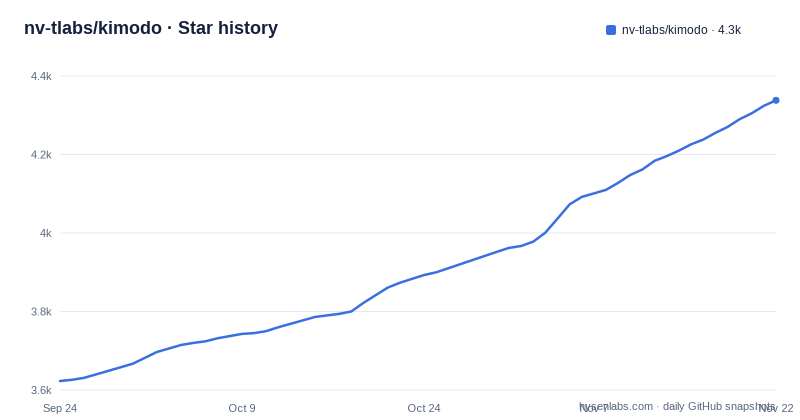
Star history
- nv-tlabs/kimodo4,338 ★ · +715
| Repository | 2026-09-24 | 2026-11-22 |
|---|---|---|
| nv-tlabs/kimodo | 3.6k | 4.3k |
715 Stars in the last 59 days, measured from the daily GitHub snapshot. Compare with other projects
Editorial analysis
What Kimodo solves, and who it is aimed at
Text-to-motion models usually give you a prompt box and nothing else. That is fine for a demo and useless for animation work, where the character has to put a hand on a specific spot at a specific frame. Kimodo is built around that second problem. The README describes it as a kinematic motion diffusion model controlled through text prompts and an extensive set of constraints: full-body pose keyframes, end-effector positions and rotations, 2D paths, and 2D waypoints.
The intended user is an engineer or technical artist who already has a skeleton and a motion target, not someone browsing for a novelty. The repository ships inference code and a CLI, an interactive demo with a timeline interface for authoring text prompts and kinematic controls, and a benchmark built on the BONES-SEED dataset for evaluating motion generation models on text and constraint following.
The training data claim is specific and worth reading carefully. The model was trained on 700 hours of what the README calls a commercially-friendly optical motion capture dataset, and the project has released the models trained on the full Bones Rigplay 1 set as the recommended default. The BONES-SEED variants use 288 hours of publicly available mocap and the README states plainly that they are less capable, existing mainly so you can compare Kimodo against other models trained on the same data.
Skeletons, constraints and the v1.1 breaking change
Kimodo does not have one output format. It has several model variants, each tied to a skeleton: SOMA (via the NVlabs/SOMA-X repository), the Unitree G1 robot, and SMPL-X. All variants support text-to-motion and kinematic controls, so the choice of checkpoint is mostly a choice of which rig you are driving.
The most consequential fact in the changelog is dated 2026-03-19 and marked breaking: model inputs and outputs now use the SOMA 77-joint skeleton, `somaskel77`. Anyone with code written against the initial March 16 release is working against a different joint layout and should expect to rewrite the parts that index joints.
The v1.1 Kimodo-SOMA models appeared on April 10, 2026. The README is candid about why: they were released primarily for compatibility with the new Motion Generation Benchmark, with minor quality improvements over v1 on top. That is a compatibility release, not a capability jump, and the README points to the Hugging Face model pages for the details rather than describing them itself.
Two later news entries matter for anyone running this on their own hardware. A 2026-04-24 entry adds improved multi-prompt generation and better support for small VRAM GPUs through a `TEXT_ENCODER_DEVICE=cpu` environment variable, which lets you move the text encoder off the GPU. A 2026-05-03 entry fixes a bug that caused incorrect calculation of averaged metrics for constraint test cases in the benchmark, so any averaged constraint numbers produced before that date are suspect.
Installing Kimodo and generating a first motion
The README does not put installation instructions in the repository root. It says the full documentation holds detailed installation instructions, the CLI and Interactive Demo usage, and practical tips, and links to the project documentation site at research.nvidia.com/labs/sil/projects/kimodo/docs/index.html. Treat that page as the source of truth for setup rather than the README, which stops at the pointer.
What the repository does show is the packaging. `pyproject.toml` declares the package name `kimodo`, version 1.0.0, and requires Python 3.8 or newer. It also declares four console scripts, which is how you actually invoke the tool once installed: `kimodo_gen`, `kimodo_demo`, `kimodo_textencoder` and `kimodo_convert`. The optional `demo` extra pulls `viser` from the nv-tlabs/kimodo-viser fork, and the `soma` extra pulls `py-soma-x` from NVlabs/SOMA-X.
A Docker path is provided as well. The `Dockerfile` builds from `nvcr.io/nvidia/pytorch:24.10-py3`, installs system packages including cmake and build-essential, and then installs from `docker_requirements.txt` with `SKIP_MOTION_CORRECTION_IN_SETUP=1` so that the MotionCorrection component is installed separately from its own directory rather than bundled by `setup.py`. That detail matters because `setup.py` runs CMake during the build, and the Dockerfile explicitly removes a broken `/usr/local/bin/cmake` shim that shadows the system cmake and breaks builds invoking it.
The compose file defines two services, `text-encoder` and `demo`, both built from the same image tag `kimodo:1.0`. The text encoder runs `python -m kimodo.scripts.run_text_encoder_server`, publishes port 9550, mounts the host Hugging Face cache at `/workspace/.cache/huggingface`, and mounts the host token file read-only at the standard cache location. It requests all NVIDIA GPUs and sets a 16 GB shared memory size with host IPC. A healthcheck polls `http://localhost:9550/` every 3 seconds with 40 retries.
services:
  text-encoder:
    image: kimodo:1.0
    command: python -m kimodo.scripts.run_text_encoder_server
    ports:
      - "9550:9550"
    environment:
      - HF_HOME=/workspace/.cache/huggingface
      - NVIDIA_VISIBLE_DEVICES=all
      - NVIDIA_DRIVER_CAPABILITIES=compute,utility
Once installed through whichever route the documentation prescribes, generation goes through the console scripts declared in `pyproject.toml` rather than a Python import:
kimodo_genThe README states that models are downloaded automatically when you attempt to generate from the CLI or the Interactive Demo, so there is no separate manual download step. The interactive demo runs through its own entry point, and the text encoder server is also exposed as a script:
kimodo_demokimodo_textencoderIf you are short on VRAM, the April 2026 changelog entry gives the environment variable to set:
TEXT_ENCODER_DEVICE=cpuThe model weights are not under the repository licence
The repository is Apache-2.0, and `pyproject.toml` declares `license = {text = "Apache-2.0"}`. That covers the code. It does not cover the checkpoints, and the README's model table makes the split explicit with a separate licence column.
Five of the six listed models, including both v1.1 SOMA variants and all three G1 variants, are released under the NVIDIA Open Model License. The sixth, Kimodo-SMPLX-RP-v1, is under the NVIDIA Internal Scientific Research and Development Model License. That is a materially different grant, and it applies to the SMPL-X checkpoint specifically. If your pipeline is built around SMPL-X because it is the common interchange format in this field, the model you want is the one with the most restrictive terms.
The BONES-SEED training data is publicly available on Hugging Face, and the README notes that fine-grained temporal text descriptions created for Kimodo are included in that dataset, with more information in a separate Hugging Face repository for the timeline annotations. The Bones Rigplay 1 data behind the recommended models is a commercial dataset, which is presumably why the README calls it commercially-friendly rather than open.
This is not legal advice, and the licence texts are the authority. But the practical reading is that adopting Kimodo means tracking two licences at once: Apache-2.0 for the code you fork, and the NVIDIA model licence for the weights you download.
Where Kimodo is the wrong tool
The clearest limitation comes from the project itself. The changelog entry for 2026-07-10 announces ARDY, described as a real-time motion generation model with all the controllability of Kimodo. A diffusion model that generates motion offline and a model that generates it in real time are different products, and NVIDIA maintains both. If your application needs motion generated inside a live loop, Kimodo is the wrong one of the two, and the project says so by pointing at ARDY.
The second limitation is the benchmark comparison trap. The README recommends the Bones Rigplay 1 models for actual motion generation needs and describes the BONES-SEED models as less capable. But the BONES-SEED models exist for comparing against other models trained on BONES-SEED, and the v1.1 release was made primarily for benchmark compatibility. Pick the checkpoint by what you are doing: production motion, or a number you can put in a table next to someone else's.
The third is the skeleton migration. The breaking change to `somaskel77` landed three days after the initial release. Anyone who integrated in that window has joint indices that no longer mean what they meant. The README does not document a rollback path or a conversion utility for code written against the pre-`somaskel77` layout, though the `kimodo_convert` entry point exists for motion conversion.
Finally, the README's own installation section is a pointer to an external documentation site. The repository alone does not tell you how to install Kimodo. If the documentation site is unavailable to you, the packaging files in the repository are what you have to work from.
How it compares to the benchmark it ships with
The most interesting comparison is not against an outside tool but against the benchmark inside the repository. Kimodo ships test cases and evaluation code on Hugging Face, built on BONES-SEED, to evaluate motion generation models on text and constraint-following abilities. That is an unusual thing for a model release to include, and it changes how you should read the model table.
The difference in approach between the two model families is a data trade. Bones Rigplay 1 gives 700 hours of commercially-friendly mocap and produces the models NVIDIA recommends. BONES-SEED gives 288 hours of publicly available mocap and produces models the README calls less capable but useful for comparison. If you are evaluating Kimodo against a model trained on BONES-SEED, you need the BONES-SEED Kimodo checkpoint to make the comparison fair, even though it is the weaker model. If you are shipping motion, you want the Rigplay checkpoint and the benchmark is irrelevant to you.
The `MotionCorrection/` directory at the repository root is a separate component with its own build step, installed non-editable and excluded from the main package via `SKIP_MOTION_CORRECTION_IN_SETUP=1`. Its presence suggests generated motion is expected to need correction before use, which is consistent with a diffusion model producing plausible but not necessarily constraint-exact output. The README does not describe what MotionCorrection does or when to invoke it.
Maintenance, upgrades and what to watch
The repository is not archived, and the last push was on 2026-09-22, one day before this writing. The changelog shows a steady cadence through 2026: the initial release on 2026-03-16, the breaking skeleton change on 2026-03-19, the benchmark and v1.1 models on 2026-04-10, the VRAM and multi-prompt improvements on 2026-04-24, a benchmark metric fix on 2026-05-03, and the ARDY announcement on 2026-07-10.
The upgrade cost is concentrated in the skeleton change. The README marks it breaking, and there is no documented compatibility shim. Beyond that, the dependency pin worth noticing is `transformers==5.1.0` in `pyproject.toml`, an exact pin rather than a range, which will fight you if something else in your environment needs a different version. The Python floor is 3.8, which is generous.
On the release side, the repository has no published GitHub releases, so version tracking runs through the changelog and the Hugging Face model pages rather than release tags. The package version in `pyproject.toml` is 1.0.0 while model versions have moved to v1.1, so package version and model version are not the same number. Do not assume a `pip install` upgrade gets you new weights.
Editorial conclusion
Adopt Kimodo if you need text-and-constraint motion generation on the SOMA, Unitree G1 or SMPL-X skeletons and you can read the NVIDIA Open Model License before shipping. Do not adopt it if you need real-time generation (the project points to its own ARDY release for that) or if you cannot accept that SMPL-X weights fall under a research-and-development licence rather than the open model one. Verify first which checkpoint you actually need: the README recommends the Bones Rigplay 1 models over the BONES-SEED ones for capability, but the BONES-SEED models are the ones meant for benchmark comparison.
Frequently asked questions
What is Kimodo?
Kimodo is a kinematic motion diffusion model from NVIDIA that generates 3D human and robot motion, controlled through text prompts and constraints such as full-body pose keyframes, end-effector positions and rotations, 2D paths and 2D waypoints. It was trained on a 700-hour optical motion capture dataset, and the repository provides inference code, a CLI, an interactive demo and a benchmark.
Is NVIDIA Kimodo open source?
The code repository is Apache-2.0, and pyproject.toml declares that licence. The model weights are separate: the README's model table lists the SOMA and G1 checkpoints under the NVIDIA Open Model License and the SMPL-X checkpoint under the NVIDIA Internal Scientific Research and Development Model License.
Is Kimodo free?
The repository is Apache-2.0 licensed, so the code is free to use under those terms. The model weights carry their own NVIDIA licences, which are not the same as the code licence, so check the licence column in the README's model table for the specific checkpoint you plan to use.
How to install nvidia kimodo?
The README does not contain installation steps. It directs readers to the full documentation at the project's documentation site for detailed installation instructions, CLI and Interactive Demo usage, and practical tips. The repository also provides a Dockerfile and docker-compose.yaml if you prefer the container route.
how to install kimodo
The README points to the full documentation for detailed installation instructions rather than listing them itself. The repository shows the packaging side: pyproject.toml declares the kimodo package with four console scripts, and the Dockerfile plus docker-compose.yaml provide a container route built from nvcr.io/nvidia/pytorch:24.10-py3.
Official sources
Add this badge to your README
If you maintain this project, the badge below links readers to this analysis and shows its maintenance status from the daily GitHub snapshot. Paste the markdown into your README; add ?metric=license or ?metric=stars to the image URL for a different field.

[](https://hysenlabs.com/projects/nv-tlabs-kimodo)Star history chart for your README
[](https://hysenlabs.com/projects/nv-tlabs-kimodo)Was this useful?